🖨️ Elevate your home office with Canon’s wireless MegaTank marvel—print smarter, live better!
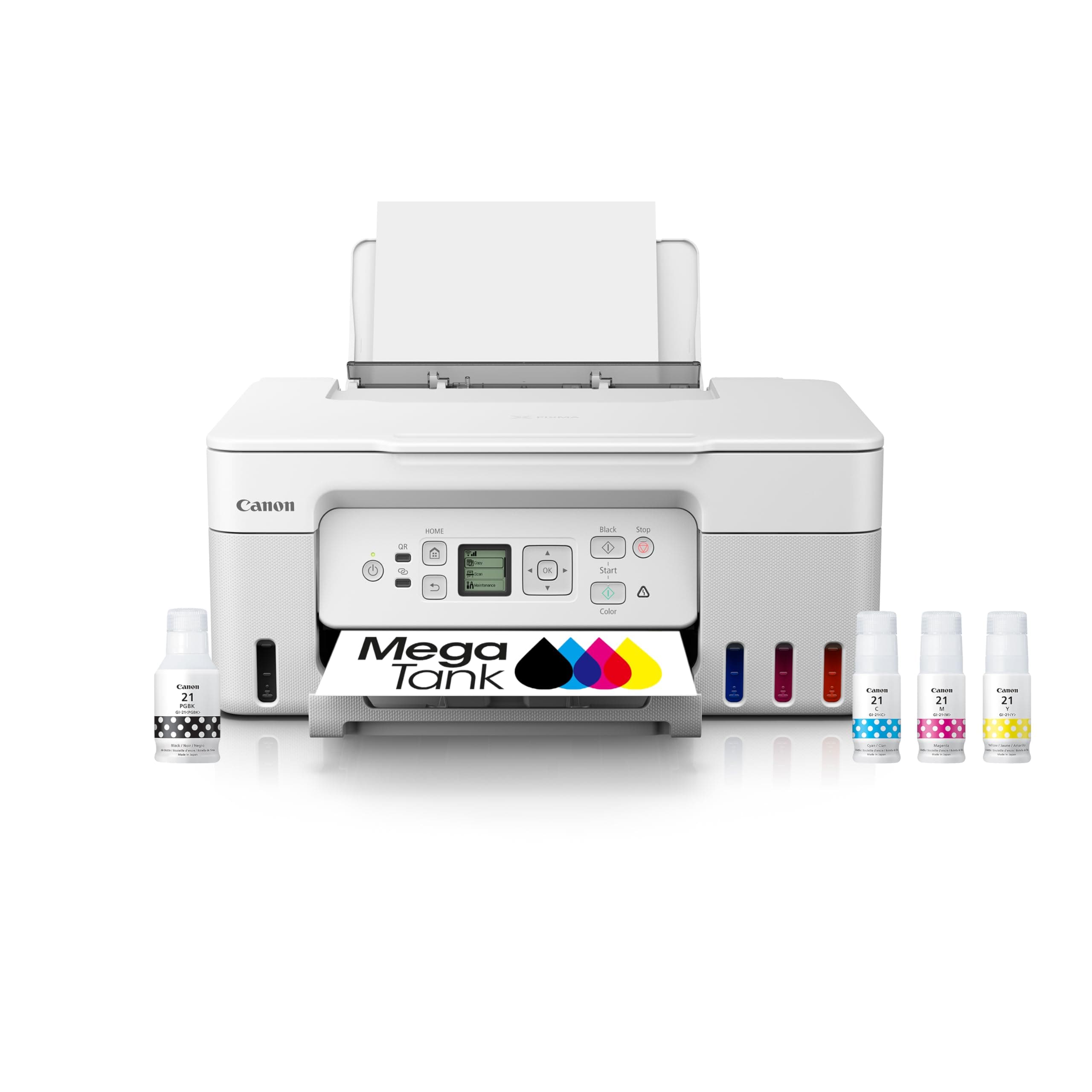
The Canon PIXMA G3270 WH is a wireless all-in-one MegaTank printer designed for professionals and students seeking cost-effective, high-volume printing. It features integrated ink tanks capable of printing up to 7,700 color pages, a 100-sheet rear tray, and mobile device compatibility via Canon PRINT app, Apple AirPrint, and Mopria. With a compact 1.35” LCD screen and keyed ink bottles for error-free refills, it balances convenience with eco-conscious ENERGY STAR and EPEAT Silver certifications.


| ASIN | B0BSMPHC93 |
| Are Batteries Included | No |
| Best Sellers Rank | #109,399 in Computers ( See Top 100 in Computers ) #219 in Ink Tank Printers |
| Color | White |
| Compatible devices | Smartphones |
| Controller type | iOS |
| Customer Reviews | 4.1 4.1 out of 5 stars (668) |
| Date First Available | 19 October 2023 |
| Dual-sided printing | No |
| Included components | PIXMA MegaTank G3270 Wireless All-in-One Printer, Set of Ink Bottles (GI-21: PGBK, C, M, Y), Print Heads, Documentation, Power Cord |
| Item Weight | 5.99 Kilograms |
| Item model number | 5805C022 |
| Manufacturer | Canon |
| Max input sheet capacity | 100 |
| Maximum Media Size | A4 inches |
| Maximum black and white print resolution | 600 dpi |
| Maximum color print resolution | 4800x1200 Dots Per Inch |
| Number of Ethernet Ports | 1 |
| Power consumption | 16 Watts |
| Print media | Envelopes, Labels, Paper (plain) |
| Product dimensions | 55.6D x 41.7W x 26.9H centimeters |
| Scanner type | Flatbed |
| Sheet size | A4 inches |
| Standing screen display size | 1.35 |
| Wattage | 16 watts |
B**D
New box came, I weighed it, 19 lbs. The printer, once unboxed weighed 12 lbs. Instead of reading the destructions, I used some unboxing and set-up videos I found on YouTube. One thing that surprised me is that you have to install the 2 print heads. They just slide right in like it was an old style ink cartridge. One is labeled B (Black only) and the other C (color). Takes 10 seconds but remember to remove the tape on the print heads. It's great that you can easily replace the print heads if they get clogged. Canon sells them for about $30 for black only or $40 for color. This next thing I absolutely love. The ink bottles are keyed. You cannot put them in wrong. The ink bottles drain in the printer for less than 60 seconds. No mess whatsoever As someone who once put the wrong color ink cartridge in an Epson printer, I learned my lesson. That was, of course, a disaster. I had the most difficult time finding the USB port. Its a couple of inches above the power plug port but it's really hidden. But, there is one real down side to this printer. It's the incredibly tiny (1 x 1 inch) display that is very difficult to read and must be used when setting up the printer. It's awful. The contrast is terrible and I have yet to find a way to control it. Once you do get it setup you probably won't have to ever use it again because the App allows you to everything you need from your computer. I have not tried to wirelessly print yet. I’m Old School (emphasis on Old) and I prefer not sending my documents through the air. Update: I didn't use wireless because I thought that I couldn't scan wirelessly but I now can. There's a U Scan utility that I had to download and it works flawlessly. I can print and scan from three different computers (all Window's PC's). I'm not a Mac guy so I can't vouch for that platform. Print quality is very good as is the scanning. It's all brand new so of course everything works. I would rate the quality overall as a SOHO or just an occasional printer use. This is not for a graphics professional, but college student, definitely. Printing speed is a little slow. You can duplex print but only manually. You have to flip the paper. Some pretty cool options in the software. A deep cleaning mode, an actual page count and a graphical representation of ink levels. Update: I can't find the graphical representation of individual ink levels but that was working when I did the initial install of the ink tanks. So now, I just look at the ink level windows. But still, for the money and usability, it's very good. I'm pretty happy.
C**R
This review is weighed by its cost and performance. I had short term need for a scanner not a high volume printer and ended up impressed by all aspects. Okay the scanner software is clunky but works and is free. Printing quality is very good even compared to machines far more expensive. Haven't attempted faxing but with scanning direct pdf I likely never will need to. Yeah the screen is very small but clear enough for 77 year old eyes. If your needs are limited or wallet is strained one can't go wrong with this all-in-one printer.
D**H
Ok for the money... Not sure why I thought this was double sided, but it isn't. So i have to feed it twice to do double sided printing It is NOT borderless unless you use 8x10 paper (usually photo paper) The colors are not that bright ad black is not fully black I got Koala double sided bright white matte photo paper and it doesn't print as bright as I hoped Printing via wifi is so slow, takes 30 minutes for 1 page so I have to constantly connect the USB Figuring out the scanner was challenging and sometimes wouldn't connect for some reason, there aren't any clear instructions but then I found this scanner icon and it works. I also tried their mobile app which also took forever to find because there is no clear instruction on which app to use and it doesn't always connect to the scanner for some reason. See the scanner icon I attached. I had a black and white laser printer for a few years and it finally stopped working so this is definitely an upgrade even though it's been a little frustrating figuring out why things sometimes don't work
C**O
Let me tell you, you will get your monies worth from this printer I have had it for over 2 years. A full time college student ALWAYS printing in full color, I have more than half the ink still in the printer. I haven’t had to replace the ink not once! And I’m printing A LOT. I recommend this printer to everyone!! Definitely worth the extra price to save money on ink. I haven’t bought a single bit since I’ve had it. Absolutely 100000/10!!!
S**E
For context, I bought this printer primarily so I could print photos for photo albums and scrapbooking. It's hard to say how I feel about this printer. The worst part about this printer is trying to connect to it to another device wirelessly. The first time I set it up on my computer and phone, it worked like a dream. But every time after that when I would go to print from my computer, I got the error, "Printer is Offline." However, both the printer and my computer were connected to the same wi-fi, and still it would refuse to actually connect. I spent hours turning things off and back on, troubleshooting and diagnosing, reading online forums, forgetting and re-adding the printer back in my settings, and redownloading the printer drivers (which took a while and was the only thing I found that would actually get them to connect again). But who wants to do that every single time they want to print something? It is honestly unacceptable. So if you want to purchase this printer, just go ahead and buy a USB-B to USB-A cable and save yourself time and sanity. I would have a much more positive experience had I just bought the USB cable to begin with. As for print quality, by default, it prints photos very faded, but this can be fixed by changing the settings: For plain paper color printing, go into the Canon 3270's Printing Preferences from the settings app, click on Media/Quality tab, click Color/Intensity, click Set..., and set Brightness slider to dark. For photo paper, set paper type to matte photo paper regardless of paper type to get the most saturated ink and only adjust color settings as needed. When this is fixed, it prints nice photos with good colors. I will say, the black is not as dark as I wish it was on photos. I read that this is because the black ink is pigment-based while the colored inks are dye-based. The black pigment-based ink works well on plain paper, but the pigments can't be absorbed by photo paper. As a result, the "black" color on the photo paper is made up of the colored dye-based inks, which can be absorbed by the photo paper, so the black isn't super dark black on photo paper. See photos for reference. Scan quality is very good. No complaints. Overall, I like this printer and its print quality (if you know the correct settings). And I truly cannot express this enough: DO NOT WASTE TIME TRYING TO CONNECT WIRELESSLY WHEN IT SAYS PRINTER IS OFFLINE. It's not going to work. Just get the USB cable mentioned earlier, and it will work immediately. I really mean it! I hope this helps.
ترست بايلوت
منذ شهرين
منذ شهر