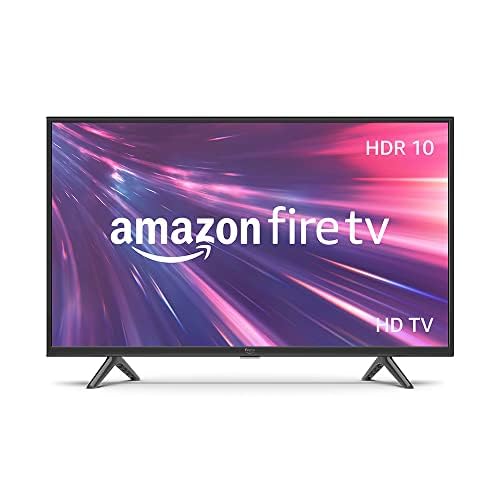
🔥 Elevate your binge game with Fire TV’s smart, sleek, and secure entertainment powerhouse!
The Amazon Fire TV 40" 2-Series delivers crisp Full HD 1080p visuals enhanced by HDR10 and HLG, powered by Fire TV OS for seamless access to top streaming services and free content. It includes an Alexa Voice Remote for intuitive voice control and supports Dolby Digital Plus audio. The bundle features a comprehensive 4-year protection plan with no deductibles, 24/7 support, and quick replacements, making it a smart, stylish, and worry-free entertainment upgrade.
| Resolution | 1920 x 1080 |
| Display Resolution | Full HD |
| High Dynamic Range (HDR) format | HDR10, HLG |
| Backlight type | Direct LED |
| Refresh rate | 60 Hz |
| Screen size | 40” |
| Viewable display size | 39.5” |
| HDMI ports | 2 HDMI 1.4 + 1 HDMI ARC |
| Ethernet | 1 Ethernet port |
| USB | 1 USB 2.0 port |
| IR device control with included Fire TV Alexa Voice Remote | The included Fire TV Alexa Voice Remote can control certain functions, such as power and volume, on a wide range of compatible IR-enabled devices, soundbars, and A/V receivers. Note: Certain functions may not be available on some IR-enabled devices. |
| Voice support | Yes, with Fire TV Alexa Voice Remote (included) or the free Fire TV app (available for download on Fire OS, Android, and iOS). |
| Audio support | Dolby Digital Plus with passthrough of Dolby-encoded audio |
| Audio power | 8W + 8W |
| OS | Fire TV OS |
| Product size without stand (WxHxD) | 35.6” x 20.5” x 3.4” |
| Weight (without stand) | 12.8 lb |
| Bezel size (mm) | 11.7mm |
| Front finish | Black Plastic |
| Distance between TV legs | 31.4” |
| SKU Number | HD40N200A |
| VESA Wall Mount Standard | 200 mm x 100mm |
| Accessibility features | VoiceView screen reader enables access to the vast majority of Fire TV features for users who are blind or visually impaired. Screen magnifier enables viewers to zoom in and out, and pan around the screen. Text Banner consolidates onscreen text into a compact, customizable banner that appears on the screen. Watch videos and TV shows with closed captioning displayed. Use Audio Description for verbal descriptions of what is happening on the screen, including physical actions, facial expressions and scene changes. Captions and audio descriptions are not available for all content. Fire TV 2-Series, Fire TV 4-Series, Fire TV Omni Series, and Fire TV Omni QLED Series support audio streaming for select compatible Bluetooth hearing aids and devices for a private listening experience. You can also listen to Fire TV with compatible Bluetooth headphones. Learn more about accessibility for Fire TV. Note: “Hearing aids” refers to compatible Bluetooth hearing devices such as traditional hearing aids, cochlear implants, and bone conduction hearing devices. |
| Content availability | Certain apps and services are subject to change or withdrawal at any time, may not be available in all areas and languages, and may require separate subscriptions. |
| Connectivity | Wifi or Ethernet |
| Digital Optical Audio Output | 1 Digital Optical Audio Port |
| Warranty and service | 1-year limited warranty and service included. Optional 3-Year and 4-Year Extended Warranty available for U.S. customers sold separately. Use of Fire TV is subject to the terms found here. |
| Included in the Box | Fire TV 2-Series 40”, Fire TV Alexa Voice Remote, power cord, 2 AAA batteries, 4 screws, TV stand (2 legs), Quick Start Guide (PDF / Accessible HTML) |
| Software security updates | Learn more about software security updates. If you already own a Ring device, visit Software Security Updates in Ring Control Center for information specific to your device. |
| Size | 38.2 x 157.7 x 17.1 mm |
| Weight | 51 g (without batteries) |
| Batteries | 2 AAA required (included) |
| Technology | Bluetooth 5.0 |
| Compatibility | Amazon Fire TV 2-Series, Amazon Fire TV 4-Series, Amazon Fire TV Omni Series, Amazon Fire TV Omni QLED Series, Fire TV Cube (3rd Gen) |
J**P
Was FRUSTRATED- Now HAPPY
Editing my review from two stars to 5 stars. Very impressive that Amazon actually reads these reviews and seriously cares about how we like their products. Since I posted the original review a very nice, very knowledgeable, tech support lady called me to work my problem of Apps not loading or playing on my FireTV. Basically it boiled down to my new TV needing a software update. I absolutely thought this TV was plug and play, but it wasn't. Just like with any new device I guess everything needs a software update to work properly. The wonderful tech support lady was on the phone with me over an hour, she step by step walked me through everything. We updated all the software and now my FireTV works PERFECT! All my news Apps and weather apps load without a problem. The TV is no longer sluggish. It's all fast and Perfect! So, the next FireTV I order, and there will be more because this is an excellent value for the price, I will know to update the software before logging in or loading any apps! Thank you Amazon for truly caring about your customers 😊 Seriously hate this TV. It's been a HUGE source of frustration for 3 weeks, ever since I hung it on my wall. The picture is great. Sound is great. Remote is great, but the operating system is awful. It WILL NOT load certain Apps, mainly Fox News and Fox Weather and other Apps are sluggish. I know it's not a problem with the App because when I tested them on our living room TV (different brand with Roku hooked up) at the same time, they load perfectly, so I know it's just this TV. I LOVE Amazon and really wanted to love this TV, but I just don't. Daily I have to end up clearing my caches for all the Apps and unplugging the TV for one minute to reset the TV, if I want to watch either of those two Apps. Super frustrating. I still have about another week to return this TV, but I'm concerned if I order another one will I have the exact same problem? If anyone at Amazon Tech support has any ideas why just these two Apps will not load please reach out to me!
J**N
Perfect TV for me!!
Love this Amazon Fire TV. It was easy to install and i was able to hang it with the same frame i previously had. The picture is great, also the color! It was a very reasonable price too. I needed a slightly bigger screen as I'm getting older 🤓 and this is the perfect size. It came in perfect condition, nothing damaged. The sound is very clear and I've had to relearn the remote, but didn't take long. I'm so happy with this tv, it was a great purchase!
J**L
Dec 2025 update. I'm happy !!
UPDATE: I kept trying to connect my BT earbuds and finally one of them did but with a different ID than on my old TV. One earbud still won't pair. And that echo listing finaly went away although it was never installed so there was no way that I could remove it. A speaker I ordered arrived and it paired immediately so IDK what the problem was. The sound seems fuzzy at times but that is probably my hearing which is why I use earbuds and now the speaker. My comments now are that I use it only with firestick and it is slow toload in when I fist turn the TV on. Maybe I need a new firestick. So now I am satisfied with the purchase ; I love the large screen and the clear almost 3D look of the shows I watch. I also really appreciate the monthly payment plan. I'm so annioyed !!! The TV has been good although a bit slow and sometimes the screen goes dark. I have to change the volume for different streamers or shows and sometimes it sounds tinny but it could be my allergy affected hearing. I've been using BT earbuds that make the dialogue more clear. Yesterday I turned it on and I had been signed out of hulu and I noticed some other changes; we did not have any electrical or internet interruptions to cause it. It didn't respond well to the remote, jumped around, didn't work the same. I needed earbuds but they didn't connect and in BT settings none of my previous paired earbuds were listed anymore. I tried to reconnect three buds and nothing worked; only a strange echoshow5 212 showing up that I'd never heard of. So i had to spend over an hour searchin for answers beginning with what the heck is this and how do I get rid of it? I read something that I thought was an answer so when that echo thing showed up (and it took a couple minutes each time I tried to pair the buds when before they connected immediately) and I told Alexa to pair. Got a message that Alexa was not able to do it, so more searching online and more confusion and dozens of options and instructions and reference to things i've never heard of. I just want my normal remote to turn on and off and change channels and volume...how do I get it back? I don't have my old remote anymore or I'd try to go back to using that. I have a month to return this tv and probably will unless I or someone can help me. I didn't select echo on any list, didn't see any option to get it, it just took over my TV and I do NOT want it so I can use bluetooth again. HELP !!! I've u;nplugged, restarted, tried pairing multiple times . i do not want to do a factory reset and have to start over setting up my channels an shows. So just now I went to BT again, the echoshow thing came up but there is no way to remove it so I clicked it and it said it was pairing and then a window popped up saying pairing was not successful. HOW DO I GET RID OF THIS?
D**.
Great Tv, affordable, same format as my bigger one, but a pain to set up.
I needed a new TV because the one we had in the bedroom started to go dark on the left side and finally died. The settings were on the left side! We had to watch TV in the dark. It was a 43" dinosaur. I chose the Amazon Fire TV because we have one in the den, and the format is the same. It is confusing enough going between the "big" cable remote to the "little" smart TV app remote control and navigating to the right input. I like the smaller size in the bedroom. I don't need to feel like we're at a drive-in movie. This TV is very light, and the picture is crisp and clear. The price was great. I would have given it an easy 5 or even six, except for two problems. The "legs" on the TV were impossible to attach. The TV was unstable and tilted forward. I had to use my screws after struggling for an hour. Here I was, all excited to set up our new TV, and it was precariously tilted forward. The next issue I had was setting up. I am a long-time Prime member, and I had to sign in, but I forgot my password. There is a process of scanning, and I was switching between my phone and PC. Finally! And there is my husband's favorite program on Pluto but I have to download and sign in, verify, etc. I only want to watch TV. This felt more like a house closing! Two rooms away, I have this TV's big Momma. I am looking forward to enjoying our new TV once it is all set up and customised for what Fire TV calls our "stuff".
T**J
IMHO - money well spent
Given the amount of mixed reviews on this product, everyone is entitled to their own opinion. So, please forgive me for the overly detailed & occasionally humorous review. My opinion, being of the rave variety because this Alexa TV solved so many problems that its completely absurd for me to think about the flat screen that I had before. Not to be speaking ill of Emerson electronic products but about twelve years ago, before they stopped making TV's, they had a bulky flat screen model that was pretty awesome at the time & now, not so much as I have come to see of it. I had at least two remotes that I had to use just to switch between the fire cube, gaming consoles & my PC. YES...! I had my PC hooked up to my TV VIA an HDMI cable just so the PC picture would be that much larger so I could sit back in my reclining bed to use my PC or watch fire TV. But I had one remote too many which was one of my many problems. Energy Consumption: Like I said, my old Emerson flat screen had some issues. In its prime, it was listed with a decent energy saver rating but compared to this model, my old TV now looks like an energy hog. I don't remember the energy rating on this one which even now, I am using my PC on it to write this review but its definitely, a lot less than my old TV. Heck! It's been approximately twelve years so I don't remember what the rating was on my old TV but I'm sure that it was more than the rating on this one because of how far that the technology has progressed. HDMI Connections: Having three HDMI ports on top of having the built in fire TV that operates independently, is like having your cake & eating it too. As the song from "Electric light Orchestra" goes, "Anyway you need it..." & I'm happy that I'm getting it the way that I want it with the ability to connect my two PS gaming units & still have a spare port for whatever else I want to connect to this new TV. SIZE: Like I already mentioned, my old flat screen was bulky so it was also heavier & it was causing my work desk to sag in the middle a little because, of course, the desk is cheaply made out of pressboard so it can only withstand so much weight before it slowly warps under the strain from a bulky 39 inch VS a much lighter & less bulky 40 inch. The Emerson had a beefy frame & I mean a REALLY heavy frame. Compared to this one which is almost all screen & a minimal frame while I am also enjoying a full 40 inches of flat screen as opposed to only 39. So, to recap in the short of it, more screen & less frame! ONE OF THE DOWNSIDES: IF the TV UNIT that you ordered was sitting to collect dust in a warehouse for an unknown time BEFORE it got to you, be prepared to sit through a lot of updates before you actually get to enjoy it. ONE UPSIDE OF THE SETUP: If you have been permanently saving your WIFI & other various settings from a Fire Cube that you might possibly own, your settings are likely saved on your Amazon account. With that fact in mind, you won't have to bother too much with setting up your fire TV all over again like you may have with your fire cube, Just select the option to copy your fire cube settings & preferences to your TV & your done with that but make sure that your fire cube is still connected so that the new TV can copy your current saved settings & apps. FURTHERMORE... Sound-wise, some people prefer to add a sound bar while others are fine with just headphones. I am partial to the later option. It just seems to sound better to me & I play A LOT of hard core PlayStation games where sound is an important factor in wining so no one can sneak up on you to shoot you in the back. With a sound bar, you may like hearing the thump of the base but IMHO, nothing beats a good set of noise canceling headphones. So, all you hear is the sound effects of the game & this TV doesn't fail to transmit more than decent sounds to my Bluetooth headphones. GAMING: I have yet to set up either of my PlayStation units. So, I don't have any honest opinion to offer other than the issue that the old PS one & two operate through AVI jacks although there is a HDMI adapter for both on Amazon. I ordered one for my PS two & I actually have a HDMI splitter so I can run both off of one HDMI port & that will still leave me the one remaining port since I have my PC on the HDMI ONE port. No issues as far as I'm certain about the connectivity of my PS3 which I'm certain that all I have to do, its plug it in again & everything will be back the way that it was. INTERNET GAMING: I have a Luna controller & I did have a Luna account but the issue with internet gaming, is that it is still in its infancy & the Luna app is a bandwidth hog. To further clarify, I live on a mountain top farm that is located on the edge of the wilderness & no-where-ville. So, even though we now have the option for fiber optic cable internet, before it was finally installed up here, my Star Link was putting out oodles of bandwidth which allows me to run all my internet devices all at once if I need to. Yet, the moment that I try to run my LUNA gaming account, FORGET IT!!! It skips, glitches & just plain freezes up no matter what game I play. It also takes the much needed bandwidth away from other devices at the same time that it bugs out. MIND YOU... I have yet to try it on this specific TV but I'm positive that the result will be the same even if I were to directly plug into my Star Link instead of using the WIFI. THAT, mind you, isn't any sort of negative comment against this specific TV model, just Luna. I will be adding an update about it, IF the Luna App should improve but not holding out for any hope of that. The last few issues, ([I]for now until my update review[I/}) about that my old TV, after so many years since I bought it, was starting to wear out under the strain of the demand for the many uses that I placed on it. It would blink out at the worst possible moment & it was often leaving warning messages about not being able to handle the video demands of my PC which is a windows 10. Occasionally, vertical lines would appear on the screen during one day & then they would be gone the next. That brings me to the point that I believe that this TV that I'm using even now, was clearly designed to multitask. So a person like me could seamlessly switch from watching TV, playing video games or working on my PC to various things. Everything in one place & "One Remote to rule them all" LOL! Just a little Tolkien humor from "The Lord Of The Rings" It really is a awesome TV which reminds me of the old expression: "Less is more" I got more screen in a thinner lighter frame with so many possibilities to explore & my Fire TV WITHOUT having to sacrifice a HDMI port because the Fire TV is built into this unit so all it takes is one click of the remote to switch to the desired port & whatever may be connected to that port although I would suggest to the manufacturer that the aspect of altering the TV software so each HDMI port can be digitally labeled & then you can tell Alexa to switch to the PC or your gaming system(s) or back to the fire TV without having to even pick up the remote. I still haven't found the wake word controls on this unit. Although, I don't think that there is one so you may have to pick up the remote just to speak the various Alexa commands. Its likely that there isn't any microphone pickup on this unit. Hence the lack of a wake word. (No, I didn't read the instructions because I'm one of those people that likes to figure it out as I go along.) "Instructions?? I don't need no stinkin instructions! I'll make like an angel & just wing it" What's not an issue, is the interesting fact that by merging the fire cube with the TV, that is one less plug in need of an power outlet since its all in one package. LUNA UPDATE: Yeah... Still not happening even when directly plugged into my high-powered WIFI network. Like I said before, Internet gaming is still not ready for everyday use without the constant glitching. It needs A LOT more bandwidth than any average subscriber can afford. I think that it can only work out if we had nation wide 6G or higher. I've got 5G in spades with the option to jack in, instead of using WIFI but still, it won't work without serious glitching. So, no improvement there by buying & setting this unit to replace my tired old worn out flat-screen but overall, definite improvements on many of the aforementioned fronts. And for now, until I think of something else, don't wait to buy this fully loaded unit because its totally worth the current asking price.
R**M
Great buy
I love the fact that I can connect my Bluetooth earbuds to the TV so I can watch TV anytime without disturbing anyone when they're sleeping. That was what sold me on this particular brand. I've only had it for a few days but so far I've got no complaints. It was super easy to set up and get started, I've been able to download all of my streaming apps, no screen damage, no lag, overall it's a great TV for a super low price. I highly recommend
L**E
Another Great Fire TV
We love the Fire TV brand, so this was an easy choice for us. We now have two Fire TVs and several Fire Sticks, and they’ve all been reliable and easy to use. Setup was simple, the picture quality is great, and everything works seamlessly with our other Fire devices. We’re very happy with this TV and would definitely recommend it!
W**R
Good for the price - but we have minor complaints - but it might just be us - read review
Additional comment added Jan 9 2026 - I think I am being unfair a bit in the review below as we have 2 other fire tvs and they do not seem to have the same issue- We actually bought 3 fire tvs - 2 reasons the price was good - and we trusted the brand name - Let’s go with the positives picture is great - the TVs are very light weight- and the sound is good. Also I monitor power on all our devices- the tv draws less power for its size! I have not compared this to the 100’s of TVs out there - but its power consumption for its size is lower than other brands we have. That’s a win. So why not a 5 star? Here are the complaints we have - which are relatively minor but annoying. From switching from channel to channel- the volume changes considerably. Our other brand tvs do not seem to do this. Occasionally the tv goes dark - the fix is turn it off and on again- this has happened rarely, but happens. I am not sure if it’s the remote or tv but while adjusting the volume up it keeps going to 100%. I cannot get it to go back down until it reaches 100% - this also happens rarely but happens - maybe we got a lemon not sure. Hope this helps-
ترست بايلوت
منذ 5 أيام
منذ شهر