We remain fully operational. Our teams are working around the clock to ensure your deliveries continue safely.

قم بتنزيل التطبيق


معلومات عنا
حقوق الطبع والنشر © 2024 Desertcart Holdings Limited
قم بتنزيل التطبيق
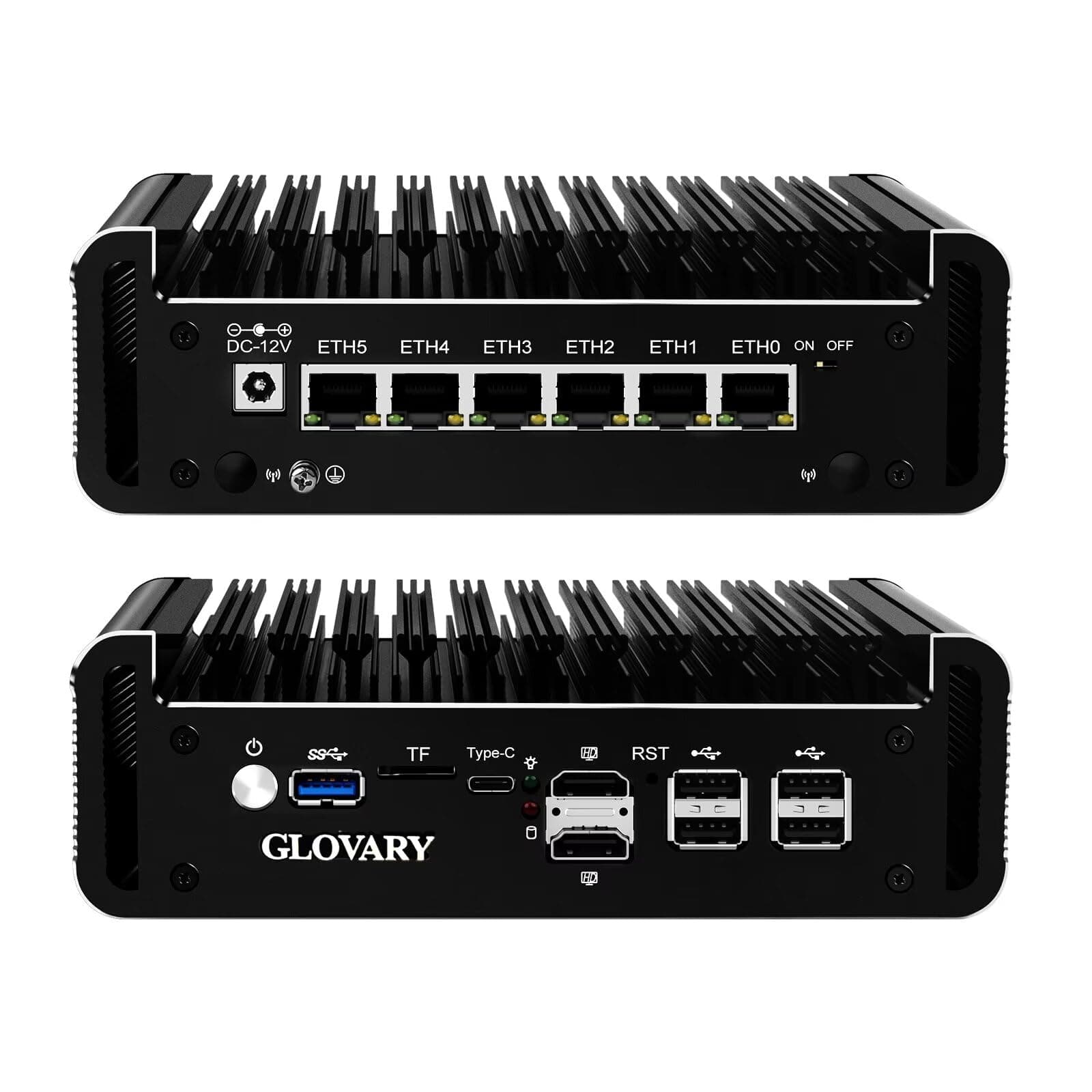

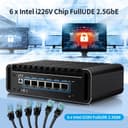
🚀 Elevate Your Network Game with Silent Power & Speed!
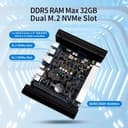
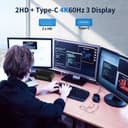
The Glovary Firewall Mini PC N150 is a barebone powerhouse featuring a 12th Gen Intel quad-core processor, six ultra-fast 2.5GbE LAN ports, and fanless aluminum cooling. Designed for professional-grade firewall and routing applications, it supports DDR5 RAM, multiple NVMe SSDs, and triple 4K display outputs, making it the ultimate compact micro router appliance for secure, high-speed networking in modern workspaces.


| ASIN | B0CV3NTLTJ |
| Additional Features | DDR5 |
| Aspect Ratio | 16:9 |
| Best Sellers Rank | #8,850 in Computers & Accessories ( See Top 100 in Computers & Accessories ) #323 in Mini Computers |
| Brand | Glovary |
| Built-In Media | GLOVARY Firewall Mini PC, Power Adapter, SATA3.0 Cable, 4 Pin Fan Cable |
| CPU Model Number | N150 |
| Cache Memory Installed Size | 6 MB |
| Color | N100 6 LAN Firewall |
| Compatible Devices | [Any generic external device connectable via common interfaces] |
| Connectivity Technology | Ethernet |
| Cooling Method | Fanless |
| Customer Reviews | 4.6 4.6 out of 5 stars (48) |
| Display Resolution Maximum | 4096 x 2160 |
| Display Type | LCD |
| Graphics Card Interface | Integrated |
| Graphics Card Ram | 16 MB |
| Graphics Coprocessor | Intel UHD Graphics |
| Graphics Description | Integrated |
| Graphics Ram Type | DDR5 SDRAM |
| Hard Disk Description | SSD |
| Hard Disk Interface | Solid State |
| Hardware Interface | Ethernet |
| Human-Interface Input | Keypad |
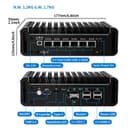
| Item Dimensions | 7.09 x 4.92 x 2.17 inches |
| Item Type Name | Mini PC |
| Item Weight | 1.2 Kilograms |
| Keyboard Description | Standard QWERTY layout |
| Keyboard Layout | QWERTY |
| Manufacturer | Glovary |
| Memory Clock Speed | 5600 MHz |
| Memory Slots Available | 1 |
| Memory Speed | 4800 MHz |
| Memory Storage Capacity | 2.5 GB |
| Model Name | N150-6L-BA |
| Model Number | N100-6L-BA |
| Model Year | 2022 |
| Native Resolution | 4096 × 2160 |
| Number of Component Outputs | 3 |
| Operating System | Barebone |
| Personal Computer Design Type | Barebone |
| Power Consumption | 6 Watts |
| Power Plug Type | Type A - 2 pin (North American) |
| Processor Brand | Intel |
| Processor Count | 4 |
| Processor Series | Celeron |
| Processor Socket | BGA |
| Processor Speed | 3.6 GHz |
| RAM Memory Technology | SO-DIMM |
| RAM Type | SODIMM |
| Ram Memory Maximum Size | 32 GB |
| Resolution | 3840 x 2160 |
| Security Features | [Possible security features: firewall (OPNsense)] |
| Specific Uses For Product | Business |
| Style Name | N150 6 LAN Firewall |
| Total Expansion Slots Quantity | 1 |
| Total Number of HDMI Ports | 2 |
| Total Usb Ports | 6 |
| Video Output | HDMI |
| Video Output Interface | HDMI |
| Video Processor | Intel |
| Wireless Compability | 802.11ax |
| Wireless Network Technology | Wi-Fi |
| Wireless Technology | Wi-Fi |
S**E
exceeded expectations
The item actually arrived several days ahead of schedule. The day I purchased the seller reached out to me to share some technical expectations. Product is sturdy with solid construction. I bought the bare-bones model thinking I would be cheap to install my own ssd and ram, but I've had problems sourcing the parts I really wanted, it would have been smarter just to buy it with those parts already installed. Installed proxmox over pxe, no issues. The hardware all seems to be working as expected. I'm seeing good network throughput and after running for several hours the heat sink is cool enough to touch. Running opnsense in a pve vm. 5 star product, 5 star vendor! Thanks.
G**A
Excellent mini pc firewall product from glovary
Very sturdy and original components used, seller celia was very helpful in answering queries and sent a fan as per request ! Delivery to US in 5 days , as per request for faster delivery! Attached all images in the box, added ram and nvme to the barebone for a powerful virtual firewall homelab! Thanks glovary, will definitely purchase again other devices!
P**A
Works great, but you should read on...
This has been a bit of a journey, but if your serious about buying one of these, then read this entire write up. First this is a really nice little device for running OPNsense and highly recommend for that purpose. I deducted a star purely because I've never seen a device so sensitive on memory selection. When you first place new memory in, it will have a LONG 1st boot cycle. It is somehow becoming one with whatever you gave it and thus it is very important you just be patient for 2-5 minutes. Also note that just giving it power will likely initiate that 1st boot, don't play with the power button... Given the description, I purchased a good deal 12GB 5600MHZ Crucial memory and that kind of worked... It passed all forms of stress-ng, SMART, and memtest86 tests with flying colors and the heat was perfectly acceptable. HOWEVER, it was freezing (hard reboot required for recovery) after about 1-3 hours of normal operation. I eventually used iperf3 to stress the network ports and it froze the device in less than 2 minutes pretty consistently. After discussing with the seller (Glovary), I explained all of this and was HIGHLY suspect about their reply that my memory was the probable root cause, but they were correct... They sent me a link to the Crucial CT16G48C40S5 (16GB 4800MHZ), I bought one and it has been working flawless ever since... With that said, the description led me to believe the 12GB 5600 SHOULD have worked. So, this is one of the very few devices that I might actually recommend you buy it with the memory from the manufacturer. If you do not, then you should absolutely buy the 8, 16 or 32 GB version of the 4800 Crucial memory. For OPNsense, you can absolutely get away with 8, but if you want to do something more like proxmox, then try the 32, but I have not directly tested that stick or proxmox. I am just throwing those out there because Glovary seemed to imply they had directly tested/verified those 3 sticks. Other Notes: The specified shipping estimate was pretty close. I think it may have been a day longer than the maximum, but the important thing is that it will not be put on a boat, and it will not be held up at customs for 3 weeks. Whatever shipping carrier from China is being used is quite reasonable and streamlined when it hits the states. I was kind of hoping the bios would have an option to RAID-1 the two NVME slots, but it does not and thus am only running one NVME. It doesn't ship with documentation, but they will give you a link to access online PDF documentation after you make a purchase and it is not bad. My only complaint is that it is just a file/folder link so it isn't super clear which one you need.
S**R
Be Careful
This product was great for the 3 months it lasted. Now I have a device that won't turn on. I have a mutliplug power supply to try and isolate whether the board or the power supply but none of the connections work. I could find no way of contacting manufacturer and Amazon could care less because outside of return window by 1 1/2 months. What I would really like to do is get a different power supply to see if that is the issue but fat chance. The unit tended to run hot anyway so a lack of adequate cooling may contribute. If the items works for you-great! If you have issues you're on your own.
A**O
This device will NOT talk to my ISP ONT. Would not Recommend.
This device will NOT talk to my ISP ONT.
C**O
Ho acquistato questo mini PC da utilizzare come firewall con pfSense e funziona egregiamente. Consiglio di acquistare disco e RAM a parte. Il venditore è molto disponibile, risponde anche su WhatsApp. È possibile scaricare gli aggiornamenti del firmware dal sito del produttore.
J**O
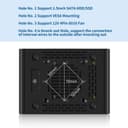
I purchased the bare-bones N100 version with 6 NICs and received it less than two weeks later, added 32GB Crucial RAM and 512 GB Samsung 970 Pro NVMe. The customer support via Amazon messaging was prompt and so far has been very attentive, sending me a message containing support info and docs just hours after placing my order. It's a solidly-built piece of kit, feels like good quality and after installing the RAM and NVMe disk, it booted up just fine (takes 10 secs to recognise the hardware) and I installed Proxmox VE, creating VMs for OPNSense, PfSense and LXCs for Adguard Home and Tailscale. It's all working fine so far, with either just PfSense or OPNSense running with just a few clients connected in my homelab and sitting behind my current Asus router for WAN. Reported CPU temps have reached close to 50°C in the recent very hot UK weather (35°C outside), but today with ambient temp of 25°C, CPU temp is 39°C so it would seem the CPU runs about 15°C hotter than ambient. Glovary supplied a PWM cooling fan on request, which screws inside the baseplate underneath of the case and operates as an exhaust fan pulling down warm air from the downward-facing motherboard/RAM/NVMe, though I'm not sure how effective it is, operating against rising warm air. The CPU is mounted on the other side of the mobo and can't be seen as it's directly connected to the case, the top of which is a large heatsink. I didn't see any vents inside the case to allow warm air to naturally escape upwards, so it's pointless using the fan as an intake fan so it's staying as an exhaust fan. The PWM fan is configurable via the BIOS but the settings parameters are very basic, namely the temp at which the fan stops, the temp at which it's at full speed and the temp at which the fan starts. The fan is a Chinese-branded 80mm PWM fan that's 10mm thick and it seems pretty quiet with the BIOS reporting it running at around 1400rpm with the CPU temp reported as 38°C. I did find that the motherboard/BIOS doesn't support PWM (nor any) sensors for the fan, so using the sensors utility in Proxmox/Linux shell only reports CPU temps along with ACPI interface and NVMe temps, with nothing for the fan. I guess this is one corner that's been cut to keep price down; I wonder if the more expensive similar devices (such as Protectli) do support fan control via the OS? 10mm thick PWM fans are pretty thin on the ground, I've found an Akasa 10.8mm thick fan which is probably thin enough but it gets mixed reviews for noise. There are 15mm fans available (even Noctua) but Glovary support point out that they might cause issues with insufficient clearance. I've found that the biggest difference to cooling is achieved by placing a vertically-oriented 120mm fan in front of the unit, so that it blows air laterally over the heat sink fins and underneath the case via the 3mm gap afforded by the case feet. An external 5V USB 120mm fan placed directly on top of the unit/heatsink was the suggestion of Glovary customer support to provide more cooling, but I'm not sure such placement would work very well. I purchased a NewHail 2Pack Quiet 120mm USB Fan Dual-Ball Bearings, USB Fan 5V, with L/M/H 3-Degree Speed Switch from Amazon which was on offer at the time, it has silicone feet which I'd guess helps reduce noise and provides stable placement for the fan itself. Placed vertically about 2 inches from the Glovary with fan speed on lowest, I see a reduction in CPU temps of about 10°C and a reduction of 8°C for the NVMe, no difference to the ACPI temps; the noisier medium and high speeds didn't make any discernable difference and the low speed setting is pretty quiet, certainly not enough to draw attention. The router isn't "live" yet, I'm currently still deciding between PfSense and OPNSense, though the latter looks more appealing. The availability of up to 2GB/sec fibre broadband on my street has prompted me to invest in and use this device in the near future, the two Asus routers I currently have as an AIMesh 2 network will be relegated to providing WiFi across the house using AIMesh on a wired backhaul. Overall, the Glovary is an excellent specced machine for the money, it has all the ports you need, covering USB-c, USB-3 and 4xUSB-2 ports for things like mouse, keyboard and bluetooth dongles, plus the 2 HDMI ports means multi-monitor support. Compared with the competition, the Glovary is excellent value for money, other 6 port Intel NIC devices from other vendors on Amazon cost twice as much for a lower-spec CPU and only DDR4 RAM support. Highly recommended by me.
A**I
Good build quality and quite powerful CPU. Works great together with Opnsense. Although it gets quite warm during load due to the fanless heatspreader. Nothing major, just warm to the touch.
I**W
Lekker ding hoor, die fanless firewall. Zelf even 32 GB RAM en 512 GB SSD erin geprikt, en op de SSD een warmtegeleidende heatsink gezet zodat ’ie niet staat te puffen. Ik draai er Proxmox, OPNsense en Pi-hole op. En ondanks dat alles blijft dat bakje met die N355-core gewoon chill rond de 30–36 graden.
O**K
Ich habe drei dieser Maschinen für den Aufbau eines kleinen Testlabors gekauft. Meine Wahl fiel auf die Barebone Version, da proxmox installiert werden soll. Leider konnte nicht verbindlich gesagt werden, welche SSD Modelle bei Mitbestellung verbaut sind bzw. was deren I/O Werte gewesen wären. RAM: Die Empfehlung des Hersteller für Crucial 4800 war einwandfrei, da schnellere Bausteine zwar kompatibel sind, aber meines Wissens trotzdem auf 4800 betrieben werden. Überhaupt lief die Kommunikation stets zügig, auf den Punkt, freundlich und professionell ab, das erwartet man nicht unbedingt und Glovary ist hier besser als manch großer und etablierter Hersteller. Bisher verhalten sich die Maschinen im allerbesten Sinne unauffällig: Die Installation der Hardware war sehr schnell erledigt, die Verabeitung des Gehäuses ist wertig, Bohrungen sitzen exakt, alles tiptop. Der Proxmox installer hat alle Komponenten problemlos erkannt und in wenigen Minuten waren die Nodes betriebsfertig und der Cluster erstellt. Im Betrieb werden die Maschinen handwarm, d.h. bei mittlerer Last gut passiv kühlbar. Ich habe noch keine Lasttests durchgeführt, denke aber darüber nach, dass es im Sommer hier wärmer wird und bei längerer starker Last die Arbeit der sehr großen Kühlkörper noch durch einen Luftstrom verbessert werden könnte. Ob es dafür den internen Lüfter braucht oder ein größerer externen Lüfter besser ist - ich neige zur zweiten Version, da dann auch andere Komponenten im Rack mit gekühlt werden können und ein großer Lüfter bei gleicher Volumenleistung leiser ist als die 8010er. Apropos interner Lüfter: Hier passen 12V 8010, von denen es nicht allzu viele Angebote gibt. Wer Interesse an den internen Lüfter hat, sollte sie also gleich mitbestellen. Insgesamt bin ich von dem, was Glovary hier bietet, sehr angetan und überlege nun auch für den produktiven Einsatz weitere Maschinen zu ordern. Davor stehen aber noch ein paar Tests an: Wie hoch der Durchsatz unter proxmox ist muss ich noch testen und dann entscheiden, ob es für die Produktion N100 Baremetal oder auch N305 virtualisiert wird. Der Support ist erstklassig und proaktiv: Man wird zB via messenger angesprochen, es gibt eine website mit manuals, BIOS Updates, Treibern usw.. Auch wenn ich den Support bisher nicht benötigt habe, fühlt man sich hier in einer Weise betreut, wie ich es bei anderen Herstellern mit deutlich bekannteren Namen noch nicht erlebt habe. Klare Kaufempfehlung!
ترست بايلوت
منذ أسبوع
منذ يومين