We remain fully operational. Our teams are working around the clock to ensure your deliveries continue safely.

قم بتنزيل التطبيق


معلومات عنا
حقوق الطبع والنشر © 2024 Desertcart Holdings Limited
قم بتنزيل التطبيق
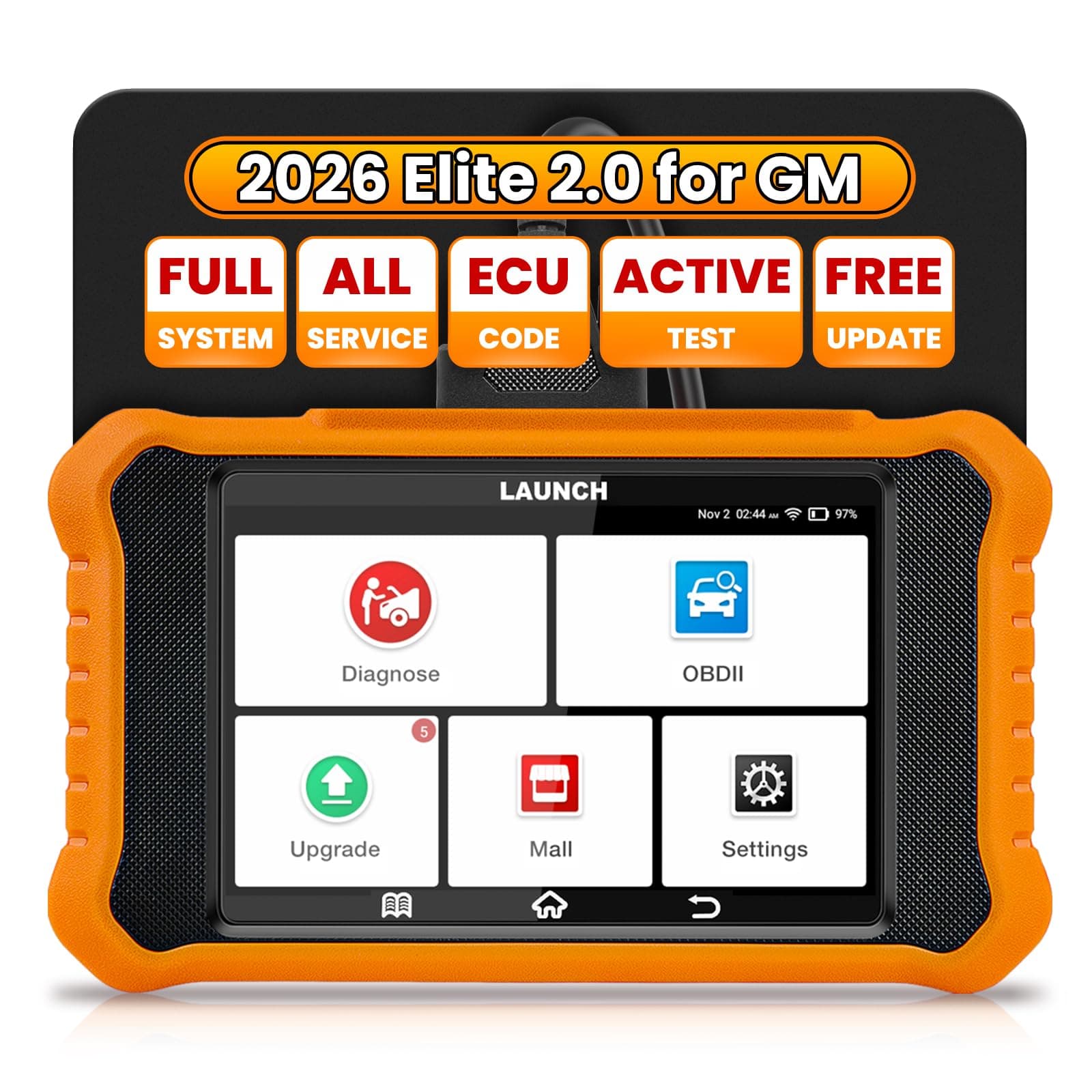
🚗 Diagnose Smarter, Drive Confidently — Never Miss a Beat with Creader Elite V2.0!
The 2026 LAUNCH Creader Elite V2.0 is a professional-grade bi-directional scan tool tailored for GM vehicles, featuring enhanced hardware, Android 8.1 OS, and a 3000mAh battery. It offers OE-level full system diagnostics, active ECU testing, and comprehensive reset functions. With lifetime free updates via WiFi, AutoVIN for effortless vehicle identification, and multi-language support, it empowers millennial managers to save time and money by confidently maintaining their vehicles with cutting-edge technology.




| ASIN | B0CRT4GJMX |
| Best Sellers Rank | #41,057 in Automotive ( See Top 100 in Automotive ) #236 in Code Readers & Scan Tools |
| Brand Name | LAUNCH |
| Customer Reviews | 4.1 4.1 out of 5 stars (246) |
| Manufacturer | LAUNCH |
| Manufacturer Warranty Description | 5 Year warranty |
| Native Resolution | 800x480 |
| Operating System | Android 8.1 |
| Power Source | Battery Powered |
| Screen Size | 4 Inches |
T**.
Saved my 2013 chevy volt from $1,000s and tons of shop visits
Takes some time to learn to use correctly, but has saved me $1,000s in shop visits. It has saved my Chevy volt from several shop visits... Note: get a cheap reader for clearing superficial faults rapidly...!. This thing takes way to long to load, update, and recognize your vehicle, but it is priceless when your car is bricked ( meaning your car will not go anywhere) and a simple cheap reader will not clear the faults...then this thing becomes priceless. I am so grateful for this item and the money/time it has saved me and saved my car...
J**E
Great product
Great product. Scanner works awesome!
3**N
Good so far, but any vehicle not GM requires a yearly subscription...
This scan tool does what I bought it for, what I needed it to. Its interface isn't perfect, but it works. My biggest concern after I bought and received it was seeing the terms. In its "Mall" it provides the opportunity to buy the ability to scan other manufactures, other than GM. The terms though follow with the horrible trend of subscriptions. Most vehicle manufacturers in the "Mall" cost about $40. That's very fair. But unfortunately, after you purchase the ability to scan another vehicle manufacturer, it expires after one year. After that, you'll have to buy it again. My family members mostly drive Toyotas, but ours is a Chevy. I can buy the ability to scan thier cars, but must buy it again every year if I want to keep it. This subscription-model system sucks across the board. Whatever happened to being able to just buy something outright, knowing we'd have it for as long as we could keep it in tact?! Not so with Launch. You have to buy it again every year if you want to keep it. Now after reading their terms and agreements, I worried that even the GM/Chevy ability might expire after I've had this scanner for a year. They didn't make clear if that was the case—if after buying this device, we'd have to pay them $40 (for now) to keep using it for the GM function I bought it for. Their terms and fine-print made it sound like that was the case. If so, I'd be returning it. I contacted the company, and they promised that the ability to scan GM vehicles (and updates) would be provided forever at no additional cost. They him-hawed about it at first, but after a few back-and-forths, they promised me that the GM/Chevy function it came with when I bought it was permanent—lasting for the life of the scan tool. I pushed to make them promise that two times, but they did. Hopefully they won't decide to go back on that down the road, but honestly their required user terms do allow them to. They did promise not to twice though, in writing. If you need this for other vehicle manufacturers, you will have to rebuy it each year if you wish to continue using it for anything other than GM series vehicles. Most options are about $40. Know that going in. This tool does do a good job, including letting you email a full report to wherever you wish, and it includes everything that the tool shows in its diagnostics, minus freeze frame etc. So far it seems to be a very good tool. It seems very durable physically, and capable electronically. But only because they guarunteed lifetime GM updates.
C**2
good bang for the buck, love it!
solid, was able to calibrate the steering torque sensor on my 2006 pontiac G6, im excited to plug it into all my cars and see not only what i can mess with but codes normal readers couldnt read like my airbag code. certain makes that are not GM/built in do have a subscription, however for 4 bucks a month or 40 a year, i dont think its that bad. alot of updates from V12 when i got it, to V22 after my updates were done. there are youtube videos about the operation as well. it may be a bit slower/hard to navigate but id say its a great bang for the buck! saves me alot of money.
S**.
Save your money. This is so close to being great, but falls short enough to send back
UPDATE: I bought this for a second time. Brand new, out of the box, the Scanner crashes, won’t update, won’t read the car, and the buttons are unresponsive. No chance it is user error. If I could update the firmware I certainly would, but this won’t even stay stable enough for that. Please don’t spend your money or energy on this disappointing piece of crap. Launch is close to getting this right, but at the end of the day, poorly written Chinese software makes it unable to do the jobs you are hoping that a model like this will do. It’s basically no different than a sub $50 scan tool with live data. Do not believe the website descriptions of what it claims it will do- it won’t.
M**E
Highly recommend
Easy to use, and has a lot of features. Fast diagnostic. Highly recommend 👍
S**Y
It works
This thing is amazing. Has so many functions..
L**.
Not good at EVAP testing
I agonized over which scanner to get for a problem with my 2005 Chevy Suburban. The problem was the EVAP monitor did not set with no check engine light. I went for a model specific scanner hoping it would have more detailed tests. While the scanner gives you lots of data, it falls short on EVAP testing. For one, it is had to find. When you finally do, it is pretty much do it yourself, having to select lots of data to check. Then when you activate the solenoids it does not give you a way to reverse the process. To do that you have to kill the test and go to the individual solenoid and shut it down. This destroys the value of the test. Maybe I am doing something wrong, but after several days of trial and error, I gave up and sent it back. If Launch reads this, please make EVAP testing more user friendly so you can just select the test and all the elements of the test come together so the user does not have spend time searching for the individual elements needed for the test. This is not hard to do.
ترست بايلوت
منذ 4 أيام
منذ شهر