Buy anything from 5,000+ international stores. One checkout price. No surprise fees. Join 2M+ shoppers on Desertcart.
Desertcart purchases this item on your behalf and handles shipping, customs, and support to Morocco.
🚀 Upgrade your network, upgrade your hustle.
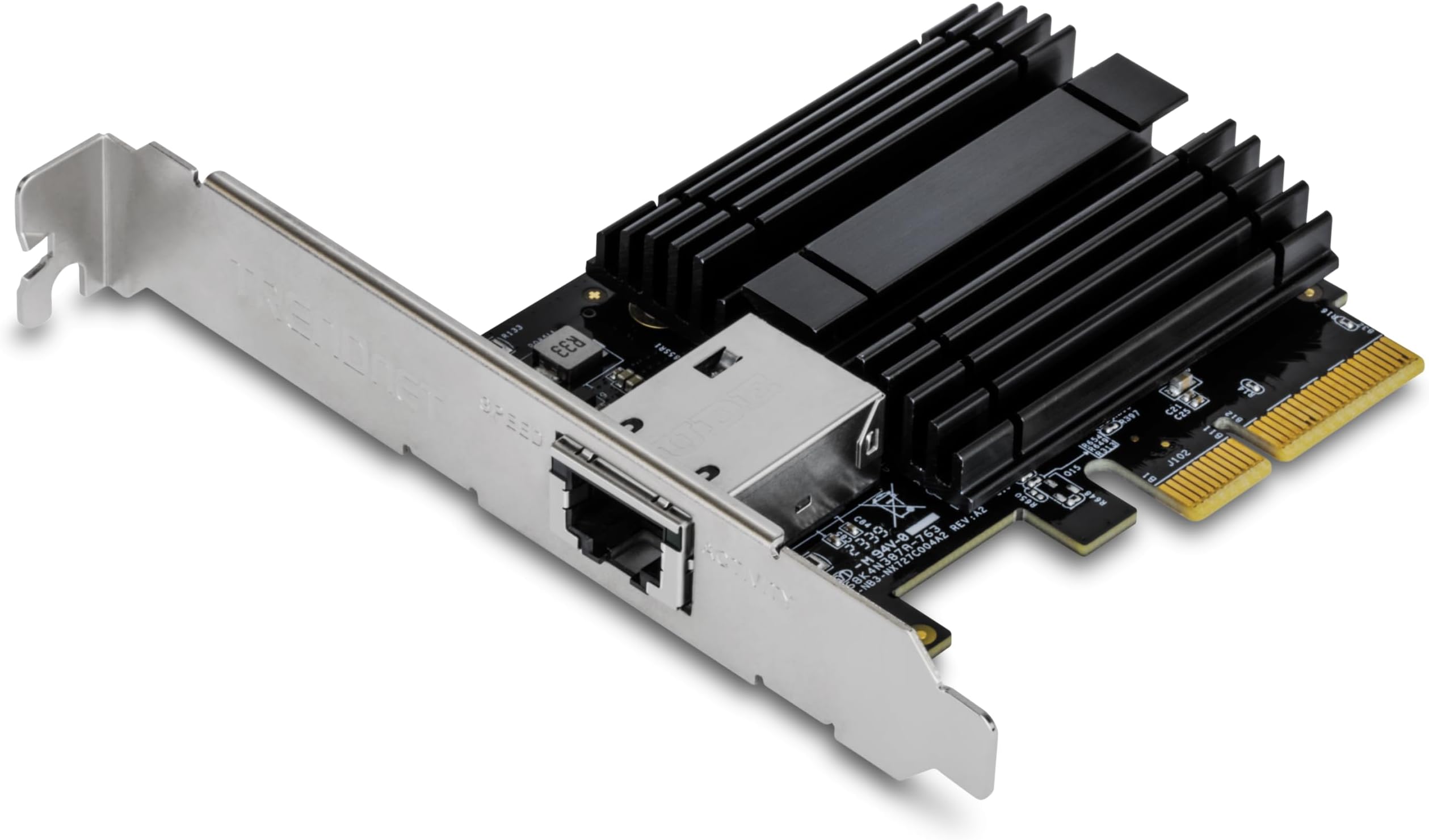
The TRENDnet TEG-10GECTX is a high-performance 10 Gigabit PCIe network adapter that converts a PCI Express slot into a blazing fast 10Gbps RJ-45 Ethernet port. Featuring PCIe Gen 3.0 x4 interface, NDAA and TAA compliance, and support for multiple speeds including 2.5GBASE-T over Cat5e cables, it’s designed for professionals seeking reliable, future-proof connectivity. Compatible with Windows and Windows Server, it includes both standard and low-profile brackets and is backed by a 3-year manufacturer warranty.


| ASIN | B01N5AOWW6 |
| Best Sellers Rank | #25 in Internal Computer Networking Cards |
| Brand | TRENDnet |
| Built-In Media | Quick Installation Guide, TEG-10GECTX |
| Color | Silver |
| Compatible Devices | Desktop |
| Compatible Operating System Family | Windows |
| Customer Reviews | 4.4 out of 5 stars 999 Reviews |
| Data Link Protocol | Ethernet |
| Data Transfer Rate | 10000 Megabits Per Second |
| External Testing Certification | FCC, CE |
| Global Trade Identification Number | 00710931140323 |
| Hardware Interface | Ethernet |
| Item Dimensions L x W x H | 4.7"L x 2.5"W x 0.7"H |
| Item Type Name | TRENDnet 10 Gigabit Pcie Network Adapter, Supports 802.1Q Vlan, Standard and Low-Profile Brackets, Windows, Server, Linux, Nbase-T, TEG-10GECTX |
| Item Weight | 62 Grams |
| Manufacturer | TRENDnet |
| Mfr Part Number | TEG-10GECTX |
| Minimum Required Operating System Version | Windows 10, Windows 11 |
| Model Number | TEG-10GECTX |
| Product Dimensions | 4.7"L x 2.5"W x 0.7"H |
| UPC | 710931140323 |
| Unit Count | 1.0 Count |
| Warranty Description | 3 Year Limited |
T**B
Good card so far!
Plug and play, works well, good value for the money, good speed
J**L
Essential to future proofing your system
I recently upgraded the network at my home. I ended up wiring all rooms to Cat8, and installed a Wifi 7 Mesh based on 2 Eero 7 Max routers. I know what people say: it's too fast, I'll never need it, etc. However, if I'm spending days in the attic pulling and fishing network cables all over the house, I'm going to install the latest standard wiring. This way, I don't have to worry about it again, probably for decades. This card was the second to last item that needed upgrading my entire network: my PC connection. The existing port maxed at 1GB. This card was the 4th card I purchased from Amazon, by the way. And it was the best outcome. 1st try was a much cheaper alternative. It supported 10/2.5/1gb speeds on paper. However, it started having temperature issues. The card would get so hot, it would start dropping the connection. I was worried about fire hazards as well. 2nd try was a more expensive alternative (the entire card was covered with a nice shiny red heatsink!). However, it only supported 10/1gb. Max 7 has 2.5gb ports as well. Why settle for slower? 3rd try was a generic card running on Intel chipset. It was advertised as 10/2.5/1, however, in reality, it was only 1000/100mb. The speed tests were obvious. My suggestion: go with this card. Excellent component overall. Here's a little review: 1. Good temperature distribution, heatsink is pretty large, and effective. 2. The drivers are available on the manufacturer's website. You don't need to keep searching into the depths of internet, like some intel models. 3. This card utilizes PCI Express 3.0. If you look at the market, overwhelming majority of cards are designed for 2.0 architecture. Being able to utilize 3.0 is an advantage. 4. Jumbo frames: I'm not big on this topic. If you are using NAS or Outbound VPN, I can see the advantage. My current router does not support it anyhow, but I checked the options, you can change the driver settings and utilize 16kb frames if that's what you'd like. 5. Price range.. Excellent hardware for this price point. 6. High and low profile brackets for different cases (not very useful, but thoughtful) Overall... The card works. I can get 1gb/2.5gb/10gb. The speed test result is attached for 2.5gb. I'll update the post once I receive the 10gb switch. PS: Little known issue with 10gb ports on routers and switches... Most hardware today, come with 2 ports that can support 10gb. Sounds great, right? However, the practice is a little bit different. Port 1, is used for input (from your modem) (in my case, my ISP, who can provide 8gb fiber input, so it's a must). Port 2, is used to connect your 2nd router for mesh purposes (this way, you have a 10gb backhaul, assuming you have the necessary wiring). Guess what? No port left for the PC or any other hardware. Therefore, until I buy a 10gb switch, and route the mesh through the switch, I won't be able to test 10gb on the PC. Seeing how this card handled 2.5gb, I have no reservations, I'm sure the card will outperform as I came to expect.
M**H
Great way to upgrade a motherboard that maxes out at 1Gbps
I upgraded my fiber internet service from 1Gbps to 2Gbps, but my motherboard's built in ethernet maxed out at 1Gbps. This product was the perfect solution to use a spare PCIe slot and upgrade my connection. One tip, I was having issues when the computer was idle. Seems the PCIe slot was being put in a low power state and when I'd come back to use the PC, I couldn't connect to the internet. So, I looked into the following power saving settings in the card's properties, changed them and it resolved the issue: I set each of these to a disabled state: Energy-Efficient Ethernet, Green Ethernet, & Power Saving Mode. Now my internet is rock solid and stable. This was a great upgrade!
R**N
Bought for a Zima Blade, works
Had to remove the high profile support bracket. Plugged it in, connected to my 10Gbe switch, also connected up the Gbe port. Logged on over the Gbe connection - assigned a static IP to the 10Gbe port ( ZimaOS even listed it as 10). Pulled the Gbe and connected over the 10Gbe. Worked fine. Ran Iperf3 to my NAS over the 10Gbe and got: [ ID] Interval Transfer Bitrate Retr [ 5] 0.00-10.00 sec 9.41 GBytes 8.08 Gbits/sec 49 sender [ 5] 0.00-10.00 sec 9.40 GBytes 8.08 Gbits/sec receiver Don't like the Retr number, we'll keep in testing and see what happens So for now it's a solid 4.5 - 4.7 ( I almost never give 5s things can always be improved) Shipping ( not under their control mostly) product box creased on one side, the shipping box and all the rest of the shipment was fine. Card fine as review shows.
A**N
Stable in Windows, 10G speeds... can't ask for simpler reliable card.
Working well and stable on a Windows 10 machine, connecting at 10gbit without any issues. SFP+ transceiver is Ubiquiti 10G going to Ubiquiti Enterprise 8 PoE switch SFP+ port, same transceiver. Simple plug and play with Windows, but user reviews here are accurate, download the Marvell AQN-100 drivers and there is a firmware, which can be accomplished in Windows. Once driver is installed it will be ID'ed as "Marvell AQtion Felicity Network Adapter" ... everything working seamlessly, much easier managing files on the home environment with the speed boost from 1g to 10g. Its an extremely compact card (and heatsink) compared to the Mellanox ConnectX3 which was having stability issues installed in the same box. Tip...Download the drivers and firmware update first before installing, Windows didn't know what it is for me * iPerf3 results showing ~7-9gbit consistently to my 10Gbit enabled Synology NAS ** Received hardware v3.0R
M**.
Stopped working after 4 Months of use.
I rarely leave reviews, but I need to share my experience with the TRENDnet 10 Gigabit PCIe Network Adapter. I bought TWO of these in the same month, and they both stopped working in the same week after just three months of use! At first, I was pleased with the performance, but that quickly turned into frustration. When the first adapter failed, I thought it might be a one-off issue. But when the second one went down just days later, I realized I’d made a huge mistake. I spent countless hours troubleshooting both adapters: reinstalling drivers, switching PCIe slots, and testing on different systems—all to no avail. It’s unbelievable that a product designed for reliability could fail so spectacularly. To make matters worse, customer support was a complete letdown. I faced long hold times and received little help in resolving the issue. I ended up having to return both adapters, which was an unnecessary hassle. I can’t recommend this product to anyone. If you want a dependable network adapter, steer clear of TRENDnet. Save your time, money, and sanity—go with a brand that stands behind its products!
J**.
Great performance
Quick installation, good fitment performance is as advertised. Throughput speeds close to 2.5gbs. Paired with 2.5 gb trendnet switch. The nic runs well on 1gb switch as well.
M**.
Good card but seems to stumble a bit under load.
I'm running this card in a desktop running Windows in my personal gaming rig. It seems to stumble under load. The only sustained load I put it under is downloading a Steam game. It starts the download fine, but as the download progresses the card "crashes." I'm only able to get it to connect again after disabling the Ethernet connection in the Windows control panel. I've tried a few drivers (currently running the latest directly from marvell dated 4/23/2024), updated firmware, I've tried blowing lots of air on it to keep it cool, nothing seems to work. Worse, if it does it once it'll likely do it again. I tried this in one of my Linux servers just to test and transferred a bunch of large files and it didn't do it there. Maybe it's a quirk in the Windows drivers, maybe it's something I'm doing, maybe mine is defective? I'm not sure. If you want something new from a reputable company with a warranty, I don't think you could go wrong with this especially if you're putting this in a server. I bought this to replace an Intel X520 DA2 card in my gaming rig as that card caused some odd POST issues but I'm afraid I'm going to be putting it back in for now. I'm gonna keep this card as I still have a use for it in my other machines, but if it starts acting up, I'm gonna RMA it.
A**W
Worked out of the box on Linux
Worked out of the box on Linux with atlantic kernel module. Works with any SFP+.
T**S
Small and fast, no issues
Arrived with full hight bracket mounted and half hight in the box. Easy swap. Works well in booth 2.5 Gbps and 10 Gbps mode. Pushes speed jus fine with iperf. Works well with 9k jumbo frames (could not test 16k since i have nothing at the other end that support it..)
A**R
Great power efficiency, but could not get ASPM to work
Works great, Barely gets warm Only issue, is that I could not get ASPM to work, I did see another comment in a review saying it was supported, but I could not get it to work on my UbuntuServer or Truenas machine. (My X710-da2 works fine)
V**9
Excelente
Agregué conectividad a mi QNAP en minutos, por ser PCIe Gen 2 es apta para equipos legacy.
M**S
Fungerade direkt ur lådan
Fungerar bra i Linux och ger full hastighet i 2.5Gbps.
Trustpilot
1 week ago
2 weeks ago