Buy anything from 5,000+ international stores. One checkout price. No surprise fees. Join 2M+ shoppers on Desertcart.
Desertcart purchases this item on your behalf and handles shipping, customs, and support to Morocco.
🚀 Elevate your Raspberry Pi setup with ROADOM’s sleek, responsive touchscreen — don’t get left behind!
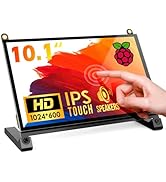
The ROADOM 10.1’’ Touch Screen Monitor offers a sharp 1024×600 IPS display with a wide 178° viewing angle and smooth 3-5 ms touch response. Designed for Raspberry Pi 5/4/3/Zero and compatible with multiple devices, it features dual built-in speakers, a protective integrated case, and a versatile adjustable stand. This plug-and-play monitor streamlines your workspace with clean cable management and immersive multimedia capabilities, making it ideal for professionals and tech enthusiasts seeking compact, high-performance displays.


| ASIN | B0CJNKFVPY |
| Additional Features | Built-In Speakers, Flicker-Free, Portable, Tilt Adjustment, Touchscreen |
| Aspect Ratio | 1.71:1 |
| Best Sellers Rank | #7,312 in Electronics ( See Top 100 in Electronics ) #265 in Computer Monitors |
| Brand | ROADOM |
| Brightness | 300 Candela |
| Built-In Media | ROADOM 10. |
| Color | Black |
| Color Gamut | 100 |
| Compatible Devices | Raspberry Pi, PC, PS, XBOX, TV-Box, CCTV, Camera |
| Connectivity Technology | HDMI |
| Contrast Ratio | 700:1 |
| Customer Reviews | 4.4 out of 5 stars 274 Reviews |
| Display Resolution Maximum | 1024 x 600 Pixels |
| Display Technology | LCD |
| Display Type | LCD |
| Hardware Connectivity | 3.5mm Audio, HDMI, USB Type C |
| Has Color Screen | Yes |
| Image Contrast Ratio | 700:1 |
| Item Dimensions D x W x H | 0.5"D x 9.2"W x 5.6"H |
| Item Weight | 1.23 Pounds |
| Manufacturer | ROADOM |
| Model Number | Z3-3 |
| Mounting Type | Desk Mount |
| Native Resolution | 1024x600 |
| Number of Component Outputs | 1 |
| Refresh Rate | 60 Hz |
| Resolution | HD |
| Response Time | 5 Milliseconds |
| Screen Finish | Matte |
| Screen Size | 10.1 Inches |
| Screen Surface Description | Matte |
| Shape | rectangular prism |
| Specific Uses For Product | Multimedia |
| Total Number of HDMI Ports | 1 |
| Total USB 3.0 Ports | 1 |
| Total Usb Ports | 1 |
| Viewing Angle | 178 Degrees |
S**S
Great value - Even better customer service!!!
We bought 2 of these monitors, mainly for the low price. We wanted a low priced, small monitor to fit under our main computer monitors for use to have company cameras in view without taking space on our main screens. We got one screen up and running but then it just shut off and quit within 15 minutes. Our IT department tried everything to get it to work again, googled the problems and attempted all the possible fixes. The 2nd monitor installed as it should and worked great for our purpose. I checked the return policy on the listing on Amazon and it was 30 days and we were over that by the time we did the initial install, it broke, we attempted all the fixes. I thought we were just out of luck, which it's a lower priced item so I was frustrated but not really surprised - you get what you pay for, right?!?! Wrong!!!! While I was packing up the monitor to get rid of it I noticed a small card in the box saying it had a 12 month guarantee. I thought, what the heck, isn't going to hurt to contact them and see what happens. My expectations were low, I assumed there would be some reason they wouldn't replace the item. But - they DID!!! They sent a replacement quickly (like lightening quick) once I told them the problem and also sent a video of what the monitor was doing - or not doing in this case! I provided them with the video on 5/2/2024 and I had a new monitor in hand by 5/3!! The person I dealt with via email was information, courteous and professional. They FAR EXCEEDED my expectations. I would not hesitate to buy from this seller again. The monitor itself is great for our purposes. Actually it probably has more features than we need.
S**S
Mounting a protective RPi case...
Update: found 10mm M2.5 screws to attach official case - from kit on here (VGBUY). Also 4" USB A to USB c cables. (Umefly) Used official RPi cooler but had to use Geekworm X1003 NVMe SSD M.2 adapter (as yet untested) to fit in the official case with the cooler. Some parts from Vilros - black official case, black Power Supply.... looks great! Works well with the Raspberry Pi 4 or 5 BUT trying to mount the Pi with hats in a case (not willing to hang my $200+ parts out in the wind) - RPi official RPi 5 case will work - but is very difficult, and won't work with the supplied screws . I finally ordered some threaded M2.5 brass rod to be cut to length (yet TBD but 16mm length looks about right, 6mm in case, 5mm on each side for attachment) to make headless studs for mounting. The black RPi official case looks good for it as well. The compact RPi NVMe SSD adapter with the official fan cooler also should work. Let you know when I get it assembled... Interestingly, I think the official RPi 4 case would work if holes were drilled in it. I may try that too as I have a 4 hooked up to it right now, although in a case with a fan.
S**E
A small and yet readable monitor with touch and speakers to work on your Raspberry Pi
UPDATE: The only down side I found is that it is very tricky to access the MicroSD card when the Pi is mounted on; this can be easily solved with standoffs that lifts the Pi up a little which gives more room for your fingers to pull and insert the card. In the picture I used 11mm brass standoffs. I also put some tape around the edge of the MicroSD card so it could be easily pulled out. ORIGINAL REVIEW: There are 2 versions of this monitor: a 7" and this one which is 10.1". On the 7" version the ports are located on the side, where on this version they're more inward because, well - it is physically bigger. Because of this, the mounted Raspberry Pi on the back along with all the cables are less visible from the front. For this reason and because I wanted something small and still big enough to read from, I decided to go with this 10.1 version and I'm very pleased with it. The box of this monitor is quite rich with stuff - you won't need to go and buy any cable to connect it to your Pi as it comes with all the cables you'd need - it also comes with a screwdriver and screws for mounting your Pi. I didn't even have to use its power adapter as I already have a power adapter for my Pi, and I just connected the included short USB cable from my Pi to the monitor's 5V+TOUCH port to power it up, which also enables the touch. The only thing I did added which wasn't included in the box is a convenient ON / OFF power switch cable, as the Pi 4 that I'm using doesn't have a power switch. The idea of screw mounts specifically for the Raspberry Pi on the back of the monitor is what makes this monitor a very good product - I began a Raspberry Pi course and had trouble trying to keep my Pi and all the cables organized on my desk, which every time turned into a mess when I touched one of the cables. No more with this solution - I mounted the Pi on its back, connected all the included cables and forgot that it's there. It's like having an all-in-one computer, just smaller. :) My desk is now cleaner, and every time I want to access the Pi I just flip the display to its back, do whatever I need and flip it back to the front. The built quality seems and feels very good. It's plastic all around but it seems to be built to last. The tension of the stand is quite firm as well and very steady, and the touch feature is very responsive with no delay or lag. When I got it, I almost forgot that it has internal speakers. I realized that when I went into its menu settings and suddenly saw "Volume". These built-in speakers are very nice thing to have for occasional use, but don't expect too much of them; I have a simple mounted stereo speakers soundbar on my main monitor so I'm no hardcore music listener by any mean, and so to me these built-in speakers are quite good for this small form factor - and it doesn't take any additional space on the desk. To access the menu you use the buttons on the right hand side: there's an ON/OFF button, a Menu button, an Up button which is also a shortcut to access the Brightness, a Down button which is also a shortcut to access the Volume, and an Exit button. The screen quality is very sharp, though only when used on its proper native resolution, which is 1024x600 (if you try different resolutions the image won't be as sharp, but it's a common behavior with all LCD monitors). Though, on boot, I'm not sure why the on-screen menu shows 1280x720, as this is beyond what this monitor is capable of - you can set it to that resolution or even to Full HD from the OS side too, but again, the image won't be as sharp, so make sure you keep it on 1024x600. The menu of this monitor is also quite rich with settings that I didn't expect to find on this small form factor, such as color temperature presets, energy saving and also a low blue light setting which makes the screen appearance to a warmer one, like how your smartphone nowadays does - it doesn’t do it automatically though, but I really appreciate this feature, as I'm quite sensitive to blue lights. Beside of this, you have the traditional 4:3 and 16:9 aspect ratio toggle settings so this monitor could be used for playing retro games at the correct aspect ratio as well. Attached some pictures that I took from the unboxing process for your impression (I blurred some areas that reflected my personal environment). Hope you'd find this review helpful.
J**T
Great Little Monitor
Just received my Roadom 10.1” monitor and I’m loving it so far. Assembly and connection was easy. The colors are vivid. It actually has a lot of features , more than I realized. It has several easy to reach controls on the side, connection ports are many and easy to reach giving much flexibility past the HDMI port I’m currently using. The stand is very adjustable, which I was concerned it wouldn’t be, and it’s sturdy. I looked at several other monitors that were a little cheaper but the difference in quality between this one and those seemed to be pretty wide. This is well worth the money and should list for years.
A**E
Great for Klipper
Worked great on my Pi 4 and 5. Display is bright and the range of viewing angles are good. The touch works well and is responsive. Use it for klipper control. I wish the USB C port could display video but it can’t. You will need a min of 2 cables, HDMI, and then USB C for touch and power.
J**D
Great monitor but....
I use this with a raspberry Pi 5 mounted on the back of the monitor. It is connected as shown with the instructions that come with the monitor. It works great and I really like it, but... At shutdown my active cooling fan on the cpu is somehow powered on and runs at full speed. I thought this was an Issue with my RPi5 but could not identify what it was. While troubleshooting, I had taken the RPi5 off of the monitor and only had the hdmi cable and power hooked to the monitor. I did not have the touchscreen cable connected. When I shut it down everything worked as it should and the cooling fan did not come on. I remounted the Pi, connected the touchscreen cable and the fan came on after shutdown again! So I disconnected the touch screen cable again and the shutdown went as it should. Somehow the monitor is backfeeding power through the touchscreen cable, to the RPi5 after shutdown and that is causing the cooling fan to run non stop at shutdown. The only way to stop the fan is to unplug the power, or disconnect the touchscreen cable which is not how things should work. I'm sending a copy of this to Roadom and hope they have a solution. If so I'd gladly give this a five star rating.
D**I
Awesome peoduct and its support
Love them, awesome company, awesome quality, really cheap and durable. Good quqlity of the image and size if you are building some kind of small raspberry pi station! it has touchscreen and can be used with 2 different connectors by usb or type C. Be awaree that Raspberry Pi 5 cannot receive the enough power from this display separately (there is the way to get the power flow from the display, but for Raspberry Pi5 will not be enough so you will need is own power cord for sure). I purchased 3 diplays in total, 1 had a small issue but the product support saw all the issues and resolved by replacement on the spot! Perfect product and the support. Love then and I recommend them to everyone !
D**S
READ THIS IF YOU'RE USING RASPBERRY PI OS (BOOKWORM) AND MULTI-TOUCH ISN'T WORKING
📢 READ THIS IF YOU'RE USING RASPBERRY PI OS (BOOKWORM) AND MULTI-TOUCH ISN'T WORKING If you're using one of these excellent touchscreens (I personally own both the 7" and 10.1" models), and you're scratching your head wondering why multi-touch isn't working on your Raspberry Pi 3, 4, or 5 — you're not alone. Despite being advertised as fully compatible with Raspberry Pi (even the box says so!), I could only get single-point touch to register. No pinch-to-zoom, no two-finger scrolling — just basic tap input. This was a dealbreaker for me, especially since I planned to use the screen with my Blue Iris server to monitor security cameras. Being able to zoom in and scroll with intuitive gestures was essential. 🤔 What’s Going On? Here’s the twist: multi-touch works perfectly on older versions of Raspberry Pi OS like Buster, but completely breaks on Bookworm and newer releases. After hours of troubleshooting (and as a self-proclaimed Raspberry Pi newbie), I finally uncovered the root cause: 🧠 The Culprit: Wayland + labwc Starting with Bookworm, Raspberry Pi OS switched from the legacy X11 windowing system to Wayland, using labwc as its default compositor. If you're wondering what a "Wayland compositor" is — it's essentially the software that manages how applications draw on the screen and how input devices (like touchscreens) interact with them. Wayland offers: - Better performance - Improved security - Smoother graphics with less screen tearing However, labwc (the default compositor used in Bookworm) handles touch input via basic mouse emulation by default. That means it only supports single-point interactions — no gestures, no multi-touch. This limitation didn’t exist with X11, which had more robust touch support out of the box. ✅ How to Fix It: Enable Multi-Touch Mode If you're running Raspberry Pi OS based on Debian 11 or newer, here’s how to restore multi-touch functionality: 1. Go to: Start → Preferences → Screen Configuration 2. Select your touchscreen from the list of screens (if you only have one, then choose that one) 3. Navigate to: Touchscreen → Mode 4. Set it to: Multitouch - note the default is 'Mouse Emulation' 5. Click Apply - your pi will reboot for the didn't to take affect After this change, your touchscreen should finally recognize multi-touch gestures like pinch-to-zoom and two-finger scrolling, especially inside Chromium. 🙌 Final Thoughts I hope this saves you the hours of frustration I went through. Raspberry Pi is an amazing platform, but sometimes the little quirks can trip you up — especially when major system components like the display server change under the hood. If you're using a touchscreen for anything beyond basic input, enabling multi-touch is a must. It should also be noted, as it isn't described in the included manual - You don’t need the GPIO or 4-wire USB cable to power the monitor or enable touch. Just use the included USB to USB-C cable and plug it into the Touch + 5V port. This single connection delivers both power and touch input — cleaner, simpler, and fewer cables to manage. Lastly, a special shoutout to Roadom's customer service, who is excellent and very responsive. Feel free to share this with others who might be stuck — and happy tinkering!
D**9
Did the job, but...
I used this to put Lineage OS on a Raspberry Pi 4 to make a bartop interface to my ai server so I could generate cocktail mixing instructions on the fly. I have two issues with it. The first is the resolution is lower than I would like. It's advertised as "HD" but the actual resolution is below 720p at 1024x600. To be fair that is also clearly stated but I missed that part. Secondly, the base is quite wobbly, making it difficult to use an onscreen keyboard without the whole unit shaking. You could probably fix this by securing the base with some double-sided adhesive tape or something like that. I haven't tried yet. Other than that it works as intended. They have the right idea, but the execution needs improvement imo.
W**R
Read to know
Quality and accessories are good.. slightly wobly when the pi goes on it while touching.. and the touch screen is bad.. i touch one side of the keyboard and it starts touching random other keys on the same line.. tried this on both screens i bought on 2 different Pi’s as well.. otherwise good for what i intended buying it for
Trustpilot
1 month ago
5 days ago