✨ Transform your TV space into a cinematic masterpiece with Govee’s smartest backlight yet!
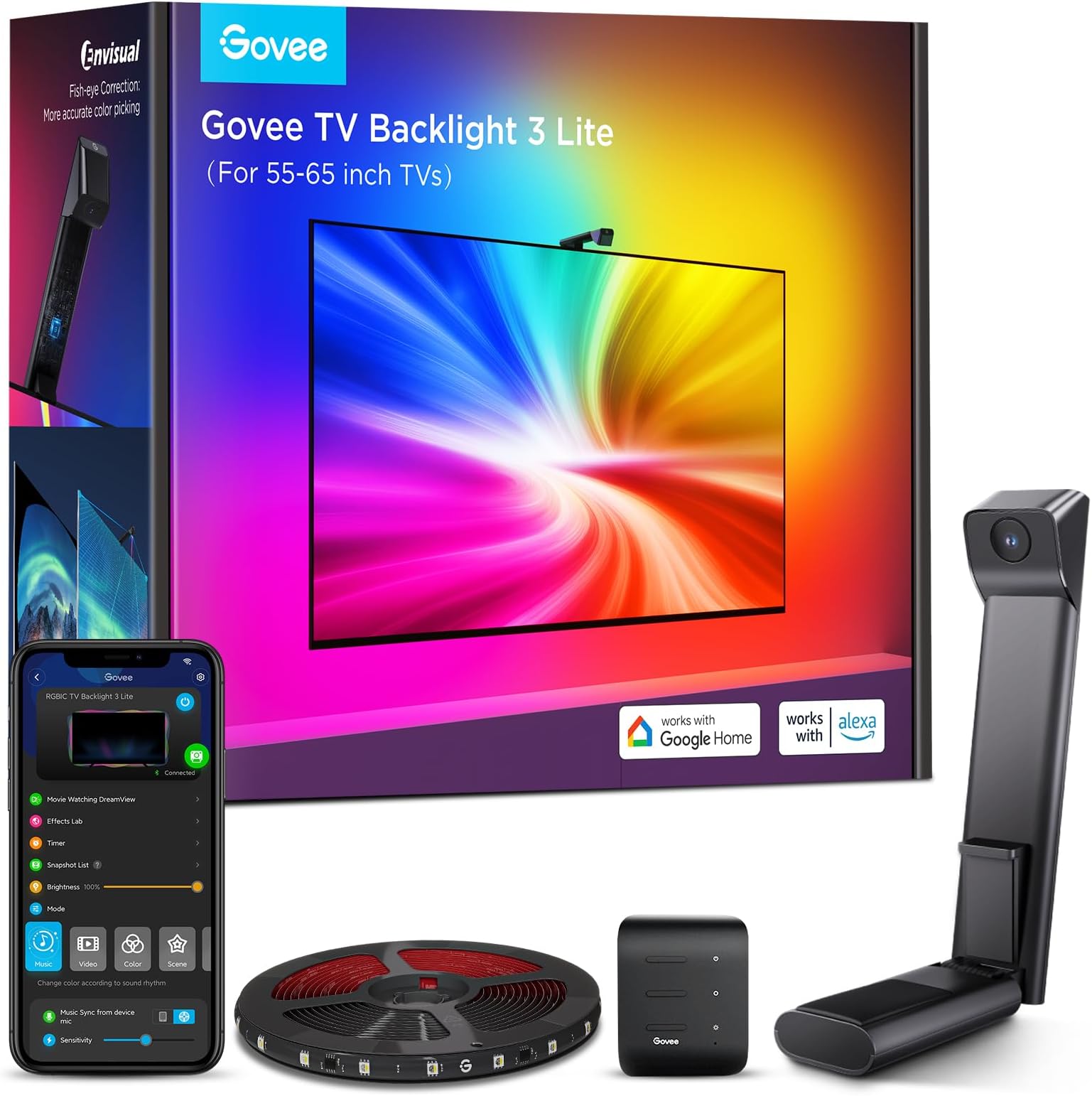
The Govee TV Backlight 3 Lite is an 11.8ft RGBICW LED strip designed for 55-65 inch TVs, featuring advanced fish-eye correction for precise edge color matching. It includes a camera for real-time screen color capture, supports Wi-Fi and voice control via Alexa and Google Assistant, and offers dynamic syncing with up to 7 devices. With 4-in-1 lamp beads and smart app control, it delivers vivid, natural lighting that enhances immersive viewing experiences while being easy to install and customize.


| ASIN | B0CHS2BGHY |
| Batteries Included? | No |
| Batteries Required? | No |
| Best Sellers Rank | #343 in Tools & Home Improvement ( See Top 100 in Tools & Home Improvement ) #7 in LED Strip Lights |
| Brand | Govee |
| Bulb Features | Dimmable |
| Color | Multicolor |
| Control Method | Voice |
| Controller Type | App Control, Voice Control |
| Customer Reviews | 4.5 4.5 out of 5 stars (8,475) |
| Date First Available | November 13, 2023 |
| Included Components | 11.8ft LED strip lights for TVs *1, Adapter *1, Camera *1, Control box *1 |
| Indoor/Outdoor Usage | Indoor |
| Item Length | 11.8 Feet |
| Item Weight | 1.63 pounds |
| Item model number | H6099 |
| Light Color | Multicolor |
| Light Source Type | LED |
| Manufacturer | Govee |
| Material | Plastic |
| Number of Items | 1 |
| Number of Light Sources | 108 |
| Occasion | Father's Day |
| Part Number | H60991D1 |
| Power Source | Corded Electric |
| Seasons | Christmas |
| Special Feature | APP and Voice Control, Black Bars Elimination, Blank Screen Detection, Fish-eye Correction Function, RGBICW |
| Special Features | APP and Voice Control, Black Bars Elimination, Blank Screen Detection, Fish-eye Correction Function, RGBICW |
| Specific Uses | Indoor use only |
| Style | Modern |
| Theme | TV |
| UPC | 810088347177 |
| Voltage | 12 Volts (DC) |
| Wattage | 24 watts |
A**.
Probably the best available for the money
I love these lights. High-quality dynamic backlighting for your TV. With the calibration and settings dialed correctly, it moves and breathes smoothly with the picture as you use the screen. With this installed it really amps up the cozy and artsy vibes of the screen, adding further immersion. It's also easier on your eyes in a dark room to add backlighting. You can set the brightness level to the level you want, and you can fully control the colors and tone, whether you want to set it to something static, add a colored border, or use the dynamic lighting (which is what I'm currently using). These lights were made for 55 inch to 65 inch TVs. There are four strips rolled up, two for the short side and two for the long side. No matter which corner you start from, you will be able to set it up properly during calibration. The strips stuck well so far but were not so firm that I couldn't pull up one strip to reapply it. The TV I have here in the pictures is the Sony Bravia ii OLED 4K panel (~$2000 screen, excellent picture quality for the price point). I am using a Rocketfish omnidirectional wall mount behind it. TIPS I followed some other reviews here for the calibration. It was recommended to set the TV brightness to max for calibration, then adjust both TV and backlight brightness after setup. The physical setup only required me to have a TV pulled forward from the wall a foot or so, plus a 3-step ladder so I could easily reach the top of the TV. You could absolutely install this on a TV sitting a bit forward on a stand as well. App setup was a breeze once the lights and camera were attached properly. I will sort out my cable management eventually, once I have a TV shelf installed below my panel which is my next goal for this room. The kit comes with some additional adhesive to secure the lights that I didn't end up using, as the adhesive on the back of the light strips was sufficient for now. I'm saving the extra parts just in case. Overall I highly recommend it! The dynamic lighting adds so much immersion without being loud or flashy unless you want it to be. Kinda just blends into the background and subtly amps up the quality of your whole experience. Like the color on the picture just blends seamlessly into the wall and the room.
C**O
Magical TV Backlight With Amazingly Accurate and Vivid Colors
I had very high expectations for this Govee 3 Lite backlight and it surpassed all of them by a mile. This Govee 3 Lite with proper set up, calibration and correct settings looks absolutely magnificent with beautiful and accurate colors that it adds so much to my TV viewing experience. Most of the "bad" reviews on here is USER ERROR because the person can't bother to do even the most basic research therefore he/she doesn't know how to set it up, calibrate and adjust settings correctly. So here are some tips and settings that may help others: For accurate colors it's vital to set your white light accurately first since all other colors blend off of white. Also, ALL of your TV SETTINGS like BRIGHTNESS, COLOR TEMPERATURE, PICTURE MODE, COLOR, CONTRAST, etc. has an impact on the LED strip brightness, vividness, accuracy and density as well. So play around and pause a scene on your TV that's really colorful and then turn your individual TV settings all the way up and all the way down to see how it affects your Govee lights. Now I have an LG OLED and OLED's have perfect black levels and near perfect colors out of the box, so you may not get the exact results I did. But it doesn't hurt to give it a try and see if it helps your Govee set up if you are not satisfied with your colors. 1. Put the camera dead center of your TV and at 90 degrees (or as close as you can). 2. Install the light strip as close as you possibly can to the edge of your TV. I've seen youtube videos where people install them 2" to 3" inward from the edge (I get it if you have no choice because your back panel has a weird shape or is not completely flat along the edges) and that gives such a tiny light spread on the wall and also leads to dead spots in the corners because the light is set too far away and that causes the TV's corners to cast a shadow on the wall leaving a dead spot. 3. When you calibrate with the orange squares make sure the gray box ends up looking either like a rectangle or a bow tie. I added pictures of my actual calibrations of both shapes to my review to give you an idea of what I'm talking about. If your TV is wall mounted or on a TV stand where there's nothing underneath the camera that may interfere with it, I'd probably go with a rectangle shape which is the ideal shape according to Govee. But after playing around with the calibration I discovered that for my set up a bow tie shape gives me the most accurate and uniform colors because I have a semi-glossy TV stand and it helps to prevent the camera from seeing past the bottom edge of my TV and catching whatever colors that are reflecting back up off my TV stand so it doesn't interfere with the actual colors coming from my screen. 4. When you adjust the "color calibration, saturation, white balance, etc." in the app do it in a dark room. 4a. "Saturation" setting needs to be dropped way down to give you accurate colors. I keep mine between 1%-5%. If you're one of many people that's having problems with your white light looking green, dropping the saturation down a lot should fix that problem and give you a nice white light that will go a long way in giving you accurate colors across the board. 5. "White balance" default is 50% but it looks a little too blue on my LG OLED so I keep my white balance a little more on the red side at 70%-75% and I get a nice slightly warmer white that works wonders in getting accurate colors all around. Google "pure white" background and use that to adjust your white balance and saturation. 6. "Relative Brightness" default is 50%. I set mine all the way up to 100% on all four sides and then I control the brightness level with the main brightness slider which when it's a bright room I set it to 100% and when it's a dark room I set it to 47% because that's the percentage I found that when the screen or parts of the screen goes dark so do the corresponding lights which only adds to the immersive viewing experience. 7. If you want your lights to show all the different colors as you watch TV you need to choose "part" in the app. If you choose "whole" you will get only solid colors on all four sides. 8. You can choose either "movie" or "game" but personally I leave mine to "movie" 90% of the time even if I'm gaming. The difference between them is with "game" the colors switch a little faster but that leads to a lot more flickering which can be very distracting. With "movie" it's a softer and smoother transition. 9. I love that I can connect my Govee kit to my Alexa app by adding it in the "skills" section which allows me to control the backlight with voice commands for things like turning the LED strip on and off or the brightness up or down or setting a timer/routine to turn the LED strip on or off at a certain time of day I set. Thankfully I had a few weeks to do a lot of research and also check out youtube videos before Prime Day when I was able to purchase this kit for $46 for the 40"-50" size. And it was in doing this research that made my set up super easy with no problems at all when my kit arrived. All told it took me about two hours from start to finish to install and set up my backlight settings to get it perfect for my LG OLED TV. It took me longer than most people since I went all OCD when figuring out the exact placement, spacing, height and measurements of the lights to get the best possible light spread on my wall and it was all worth it since my LED's look fantastic because I have a full and wide light spread and the colors are so evenly dense with no dead spots in the corners like I've seen on so many other set ups. I was worried that the whole calibration thing would be a PITA since a lot of reviewers seem to struggle mightily with getting it right. For me, it was super simple because through my research I learned what not to do and avoided all the pitfalls that plague others. The proof is in the pudding. I've added screenshots of the settings I use and a sample video with those settings and my lights are mesmerizing and gorgeous. Check it out!
A**R
Great unit at a better price!
Great way to add immersion to your viewing experience, whether it be watching cable TV or a 4K movie. I went with the 55"-65" version to use on my 55" Hisense U8N. The set up instructions aren't clear on a few points, so be sure to take your time. This isn't a 5 minute install. Between installation and calibration, expect to take 30+ minutes. A few things I want to point out. 1.) The orientation of the light strip matters. The picture on the installation guide shows the led strip installed so that the power plug end is at the bottom right corner coming from the top right corner (when looking at the tv from behind, and at least on the 55"-65" version I have). Failure to install the led strip in the correct orientation shown in the drawing will result in the lights showing the colors in incorrect positions. 2.) Take your time with the calibration process. Do not think you have it wrong when setting the area of the screen, you can move forward and backward through the steps freely in the app on your phone during the process. 3.) You will likely need to adjust various settings in the app to get the light colors to closely match the colors on your screen. Most important settings for this are Saturation (turn way down)l usually) and White Balance (this will be dependent on your TV). 4.) There is an option for Part or All. Part makes the lights more reactive to color variations in the scene and All makes the colors match the scene as a whole more. There is also an option for Game or Movie. Game has faster, more abrupt lighting changes, while Movie has smoother, less rapid lighting transitions.
R**M
An effective TV watching enhancement
The Govee TV Backlight 3 Lite transformed my TV-watching experience. Installation was quick, the adhesive holds well, and the calibration process is a little tricky and will take time to get right, from mapping out the TV size to setting the light quality up within the app. But the light quality is good and works best in rooms which are very dark with no external light sources to influence the color the camera picks up. The ambient lighting makes movies and gaming feel more immersive without being distracting. The app controls are intuitive, and the customization options let you fine‑tune everything from brightness to color modes. If you want an easy, affordable way to elevate your TV experience, this backlight delivers as promised.
M**S
The Ultimate Enhancement for Your Home Theater Experience
I recently installed the Govee TV Backlight 3 Lite on my 75-inch TV, and the experience has been nothing short of fantastic. This product truly enhances the home theater experience with its vibrant lighting and advanced features. I like the technology with the camera and how it automatically adjusts the lights to what is on the screen. The design of the Govee TV Backlight 3 Lite is sleek and user-friendly. The strips are flexible and can be easily attached to the back of the TV using the strong adhesive provided. The process of installation was straightforward—I simply cleaned the back of the TV, applied the strips, and connected the cables. The inclusion of clear, step-by-step instructions made the setup quick and hassle-free. One of the standout features of this backlight system is the Fish-Eye Correction Function. This feature ensures that the lighting remains uniform and accurate, even around the curved edges of larger TVs. On my 82-inch TV, the fish-eye correction worked brilliantly, resulting in an even distribution of light that enhances the viewing experience without any distortion or overly concentrated spots. The syncing capability of the Govee TV Backlight 3 Lite is impressive. The lights seamlessly sync with the scenes on the screen, creating a dynamic and immersive atmosphere. Whether I'm watching a movie, playing video games, or just streaming some YouTube videos, the lights enhance the overall viewing experience by extending the on-screen colors to the surroundings. The response time is excellent, with minimal lag, making the transitions smooth and natural. The RGBIC technology employed by Govee ensures a wide range of vibrant colors and customizable modes. The brightness levels are easily adjustable through the Govee Home app, allowing me to set the perfect ambiance for any mood. The colors are vivid and contribute to reducing eye strain, especially during long viewing sessions in a dark room. The Govee Home App adds a layer of convenience and customization. Through the app, I can easily control the light settings, choose from multiple lighting modes, and even create my own light patterns. The app’s interface is intuitive and allows for seamless integration with smart home devices, making it easy to control the lights using voice commands through Alexa or Google Assistant. The overall impact of the Govee TV Backlight 3 Lite on my home viewing experience is significant. It creates an immersive, theater-like environment that enhances both aesthetic appeal and functionality. The light sync feature makes action scenes, colorful animations, and cinematic moments more engaging and visually impressive. The Govee TV Backlight 3 Lite with Fish-Eye Correction Function is a fantastic addition to any large-screen TV setup, especially for 75-85 inch TVs. The fish-eye correction and sync features, combined with the vibrant colors and easy installation, make it a standout product in the market. It has significantly improved my home theater experience, making every movie night and gaming session more enjoyable and immersive. If you're looking to elevate your viewing experience, I highly recommend the Govee TV Backlight 3 Lite.
R**H
Movie lighting must have.
This is exactly what it was in the listing. It was very easy to install they stick to the back of the tv very well. The lights strip is good quality and they wont fall off the tv even from the heat.. The app is easy to use. Will say there are a lot of options to control it from the app. Once the control box is behind the tv your not going to be reaching back there to turn it off and on. I have mine connected to Alexa and Google so i can control them with my voice. They look great for watching movies even in a somewhat lit room. Be mindful of the camera on the top of the tv I did have to calibrate it 7 times cause it wasn't picking up all the corners and i accidentally hit the camera while walking around if your tv is on the wall you have nothing to worry about unless you have my first issue of it not catching the corners properly. The little orange squares don't stick too well especially since i had to do this several times. Even tried it without the squares and still had problems. The video was recorded after the second time of calibrating it. The problem comes when you try to get the hue right. Everything white makes the lights turn red so i had to mess with the saturation and the white balance on color calibration feature on the app to get it as close as possible to the white on the tv and its still something i have to adjust ever time i watch something.(Shown in the second picture)
J**M
Will purchase again and again, fantastic product
I purchased these for my son, and I was able to put them on myself; which is remarkable because I am not a handy mom at all. But the instructions given were clear, the app to turn on/off the lights is SUPER easy to install and work through. The lights are bright, and they have an array of colors. My son likes to game a lot so these are perfect for him as they respond to the screens colors. The quality is great, I did add my own tape just for peace of mind, but it is not needed at the 3M tape that is already attached worked well. As mentioned, the app to use offers an array of different colors and controls for the lighting, we will purchase these again and these are perfect for the person in your life who lies to game or watches a lot of movies or shows. Fantastic product!
P**D
Don't expect top level performance from an entry level product
We own an 65" LG C3 OLED television, a TV that has impressive color accuracy. To make our viewing experience more immersive and prevent eye strain, I bought the Govee 3 Lite backlight kit. If you own this LG television, you know that this TV has some soft kind of fabric on the back, so I highly recommend you buy some extra strong 3M double sided tape and attach the Govee light strip to that. Anyway, I installed the backlight strip and camera and followed all the calibration instructions to the letter. Yet, the way the camera was reading the colors on the screen, and the way the processing software translated this to the LED lights, was often confusing and unrelated. Case in point: the dominant color of the sample Snoopy picture is clearly magenta, and yet, the Govee system projected some shade of blue. And this was after multiple rounds of calibration. Orange will show up as a shade of red, and the color brown is not even represented. BTW, when calibrating, don't bother with the annoying orange foam sticky cubes. Go to YouTube and find "Govee Calibration Test Screen." It will give you a white image with the orange squares already on the screen. I've calibrated the light strips in bright daylight and during dark evenings. I've experimented with the angle of the camera. But at no point did the colors of the LED's precisely match the colors on the TV. It was frustrating, to say the least. This Govee system did not live up my expectations. However, here's the good news: once everything is up and running, I highly recommend you go to the Govee app and find the AI filter. This will allow you to type in the name of a show or movie you're about to watch. If the system finds a match, the software will automatically calibrate the lights to what you are watching, and the color accuracy increases by leaps and bounds. I just saw the latest season of the show "Dark Winds," and I was blown away by how much of a difference the AI filter makes. It convinced me not to return the Govee kit. One last point: initially, I had reservations about installing back lights that react to what's happening on the screen because I thought it might be a distracting gimmick. If the color match is clearly off, it did take me out of the experience, but when it's fairly accurate, it makes the screen look bigger and the content more captivating. But temper your expectations. It's unrealistic and unfair to expect top level performance from an entry level product.
ترست بايلوت
منذ 3 أسابيع
منذ شهرين