🚀 Unlock next-level storage speed and reliability — don’t get left behind!
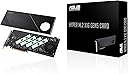
The ASUS Hyper M.2 x16 Gen5 Card is a cutting-edge PCIe 5.0 expansion card that supports up to four NVMe M.2 SSDs with blazing 512 Gbps bandwidth. Featuring server-grade PCB design, advanced cooling solutions, and cross-platform RAID support, it delivers unmatched storage performance and reliability for both AMD and Intel systems.
| ASIN | B0CKH9FWRQ |
| Best Sellers Rank | #2 in RAID Controllers |
| Brand | ASUS |
| Color | Gen 5 (PCIe 4.0/5.0) |
| Customer Reviews | 4.1 4.1 out of 5 stars (116) |
| Date First Available | October 9, 2023 |
| Item Dimensions LxWxH | 10.3 x 12.9 x 2.01 inches |
| Item Weight | 1.9 pounds |
| Item model number | HYPER M.2 X16 GEN5 CARD |
| Manufacturer | ASUS |
| Operating System | Windows, macOS, Linux |
| Product Dimensions | 10.3 x 12.9 x 2.01 inches |
M**R
Fast. Boots fast. Reads/writes fast.
This is well made and works very well. Faultless / flawless so far. Do use the various heat management apparatus to keep your NVME in temperature range (they slow down if they get hot). Takes a PCIE3 or better slot, bifurcated 4x4x4x4 (may have to specifically/manually set from BIOS screen.)
J**D
Works fine even on PCIe 3.0 bus, as long as it supports bifurcation
Not currently able to test maximum throughput as I've put this in a PCIe 3.0 slot on a superMicro motherboard. Setup 4x4x4x4x bifurcation and all 4 slots recognized and working. Heatsink setup is substantial, though probably overkill for my use given the airflow and machine-room location -- likewise have not powered the fan in quite room, so cannot judge the sound from it. Overall construction is very solid. It is also a very large card, so be sure you have the space for it!
Z**N
Great design, but with some notable requirements to fully utilize all 4 slots.
These cards (all brands and types), cannot use all 4 lanes on any gaming system, unless you use the primary video card PCIe 16x slot. Otherwise, the most you will probably get is 2 drives. There weren't even posts to install the 3rd or 4th slot, despite thermal strips being available. The only method of full utilization is with a Threadripper motherboard and accompanying processor as it has enough lanes for each PCIe slot to fully utilize 4 drives. Buyers after normal gaming rigs, should not bother, unless they want a limited experience.
C**L
Avoid ASUS products if technical support is expected
I bought this card to resolve a problem that ASUS technical support created for me due to completely incorrect information regarding the Pro WS W790 SAGE SE motherboard. After installation this card wasn't working and I called support to try and resolve the issue. ASUS strung me along for well over a week without ever getting back to me with any help, and I eventually solved the problem on my own (it was an incorrect BIOS setting). Below is the review I wrote regarding the motherboard, explaining why I no longer recommend dealing with ASUS. ----------------- In 2014 I built a high-end workstation around an ASUS Z9PE-D8 WS motherboard and received excellent support. I was so pleased that I bought many other ASUS products including laptops and considered ASUS to be one of the best companies in the computer business. Jump ahead to 2025. I decided to build a new workstation around this top-end Pro WS W790 SAGE SE motherboard. While the hardware is fine, this turned out to be the worst technical support experience in my long life. I found the documentation on the ASUS website to be somewhat confusing, so I started a dialog with their support team to get clarification. Prior to commencing the build I asked some straightforward questions regarding CPU usage and received straightforward answers -- answers that turned out to be completely wrong, leading me down a path that resulted in many of the features of this board being unusable and costing me hundreds of dollars in attempting workarounds. After well over six weeks of back and forth with support, being lied to over and over about escalating my issues to next tier support and "getting back to me within two business days", I never received any useful help. Eventually I resolved a series of problems on my own and finished the build with a working system, but this support ordeal was nearly unendurable. Note that ASUS, as a company, has now completely shielded itself from its customer. You deal with the absolutely horrible phone or chat interface to tech support and can never call or speak to anyone directly or continue a support call with the same person -- many of whom do not speak clear English. If you ask for a "manager" you get someone who knows little more than the front-line people and will lie to your face, refusing to pass you on to anyone else higher in the organization. I was never able to locate a phone number or email address for anyone in ASUS management to whom I could explain what was happening in their support department. Like blind, deaf, and mute monkeys, they clearly do not wish to know. So ultimately, while I find the motherboard's operation to be fine, I strongly warn against its purchase -- or any other ASUS product -- as having to deal with their support and management may lead to some very grim thoughts. I leave you with this last sad story. Like me, did you ever have to replace the CMOS battery on a motherboard? It's never been a problem until I got this one. I can see the battery through the translucent plastic case around the rear connectors, but could find no way to get to it. As a routine question I asked multiple people in tech support how to replace the battery, and not one person could provide an answer. THIS is what you face if you choose to deal with ASUS now. My recommendation: don't.
D**C
Works well; be aware of limitations
The product does exactly what it says it does -- you can install up to four NVME sticks. It's a full-sized card, with a fan and a heat sink to keep the NVMEs cool. If you need to build a high-performance file server, this would be one way to do it. Be advised, the maximum number of NVME devices depends on how much available PCIe bandwidth your motherboard has. It will not support as many NVME devices if you lack the PCIe bandwidth. You may encounter problems if you add this to a computer that already has a high-performance video card or other accessories that use most of your PCIe bandwidth.
T**H
Need more m.2 slots?, try this!
As someone who needed more super fast storage this was the perfect solution. I had already used up all four m.2 slots on the motherboard and needed to add more storage capacity. So far I have only used two of the slots and it seems to be working great but there have been some reviews saying trying to use all the slots doesn't work as well but I have not had any issues out of it. The speeds are also just as good as the ones directly on the motherboard and it was very easy to install. And being that it is from Asus you can expect a quality product that has good value.
B**E
Great combo for ASUS WRX90 motherboard
Blazing fast nvme gen 5 for RAID-10. Easy integration with ASUS WRX90 motherboard
G**X
Crazy Fast!!
Super fast card. The speeds and temps are incredible when using gen 5 drives but note you need an additional power connection and the card itself is slightly (just slightly) larger than a transitional single slot pci card. I had to reorganize some things in my case to get it to fit. Once in though, holy smokes this thing is FAST.
S**I
Fits well with my b650x ax gigabyte and amd rygen 9 7900 , birufication is needed to run it , I am using 4 samsung evo 990 Looks premium
M**E
Of course this is like the previous generation cards that require PCIe bifurcation on the slot it’s put into. A lot of consumer motherboards these days do 1x8/2x4 in the first/second slot respectively. This means this device can be useful to optimize IO with limited PCIe slots and lanes while still having a graphics card in the first slot. In my case I have a B550 board with only one usable NVMe slot due to having a peripheral on my 3rd PCIe slot. Having this card allows me to make use of the unused second slot to add an additional 2 NVMe drives at full speed. This is nothing special and now there are many cards that do this but what I like about this card is that it is the only one I’ve found so far that supports Gen 5 speeds making it a long term purchase. It is packaged with a few goodies, including extra mounting screws and also foam spacers for single sided drives to get adequate pressure against the front side thermal pads. Another goodie which is very cool (literally) is a connector to motherboard fan headers which would allow software control of the fan speed. Personally I don’t use the fan at all since I’m only using two PCIe 4.0 drives which don’t get that hot compared to 5.0 drives. Finally, I was surprised to see a 6-pin PCIe power header on this board. My two drives seem to work fine without this plugged in but I can see it providing extra power if there were 4x Gen 5 drives running at full power. All in all, I’m happy with this purchase as it should hopefully come useful for a long time so long as I intend to upgrade to PCIe 5.0 components some day.
R**2
I you have a board that supports X4X4 on the 2nd PCIe slot at 5.0 this is a no brainer. I will list reasons for and against. 1. It is slim 2. It fits 4 5.0 M2 drives 3. It has a 4 pin PWM header 4. It is the best solution for cooling 5.0 M2s.. 5. It is built much better than the previous Generation. 6. It works automatically in my As Rock board Cons. 1. It must be a MB that has at least 2 PCIe slots wired to the CPU for more than 1 drive to be recognized by the OS. 2. On X670E and X870 there are only 4 or 5 boards that support this and they are all expensive. 3. It has no on board controller like the WD AN1500. If you know what this is and are tired of the M2 sitting under your GPU adding to the thermal load in the case making the fans spin that much faster? Then this is the solution. I have some Crucials connected and the blaze through operations. It is the fastest drive to download and install Epic Games.
A**R
Good product
S**E
Well, if you need to add 4 M.2 drives to your PC, this is just about the only way but… it has an ANNOYING fan and has no temperature sensors so it will simply spin for no reason no matter what you do with the POS Armory Crate that Asus makes. I found a 3rd party fan controller and have permanently set it to 30% fan and it’s decently quiet. Have yet to see drives throttle (have 4x4tb gen 5 SSDs inside) so it’s an inelegant solution. It DOES have a tiny switch at the back that can turn the fan off/on which you can do if it really peeves you - or if you choose alternate cooling methods.
ترست بايلوت
منذ 4 أيام
منذ شهرين