Desertcart purchases this item on your behalf and handles shipping, customs, and support to Morocco.
🔌 Double your workspace, halve your hassle!
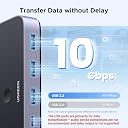
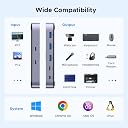
The UGREEN USB-C Switch lets two computers share four USB 3.2 Gen 2 ports with blazing 10Gbps transfer speeds. Compatible with both USB-C and USB-A devices, it offers remote and manual switching modes for seamless multitasking. Compact, power-efficient, and plug-and-play, it’s designed to boost productivity by simplifying device sharing between PCs and laptops.


| ASIN | B0CH7T76RX |
| Additional Features | Transfer Data |
| Best Sellers Rank | #146 in KVM Switches |
| Brand | UGREEN |
| Color | Black |
| Compatible Devices | Desktops, Laptops |
| Customer Reviews | 4.1 out of 5 stars 700 Reviews |
| Data Transfer Rate | 10000 megabits_per_second |
| Enclosure Material | Aluminum |
| Hardware Interface | USB Type C |
| Item Dimensions L x W x H | 4.8"L x 2.1"W x 0.7"H |
| Item Weight | 0.28 kg |
| Manufacturer | Ugreen Group Limited |
| Mfr Part Number | 25164 |
| Minimum Required Operating System Version | Mac OS 10.12 Sierra, Windows 10 |
| Model Number | 25164 |
| Number of Items | 1 |
| Number of Ports | 4 |
| Operating System | ['Windows 10', 'Windows 7', 'macOS'] |
| Special Feature | Transfer Data |
| Total USB Ports | 4 |
| Total Usb Ports | 4 |
| Unit Count | 1 Count |
C**Z
Simplified use of same peripherals across 2 PCs
Item works as intended. Was able to use this to connect my Keyboard, Mouse & Elgato Stream Deck to my work laptop & PC to be able to switch which device it connects too seamlessly. I did have an issue where I could not use the included USB-C cables to connect to them because the cable length was too short for the placement of my laptop & although the cable was long enough to connect to the PC, it was continuously disconnecting & reconnecting making it unusable. I am not docking any stars for that, only because I didn't actually test if the issue was with the cable itself or if it was with the USB-C port on the motherboard. I have spare USB-A to C cables, so I just swapped it & it started working flawlessly. In the future I may test the included USB-C on another motherboard & if it turns out the issue is with the cable & not the port on the motherboard, I will update my review.
C**S
This solved my personal/work Mac issue.
I have a work Macbook Pro and a much newer personal one that I need to switch between because I use an ultrawide monitor, and I needed the ability to switch machines and accessories seamlessly. I had tried other routes that switch the monitor and accessories, but none of them were compatible with the 'wake up' signal required by modern monitors that don't mind making your life harder while trying to save the earth. The options for KMV switches that guarantee to work across platforms are very expensive, and don't match the value. Since my monitor (LG ultawide) has 2 HDMI inputs anyway, I just keep both machines connected and then switch at the monitor. This selector then handles the seamless switch for input devices. I've only had it a couple of weeks, but so far it works like a charm.
T**L
Webcam for Windows Hello Works With 2 Computers
UPDATE: Dropping the rating to 4 stars due to its poor performance with the headphones and microphone. My best guess is that even with USB-C connections to the computers, this switch has data bottlenecks resulting from the combination of webcam and audio devices. Original review: TLDR: With the addition of a powered hub, I am able to quickly switch my webcam, keyboard, mouse, microphone, and headset between two computers. The ease of use of the wired remote is appreciated. I needed to integrate my work laptop (Windows) with my home office. The laptop supports Windows Hello for sign-in. My old Logitech webcam doesn't because it lacks IR capability. I bought a Logitech Brio webcam. I wanted to share it between both computers, but the Reddit articles I read said that the camera needed to be connected directly to the computer and not through a hub. I wondered if it would work with a switch and USB-C connections. Enter this UGREEN switch. I used a spare USB-C to USB-C cable (thanks, Apple) to connect the Brio webcam to this switch. Then I used the provided USB-C to USB-C cables to connect this switch to both the laptop and my home computer. But why stop there? I wanted to add my other peripherals as well. I needed a total of 6 USB-A ports, of which this switch only has 3. I picked up the UGREEN USB 3.0 Hub mostly for aesthetics, but also because it has the option to be powered externally. I put my power-hungry peripherals on the hub, and then connected the hub to this switch. I plugged in the wired remote and put it within easy reach. Now at the press of a button I can move everything between the two computers. Best of all, the Brio webcam provides Windows Hello sign-in capability on both of them. Here are the gory details: UGREEN USBC Switch - Logitech Brio 4K Webcam - Corsair M65 RGB ELITE Tunable FPS Gaming Mouse - Empty USB-A port - UGREEN USB 3.0 Hub -- Corsair K95 RGB PLATINUM XT Mechanical Gaming Keyboard (2x USB-A ports needed as the keyboard has an integrated hub of its own) -- Corsair HS60 Haptic Stereo Gaming Headset -- Blue Yeti USB Desk Microphone -- Powered by an Anker USB-C Charger, 30W 2 Port Fast Charger
C**.
High Quality/Speed Top Tier Performance!
It's very high quality and small, around the size of a smartphone. The throughput speed is top tier with no latency. No external power required. I used 3M double-sided sticky tape to mount it on the underside of my desk and ran the wired remote control button to the top side of my desk. I used double-sided tape to keep the button from moving around on my desk. I'm using a Logitech 4k webcam, Corsair K100 keyboard, and Logitech G502x mouse running at 1,000Hz polling rate. All of my peripherals perform at peak levels. This devices enables quick switching of my peripherals between my laptop and desktop computers while still using the same monitor for both systems. It's better than a KVM switch because KVM devices don't support G-Sync or ultra high refresh rates like 244Hz.
J**E
Is not compatible with Ugreen thunderbolt 4 dock
Nice switch but didn’t quite work with my UGreen thunderbolt 4 dock. I was hoping it would since it’s the same brand. The thunderbolt 4 dock works well I just have to plug and unplug when I move from Mac to Work windows. I was hoping I could plug in this switch into the dock and it would solve the wear and tear of plug/unplug The search continues.
M**W
Best feature is the immediate switching
An issue i've noticed across the board looking for a good usb switcher is latency. You can press the selector button and every product has a significant lag to it. And while half a second at best might seem like nitpicking, the moments add up through out the day into a frustrating experience. FINALLY tried this and the latency is almost immediate, I can't even perceive any lag even when I have every port connected. For me at least, that alone is worth the price.
G**G
Input Lag, loss of connection, no detection
I bought this to switch between a Macbook Pro and my gaming PC in hopes of being able to use just my usual keyboard and mouse. It seemed to work fine the first day, however from then on there was noticeable input lag on the keyboard where I would press a button then it would only register about half a second later and the inputs would be queued. There was also a small but noticeable delay on the mouse noticed more when gaming when the keyboard was being rapidly pressed at the same time as moving the mouse. I am also running into the issue of my keyboard not being detected when switching between computers, rendering the device useless at this point. In the end I am very disappointed.
O**L
This USB 3.2 Switch does work as Promised
I have a high-end PC. The Greenwise switch does work as described. With a USB mouse and keyboard attached, the switch causes the computer to indicate either no keyboard detected or the mouse and keyboard do not work after the PC completely boots up to Windows 11 Pro. Occasionally, after displaying the error, no keyboard is detected, the mouse and keyboard will work properly after bootup completes, but most of the time both keyboard and mouse are dead. The switch does work fine with my StarTec docking station. The two cables and switch packaged with the unit are high quality. I'm disappointed.
J**E
Great for sharing peripherals across 2 computers!
I bought this to share a set of keyboard, mouse, and speakers across my PC and work laptop. It works perfectly most of the time, and I especially like the fact that it has a remote because it's less clutter on the desk. Both computers don't have USB C ports, so I use USB A-to-C adapters to connect the USB-C cables that come with the switch to both computers, and thankfully it still works. The speakers sometimes disconnect intermittently, but strangely, this only happens on my work laptop and never on the PC, so I'm not sure where the problem lies. Another minor issue I have is that it doesn't seem to auto-detect the peripherals when I turn on the computers; I have to press the button on the remote (I've hidden the console itself under the desk) before it would detect them. Aside from that, it's a great purchase! Easy to set up and easy to use. Would be even better if it came in white or at least silver.
S**M
Works with PC and PS5
I'm using this USB switcher with my PC and PS5. It works perfectly to switch my headphones and mic between both devices with a press of a button.
A**E
Good switch for A B computer at a nice price
Very good usb 3.2 switch with 10 Gbps speed. Its an A or B switch. Put everything behind this switch then then with a button on the switch or through a extension switch between 2 computers. Sort of like a KVM but only for usb devices. The backend is usb-c between this switch and your 2 computers The frontend has 1 usbc and 3 usba all at 10 Gbps speed. Of course this is not enough but you can daisy chain. Slick design Solid
S**R
High Performance, seamless switching.
This USB switch was attempt number 2 at finding a technically solid solution for switching a gaming keyboard and mouse, and a webcam (Razer ornata v2, Balalisk V3, and Kiya Pro) between a work laptop and a gaming PC. And while this one cost twice the price of the last, it's performance is easily double, and hasn't skipped a beat. First - the bandwidth: A lot of cheaper switches say they offer USB 3 or even up to 3.2, but while that might be the case when connecting one or two devices, the signal will quickly degrade with more connected. My previous switch was rated up to USB 3.0 and that 0.2 difference with the 3.2 in this switch is a LOT. Previously the LED effects on my keyboard and mouse would stutter and have noticeable performance latency when the webcam was also connected. This switch has no such issues and all devices function perfectly. Set up: This one uses USB-C connectors which is amazing. It frees up 3 USB-A ports on my PC for other devices, and means all the cables needed can plug into one side of my laptop keeping it tidy (as most laptops will pair the HDMI, and USB-C I/O next to each other). It works with any USB-C cable which supports USB 3.2 - As I bought a 3M USB-C cable and it works great! Performance: Performance on this device is lightning fast. When hitting the button on my desk my mouse is controlling the next PC by the time my hand reaches back to it. On the old switch I would often have to wait a few moments, and even then the switch would often malfunction, causing me to need to re-insert it into the USB port - not here! 100% issue free! Build quality The build quality is great, in particular the remote switch has a nice feel to it and is easy to locate and feel without looking at it. (its mounted under my desk) - this is a huge improvement over the remote of the previous one, which was cheap rubber plastic with barely noticable bumps for buttons. Overall, absolutely spot on product.
C**C
Parfait pour switcher entre ma tour et mon portable.
Rien à redire. Nickel.
Trustpilot
1 month ago
2 weeks ago