⏰ Upgrade your wall switch game — control time, save energy, and impress your guests!
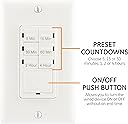
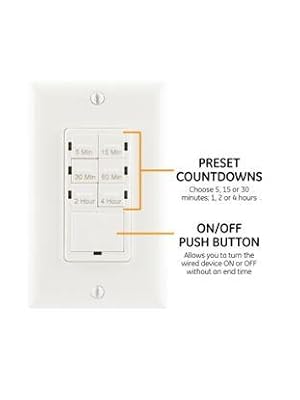
The GE Push-Button In-Wall Countdown Timer Switch offers six preset timer options (5 min to 4 hrs) with easy push-button control. Designed for simple installation without a neutral wire, it’s ideal for both older homes and new builds. Compatible with multiple bulb types and including a sleek white wallplate, this timer switch enhances energy efficiency and convenience for lights, fans, heaters, and more.


| ASIN | B007BJULYS |
| Best Sellers Rank | #278,757 in Tools & Home Improvement ( See Top 100 in Tools & Home Improvement ) #251 in Wall Timer Switches |
| Brand | GE |
| Brand Name | GE |
| Color | White |
| Customer Reviews | 4.4 out of 5 stars 3,863 Reviews |
| Global Trade Identification Number | 00043180153180 |
| Included Components | Timer, Wallplate |
| Item Dimensions D x W x H | 2.24"D x 4.78"W x 6.88"H |
| Item Type Name | GE In-Wall Push-Button Countdown Timer Switch, 5-15-30 Minute/1-2-4 Hour, ON/OFF, No Neutral Wire Needed, Ideal for Lights, Exhaust Fans, Heaters, Wall Plate Included, 15318 |
| Item Weight | 0.29 Pounds |
| Manufacturer | Jasco Products Company, LLC |
| Manufacturer Part Number | 15318 |
| Material | Tungsten |
| Material Type | Tungsten |
| Model Number | 15318 |
| Number of settings | 6 |
| Product Dimensions | 2.24"D x 4.78"W x 6.88"H |
| UPC | 043180153180 |
| Unit Count | 1.0 Count |
D**H
Works fine - but watch your wiring!
Installed in a bathroom to run the exhaust fan. This was wired correctly per instructions, but the timer wouldn't shut off after one minute, the fan ran forever, and buttons on the timer did nothing. The problem was solved by my electrician: instead of the power going from the switch to the fan, the power was going from the fan to the switch. Line/Load/Ground in the switch box appeared correct, but they weren't: what showed as the hot line was really the neutral return from the fan. This meant that when the 15318 was installed and turned on, there wasn't enough power being returned to the switch for it to charge the capacitor, activate the timer, and shut off the fan. If you have a similar problem in an older house where the switch doesn't turn off after one minute, check this: if a multimeter shows 120v from line to ground with the switch off, but nothing or near nothing with the fan running, then your fan (or other item) was probably wired wrong, and an electrician or a good handyman needs to change the splicing so hot goes to the switch first, not the fan. After that was sorted out the timer worked great.
O**N
Troubleshooting Tips! Works great.
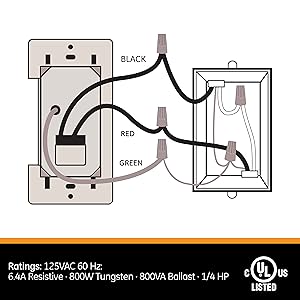
This thing works just perfectly for this old house with no neutral wire. I'm using it to control a bathroom vent fan. Here are some things to know: 1) You do need to connect this exactly as the instructions say even when you have two black wires that aren't labeled properly as to which one is hot and which one leads to the load (light, fan, etc.) 2) The earth ground is required for operation and not just for safety! if you don't see a green wire, look for a naked copper wire which is probably connected to the wall box. You can attach the green wire either directly to the naked wire or screw the green wire to the wall box if the naked wire is screwed to it. 3) if you have two black wires, and don't know which one leads to the load, just try to guess based on where the wires are coming into the box. If you know the path through the walls to the load device then that will help. If you guess wrong, the switch won't work properly. In this case just shut off the circuit break and swap the black wires. After that it should work. 4) When you restore power, the switch might start up in the "on" state and your load (fan, light) might be running. Just wait a minute or less and it will shut off as soon as the capacitor in the switch charges up. Then wait a few more minutes and the switch should be working as expected. I think the switch probably uses a design like US Patent US5903139A. This charges a capacitor, not a battery, so should have a decently long lifetime. If you do have a neutral wire in your house (2 phase AC power) like most modern houses, then you're probably better off with a design that makes use of the neutral wire and the 2nd electrical phase to power itself. That will avoid the start up delay.
J**.
GE compare to Woods 59007
I bought two of these for my two bathroom ventilation fans because I've forgotten to turn them off every now and then (because they're whisper quiet) and end up wasting power for hours and hours at a time. I did not want anything too fancy or too high-tech. I just need a switch that is simple and easy to use and looks good. Before purchasing this, I compared with Woods 59007 (http://www.amazon.com/Woods-59007-Decora-30-15-10-5-30-Minute/dp/B002KS1DBU/ref=pd_sim_60_4?ie=UTF8&refRID=1FJHTTBV5NCTJ3RESSJ2), which is similar to this. The Woods has over 600 reviews with 4.5 stars overall, while this one only had 100+ reviews, but also with 4.5 stars overall. So, it seemed the Woods would have been the better choice just based on more reviews. However, let me share with you why I bought these GE timers over the Woods. - The wiring is much easier than the Woods. You only need to connect 3 wires instead of 4 on the Woods. Plus, you don't need the Neutral wire, as specified in the product description. If you need to connect 4 wires, it may be a bit more troublesome for those who are not familiar with electrical wiring. If you are replacing an existing power switch, some electrical boxes might not have a neutral wire, since most common basic wall switches only need 2 hot (black) and ground (green) wires, so then you might have to find other means to connect the neutral on the Woods. - This timer gives you a wider range of time options. The Woods can only go up to 30 mins. If you want more time, they have a different model which goes up to 8hrs, or even 12hrs. However, the time range will also change. For example, on their 8hr switch, your options are 1,2,4, or 8 hrs. So if you sometimes want 10 minutes, or sometimes 2 hrs, you can't do that with the Woods. - The style of the buttons look a lot better than the Woods. The Woods has one small button (too small in my opinion). In my personal opinion, for a wall switch you want the button to be big and easy to locate, especially if it's used often. The GE has 7 buttons. While it may seem a lot, however it is designed to be more practical, intuitive, and easier to use. On the Woods, you have to press the one small button a certain number of times to "set" the time you want to use. This is kind of a pain, and without instructions it may take a bit of time to figure it out. On the GE, you can press just once any of the clearly labeled 6 time buttons or press the big button, which will use your "last used/saved" time settings. There is no need to really "set" the time. It's all one press of a button. Easy and simple to use. This is important for my use since one of the timers I bought is for a guest bathroom, I don't want guests to have to try to "figure out" how to use the timer switch to select a desired time. - The style and color of the indicator lights look cleaner, more subtle, and modern. The Woods uses 5 lights that look a bit out of style. The GE uses very subtle LED blue lights on all 7 buttons, and each one only blinks momentarily when you press it to turn on. - They don't print their logos on the switch or the face plates. The Woods have their logos below the switch, which I really did not like. It looks like an added distraction on the wall. From the pictures, the logo is not very subtle, which sort of ruins the clean look of all my other switches on the wall. For those who like to have a clean, minimalist look, the logo may bother you. - The GE timer includes a face plate. I'm not sure if Woods includes one, but from the pictures it doesn't look like it includes one. I couldn't use it for my installation because I have 2 switches next to each other. However, the extra plate can come in handy whenever one needs to be replaced in the house. The only downsides (that I can think of) about this product compare to Woods and any other similar timer switches available in the market are: 1. This one does cost a little more. Compare to Woods (depending on model) and some other brands, price difference range from $3-7 dollars more. However, in my opinion, the few dollars you pay is worth it for the reasons above. 2. The maximum time is 4 hrs. If you need more time, then I would suggest going with Woods (like this one: http://www.amazon.com/Woods-59007-Decora-30-15-10-5-30-Minute/dp/B002KS1DBU/ref=pd_sim_60_4?ie=UTF8&refRID=1FJHTTBV5NCTJ3RESSJ2) or some other brands. Installation: These are very easy to install. With main power turned off, you just remove an existing switch (if you are replacing one), and use the included wire connectors to twist and tie 3 wires (Black(hot) to black, Red(hot) to the other black, and Green (earth ground) to Green). When powering back up, just wait for about a minute while the timer charges (I think it probably has a capacitor inside that discharges). Once charged, it will first turn ON automatically. From then on, it's pretty much straightforward to use. All buttons are like toggle switches. Use the labeled time buttons to turn on and run for the selected amount of time, or use the big button to turn on using the "last used" time settings. Press again to manually turn off. Overall, I'm very satisfied with my purchase. The timer was easy to install and it's very easy to use. I definitely recommend this to anyone looking for a simple timer switch, especially for a bathroom fan!
A**R
Works with a few gotchas (updated)
The switch mostly performs as advertised. But there are some gotchas that you have to look out for. Fair Warning: I am not an electrician. Installation was not difficult. The switch has black, red and green wires. According to the instructions, the black is for the hot side, the red for the load side (bathroom fan in my instance) and the green for earth ground. I could not tell which of my black wires was the load side, so I made my best guess and continued. Upon flipping the circuit breaker back on, the switch/fan came on. According to the instructions this is normal as it "takes about 1 minute to fully charge (the switch)" after which it turned off. I pushed the 5min timer button and the fan came on as expected. I immediately tried pushing some of the other buttons to get a feel for how they worked whereupon the switch turned off and would not come back on no matter which button I pushed. The instructions state "This happens if you cycle the load to(o) many times in a short period. Wait 1 minute and the timer will be ready for use." I waited 1min, didn't work. I waited 5mins, still didn't work. I waited an hour, still didn't work. Lacking any other ideas, I began to wonder if I'd attached the red wire to the hot side. So I rewired the switch and now it seems to work. Cycling the load several times within a short period doesn't seem to cause malfunction. The switch has a small blue light next to each timer button (5min, 10min... etc). When you push one of the buttons, the blue light next to it flashes on twice... and never again until the time expires. Why can't the blue light next to the chosen timer stay on when the switch is on? There's certainly power flowing through the circuit. According to the instructions, "Timer will blink every 20 seconds to show the last time used". **THIS DOES NOT WORK**. Whether the switch is on or off, the chosen timer does not blink every 20secs. Overall it gets the job done (as long as you wire it correctly, it seems). But I wish the light next to the chosen timer stayed on. There's no way to tell what timer the person before you chose. UPDATE: The instructions also state "If you hold the big button down for 5 seconds it will turn on and stay on until hit again" **THIS DOES NOT WORK**. I've tried holding the button down for 5 secs and more. The switch eventually turns off based upon the last timer chosen no matter how long you hold the button down.
F**M
Robust digital switch
Very good switch, and much more convenient than the old timers that make an annoying ticking noise. Some reviews of this item show that the lights on it randomly flash, but this does not happen on mine. I assume this is a later revision. When pressing a button, the light will flash one time. The switch is super easy to use, you just press the button you want for the timer, and it powers the circuit on. It will then turn it off after that time expires. If you press the large button, it will turn the circuit off if it is on. If you press the large button when the circuit is off, it will use a timer of the last chosen duration (and flash that light). If you hold the large button for a while, it will bypass the timer. The item comes with everything you need, the switch, face plate, 3 wire nuts (small orange), box screws, and face plate screws. Be sure to read the instructions, as the switch does not work right away once power is restored. It takes a few minutes (around 5) before it will be able to function, so be patient. This is because the device has a battery or capacitor in it that trickle charges by leaking to ground (as there is no neutral wire). Installation is simple, just shut off power, and connect the 3 wire nuts. There is a ground (green), which must be connected.. a switch/hot leg (red), and a hot in (black). If you have large stranded wire, or 12 gauge solid, you may need larger wire nuts than the ones provided. If you have 2 black wires in your box, you will need to locate the switched leg (usually it is red, but sometimes contractors are lazy). You can do this with a meter, by simply checking continuity of the wire to the outlet/light using a test probe and extension cord.
T**5
Flimsy, Possibly Unsafe
After reading many positive reviews, I thought this switch would be a great solution for the bathroom light which my daughter never turns off. I was horribly disappointed when I received it. The construction feels flimsy and the only installation option is to twist electrical nuts onto the cheap stranded aluminum wires coming out the back of this thing. OK, why is stranded aluminum so bad here? Well, there's the minor issue of aluminum being an inferior conductor compared to copper so you end up wasting some electricity, but the big issue is safety. Now, I'm a high school physics teacher and perhaps the need to have the 100+ teenagers entrusted to my care daily stay alive has made me a bit overzealous about safety in electrical circuits. Buildings are normally wired with solid-core copper wire because it's the safest, most efficient option within a realistic budget. When you twist those little threads of aluminum around solid-core copper, you don't get a very good connection. I even tested this setup by twisting the three wires on this switch to my solid core and gently tugging. All three came out with just a little pressure. You may be thinking: "OK, why is that a safety issue? The power won't flow in a broken connection and all I have to do is go back in and fix it." Yes, normally power won't flow if the circuit is open, but the exception is when there's just a small gap and you have a large potential difference. This effectively turns your wiring into a spark plug. I've seen it happened in a poorly-wired home, and the wire kept sparking without tripping the circuit breaker until I found the breaker and opened the circuit manually. As I was pondering the safety issue, I also became concerned with the unusually large box of electronics sticking out the back of this switch. Seriously, why is it so big? I imagine the most complex part of the circuit is a 15-bit quartz timer like a wristwatch uses, yet this circuit takes up forty times as much space. I tried inserting it into the electrical box in my wall and it wouldn't even fit. Maybe if I cut the wiring really short I could have forced it in, but I was not prepared to do it. I returned this junk to Amazon and went to Lowe's where I found a nice motion sensor switch which was so much better and a breeze to install.
L**O
Works great, easy to use
I used this timer switch for a bathroom exhaust fan. It's a small bathroom with a tub/shower so steam builds up and has nowhere to go. I installed an exhaust fan that pulls steam out (it vents to the outside) but did not want the on-off to be connected to the light. The fan needs to run at least 15 min to clear out the condensation and normally when people leave the bathroom, they turn off the lights, so the fan would shut off too. This way, the fan can run longer even when no one is in the room. Pro: It remembers the last time setting, so just pushing the big button turns it on. it looks great and installs in a standard single gang box. Cons: No cons. The hardest part is training everyone to use it EVERY time they shower. Kind of like hanging up the towels, lol.
A**R
Wait a minute for unit to charge and lights to flash after turning breaker on!
After wiring up this unit - hot to black, load to red and ground to green - and turning the breaker on, I was scratching my head as it didn't seem to work to turn my bathroom exhaust fan on and off. I undid all the connections, reconnected the old switch and everything worked. So I came back to this timer switch and whatever I did seemed to charge the unit and I saw a couple flashes and I was in business. Obviously I didn't read the supplied paper instructions, which specify that the unit takes a minute to fully charge (assuming the minute is after the breaker is turned on) and lights will flash when charged! Anyway it seems to work for its intended purpose. Each of the timer buttons work. When the power button is short-pressed on it activates the last used timer. Easy to install and takes up no more room than a normal two-rocker switch. I have this switch controlling the fan of a Panasonic exhaust-heater-light-night light - 4 rockers on a 2 gang box. The fan and main light were on one double pole rocker and I gave up the main light control and capped off that load. The bathroom has lights anyway and the night light appears just as bright for backup.
T**M
Looks awesome, works awesome, economical
Was a breeze to setup, still working a year later and looks great. I always trust GE to make a good product.
K**E
Excelente!!!
Al principio me preocupo por que no funcionaba pero realmente fue mi culpa en la instalación, pero funciona excelenre,muy útil.
A**N
Muy bueno
Muy bueno sólo mencionar que la conección a tierra funciona mejor al neutro, es mas estable.
M**D
As advertised and a great choice.
Product worked as advertised and is easy for anyone to install with written instructions (watching a YouTube video always helps too). We used it for a bathroom exhaust fan. It is nice having the options for different timers. Do note that if you want the fan on indefinitely, press and hold the big button for 5 seconds. This is not apparently clear on instructions or product advertisement on amazon. Pressing the large button turns on the last “timed” setting, unless you press and hold it for 5 seconds. Otherwise the timer functions great, looks fine, installs easy, and provides lots of options for timed settings that we find convenient.
I**R
Easy Installation, So Far Works Well
As most reviewers have reported, installation is a breeze. The no neutral wire requirement was essential for my install. There's ample room for unit to fit next to the light socket/switch. My only complaint is that light does not stay on for the time selected, it only flashes briefly when initially selected. Also the longer times are not really practical, better to have smaller incremental times (under 1 hour).
Trustpilot
2 weeks ago
2 days ago