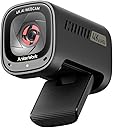
🎥 Capture Every Detail with Anker's C310!
The AnkerWork C310 Webcam is a cutting-edge 4K webcam featuring a 12-megapixel display, AI-powered functionalities like autofocus and noise canceling, and a built-in privacy cover. It supports high-speed 1080p@60FPS transmission, making it ideal for professional video calls and livestreams, all while adapting to various lighting conditions.


| ASIN | B0CCY8RBJD |
| Batteries | 22 Nonstandard Battery batteries required. |
| Best Sellers Rank | #65 in Webcams |
| Brand Name | Anker |
| Color Name | Black |
| Customer Reviews | 4.2 4.2 out of 5 stars (1,248) |
| Date First Available | September 13, 2023 |
| Item Weight | 5 ounces |
| Item model number | A3367 |
| Product Dimensions | 2.95 x 1.77 x 2.1 inches |
| Special Features | Low Light |
J**X
The people on the other end like it more than me, I do like it!
This is my 2nd Anker brand, first one being the 2K version, and I thought why not pay extra money and get the latest 4K one. I'm not really into web cams and just use them out of necessity, and my customers now say that I come in crystal clear. For me it just a device sitting there on top of my monitor, so I forget about it being there. The build quality feels solid and heavy in my hands, and it doesn't feel cheap at all compared to others I've owned in the past. Operations wise, the camera can go for hours on end without a hiccup or blimp on the screen, so that says something about it's thermal signature and data transfer rate. I like the red privacy shutter, compared to to those hinged caps that cover the lens. Installation was thoughtless and it just hooked up like it had been there for years already. To me, this is a no frills web cam that just works like military equipment, that is durable and rugged day in and day out. Maybe it's not the best, but it's not the worse by any means and it was money well spent. As far as all those features go, I don't really use them at all but did refine the zoom, lighting and other stuff via my Operating System interface, and that was it, pretty much set and forget for me. My shopping experience for buying another web cam was littered with hundreds of options from many manufactures, and it got to the point where I just settled for this one and hoped for the best, and I wasn't disappointed. If your reading this, you might of hit web cam shopping overload like I did after an hour, and your looking to just pick something decent right now at the right price point and get it over with, that's what this camera is. I gave it 5 stars for it's build quality, reliability, thermal signature, data transfer rate, and ease of use compared to others in the same price range.
G**K
Crystal clear video
I needed a new webcam that provides clear 4k video but doesn't break the bank, and this was it. Anker AnkerWork C310 is a durable webcam that fits securely on my monitor. The camera only turns on when the privacy shutter is open and is a must have these days. The 4K video feed was sharp and bright, and the AI Auto Focus does a good job of focusing on the subject. The built-in mic has good reception, but I am unsure about its capability to filter out background noise. When installing this, ensure it is plugged into a USB 3.0 or USB-C port due to the data rate requirements of 4K video. I am sure it will work plugged into a regular USB 2.0 port, but if you are buying this for great video quality, then it needs to be set up right. It does get a little warm once it is going, but that is normal. Overall, this is a great product for anyone who is in the market for a 4K webcam.
R**I
Impressive but a bit large and the cable is out-of-date
I purchased this webcam primarily for Zoom calls so I wouldn’t have to rely on my MacBook Pro’s built-in camera. The image quality ranges from marginal to good, but there are some key drawbacks potential buyers should be aware of. First, if you want to take advantage of 4K resolution, you’ll need a USB 3.1 or higher connection. Unfortunately, the included cable is a USB-C to USB-A, which limits you to 1080p unless your setup supports USB 3.x or later through USB-A (unlikely in many cases). To use 4K, you’ll need to purchase a high-speed USB-C to USB-C cable separately. I had a couple of shorter USB-C cables on hand for testing, and they did enable 4K, but they weren’t long enough for practical use. I’ve since ordered a 2-meter USB-C to USB-C cable rated for “USB 4” speeds. Another disappointment is the lack of a “follow me” feature, which is standard on many modern webcams and built-in laptop cameras. [**EDIT**] It turns out this feature is in there but is obscured by a different terminology. They call it "Solo Frame" under "Field of View" in the settings. But it is limited to one field of view so you can't be doing something like a presentation and have it follow you since it is always zooming into your face with "Solo Frame" or not following with the other 3 settings. If you don't need this then it won't matter, but it needs some enhancing. The other thing is echo suppression. Most phones, cameras, iPads etc allow you do to video calling (zoom, Teams, FaceTime, etc.) and they person on the other end of the line does not hear their own voices echoing back to them. This camera has 3 Audio settings. 360, 90, and AI Noise Reduction. 360 uses mics on both sides of the camera to pick up sound, 90 uses the front mic only, and the AI Noise Reduction--I don't know what it does. But here's what I found. If you set it to 90 (front mic only) and turn OFF their AI Noise Reduction, the caller's voice does not echo back to them. If you use 360 (both mics) or AI Noise Reduction, the caller's voice is echoed back to them. (Trial and error was how I found this as their Tech support literally said "I am unfamiliar with this product but I can point you to the web where the product is documented". Despite these shortcomings, I’ve decided to keep it. It’s already mounted on my curved monitor and will likely stay there for now. For simple Zoom, MS Teams or FaceTime calls, it gets the job done--albeit substantially less quality than the built-in mic and camera in my iPad,. If you’re considering this webcam, here’s my advice: • If 4K is essential, double-check that your setup can support it with the appropriate cable. • If you want a “follow me” feature, look at the "Solo Frame" setting or this camera may not be right for you. • If you only need 1080p, Anker offers a budget-friendly option at around $60, which is a better value unless you snag this model on a decent sale. I bought mine during a Black Friday deal, but it was only about $10-$15 off. For what it offers, it’s a decent webcam but not the slam dunk I was hoping for.
A**A
Exceptional Webcam for Professional Use
The AnkerWork C310 Webcam has significantly enhanced my video conferencing experience. Its sound quality is outstanding, thanks to the AI noise-canceling microphones that ensure clear audio even in noisy environments. The webcam's seamless compatibility with Microsoft Teams and other platforms makes it a reliable choice for professional meetings. Visually, the webcam delivers impressive color accuracy, producing vibrant and true-to-life images. Its performance in low light conditions is commendable, maintaining clarity without the need for additional lighting. The auto focus feature is responsive, keeping the subject sharp and in focus throughout the session. Overall, the AnkerWork C310 combines advanced features with user-friendly design, making it a top-tier choice for anyone seeking a high-quality webcam.
A**Y
Solid daily use camera
Sharp picture quality with natural colors. Plug-and-play on both Windows and Mac. Microphone picks up clearly, even without a headset. Low-light performance is much better than built-in laptop webcams. Works well for video calls and streaming. Mount is stable, doesn’t slip. connects seamlessly and has many options for adjusting to personal preferences with their app.
D**E
Works perfectly and the video quality is good.
S**I
Bardzo dobra kamera internetowa. Dość duża ale bardzo estetyczna. Stópka regulująca możliwość powieszenia kamery na ekranie monitora, w dolnej części gwint do wkręcenia np w uchwyt, statyw. Kamera ma złącze USB-c w zestawie dość długi kabel. Fajnie, że jest aplikacja którą możemy zmieniać ustawienia kamery, od kąta obrazu do ostrości jasności itd. Dźwięk mikrofonu też bardzo znośny. Porządna kamera spelanajaca swoją funkcję. 60 klatek otrzymujemy przy rozdzielczości 1080p co jest super wystarczające. Jak ktoś szuka zamiennika do kamery w laptopie bądź ma już swoją wysłużoną, warto kupić.
C**.
I researched a lot and watched many reviews. I think this is still the best value for money, high quality webcam out there. Anker products are so well built, and I have no reason to believe this will not be more of the same. For 65e it is considered a cheap webcam, but the specs and very good Anker app make it easy to use and a joy to get set up just as I want it. Lots of FOV options, exposure adjustments, and basically almost all the features of the highest quality webcams out there. I would recommend a cheap tripod or webcam stand for your desk if you do not want the bulk on the top of your laptop screen permanently. Recommended.
T**S
I didn't think much of it when I purchased this. I had bought a logitech brio 4k before this but it ended up being a dud, or at least that's what I thought. The BRIO was very poor image quality and the frame rate was terrible on the work pc I was using it on. Enter the Anker C310, honestly, after my let down with the BRIO (I'm sure it can achieve better quality video but the one I had simply did not), the Anker is SIGNIFICANTLY cheaper at nearly half the price, the image quality is superior, though again this is biased based on my experience, the stream quality is fairly okay and it switches to 60 fps without issues. You do need the software installed to adjust field of view and switch resolutions, you'd also need to connect it to a USB-C port to take proper advantage for 4k if you are using that but 1080p 60fps is the sweet spot for me. Overall, you do still need a proper light setup to get better image quality as is the case for most webcams due to sensor limitations, unless you're willing to shill out gopro levels of money. I also have a GOPRO Hero 9 i occasionally use in video conferencing but I use it through an HDMI video capture card, obviously the quality of gopro is beyond superior, but it takes way too much time to setup each time as you have to click on a bunch of menus on the camera itself to hide the UI through capture mode. I haven't tried the webcam software with the gopro in a few years (on release it was absolute trash). The gopro also heats up quite a bit so it's not ideal for continuous sessions, again here is the Anker C310 which I'm fairly happy with at this point, its bulky but not terrible and sits fine on my fine bezel screen. The best part is that it comes with a built in privacy shutter which also enables/disables video, I'm hoping this isn't an issue in the long run but it feels really well built. The mic on the camera is pretty decent too though I haven't really vouched for the noise cancellation capabilities as most of this is handled by default on Zoom and Teams nowdays. Overall, I doubt you'll be disappointed with this webcam, the C210 which lacks 4k is actually good contender too, though much simpler, it does great image quality and is very inexpensive compared to most brand mainstream webcams.
A**T
So, the video clarity is great! The AI works brilliantly and zooms in out very well. It chooses the subject and stays focused. My son uses it for online classes and we've mounted it on top of his monitor. Very pleased with it overall. My only gripe would be the mic quality, it's not that great, especially if mounted on top of the monitor. Else this is an amazing product. Another great one from ANKER.
ترست بايلوت
منذ شهر
منذ 5 أيام