🚀 Elevate your workspace with lightning-fast, cloud-managed WiFi that keeps you ahead of the curve.
The TP-Link EAP225 is a professional-grade AC1350 dual-band wireless access point featuring MU-MIMO technology for simultaneous multi-device connectivity. It supports flexible PoE power options for easy deployment and integrates seamlessly with TP-Link’s Omada SDN platform for centralized cloud management and mesh networking. Designed for business and advanced home use, it offers robust security, seamless roaming, and a 5-year warranty, making it a top-tier solution for reliable, high-speed indoor WiFi coverage.


| ASIN | B0781YXFBT |
| Antenna Location | Business |
| Best Sellers Rank | #4 in Computer Networking Wireless Access Points |
| Brand | TP-Link |
| Built-In Media | AC1350 Wireless MU-MIMO Gigabit Ceiling Mount Access Point EAP225 Power Adapter Mounting Kits Installation Guide |
| Color | PVC |
| Compatible Devices | Personal Computer |
| Connectivity Protocol | ethernet, wi-fi |
| Connectivity Technology | Wi-Fi |
| Control Method | App |
| Controller Type | Switch |
| Coverage | Indoor |
| Customer Reviews | 4.6 4.6 out of 5 stars (3,298) |
| Data Transfer Rate | 1350 Megabits Per Second |
| EU Spare Part Availability Duration | 5 Years |
| Frequency | 2.4 GHz |
| Frequency Band Class | Dual-Band |
| Global Trade Identification Number | 00845973093006 |
| Is Modem Compatible | No |
| Item Dimensions L x W x H | 8.09"L x 7.15"W x 1.47"H |
| Item Type Name | access point |
| Item Weight | 1.1 Pounds |
| LAN Port Bandwidth | 1350 megabits per second |
| Manufacturer | TP-Link |
| Maximum Upstream Data Transfer Rate | 867 Megabits Per Second |
| Mfr Part Number | EAP225 V3 |
| Model Name | EAP225 |
| Model Number | EAP225 |
| Number of Ports | 1 |
| Operating System | Linux |
| Other Special Features of the Product | Access Point Mode |
| Security Protocol | wpa2-enterprise, wpa-enterprise |
| UPC | 840460602310 845973093006 |
| Voltage | 12 Volts (DC) |
| Warranty Description | Limited Life Time Warranty |
| Wi-Fi Generation | Wi-Fi 5 |
| Wireless Compability | 802.11ac |
S**M
Small-business-grade Mesh Networking
I got my first AC1350/EAP225 way back in 2018 during a Black Friday sale. I got a second one this week to see how well the mesh networking feature works. For the price, I am really impressed. Before buying, I was concerned because one other reviewer said his mesh network collapsed when he powered down the PC that hosted the controller software, but that hasn't been a problem for me so far. I shut my home PC down over night, and noted that both APs were up and serving traffic just fine when I woke up this morning (before turning on my PC to run the controller software again). My second AP isn't connected to anything other than a garage wall outlet, so I know it's working without the controller running when I'm on the other end of my property surfing YouTube on a laptop. When I fired up my PC and the controller software this morning, I noted half a dozen clients from my in-laws RV in the driveway were already connected and merrily surfing away while my PC remained off. Speaking of the controller software, it's pretty nice. Some of the English is a little broken, which I find funny, but otherwise, the software is really high quality, especially for being free. It has lots of features like channel strength scanning, showing a map of clients, event log, available bandwidth, who's using which bands, signal strength, error rate, throughput, and a lot of other stuff. It's pretty fancy. It looks like the controller software is built with Java and runs some sort of Java servlet container. You access the UI via browser. I noted that the software uses a self contained Mongo database server. I elected to install the software to my "Program Files" folder, so I had to adjust some NTFS permissions to allow Mongo db write access and make it work correctly, but it otherwise doesn't need to run as Administrator. If you have no idea what I'm talking about here, this EAP setup may not be for you, but if you're an IT person like me, it's great. I'm a software engineer that didn't even know what 'mesh networking' was exactly, last week, and I found it pretty easy to learn and implement. The 'Omada' software is available and regularly updated on the TP-Link website, and I had to download new firmware for my APs right off the bat, too. Once the software is running though, it's pretty simple to provision the access points. Just make sure you know what you're doing with WPA2, passwords, etc. to keep your network to yourself, of course. The package doesn't have any of the BS bloat that ships with home version mesh network packages like 'Antivirus' junk and 'Parental Controls', that I can tell. Just pure, professional, wireless networking. It does have things like 'Guest Network', and some other bells and whistles geared toward small businesses. This package feels like it was made for IT people and an office, and that's good.
C**C
Pretty Much As Perfect As It Gets!!
First of all, let's get this out of the way. There's a review that states: "You can’t program this device (create and ssid and password protect your WiFi) without downloading their app that logs all the sites you visit TP Link shares this information with their 'partners' per their privacy policy..." Let me explain what I did and let you be the judge. I installed one. (I ordered two and they're both installed now.) Then I discovered its IP address using Advanced IP Scanner. (I also could have used IPScan or looked at a status page on my router.) At no time did I use a mobile device for anything, let alone download an app. From there, I its (really GOOD) GUI interface, turned off its DHCP and set the IP address I wanted it to be, using Firefox (I could also have used Chrome, Opera, or K-Meleon, all of which I have installed. I then went back in and set everything else the way I wanted it. If the reviewer was talking about the Omada software (which I don't use), he should have stated that. I hope this will allow you to make it past that review and read some "real" reviews. There are no cons that I can think of except those dictated by the limits on WiFi imposed by the FCC. The range is not miraculous, but it's VERY good. Really nice 360 degree coverage!! (When mounted on the ceiling, anyway!) It's extremely competent and secure, with lots of settings. Guest networks with lots of settings. Pretty much each and every setting can be set for each band (2.14 or 5GHz) and for the guest networks - separately. I have a 10 foot ceiling throughout, with ceiling tiles. I can't tell you how pleased I was that long, thin screws, "fender" washers and wingnuts were included just for that!! I can almost say it's a tool less installation, but you do have to cut a hole in the ceiling tile. I used my Swiss Army Knife. They look really nice. The power LED is very bright and visible and can be turned on or off in the settings, too. Two of them have been running flawlessly for almost two months now. It's a 3000 square foot building and it's notorious for "eating" RF. It's cider block and it even has some cinder block wall on the inside. The best cordless phones made can barely make it from one end to the other and die almost as soon as one walks outside. These two EAP's cover it completely and even reach outside! There is nowhere I can go where the signal strength isn't at least "Good". In most places, it's "Excellent". Now there's WiFi outside, too, as long as one doesn't stray too far. One is powered by the PoE adapter that came with it, and the other is powered by a PoE gigabit switch. They work great either way. And they're as fast as gigabit Ethernet, anyway! I can't think of anything I've ordered from Amazon that I like more than these things! I'd be happy if I'd spent twice the money for them; just to avoid the "junk" out there! I'm starting to have all kinds of faith in TP-Link - especially when it comes to WiFi!!
V**R
I was struggling to find a better access point which would give max speed and best coverage. I now have zero issues with WiFi. It’s as good as wired network. Go for it without doubt.
S**Y
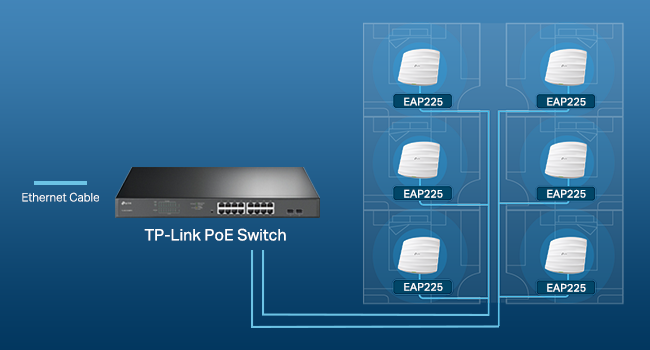
I already had two of these and got this one to replace the Telstra modem Wi-Fi as I replaced the modem with a TP-link router (Er605) but they don’t have Wi-Fi. I connected this unit to a TP-link PoE switch (TL-SG2008P) to provide power to the unit. My other two units are using the PoE injectors that are included. I have my network managed using the Tp-link Omada controller and it was seamless, was able to easy firmware updates and configure SSID’s etc simply. I would recommend the units as they seem extremely stable and give very good coverage.
J**R
Es excelente el AP, facil de configurar, trae POE, tiene muy buen alcance y sigue estable con 30 dispositivos conectados, muy buen producto
B**N
Super efficasse
F**G
Made my own router with PF sense and an AC1350. Very easy to setup and get working (within minutes). My custom built router is much more reliable then any consumer grade wifi router. WARNING: if you want to use the AC1350 in a mesh configuration, you will need or Omada controller from tp-link (about $100) or have a computer/dedicated server that runs the controller. Unlike what other people said this information does not have to shared/configured in the cloud. Having a dedicated server/computer that is on all the time to service the mesh network is not a problem for an enterprise solution, but will be an issue for home use. For "stand alone" no controller/software is needed.
ترست بايلوت
منذ 5 أيام
منذ شهر