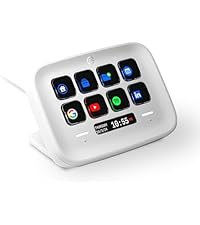
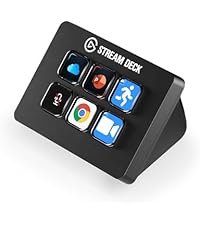
🎥 Elevate your streaming game with the Stream Deck MK.2 — control at your fingertips!
The Elgato Stream Deck MK.2 White is a premium studio controller featuring 15 customizable LCD keys designed for instant app and software control. Compatible with both Mac and PC, it supports popular platforms like OBS, Twitch, YouTube, and more. With one-touch operation, visual feedback, and powerful plugin integrations, it empowers content creators to streamline workflows and deliver professional-grade streams effortlessly.


| ASIN | B09RMXK59C |
| Additional Features | Hintergrundbeleuchtung |
| Antenna Location | Gaming |
| Brand | Elgato |
| Built-In Media | USB Cable |
| Button Quantity | 6 |
| Color | White |
| Compatible Devices | PC |
| Connectivity Technology | Wired |
| Country of Origin | Taiwan |
| Customer Reviews | 4.7 4.7 out of 5 stars (11,933) |
| Enclosure Material | Polycarbonate |
| External Testing Certification | Não Aplicável |
| Hand Orientation | Ambidextrous |
| Item Dimensions L x W x H | 11.8L x 8.4W x 2.5H centimeters |
| Item Weight | 0.15 Kilograms |
| Keyboard Backlighting Color Support | Single Color |
| Keyboard Description | Gaming |
| Keyboard Layout | QWERTY |
| Language | English |
| Manufacturer | Corsair |
| Model Name | 20GBA9901-wt |
| Model Number | 10GBA9911 |
| Number of Keys | 15 |
| Power Source | USB powered |
| Style Name | Stream Deck MK.2 |
| Switch Type | Mechanical |
| Theme | No theme |
| UPC | 840006654209 |
| Unit Count | 1.0 Count |
| Water Resistance Level | Not Water Resistant |
A**N
Nice to have
Nice to have
N**E
Check the product before sending
I like it, but the problem is when I open the box and try to plug into my laptop, one of the 1 LED button is damage.
I**.
Wenn es nur darum geht eine Taste zu drücken, reicht auch die Vorversion. Die Scissor Keys entfalten ihre Vorteile, wenn man live und ständig darauf herum drückt, in meinem Fall eine Lichtsteuerung passend zur Musik bei einer Veranstaltung. Die Haptik erlaubt nun noch schnellere Tastenfolgen zu drücken. Bei der Vorgängerversion passierte es schon mal, dass eine Taste dabei nicht ausgelöst hat, wenn man nicht sauber und mittig herunter gedrückt hat. Nun löst die Taste auch aus, wenn man nur die Ecke der Tste erwischt und herunter drückt. Die Software ist die selbe wie beim Vorgänger und auch Bitfocus Companion erkennt das StreamDeck Scissor Keys problemlos.
め**ん
15ボタンというのがちょうどよく使いやすい デスクトップがスッキリするし、あらゆるショートカットを設定できて非常に快適 質感もよく良い買い物だった
F**L
Recebi dentro do prazo e ainda preciso aprender como utilizar
A**E
I'm genuinely surprised at how many options there are for these buttons, and even more with how many free plugins you can download on their marketplace. I can control way more than I initially thought, as I was going in thinking I'd only use it for my VTuber expressions and soundboard stuff, but now I feel like I could make use of this on my regular day-to-day. The stream deck itself is the perfect size to not get in the way or take up too much space on your desk and at the same time you can still program folders upon folders, and pages of commands and buttons, so you don't necessarily need to buy a bigger stream deck with more buttons. The software is really smooth and easy to use, and works perfectly on Windows 10 even though it says it requires Windows 11 on the download page. All the settings you can choose for the text and icons are straight-forward and feel intuitive, you can even use any of your own PNG images or GIF files for the icons. It's as close to plug and play as possible and everything just... WORKS I highly recommend getting this, even if you're not a streamer cause you'll still find a plethora of ways to utilize it. Whether it's opening URLs from just a button, opening any of your applications, placing any world clock you want, joining a Discord voice channel with a press of a button, muting, deafening, making presets for where your windows open and align, etc. There's so much more to it than just typical streamer usage, but with such, there's a crazy amount of things that'll increase your quality of life and ease while streaming. Everything about this product screams high quality, including a very well-thought-out program. It'll be a massive timesaver for you.
M**.
Das Elgato Stream Deck MK.2 hat sich für mich als äußerst vielseitiges Tool erwiesen, das nicht nur meine Gaming-Erfahrung verbessert, sondern auch meinen Workflow bei verschiedenen Anwendungen und der Steuerung von Multimedia-Inhalten optimiert. Besonders hilfreich war das Stream Deck für Helldivers 2. Ich konnte spezielle Makros erstellen, um Fähigkeiten und Aktionen, die normalerweise eine längere Tastenfolge erfordern, mit nur einem Knopfdruck auszuführen. Das hat das Gameplay deutlich flüssiger und reaktionsschneller gemacht. Anstatt mühsam eine Kombination von Tasten einzugeben, genügt jetzt ein einfacher Klick auf mein Stream Deck, um in brenzligen Situationen blitzschnell reagieren zu können. Neben den Gaming-Makros habe ich das Stream Deck auch genutzt, um schnelle Verknüpfungen für Anwendungen wie Google Chrome, Microsoft Teams, Discord und Spotify zu erstellen. Das ist besonders praktisch, da ich durch einen einzigen Tastendruck sofort die gewünschte Anwendung öffnen und steuern kann, ohne ständig Fenster wechseln zu müssen. Ein weiteres Highlight ist die Möglichkeit, Multimedia-Inhalte direkt über das Stream Deck zu steuern. Ich kann beispielsweise Musik in Spotify abspielen, pausieren, die Lautstärke anpassen oder zum nächsten Song springen, alles ohne das Programm öffnen zu müssen. Das macht es ideal für die Verwaltung meiner Musik während Gaming-Sessions oder wenn ich an Projekten arbeite. Die Verarbeitung des Geräts ist, wie von Elgato gewohnt, sehr hochwertig. Das Display ist scharf und farbenfroh, die Tasten fühlen sich solide an und reagieren präzise. Dank des verstellbaren Standfußes kann ich das Deck optimal auf meinem Schreibtisch positionieren. Es passt sich nahtlos in mein Setup ein und nimmt kaum Platz ein. Die Möglichkeit, neben einfachen Aktionen auch komplexe Multi-Aktionen zu erstellen, ist ein Gamechanger. So lassen sich nicht nur Makros, sondern auch ganze Befehlsketten programmieren, die mit nur einem Tastendruck ausgeführt werden. Dadurch wird das Deck nicht nur für Gamer, sondern auch für Streamer oder Content-Creator zu einem unverzichtbaren Tool. Fazit: Das Elgato Stream Deck MK.2 hat meinen Alltag sowohl im Gaming als auch bei der Nutzung von Anwendungen und der Steuerung von Multimedia enorm erleichtert. Die Möglichkeit, Makros für Spiele wie Helldivers 2 zu erstellen und komplexe Befehle mit einem einzigen Knopfdruck auszuführen, hat mein Spielerlebnis auf ein neues Level gehoben. Hinzu kommt die praktische Steuerung von Musik und anderen Multimedia-Inhalten. Für jeden, der seine Arbeitsabläufe automatisieren oder seine Produktivität steigern will, ist das Stream Deck eine klare Empfehlung
ترست بايلوت
منذ أسبوعين
منذ أسبوع