Buy anything from 5,000+ international stores. One checkout price. No surprise fees. Join 2M+ shoppers on Desertcart.
Desertcart purchases this item on your behalf and handles shipping, customs, and support to Morocco.
🚀 Elevate your presence with the smartest 4K webcam on the block!
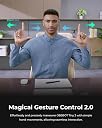
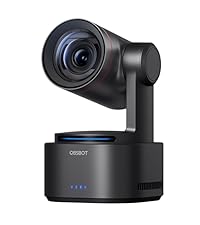
The OBSBOT Tiny 2 is a cutting-edge 4K webcam featuring a large 1/1.5" CMOS sensor for superior image quality, advanced AI tracking with four modes, and groundbreaking voice and gesture controls. It boasts ultra-fast 0.3-second autofocus, HDR light correction, and versatile shooting modes tailored for professional streaming, meetings, and content creation. Compatible with Windows and macOS, it offers USB 3.0 connectivity and customizable SDK support, making it the ultimate tool for millennial professionals seeking to upgrade their digital presence.


| ASIN | B0C3B6ZR1V |
| Autofocus | Yes |
| Best Sellers Rank | #115 in Webcams |
| Brand | OBSBOT |
| Built-In Media | OBSBOT Tiny 2 Webcam*1, 4ft USB-C 3.0 cable*1, to USB-A Adapter*1, USER Manual*1, Portable Storage Case*1, Metal Adjustable Mount*1 |
| Compatible Devices | Laptop, MAC, OSC, Personal Computer, Steam Deck, Global Hotkey |
| Connectivity Technology | USB C |
| Continuous shooting speed | 60 FPS |
| Customer Reviews | 4.5 out of 5 stars 1,052 Reviews |
| Digital Zoom | 4 x |
| Effective Still Resolution | 12 MP |
| Exposure Control Type | Automatic |
| File Format | JPEG |
| Focus Type | Autofocus |
| Has Self-Timer | Yes |
| Item Dimensions D x W x H | 1.85"D x 2.52"W x 1.73"H |
| Item Weight | 143.3 Grams |
| Manufacturer | OBSBOT |
| Maximum Aperture | 1.8 f |
| Maximum Focal Length | 4.74 Millimeters |
| Media Type | NOT Available, Rely on Your PC/Mac |
| Mfr Part Number | TINY 2 |
| Model Name | TINY 2 |
| Model Number | TINY 2 |
| Photo Sensor Resolution | 50 MP |
| Photo Sensor Technology | CMOS |
| Screen Size | 1.5 Inches |
| Sensor Type | CMOS |
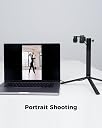
| Shooting Modes | Landscape/ Portrait/ Up-side-down |
| UPC | 786368773083 |
| Unit Count | 1.0 Count |
| Video Capture Format | MP4, MOV |
| Video Capture Resolution | 4K |
| Viewfinder Type | LCD screen |
| Warranty Description | 1 year manufactuer |
| Water Resistance Level | Not Water Resistant |
| Zoom Type | Digital |
A**R
Best overall stream cam for gamers, video calls for work. Great video quality and very small size!
I bought 3-4 different cameras to use for streaming and work meetings. They all had video quality like it was a 10 year old web cam I was shocked. This thing has great quality considering the nimble, tracking, and size. Size isnt a joke it's super tiny! Can work great if using to track around your home instead of some of the low quality security cameras. I wish it had support for linux based platforms for controlling. And the tracking with. multiple people it does get confused at time but for the price its just fine and apparently they are releasing newer one that tracks multiple people. But single person tracking is great and lets you offset your position. It takes some getting used to with how fast it moves but if you keep it further away it is great. The low light quality is surprisingly decent as well. This is coming from a professional photographer who has bought at least 20 cameras in 10 years. I am excited to see them release newer models. Especially when I bought another brand at just barely below this price and this thing blew it out of the water! Oh and the magnetic mount that I didnt realize it had? Love it! Such a simple feature that I wish other manufactures would have done.
C**X
Best webcam on the market. No contest
The OBSBOT Tiny 2 has completely leveled up my Twitch streams. The video quality is razor sharp with vibrant colors and smooth motion — it honestly looks like I upgraded to a pro studio camera. The built-in AI tracking is awesome too; it follows me around naturally when I move without being distracting, which keeps the stream dynamic and engaging. Setup was super easy, and I love how customizable the settings are. Low-light performance is also way better than any webcam I’ve used before, so I don’t need to blast my room with extra lighting just to look decent on stream. For streamers, content creators, or even just video calls, the Tiny 2 is worth every penny. My audience has already commented on how much more professional my streams look. Easily one of the best gear upgrades I’ve made.
D**E
A lil Pricey but worth it!
Can’t have enough of these! Did the job well!!!! Perfect in low light as I am a dj. Quality is amazing.. a little pricy but worth it!! Easy set up, easy adjustable.
I**.
Hands downs the best camera I've ever used
From the very first webcam that I purchased back in the late 90s, I've found all of them to be disappointing to some degree. I've always felt that these cameras should have better quality. Fast forward to the 2020's - I've have tried way too many webcams in the past 5 years, ranging from $50 - $500, to use for Zoom/Teams meetings. Most of them have been mediocre or worse. In the past year, I've focused on mainly on cameras that have Windows Hello capability, which in hindsight was dumb. I thought the Dell WB7022 was an excellent camera. I couldn't have been more wrong. I'd seen some reviews that looked promising for the Tiny 2, so I decided to give it a try. (Even though it doesn't have Win Hello) OMG!!! My jaw hit the floor after seeing the first images on my machine. I am in disbelief over what this camera can do. Not only is the video quality excellent, but the PTZ (& its speed) is unreal. The ability of this camera to track my movements is absolutely amazing! The last time I've been this excited about a piece of computer hardware was around 2000 when I'd gotten a Linksys 802.11b router w/ 768k DSL link & was able to stream video to my laptop. This freakin' camera is beyond amazing! I haven't been able to stop playing around with this thing. In my search to find a great meetings camera, I've tried an AVer 520 pro2 on my home machine. The 520 is no slouch and retailed for more than $1500 a few years ago. IMO, the tiny blows it out of the water! I’m going to mention this (because a lot of folks don’t have common sense) - The PC that you use with this camera should be somewhat modern. Do not expect that this camera to look amazing on a Core 2 Duo processor with 2gb RAM. I believe that the OBSBOT spec page lists using an Intel 6/7th gen CPU & 8gb RAM as the minimum requirement. I don’t recall this being mentioned, but a having a low-grade or better graphics card will probably be helpful as well. My system has an 11th gen Intel i7 and the cam/software utilizes 7 - 10% of CPU when running the camera at 4k/30fps. 1 - 2% of my graphics card resources are also used. (My graphics card, 3080ti, is way overkill for this application.) I’d think 16gb of system RAM or higher would be more than sufficient (Again, my system is overkill at 64gb) Something to note: 60fps is only available in 1080/720. HDR will NOT work in 60fps mode, no matter what the resolution is used. However, HDR works in all 4k/1080/720 resolution settings at 30fps As with anything, you can find flaws if you look hard enough. IMO, the tiny 2 is the best camera I've ever used, period. I'm so happy that I made this purchase.
D**.
Great webcam overall, but low light and mic could be better
The OBSBOT Tiny 2 is a really solid webcam overall. The 4K video quality is sharp, the tracking works well, and the PTZ features are genuinely useful for meetings and streaming. Autofocus is quick too, so it feels a lot more polished than a basic webcam. The main downsides for me are the low light performance and the built-in microphone. The image is still usable in lower lighting, but I expected a little better from a webcam in this price range. The internal mic is also just okay, so I’d still recommend using a separate microphone if audio quality matters. Overall, it’s a very capable webcam with great features, just not perfect in every area.
D**Y
I wanted a new toy and I ended up with a spectacular product!
I love this thing so much I just purchased my second Obsbot Tiny 2. I've been using one for months at this point. So why did I buy the Tiny 2? I like to pace around my office while I think/talk to coworkers, and it provides a way for my colleagues to see me while I walk around. Vain, maybe. Functional, yes! I am unable to install third party software on my work PC so I just use the camera in standard UVC mode (plugged in with USB-C), but the awesome and easy to use gesture recognition lets me a) turn subject tracking on and off and b) move to a preset zoom level and back out. In short, I can turn on subject tracking, have the camera follow me around, lock the camera in place by turning off subject tracking, and zoom in to a preset level (or back out) at any time. I have yet to install the software, but it looks like there are more features than I use. PROS: *The live subject tracking works great and without adding software. The tracking is fast, but not jarringly fast. In my opinion this implementation is perfect for my use. *Turn on live tracking and zoom with gestures or voice commands, also without adding software. One preset level of zoom in/out. *Very small, fits easily on my threaded camera mount. (see pic) *Privacy mode! Just tilt the camera head down, and it turns off. I really appreciate the positive confirmation my camera is off (it is pointed down with light off). CONS: *I wasn't a huge fan of the included unfoldable friction mount for monitors. Basically you get a tiny shelf to put the camera on, but the camera itself doesn't really connect to the mount. It just sits on the included shelf. This allows flexibility, but I was worried I'd knock the webcam off. I would have preferred some threading or a tab to lock the camera down with. *Requires USB to HDMI adapter if you want to use it with a live video switcher. *Price is higher than some webcams, but I think it is a great value overall. CONCLUSION I had never heard of OBSBot, so I did a lot of reading/watching Youtube reviews before buying. After owning and using the product, I can say that it does exactly what I wanted. Highly recommended! EDIT Product is still great, however I am going to try the newly announced Tail Air product instead.
P**N
Overpriced Webcam That’s Far Too BrightToo Bright for Normal Rooms — Not Worth the Price
This webcam is extremely overpriced for what it delivers. The image is far too bright, especially in a well‑lit room, and adjusting it never made it look natural. It was easy to install and worked on my Windows 10 laptop, but the brightness issue makes it hard to use for video calls or streaming.For the price, I expected much better quality. You can get a clearer, more balanced webcam for around $60 or less. This one just isn’t worth the cost.
F**K
Amazing Webcam — Clear, Fast, and Smarter Than Expected!
I’m extremely impressed with the OBSBOT Tiny 2. The video quality is ultra-clear, the autofocus is fast, and the AI tracking works flawlessly even when I move around the room. The voice and gesture controls make it super easy to use during meetings or recordings, and the overall build quality feels premium. I was surprised by how well it performs in different lighting conditions, and it instantly upgraded the quality of my online presentations and livestreams. Setup was quick, and everything worked perfectly right out of the box. Highly recommended for anyone who wants a professional, reliable webcam!
M**O
La miglior webcam in commercio
Senza dubbio la miglior webcam in commercio… Punti di forza: -innanzitutto la risoluzione, un vero e proprio 4k non le solite cinesate dichiarate 4k e poi non lo sono -il tracciamento grazie all’intelligenza artificiale che può essere anche disattivato, tracciamento fluido e preciso degli oggetti in movimento, mantiene il focus sul tuo obiettivo senza perderlo di vista. -Controllo vocale: Utilizza comandi vocali semplici e intuitivi come "Hi, Tiny", "Sleep Tiny", "Track Me", "Unlock Me" - Controllo tramite gesti: si può controllare il livello di zoom della fotocamera tramite la modalità gestuale, davvero una funzione top per chi fa streaming e cose del genere. tramite l’app si hanno altre funzioni come le modalità Beauty, Desk, Whiteboard, Hand e Group. Funzioni che migliorano l'immagine e migliorano i contenuti. -Altre funzioni tipo le modalità di ripresa: Paesaggio, Ritratto, Verso il basso e Sottosopra. Queste modalità sono adatte per videochiamate, streaming live a schermo verticale, condivisione del desktop e insegnamento a distanza, fornendo una prospettiva più ampia e dettagli più chiari per il pubblico. Punti a sfavore al momento non ne ho trovati… Conclusioni: per me al momento è la migliore webcam in commercio, anche se il prezzo puo sembrare elevato a mio avviso è in linea per la qualità e le funzioni che offre. Nel pacco molto comoda anche la custodia da trasporto e la qualità del prodotto sembra essere di ottima fattura. Poi dal punto di vista estetico è davvero bella a mio avviso, con il led di notifica e le rifiniture rosse. Super consigliato e consegna davvero veloce Voto 10+
J**N
Your Go-To for Pro-Quality Video
If your thing is streaming, video conferencing, or recording, OBSBOT is hands-down one of the best options out there — smart, reliable, and built for clean, professional results.
D**Z
Una webcam increíble en todos los aspectos
La Tiny 2 es una webcam que ha superado las expectativas que tenía. Desde el momento del desempaquetado te das cuenta de que es un producto premium y esas sensaciones se mantienen en todo momento, claro que al principio su precio puede parecer algo elevado, pero una vez que la pruebas y ves todas las funciones, así como la calidad que ofrece, la cosa cambia bastante. En principio la calidad de imagen es muy buena, sobre todo al grabar en 4K a 30fps, aunque puedes bajar la resolución y llegar a los 60fps, es a tu preferencia, en mi caso la he utilizado principalmente a 4K y he quedado muy satisfecho, no únicamente con la claridad y nitidez, sino también con el enfoque automático, así como con los micrófonos. Pero todo esto no es lo único que la hace tan buena, y es que incorpora un gimball de dos ejes, así como inteligencia artificial, con la cual podrá seguirte para que siempre estés encuadrado, tiene diversos modos en cuanto a los planos que puedes grabar, y claro que de forma manual puedes ajustar la posición de la Tiny 2, así como el zoom. Tiene distintos ajustes en el modo belleza, diversos filtros y puedes configurar la exposición, el ISO, contraste, entre otras cosas. Pero sí no quieres enrollarte con todo eso, no hace falta, ya que la cámara es plug and play, así que no hace falta descargar drivers y tampoco la app, aunque en lo personal lo recomiendo, pues es muy intuitiva y con ella le puedes sacar más partido. Lo único que podría reprocharle es que el fondo desenfocado no me funcionó en Windows y que al grabar desde el software de OBSBOT en mi MacBook Pro, los vídeos tenían retraso, pero al usar cualquier otra aplicación como Discord, Teams, OBS, etc, nunca tuve problema. Aunque no es una webcam para todo el mundo, por su precio, sí considero que es una excelente opción en caso de que tengas un Home Office, que te requiera estar en videollamadas, también sí eres un creador de contenido o stremear, esta Tiny 2 es más que suficiente en términos de calidad de imagen. Bajo esos escenarios, me parece que realmente vale lo que cuesta, porque comprar una DSLR o Mirrorless que te permita grabar a 4K por este precio, es prácticamente imposible, además de que tendrías que hacer la inversión en otros accesorios, mientras que con esta webcam no tienes que enrollarte mucho, sólo la conectas y listo, además de que puedes transportarla con suma facilidad. En conclusión, es un producto excelente y yo que soy creador de contenido en YouTube he disfrutado mucho del producto, y pienso usarla para diversos proyectos, no la recomendaría a todo el mundo, pero sí quieres una webcam con una calidad de imagen increíble, que literalmente está al nivel de cámaras mucho má caras y piensas sacarle partido, es una gran opción, en lo personal estoy muy contento con la compra.
S**N
It tracks very quietly and smoothly.
This is a smart little device. Be aware that if you, like I, use a lot of hand gestures in your delivery, it might get confused. Easy fix, you just disable gestures in the settings for those situations. The microphones work surprisingly well.
Ö**L
Kesinlikle tavsiye ediyorum
Araştırmadan alın
Trustpilot
2 weeks ago
2 weeks ago