


Desertcart purchases this item on your behalf and handles shipping, customs, and support to Morocco.
🚀 Elevate your external GPU & SSD game with pro-grade PCI-E power!
The NFHK PCI-E 3.0 M.2 M-Key to Oculink SFF-8612/8611 Host Adapter enables high-speed external GPU and SSD connectivity for devices like the GPD Win Max2. Supporting PCI-E 3.0 x4 lanes and compatible with Windows 8.1+ and Linux Kernel 4.3+, it offers versatile, compact expansion options. While praised for performance, users should ensure proper cooling and cable support for optimal stability.
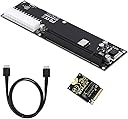


| ASIN | B0BZVW9VWL |
| Best Sellers Rank | #187 in SATA Cables |
| Brand | NFHK |
| Compatible Devices | Laptop |
| Customer Reviews | 3.5 out of 5 stars 58 Reviews |
| Hardware Interface | PCI Express 4.0 |
| Manufacturer | NFHK |
| Mfr Part Number | NF-SF-014+SF-061 |
| Model Number | NF-SF-014+SF-061 |
| Operating System | Windows 8.1, Windows 8.1-64, Windows 10, Windows 10-64, Linux Kernel 4.3 or above |
| Style | M Key+cable+PCI-E 16X |
| Style Name | M Key+cable+PCI-E 16X |
| Unit Count | 1 Count |
A**N
Perfect for Laptop eGPU setup
I highly recommend it if you're working on a budget, worked on first boot with no driver issues compared to other docks I've previously purchased, the laptop I used was a Dell Latitude e5480 and paired it with a Rx 6600xt and purchased a second laptop back cover and cut out a hole so I can easily plug in the oculink with having to remove the cover every time I want to play games.
T**P
*works* but not with GPUs
I bought this with intention of using an external GPU on this YouYeeToo X1 SBC. However, the adapter (24pin ATX side) lacks power to certain areas of the PCIe slot. This resulted in various GPUs tested in the adapter to not be detected (I also used a different motherboard and a different m.2 m key with Oculink to verify the no detect issue) as the issue still persisted. Cons: Don't buy if you plan on using an external GPU, as GPUs won't be detected. (I tried RTX 4000 SFF, 2080Ti, 3090Ti, Radeon Pro WX4100). I noticed the daughter board and it's m.2 card is on the flimsy side. I was worried the weight of a card (if not supported correctly) would crack the board / severe soldier joints. So maybe I had a bad adapter? Nope.. Pros: It DOES WORK with OTHER PCIe based expansion boards (like the Asus Hyper Card V2) I was able to get one Samsung 980 Pro m.2 to be detected on the hyper card using the Oculink adapter.
P**K
Works with my RTX 4080 Founders Edition
This OCuLink adapter works perfectly with my RTX 4080 FE card! Due to how heavy the card is though, it slants and tilts over so you may need to buy a EGPU enclosure from Etsy or 3D print one. I attached a before and after picture with Razer’s thunderbolt3 egpu enclosure vs this OCuLink adapter.
B**O
Nice
Nice
E**H
Inconsistent "4x" PCIe Lanes
One of my friends and I have ordered 3 of the Win Max 2 adapter kits between the two of us. Of those three, two of them (both with Green "power" LEDs) show only 2 lanes of PCIe connectivity - Whether connected to a 3.0 or 4.0 graphics card. This means that it's limited to only half the expected performance. The third, with a red power LED, show 4 lanes of PCIe connectivity. This behavior held up when we mixed and matched cables and 2230 adapters. If the manufacturer/seller wants to contact me for additional information and identification of problem hardware please do so.
A**R
Worked great with my GPD Win 4 2023
This works great. It has a power switch on the board but i discovered that if you leave it in the off position it will automatically power on when the Win 4 turns on and switch off when shut down :-) I now have my RTX 4070 setup in an external oculink enclosure running straight off the Win 4 Pro. Note: You will need to download the nvidia error 43 fixer script if you plan to use a nvidia gpu with this board like i did, just google it ;-). Also, I bought a 90 degree atx 24pin adapter to allow this to work in my enclosure because as standard the 24 pin power cable comes straight out the side and would not fit.
I**U
TBで接続するより高速で安定します
CUDAが必要なときにやむなく外付けで旧型のGeForceを接続するのに使っています。
T**N
Works as intended.
Using it with a Minisforum UM780XTX. Started out with a Palit RTX 4080 Jetstream. Worked like a charm. However. It seems there is a bit of bottlenecking (to be expected since it's just pcie x4 instead of x16). As an example: CyberPunk 2077 in 4K all settings at Ultra. No RT or resolutionscaling I got about 50 fps. In a x16 slot with an i9 it should be able to get up to about 58 fps with the same settings. So quite a significant loss in performance. However! I did the same thing with an Asrock RX7900XTX Taichi. Same settings it should be able to render about 65 fps in an x16 slot. I got about 63,5 fps with this! And with a quick OC I got 68 fps! This is only one example but it seems to be an indication that AMD cards have a lower need for the higher bandwidth of an x16 slot and works better with a solution like this. Further testing is required but all in all a nice and cheap way to build a tiny system. If I could make one wish it would be a couple of more layers in the PCB to make a bit more rigid. It's a bit soft and bendy but just handle with care and it shouldn't be a problem.
D**Y
Non so...
Ok, fa il suo dovere.
A**L
Did not get a cable
I specifically ordered the one with the cable and I did not receive it. Wasted a lot of time waiting for an international delivery and I cannot even use it
Trustpilot
1 week ago
2 weeks ago