

⌨️ Elevate your workspace with the MX Keys S — where precision meets productivity.
The Logitech MX Keys S is a premium wireless keyboard featuring a low-profile, full-size QWERTY UK layout with 104 spherically-dished keys for a fluid and quiet typing experience. It supports multi-device Bluetooth pairing with up to three devices and includes smart backlighting that adapts to your environment. Rechargeable via USB-C, it offers up to 10 days of use with backlighting on, or up to 5 months with it off. Programmable Smart Actions via the Logi Options+ app automate repetitive tasks, enhancing workflow efficiency. Built with durable materials including post-consumer recycled plastics, it is compatible across Windows, macOS, Linux, and Chrome OS, making it a versatile and eco-conscious choice for professionals.
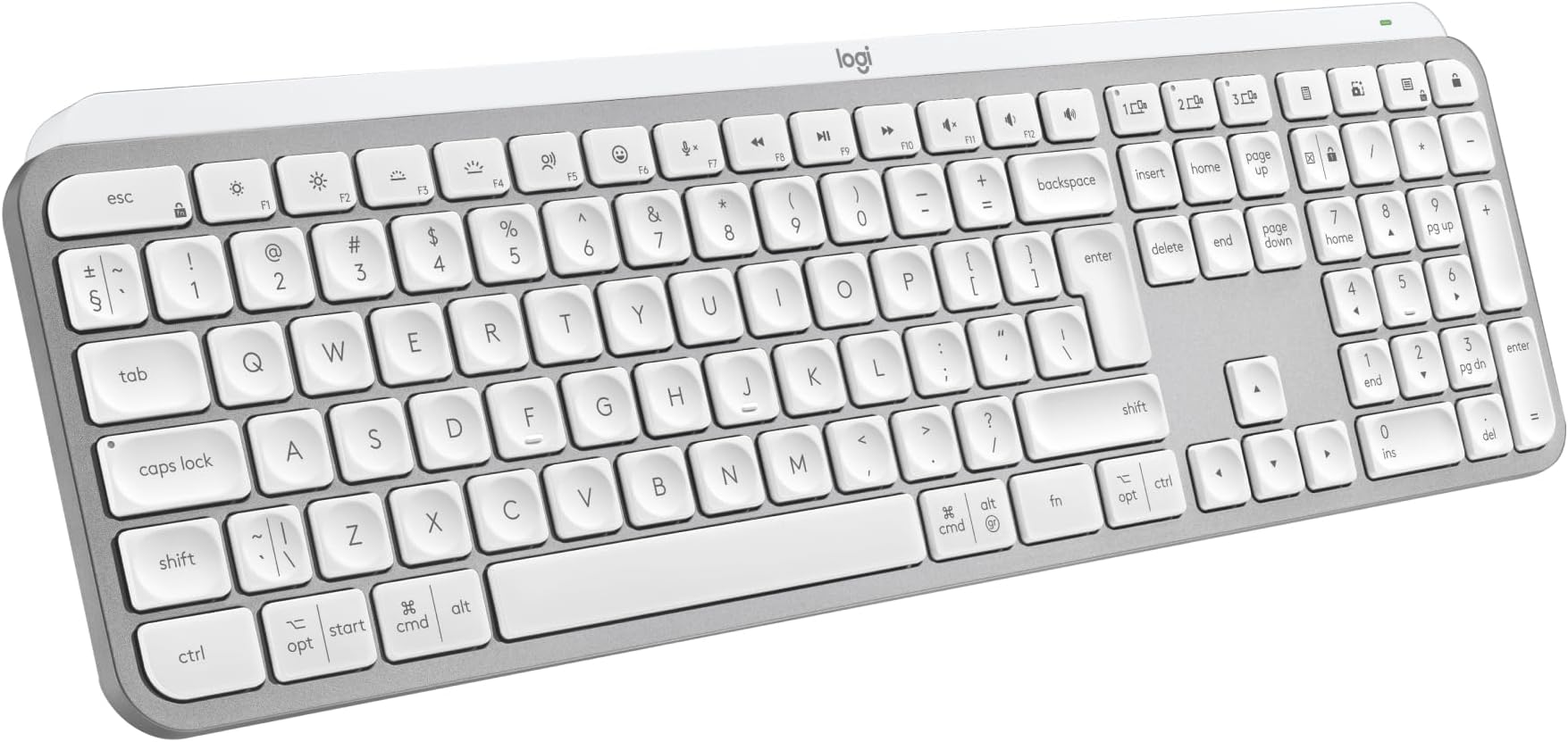



| ASIN | B07W5JK38Y |
| Antenna Location | Personal |
| Best Sellers Rank | 504 in Computers & Accessories ( See Top 100 in Computers & Accessories ) 3 in Keyboards (Computers & Accessories) |
| Box Contents | Keyboard, Logi Bolt USB receiver, USB Cable, User documentation |
| Brand | Logitech |
| Brand Name | Logitech |
| Button Quantity | 104 |
| Colour | Pale Grey |
| Compatible Devices | Chromebook, Mac, PC, Smartphone, iPad |
| Compatible devices | Chromebook, Mac, PC, Smartphone, iPad |
| Connectivity Technology | Bluetooth, Logi Bolt USB |
| Connectivity technology | Bluetooth, Logi Bolt USB |
| Country of Origin | China |
| Customer Reviews | 4.6 out of 5 stars 742 Reviews |
| Enclosure Material | Plastic |
| Generation | 1 |
| Hand Orientation | Right |
| Item Dimensions L x W x H | 43L x 13.2W x 2.1H centimetres |
| Item Type Name | Wireless Keyboard |
| Item Weight | 810 Grams |
| Keyboard Backlighting Color Support | Single Color |
| Keyboard Description | Standalone |
| Keyboard Layout | QWERTY |
| Keyboard description | Standalone |
| Manufacturer | Logitech |
| Mechanical Keyboard Switch Model | Meccanico |
| Model Name | MX Keys S |
| Model Number | 920-011585 |
| Number of Keys | 104 |
| Power Source | Battery Powered |
| Product Features | Backlit, Customizable Display Keys, Hotkeys and Media Keys, Rechargeable |
| Product Warranty | 2 year manufacturer |
| Recommended uses for product | Personal |
| Special feature | Backlit, Customizable Display Keys, Hotkeys and Media Keys , Rechargeable |
| Style Name | Modern |
| Switch Type | Linear |
| Unit Count | 1.0 count |
S**N
expensive but good quality
good build quality, feels very solid. connected to pc quickly and very stable. backlight works well and can be adjusted in strength and time for how long it stays lit. app works well and no problems finding the keyboard. the keyboard can connect to 3 different devices with quick switch buttons. I tested and worked well with pc, mac and android tablet. It feels nice and quiet to type on and there is a little travel of the keys - not quite as usable for gaming as it is for office work. travel is shallow and deeper travel is often more suitable for gaming. its not a cheap keyboard and maybe a little on the premium end of the market.
X**K
Expensive but worth it
Well as a stand alone keyboard for a computer, £83 is exteremely expensive but this is where this keybopard comes into its own. I currently have the main computer that i do a lot of work on and a laptop that i use when the mrs wants to watch tele as i use the big tv screen on the main computer. I also have a work computer that i connect up to a system i have in the house on a three monitor setup. This keyboard has the ability to connect to three computers so as long as they are not all being used at any one time, a simple press of the button switches its connection to the computer you need to connect to. This for me is what drove me to get this as we rarely have more that onr computer on at a time. You can also get a mouse that i have that does the smae thing and used the one USB adaptor to connect to but you can also use bluetooth to connect with. The weight oif this keybopard is unreal, it really does weight a fair bit by far the most of any i have ever had but it comes accross as super sturdy. Functionality of the keys is a dream, super feedback and allows for really fast typing. Worked as soon as i connected the keybpoard but there is an app to go with this called Logi Options and shows all applicable connected devices and displays tjhe current battery strength which i really like. Keyboard comes with the dongle to connect to but if you get he mouse, it does not come with one so something to be mindful off. Also comes with a USB C charging cable that is top quality although it is only a meter in length. Brightness of the keyboard works great and is easy on the eye but it loods superb when lit. Has an auto shut off so when nothing is pressed it will go off but pops right back up once you pick it up.
E**L
A great big keyboard
I purchased the MX Keys s for use with work. I currently have a remote position where I type all day every day and so it makes sense for someone like me to invest in the tools most used. I was likely one of the first people to purchase this as it had only just released a day prior to purchase without knowing of it's release date, so that was a nice surprise. Build Quality - The overall quality of the keyboard is really good having a hefty and sturdy feel. There are more premium feeling keyboard's out there but for how thin it is and it's good choice of plastic construction it has been designed well for it's intended users, putting functionality and typing experience over material and useless features. Battery Life - So far I've never run out of battery from use. I've had it for over a month and it's only been charged once. This is however with strict backlight restrictions as this is not my primary keyboard for my personal computer and I do not work at night so for those using it 24/7 as a main everyday keyboard you'll find your battery may drain quicker with constant use. Price - I'd say the price of the keyboard although steep for many can be justified for users like myself after something that will be used day to day and is comfortable to use for long periods of time. Usability - The keyboard is an absolute joy to type on for day to day work use and it's clear to see who this is aimed toward, i.e. Everyday all day typers, administrators, coders and designers. The full size keyboard has a wide variety of function buttons to make using the system convinient. It has the common lot of play, pause, skip, brightness and so on however the addition of multi device connection, emoji, mute and calulation are welcome additions. The keys themselves have a firm clacky tone with dimples for accurate and comfortable typing. Note that there are two varients of the keyboard, this one with the numpad and additional keys on the far right and the mini which maintains the same layout without these. Some may find the mini more appealing if they have no use for the extra keys and would prefer extra room for their mouse. Best suited for - The keyboard is hands down perfect for those with a keyboard focused workspace and handle numericals often. Although it can be used for gaming and wouldn't actually be that bad you may as well invest this type of money in a proper mechanical board if gaming is your thing as you'll find they'll withstand punishment better and the keytravel is more satisfying/comfortable.
M**N
Fantastic Keyboard
This is a fantastic keyboard. I did question paying nearly £90 for it but it is well worth the price. It has a good weight to it and build quality is great. I am sure it will last a good number of years. I decided to purchase this keyboard so I could set up a workstation at home as well as being able to use it in the work office because I will be hybrid working and I wanted a good keyboard to use at home and at work. It's taken a couple of days to get used to the keys but it's a joy to type on and it's virtually silent, even quieter with the keyboard cover I purchased to help protect the keys from crumbs and dust. Great to be able to program some functions such morning start up for opening all the apps and programs I use for work at the touch of a button but you do have to give up whatever the function key was originally assigned to do in order to do this. I do find a number of the function keys to already have some useful quick access functions already built in, so I am limited with the number of keys I am willing to give up and program. It would have been good if there were some completely user programmable keys not already assigned to a function. The battery is lasting as expected when I have the backlight on so I would expect to have to give it a charge every 2-3 weeks going forward. I do use the backlight on middle brightness most of the time. It's great to have the ability to have it linked to my work PC and my personal Mac at the touch of a button and there is still a spare key to assign to another device such as my iPad or phone. The keyboard is going to get a lot more use as a result of this function so in my view helps justify the high price paid. The only thing I don't like is the lack of riser legs which I would have thought would have been incorporated in a keyboard of this price. I do find the fixed rise of the keyboard to be minimal and could do with it being more of an angle. I have purchased some extra height risers that clip on which should make the keyboard the perfect height. Also purchased is a carrying case to keep the keyboard in pristine condition when putting it in my backpack for work. Overall this is just a fantastic keyboard and you won't be disappointed if you take the plunge and purchase one.
S**5
Lovely to type on. Odd Cmd/CTRL & Vol Key layouts... but would recommend.
For those wanting a cheaper version of the Mac Keyboard, this is not it. In white it certainly looks very similar. It's raised slightly more, which I prefer. The keys feel terrific quality. Time will tell if they keep their texture or go 'shiny' like another Logi keyboard I had in black (this one is white). I had a few problems, but these were more down to my settings. Whereas on a Mac Keyboard there is just a £ above the 3, on here there is a £ and a # in acircle. My Mac Mini was set to British PC. So if you are getting a £ when you do Opt/3, change your Lang to just 'British'. I like that it does have a nice look to it. The metalic look is not shiny, just a sort of shimmer. It's a quiet keyboard on which to type. Can't compare to the Mac one as not had one, but this feels nice. I can touch type at speed and it's not all "clicky". Three things I wish were different. 1) The on/Off Toggle on the back. I wish it was a little easier to use. It's not flush, but almost is, making it a bit tricky to switch. But only a bit... 2) I wish the Volume buttons were independant. The Volume UP us a button all it's own, The Down and Mute are NOT. So you have to press Fn to get it to reduce volume, which if you was not aware at the time, is a worry. I know it can't do it, but 3) is lack of Touch ID, but that's prob down to Trademark etc with Apple. But if you have a Watch, ait unlocks with that anyway, so no big deal. On a MAc, you have from bottom left: Function, Control, Option, Command. On this, you have CTRL, Options, Command. No Function, that's on the right. On the Right on a Mac you have Option, Command, Control. On this it is Cmd, Fn, Option. So if you are getting this keyboard instead of Mac, as it is "the same".... it isn't. Not sure why Logi did it like this, when people would get this, instead of the Apple one. That being said, I still like it. I'm growing use to the positions of those keys. The Volume one is just strange. Either all in Fn or none. Not just one. Can't quite understand how that was signed off. It's like having a car indicator, and to go Right to click it up. To go left, you click it down, but you also need to press something. Anyway... Id recommend it over Apple's as theirs is very costly, as one would expect from Apple.
S**R
Great keyboard
Excellent keyboard. Feels very well made. Battery seems to be lasting a long time. Key travel feels nice underhand and is very responsive. Mac picked it up straight away so setup was a breeze. Be warned there are options for layout. US and UK layouts are both catered for so choosing the right one At setup is crucial. Bit expensive but worth the extra in my opinion. Would recommend.
G**S
Premium keyboard, even works with Linux!
Well packaged with clear instructions, was able to connect to my Steam Deck running SteamOS (Arch Linux) via Bluetooth. At first I thought I couldn't customise the special keys because the Logi+ app is only supported on Windows & macOS, but it turns out my distro has that built into the settings, so I can customise some of the keybinds! Build quality is outstanding, a fair amount of heft to it. Though, it's a lot larger than I had anticipated and it just about fits in my bag (I might need a bigger bag lol). Typing feels amazing! It's quiet and there's a nice amount of travel to the keys.
T**R
Amazing Keyboard….
I've been using the Logitech MX Master Keyboard for a few months now, and it has quickly become an essential tool in my daily workflow. Here’s a detailed review based on my experience: Design and Build The design of the Logitech MX Master Keyboard is both sleek and functional. Its low-profile, minimalist aesthetic fits well on any desk. The build quality is outstanding, with a solid construction that feels durable and premium. The keys have a slight concave shape, which enhances comfort during long typing sessions. Typing Experience The typing experience on the MX Master Keyboard is exceptional. The keys provide a satisfying tactile feedback with just the right amount of travel. This makes typing fast and accurate, significantly reducing fatigue during extended use. The keyboard is also remarkably quiet, which is a bonus in shared or quiet environments. Connectivity One of the standout features of this keyboard is its versatile connectivity options. It can connect via Bluetooth or the included USB receiver, allowing seamless switching between multiple devices. This multi-device functionality is incredibly convenient for those who use different devices throughout the day. Battery Life The battery life is impressive. A full charge lasts several weeks, even with heavy daily use. When it does need recharging, the USB-C port makes it quick and easy to top up the battery. Additional Features The keyboard comes with customizable function keys that enhance productivity. The Logitech Options software allows you to assign specific functions or shortcuts to these keys, tailoring the keyboard to your workflow. The backlighting is also a nice touch, automatically adjusting to the ambient light and ensuring visibility in any lighting condition. Comfort and Ergonomics The MX Master Keyboard is designed with ergonomics in mind. The slight incline and comfortable key spacing reduce strain on the wrists and fingers. It’s suitable for prolonged use without causing discomfort, making it an excellent choice for professionals who spend a lot of time typing. Pros: - Premium build quality and design - Exceptional typing experience - Versatile connectivity options - Long battery life with USB-C charging - Customizable function keys - Ergonomic and comfortable for long use Cons: - Higher price point compared to basic keyboards - Initial setup and customization might be overwhelming for some users Conclusion The Logitech MX Master Keyboard is a top-tier choice for anyone looking for a high-quality, versatile, and comfortable keyboard. Its premium build, excellent typing experience, and advanced features make it a worthwhile investment, especially for professionals and power users. Despite the higher price tag, the value it provides in terms of productivity and comfort is well worth it. I highly recommend it to anyone in need of a reliable and feature-rich keyboard.
ترست بايلوت
منذ 3 أسابيع
منذ شهر