


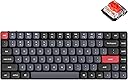
⌨️ Elevate your desk game with the ultra-slim, endlessly customizable K3 Pro!
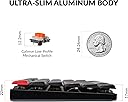
The Keychron K3 Pro is a cutting-edge 75% ultra-slim wireless mechanical keyboard featuring hot-swappable Gateron low-profile red switches, QMK/VIA programmability, and Bluetooth 5.1 connectivity for up to 3 devices. Designed for Mac, Windows, and Linux, it offers up to 100 hours of battery life (backlight off) and durable double-shot PBT keycaps with vibrant RGB lighting, making it the perfect blend of style, function, and customization for professionals on the go.




| ASIN | B0BGR3L2K2 |
| Additional Features | Wireless, Bluetooth, QMK/VIA, Hot-swappable |
| Antenna Location | Gaming |
| Best Sellers Rank | #23,913 in Video Games ( See Top 100 in Video Games ) #126 in Mac Gaming Keyboards #1,247 in PC Gaming Keyboards |
| Brand | Keychron |
| Built-In Media | Keyboard |
| Button Quantity | 84 |
| Color | Hot-swap Low Profile Gateron Red Switch |
| Compatible Devices | Laptop, PC, Smartphone, Tablet |
| Compatible Operating System Family | Windows |
| Connectivity Technology | Bluetooth, USB-C |
| Customer Reviews | 4.4 out of 5 stars 100 Reviews |
| Enclosure Material | Acrylonitrile Butadiene Styrene |
| Hand Orientation | Ambidextrous |
| Item Dimensions L x W x H | 12.05"L x 4.57"W x 0.86"H |
| Keyboard Backlighting Color Support | RGB |
| Keyboard Description | Gaming |
| Keyboard Layout | QWERTY |
| Manufacturer | Keychron |
| Mfr Part Number | cdn2769 |
| Model Name | K3 Pro |
| Model Number | cdn2769 |
| Number of Batteries Required | 1 |
| Number of Keys | 84 |
| Number of Sections | 3 |
| Power Source | Battery Powered, Corded Electric |
| Recommended Uses For Product | Gaming |
| Series Number | 2769 |
| Special Feature | Wireless, Bluetooth, QMK/VIA, Hot-swappable |
| Style Name | Contemporary |
| Switch Type | Linear |
| Theme | customizable wireless mechanical keyboard |
| Unit Count | 1.0 Count |
| Warranty Description | 1 |
G**Z
This is a a great keyboard.
I really like the keyboard, it feels great! I need two keyboards for my work use case. I wanted something smaller to use along with my C3 pro (great value BTW) that still gave me near the same brown key feeling as the standard profile. This keyboard does that and does it very well. Solid tip for most all mechanical keyboards, buy rubber o rings that go under each key. Just search for keyboard o rings. They soften the bottom of the keystroke and do wonders for the loudness and chickity feeling that you can get from mechanical keyboards. It made a huge difference on this keyboard. Some things to note just in case they may bother others. I'm fine with them. The USB is from the back with no routing option. The C3 has the port under the keyboard and you can route the cable from the left, right, or back. This keyboard doesn't, I wish it did. The keycaps aren't for backlighting, they have zero transparency. The back light lights the base of the keyboard under the keys. Kind of odd. I had some low profile keycaps intended for backlighting that I put on. The lights aren't nearly as bright as the C3 due to the structure of the low profile switch(key). There is a dedicated light mode button on the top right of the keyboard. Backlit keychron boards us FN+Q to change light mode, this one does too. This was a waist of a key. Delete would have felt better in the corner. The corner is an easy to find key for a function that you will hardly ever use, which is also redundant. I had another keyboard with nearly the same layout, but didn't have the delete, page up/down, end, and home buttons. I couldn't ever get used to it. It didn't take me long to get used to this layout. For me those things are trivial and this keyboard is a top tier, brown key, low profile, typing experience. (just don't forget the o rings, you'll thank me!)
S**R
Love this keyboard
My concern with mechanical keyboards has always been the taller keys and the large platform and impact on my wrists (regardless of whether or not that is technically the "correct" way to type) - I find myself being able to type more easily on a lower keyboard. Second is the clicks and the impact on my virtual calls as folks hear my typing. This keyboard is awesome - checks all of those boxes. Definitely a lower profile, but you get all of the positives of a mechanical keyboard and the brown switches are really great - they give wonderful typing feedback and help with accuracy as you know when keys are hit audibly. The keycaps have a really nice texture to them that is subtle but noticeable and gives the feeling of a really high quality keyboard in combination with the switches mentioned earlier. I wasn't sure about the 75% layout, but I have not missed the numeric pad at all and really appreciate how much is packed into a 75% layout in terms of buttons I actually use versus buttons that I would never use. The fn keys are the right ones. Only downside is that I have had some trouble connecting to multiple devices and switching the bluetooth connection hotkey. It doesn't seem able to switch back to my PC without resetting the bluetooth connection.
M**A
For starters in the mechanical keyboard world
Okay, so I wasnted to start using a mechanical keyboard so long, the price always was a drawback, since getting a cheap one i was skeptical of it. I saw a loot of reviews and read some forums about in what to start. Getting to use a laptop keyboard for very long got me to get a low profile keyboard since i was used to to the feel of it. This k3 pro is great, keys are feel fine, rgb is good (could be better if they were brighter), you can change the keycaps and switches with another 3 options. Can't tell you how the brown switches feel(the ones I ordered) since I got red switches. they feel fine but I really wanted to try the brown ones, you can buy the switches in bulk and exchange them with some time and effort, but thats the entire point of getting mechanical keyboard. Try, modify, test and enjoy yopur experience. Built quality looks good also, Just got 1 issue with one keycaps that felt loose, and saw the Guides broken. Good thing that it was the Enter button and there is a replacement in another color in the box. only downside of this pro is that it doesnt have a Dongle, later a knew there is a k3 max that comes with it. but is the normal k3 not a pro version. Nothing that important. So I still recommend this keyboard if you want to start using mechanical, it not exactly a true mechanical since its a low profile, but if your coming from a laptop, looking something slim that doesn't take that much space in your desk, try the k3, doesn't have to be the Pro version but that adds a plus to your experience.
V**G
Best low profile portable hot-swappable keyboard with no known alternatives
I recently had the pleasure of using a this low profile hot swappable keyboard and I have to say, I was thoroughly impressed. This keyboard was not only sleek and stylish, but it was also incredibly functional. The low profile design of the keyboard made typing a breeze, as the keys were placed perfectly for a comfortable typing experience. The hot swappable feature also allowed me to easily switch out the keys for a customized experience. This made typing even more enjoyable and efficient, as I was able to tailor the keyboard to my specific needs. Despite its low profile design, the keyboard still managed to provide a satisfying typing experience, with responsive keys that provided just the right amount of feedback. The overall build quality was also excellent, with a solid and sturdy feel that gave me confidence in its durability. Overall, I would highly recommend this low profile hot swappable keyboard to anyone looking for a high-quality and customizable typing experience. Whether you're a gamer, programmer, or just someone who spends a lot of time typing, this keyboard is sure to impress.
Z**S
All of keychron products are amazing
I have two K3P and they are solid, well built units. One for my Apple and one for my PC. They keys are easy to hotswap. The Red triggers are great and quiet, but still have that beautiful mechanical feel. The low profile nature of this model is perfect for how ones wrists lay. The LED configurations are great. USB-C is always a win. I have 3 other unit's from them of different models and they are all rock solid. Cleaning the KB is easy since you can remove the keys as needed.
N**S
Nice keyboard with flaws that make it not 100%
I was searching for a mechanical low profile keyboard that offered rgb lighting, hot swappable switches, pbt keycaps ( these sadly do Not shine through ) and QMK/VIA compatibility and aluminum construction that was also wired and wireless. A big ask for sure but when this became available it checked almost all the boxes and I ignored the keycaps lack of shine through. Upon first connection my Mac said it couldn’t identify the keyboard and I had to register the keys on the left and right sides of the shift keys. Not a problem but it is a repeatable problem every time I connect the keyboard to the Mac. No other keyboard I have does this, only this one. Secondly the QMK / VIA support is a bit lacking. When trying to add a delay to a macro I found that the delay command doesn’t work at all. Digging further it’s been released in a firmware update that of course this particular keyboard doesn’t have available for it. The developers of QMK/VIA are playing the blame game and pointing to Keychron for the update while Keychron is saying they’re waiting for acceptance from QMK/VIA. So knowing this it’s a keyboard that has some features to modify and program but it’s not 100% as advertised and support is very lacking. Trying to contact Keychron you don’t get a response from email but if you opt to go through social media you can get a faster response, though I have yet to hear about these issues. The lack of support is a dealbreaker when combined with the inability to add full macro support to the keyboard. Only the Q and V series are listed as supported in caniusevia dot com, rhis Keychron K3 pro isn’t listed. Build quality of the board is excellent, very sturdy and well made. The thin keycaps do however make picking the board up and moving it an awkward process. The keys have no protection on the sides so you can sometimes pop them off if you hold the board from the sides too tight. This could have been fixed with a few mm of aluminum around the whole board. I’d recommend to look for a board with full support for QMK / VIA as this one sadly is missing key features making it no better than another low priced clone keyboard with limited functionality.
A**R
Great for people with smaller hands
I have tried a bunch of mechanical keyboards and always had trouble reaching the F keys and the numbers past 6 until I found this keyboard. It's small and compact so my tiny hands are able to comfortably reach buttons that I couldn't with any normal size keyboard. the quality is top notched and it's a plug and play so you don't have to download your 20th program to run something simple. The lights can easily be changed and matches with my logitech mouse. This is my favorite keyboard of All time that I bought another when I spilt soda on my last one. Surprisingly, my last one survived the soda spill but became too sticky from the sugar. so another star for surviving a spill!
J**E
Ketchron K3 pro
1. I purchased the brown switch but ended up changing them with Gateron Banana switch. 2. The original keycaps are good, but too me, they were slippery, making me change them with Chosfox white keycaps. 3. I added one layer of a sponge (that was included in the keyboard box )at the bottom of the PCB to dampen the sound. After I made some adjustment, this keyboard is very statisfying. 4. The rgb backight was not as bright as I expected, but with the white keycaps, the lightslook beautiful. If you are complaint about the keylight, then I suggest you buying a light-color keycap.
Trustpilot
3 days ago
1 month ago