Buy anything from 5,000+ international stores. One checkout price. No surprise fees. Join 2M+ shoppers on Desertcart.
Desertcart purchases this item on your behalf and handles shipping, customs, and support to Morocco.
🖱️ Elevate your workflow with precision and comfort — because your wrist deserves the best!
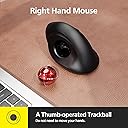
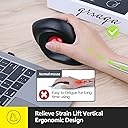
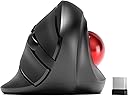
The MicroPack Trackball Wireless Mouse combines a vertical ergonomic design with a smooth trackball for precise cursor control. Featuring 3 adjustable DPI settings (600-2400), a reliable 2.4G wireless connection with up to 10 meters range, and silent clicking, it’s built for professionals seeking comfort and accuracy. Compatible with PC, Mac, and Linux, it runs on a single AA battery (not included) and offers easy maintenance with a removable trackball.


| ASIN | B0BRX75KQ1 |
| Additional Features | Ergonomic Design, Soundless, Wireless |
| Antenna Location | Office |
| Are Batteries Included | No |
| Are Batteries Required | Yes |
| Battery Average Life | 6 months |
| Best Sellers Rank | #417 in Computer Mice |
| Brand | MICROPACK Digitally Yours |
| Built-In Media | Mouse, USB receiver, possibly a battery |
| Button Quantity | 3 |
| Color | Black With Trackball |
| Compatible Devices | Laptop, Personal Computer |
| Connectivity Technology | 2.4G Wireless |
| Customer Reviews | 3.8 out of 5 stars 563 Reviews |
| Enclosure Material | Plastic |
| Finish | Glossy |
| Hand Orientation | Right |
| Hardware Platform | Linux, Mac, PC |
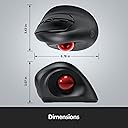
| Item Dimensions L x W | 4.78"L x 3.07"W |
| Item Weight | 0.18 Kilograms |
| Manufacturer | MicroPack |
| Model Name | V02 |
| Model Number | V02 |
| Mouse Maximum Sensitivity | 1600 Dots per Inch |
| Movement Detection | Trackball |
| Movement Detection Technology | Trackball |
| Number of Batteries | 1 AA batteries required. |
| Number of Buttons | 3 |
| Operating System | Chrome OS, DOS, Linux, Mac OS 9, Windows 11 |
| Power Source | Battery Powered |
| Range | 33 Feet |
| Special Feature | Ergonomic Design, Soundless, Wireless |
| Style Name | Modern |
| Theme | Ergonomic Wireless Trackball Mouse |
| Warranty Description | 1 year manufacturer |
W**N
Would be perfect if I could run 2 or 3 devices on it.
BUT the ball moves if it's not level. I don't yet have a level surface for my input devices, but since I like this one I'll make it happen. If you let it tilt to the left a little bit the cursor will move when you take your thumb off the ball because the ball will move slightly. This can lead to mis-clicks. All of you using a proper desk or table should never have this issue. I compute from my couch with a big rounded armrest--and is why I had to quit using mice. I did have trouble getting it up to speed on one system to I swapped it to the other one where it works fine. If it weren't for this I'd buy a second one for the other system, but a new release of Mint should fix that, and it's up. I just haven't done the upgrade.
F**U
Ergonomic Wireless Mouse👍
This wireless mouse is ergonomically designed, making it comfortable to hold and preventing wrist strain from prolonged computer use. 👌
C**R
Pick another mouse to hate
Ah, the ergonomic mouse that promised comfort but delivered nothing but frustration. If only I could give it negative stars, I would. This piece of "technology" is a masterclass in disappointment. At first glance, it looks like it could be the ergonomic mouse of your dreams. It fits your hand perfectly, and the sleek design gives the impression that it means business. But don't be fooled by appearances, for this mouse is a wolf in sheep's clothing and I'm definitely not on Team Jacob. The first sign that something is terribly amiss is its complete inability to respond. It's as if it takes pleasure in ignoring your every command. You move the cursor, and it just stares back at you, mocking your futile attempts to get work done. Oh, but don't worry, it's not entirely heartless. It occasionally decides to grace you with a response, but only after a series of desperate beatings on your desk that make you question your sanity and the state of your mouse. Yes, you read that correctly – this ergonomic marvel requires physical abuse to function properly. It's like it's in a toxic relationship with your desk and needs a good thrashing to rekindle its love for work. If I could return it after giving it a few rounds of office-spacing with a baseball bat, I'd send it off in a fiery blaze of glory just to make a point to all the other inferior mice out there. It's a sadistic game of cat and mouse, where you're the mouse and the mouse is the cat, reveling in your suffering. You find yourself questioning every life decision that led you to this point. Why did you think an ergonomic mouse would bring you comfort when it only brings frustration? Why did you trust the sleek exterior when the inner workings are a hot mess of dysfunctionality? In conclusion, this ergonomic mouse is the ultimate betrayal of form over function. It's a tantalizing illusion that lures you in with promises of comfort and style, only to slap you in the face with its incompetence. If you have any self-respect, avoid this mouse like the plague and save yourself from the endless cycle of desk beatings and frustration.
D**C
Effective, But Definitely Looks/Feels Its Price
In the hunt to replace my beloved Logitech M570 (died due to a corroded battery frying the internal components) I ended up trying out 4 different other trackball mice. I'm 6'5" with large palms and long fingers so I needed one that could support (most of) my hand with minimal wrist and knuckle fatigue or finger crowding. I've rated them by personal preference below: 1. Nulea M501 ($33.99). Clever clone of the Logitech M570 even down to the defined separate grooves/shelves for ring finger and pinky, which helped separate my fingers for less crowding. Professional packaging and instructions. Added bonus of USB dongle + 2 Bluetooth channels and charging via USB-C port (vs. AA battery). Nulea's website also offers a fast and convenient customer service messenger chat, which I used when I initially had a problem connecting via Bluetooth (FIXED). Can't recommend enough. I also picked up the black/red Anleo Hard Travel Case ($9.59) to match so I can throw it in my backpack and not worry about it. This is the one I ended up keeping. 2. ProtoArc EM01 NL ($47.99) a mashup in looks and features of a Logitech M575S and MX ERGO ($99.99) but at a less insane price. Classy black professional box packaging. The mouse really feels like a quality product and has great features and design. I really liked the 2 angles you can adjust the mouse to suit your wrist. Perhaps the thing it was missing for me was that my ring and pinky fingers were too crowded and shared the same space. I also decided I wasn't a fan of the mushier quiet buttons and preferred a tactile/audible click. 3. MicroPack Trackball Vertical Mouse ($29.99). You get what you pay for here. Minimal features and feels noticeably cheaper; same with the basic packaging. The more extreme "natural handshake" vertical angle was a little too much for me and at the time I preferred the ProtoArc EM01 NL more, although to be honest I felt MicroPack's trackball actually ran slightly smoother on the screen. 4. Logitech Ergo M575S ($49.99). Purchased from local office store before returning it because it felt smaller and ironically less ERGOnomically comfortable than my original M570, and for $49.99 it still ran off a AA battery. I also decided I wasn't a fan of the mushier quiet buttons and preferred a tactile/audible click.
J**I
decent for the price
1. I have not seen any slop in the track ball fitment as other reviewers have mentioned. 2. yes you will need to go into mouse setting in windows and reduce the speed of the mouse or it is really jerkey -- negative well at least for my hand... I find that the lip on the bottom of this is slightly annoying as it forces my pinky to stick out i am working around this by sliding my hand up and clicking with my middle finger as left and the finger next to my pinky as a right click and i slide my middle over to scroll. i do not find this to bothersome as 20 or so years of remote desktop support has trained my brain to adjust to a random left handed mouse. this ergonomic "annoyance" is my main reason for dropping 1 star from the review. i am not positive if there is any control software for this mouse as i am using it with my work laptop. if this did not have the lop or had about 2-3 cm more in height above the lip i would have happily given a 5 star rating.
R**C
Trackball Performs Well with Comfortable Ergonomic Design
I read many reviews and decided to give the trackball mouse a try despite the negative feedback and frequent return notice on this item. I’m glad I did try it because the trackball and mouse perform great! Once install was complete, the first thing I did was adjust the setting for the cursor speed for trackball. There’s no lag or going all over the screen. Also found out during use that the button in the center of left / right click buttons will control the cursor speed, click 4 times to cycle through different speeds. I use this mouse with the trackball for 8 hours a day. Very happy with the performance! I don’t generally review products. That’s how pleased I am with this one.
D**E
Convenient
Much better when you have kids and animals around because you don’t have a wire for them to get caught up in!
K**R
Nice trackball... when you can get it to track
I bought this hoping to get a more vertical wrist position than my Logitec MX Ergo trackball. It delivers on that promise but that's it. The DPI switch is located so I seem to be constantly hitting it. When I (try to) use the trackball it may or may not work, its tracking speed is erractic (to put it mildly) and I constantly have to play with the DPI button and the on/off switch to get it to function. I constantly have to use my Ergo trackball to locate my cursor. Beause of this I find this trackball to be essentially unusable, which is a same. I love the more vertical position it offers compared to the MX Ergo, but I hate everything else about it. It may be the perfect trackball for some people but not for me.
ترست بايلوت
منذ 3 أسابيع
منذ يوم واحد