We remain fully operational. Our teams are working around the clock to ensure your deliveries continue safely.

قم بتنزيل التطبيق


معلومات عنا
حقوق الطبع والنشر © 2024 Desertcart Holdings Limited
قم بتنزيل التطبيق


🎮 Elevate your game and workflow with the ultimate one-handed macro powerhouse!
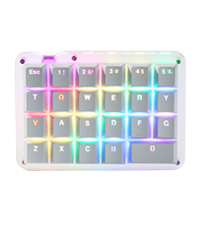
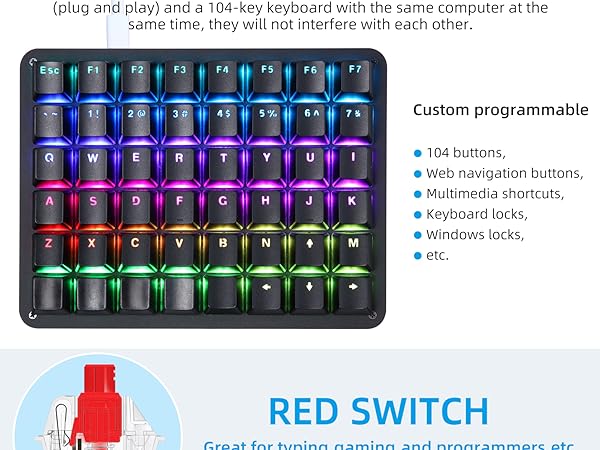
The Koolertron 24 Keys Programmable Keyboard is a compact, one-handed mechanical keypad featuring 24 fully programmable red switch keys, a multifunctional knob, and vibrant RGB backlighting. Designed for gamers, programmers, and creative professionals, it supports complex macros, multiple profiles, and mouse control, all packed into a portable USB-C device that maximizes desk space and productivity.






| ASIN | B0BNKHKTMH |
| Additional Features | Backlit, Ergonomic, Programmable Keys |
| Antenna Location | Gaming |
| Best Sellers Rank | #30,039 in Video Games ( See Top 100 in Video Games ) #162 in Mac Gaming Keyboards #2,229 in Computer Keyboards |
| Brand | Koolertron |
| Built-In Media | USB Cable |
| Button Quantity | 24 |
| Color | Black/RGB Backlight/Red switches |
| Compatible Devices | PC |
| Connectivity Technology | USB-C |
| Customer Reviews | 3.7 out of 5 stars 104 Reviews |
| Enclosure Material | Plexiglass |
| Hand Orientation | Ambidextrous |
| Item Dimensions L x W x H | 5.75"L x 3.5"W x 1.3"H |
| Keyboard Backlighting Color Support | RGB |
| Keyboard Description | Gaming |
| Keyboard Layout | QWERTY |
| Manufacturer | Koolertron |
| Number of Keys | 1 |
| Number of Sections | 1 |
| Power Source | Corded Electric |
| Recommended Uses For Product | Gaming |
| Special Feature | Backlit, Ergonomic, Programmable Keys |
| Style Name | 24 Keys/Red switches/RGB Backlight |
| Switch Type | Mechanical |
| Theme | Gaming |
| Unit Count | 1.0 Count |
| Warranty Description | NO |
| Water Resistance Level | Not Water Resistant |
A**B
Sturdy build, excellent customer service!!
This is a stellar keypad! Honestly when I ordered it I was expecting it to come in a cheap, haphazard box with no extras. And minimum thought in product design. I was so wrong! It feels premium, especially premium for what you pay for. They throw in two sets of extra keycaps (one set of black typewriter caps, one set of standard white cherry profile caps). The keypad itself is a nice weight. Solid build. Doesn't leave fingerprints or anything. The keys switches are satisfying. I have keyboard with official Cherry MX blues, and the unbranded switches feel and sound just the same! Customer service is outstanding. If you have any issue, like needed extra parts or help with configuring the keypad, they are more than happy to help. Prompt, friendly, and helpful. They reached out to me to make sure there was nothing more they could do to ensure, in their words, I had "no worries" about their product. Info for keyboard hobbyists: this product is comparable to a Nyquist or Levinson -- keyboards I have seen people spend upwards of $200 on parts and assembly. This is basically a prebuild Levinson with outstanding customer service. If you're on the fence with purchasing this, just buy it, it's solid quality and very user friendly. Full disclosure: I returned this keypad literally only because I learned to assemble, solder, program my own keyboard, so I have no need for a prebuild.
A**E
Expensive Paperweight
Did not get around to trying it out before the return window closed. Computer does not recognize the keyboard. Software does not work or synch with the keyboard. The instruction manual and YouTube video are unintelligible. This is an expensive paperweight.
D**R
Top notch product.
Easy to set up and customize. Just what I needed.
D**E
Very practical, and easy to get used to.
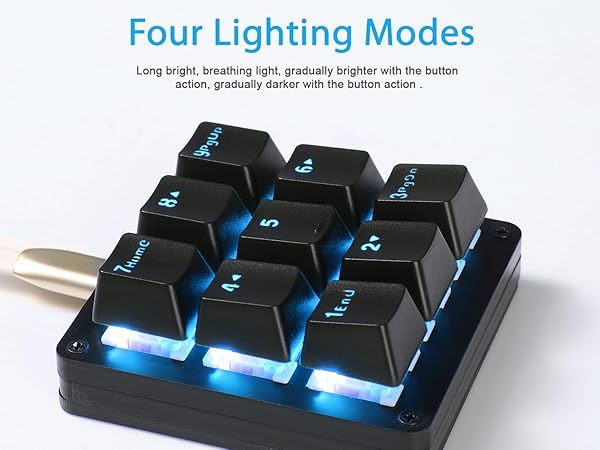
I had Razer Black Widow keyboard that had a set of macro keys on the left side. The keyboard experienced sudden death and I replaced it with vanilla Dell until I get something decent. Then I discovered how much muscle memory I had for using those macro keys on Razer. So Koolerton to the rescue. I'm overall pleased with this macro keypad. The software is a bit complicated. I also don't understand why they couldn't have a design where you can control the RGB color for each key separately. In it's current design 5 keys have individual RGB color setting (starting from top left: 1, 4, 5, 6 and 9). Keys 2 and 7 will have same color, just like 3 and 8. I like the fact that once you program the keypad it will work anywhere so i got a second macro pad for my Linux station. All in all, very nice device. The software has room for improvement though.
J**.
Awesome Keyboard
I recently got interested in getting a side macro keyboard and actually did get a small, cheap one from elsewhere, but quickly figured out I needed something better and more reliable. After quite extensive research, I decided to go with this keyboard and I'm happy I did. It's nice size, has good weight to it; sits on the desk firmly. With 24 keys there is a lot of options, and it has 4 layers overall, so wow. Personally, I set it up with one layer only, at least for now; combining most used general shortcuts with PS shortcuts that I use the most, but it's nice to know there is more layers to use if I ever need to expand. My only wish is that it had more macros - it has 15, which is not bad, but I personally could use a few more. Not a big deal though. A lot of RGB modes, you can configure everything - from mode, through brightness, hue, saturation - all of it. Overall, very useful tool and a beautiful tech piece that sits on your desk.
R**A
Decent hardware... with an embarrassingly poor programming software for a PROGRAMMABLE keypad!
Background: I recently purchased a HyperX Alloy Origin Core keyboard (with thier Aqua Switch, akin to Cherry MX Brown) to facilitate my newfound job of light Excel VBA programming and heavy-duty report writing => typing for hours straight. Between the HyperX keyboard's just-right responses and highly customizable keys, I'm a happy camper... Still, each report requires some 50-60 charts being copied off web pages and pasted into a MS Word doc, so I thought that a programmable keypad may ease/speed up the process with minimal eyestrains. ---------------------------------------- This keypad seems solidly built, even though what looked like metal parts in pics are actually thermoset plastics with rough and uneven grooves, suggesting poor machining... unimpressive but not a dealbreaker. But then it all went downhill with the customization software -- the impression went from a 4-star to 1 in no time! 1) The software has 7 color settings for a 9-key pad!!! Who the heck came up with that! So, you are forced to use the same color for some preassigned pairs even if they have unrelated functions. OK, you accept that... but then, it's hard to tell which key has which color! Red, orange, bright pink and purple may look quite different on a monitor, but on the keypad with many LEDs reflecting off each other's colors, it's tough to figure out which key has been assigned a particular color. In sum, a seriously dumb design! (Koolertron can learn so much from Logitech & HyperX.) 2) The software doesn't even allow for a 2-key combo entry! Assigning Ctrl-C to a key on a HyperX? Just press the 2 keys at once. On this thing, you have to click on 'LCtrl' or 'RCtrl' on the screen, click on 'Split' and then get a 'C' in between the now split 'LCtrl [down]' and 'LCtrol [up]'! WTF!!! I have been programming on and off since the early 1980's and I have never seen such poor design! IT'S LIKE DRIVING A CAR DESIGNED BY PEOPLE WHO CAN'T DRIVE!!! What a shame! This product has such potential from a hardware perspective, but then it's severely hindered by poor software design. Can't even assign something rudimentary like 'Ctrl-C' to a key quickly? Really? That's a sign of either inexperienced programmers or meddling middle management (a likely scenario.) Please, please think of product design from a user's point of view!!!!! --------------------------------------------------------------------------------- Update: Bumped rating from 1 to 2. Still think the customization software is way too quirky, but at least useful enough once you get used to it. Also, the Cherry MX Red switches are nicely employed. For anyone looking to program the key colors under 'Options' , here's the mapping -- counting from the left, the 1st color block is for keys 2 & 9, 2nd for 1 & 8, 3rd for 7, 4th for 4, 5th for 5, 6th for 6 and 7th for 3. Hope that this helps some users save some time.
M**O
Decepcionado
Muchas teclas, perfiles, pero si lo que quieres es programar macros por tecla, es una desgracia porque tiene una memoria muy limitada. Yo he utilizado AutoHotKey para habilitar teclas desde F13 - F24 y así usarlas directamente. Y batch de dos letras para lanzarlos desde macros. Va bien, si, es bonito, pero muy mediocre en programación y recursos, te tienes que buscar la vida para sacarle el jugo técnicamente. Tiene potencial, pero el software es malo.
P**B
Works well
Good product. Keycaps kind of suck but that's an easy fix
ترست بايلوت
منذ أسبوعين
منذ شهر