
قم بتنزيل التطبيق


معلومات عنا
حقوق الطبع والنشر © 2024 Desertcart Holdings Limited
قم بتنزيل التطبيق
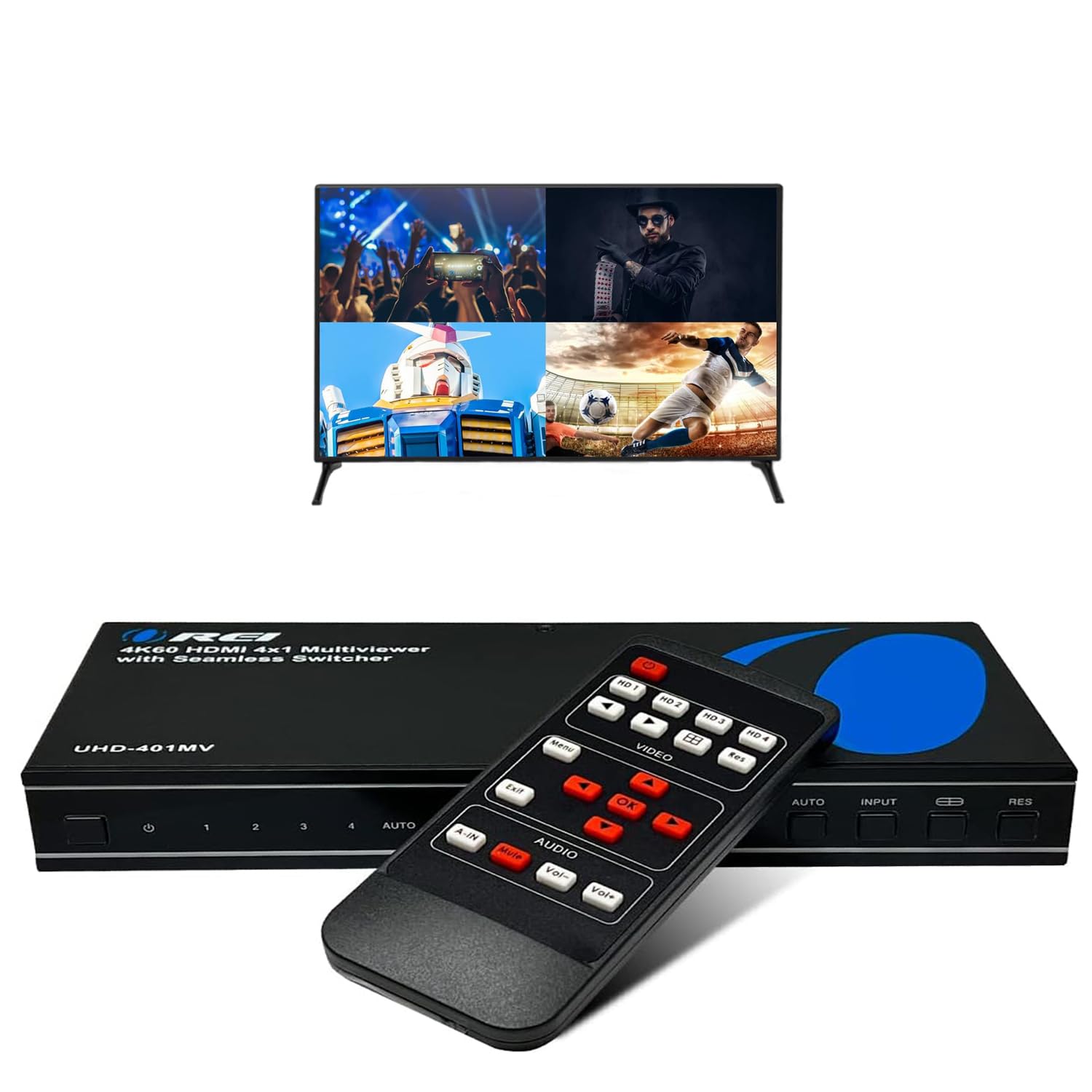
🎯 Master your multi-source setup with OREI’s 4K HDMI switcher — because your screen deserves the spotlight.
The OREI 4K UHD-401MV is a professional-grade 4-in-1 HDMI switch and multi-viewer that supports up to four HDMI inputs with seamless real-time switching at 4K@60Hz. Compatible with a wide range of devices including gaming consoles, PCs, and security cameras, it features five display modes and advanced audio passthrough supporting DTS and Dolby formats. Controlled via an intuitive infrared remote, it consolidates multiple video and audio sources into a single ultra-high-definition output, perfect for decluttering workspaces and enhancing productivity.


| ASIN | B0BQ1XK82T |
| Best Sellers Rank | 59,893 in Electronics & Photo ( See Top 100 in Electronics & Photo ) 220 in Switches |
| Guaranteed software updates until | unknown |
| Item model number | HDS-401MV |
| Manufacturer | OREI |
| Product Dimensions | 22.23 x 10.16 x 2.92 cm; 907.18 g |
M**Y
Great picture quality. User interface could be improved.
Great picture quality. I don't find the user interface for switching between Multiview modes as intuitive as my other older unit.
J**S
I have four older computers that I need to keep running at all times, each with its own separate monitor, keyboard and mouse. This is quite messy and takes up a lot of space. My wife surprised me with a G9 widescreen monitor for Christmas. This freed up my original 42" 4K monitor. Instead of shelving it, why not employ it to display all four older computers at the same time since 4K resolution is exactly four times the dimensions of standard HD resolution (1920x1080). Unfortunately, my 4K monitor only has PiP for two inputs, but I needed four. Not wanting to let a perfectly good, high quality 4K monitor go to waste, I looked around everywhere for a 4-port PiP matrix switch. The OREI 4K Multi HDMI Viewer Quad 4 in 1 Out Switcher was the perfect solution, and well under the cost of some "professional" models. Setup was super easy. I connected all four monitor HDMI cables (of various quality levels) to the switcher, and connected the switcher to the 4K monitor via one high quality HDMI cable. Note, as I found out later, cable quality matters, so try to use four input cables of decent quality and of the same brand/model. Using different cables will display different quality outputs. Use the best HDMI cable you have for output. From the front panel, I toggled through options until quad-mode activated. Suddenly, all four computers showed up on the screen, each on in their individual corner, all in 1920x1080 (60Hz) resolution, and including sound from each computer. With all four computer connected to one monitor via the switch, I wondered if it could also act as a KVM so I could control each computer with just one set of keyboard/mouse. Unfortunately, this switcher does not act as a KVM - it only combines multiple video/sound inputs into one output. Instead of buying a separate KVM, I set up special (free to use) software on all four computers. The newest computer was designated as "master", and the other three computer set to be clients. This allowed the use of just one set of keyboard/mouse on one computer to control all the others. It was cinch to set up, and works perfectly! Saved a few hundred bucks not having to purchase a KVM. My desk looks so much cleaner now, with reduced cabling and just one set of monitor/keyboard/mouse where there used to be four sets. Quality is exactly as expected. I am very pleased with this purchase. I gave this product 5 stars, and it is well deserved. Everything works exactly as advertised. Some random observations: +Get the best cables possible. There is visible difference when using lesser quality cables. This product does not reduce video quality, but using cheaper cables will definitely degrade output. If in doubt, use four cables from the same manufacturer for the video inputs. Use the highest quality HDMI cable you have for the video output (rated at 4K 60Hz minimum). +Do not lose the remote control or manual! Using chassis buttons is clumsy. Using the remote brings up a nice menu with many features, all well organized on the screen. +Some screen modes stretch or compress the picture in order to fit the selected picture box. I tried changing the computer's output settings, but none of my computers had dedicated graphics cards and could not scale to the matching dimensions. This made some modes visually unusable due to stretching and/or squeezing. +As noted above, this device will scale video inputs to match the selected output dimensions. It also seems to alter the output when refresh rates don't match. If you don't want to lose quality, make sure all computer outputs match exactly with your desired display options, including refresh rate. +This device carries audio from your computers. You can hear any one of the inputs, or a mix of all inputs. My monitor has acceptable built-in speakers, and played sound from the computers right away, without having to add external speakers or setting up anything special. Less clutter! +The only complaint I have is that my monitor does not turn off when the computers go to sleep. You can see it's still on (backlight bleeds a little), stays on all night, and never turn off. For some strange reason, the monitor's own internal sleep timer does not engage, almost like it's still receiving a signal. I have to manually turn off the matrix switch (via remote control as there is no power button) in order for my monitor to turn off.
R**D
اولا يشتغل على الجودة 1080 فقط تقسيم الشاشات الى ٢ او ١ كبير و٣ صغير سيء لان الشاشة تكون مربعة والاصل في الشاشة المستطيل يستخدم للكامرات الخارجية ٤ كامرات افضل للرقابة ٤ شاشات صراحة مانصحكم تاخذونه للتلفزيون للكامرات اوكي ممكن
T**Z
Pues funciona pero el control remoto es un poco complicado
G**K
Very good product
I**N
After doing a lot of research on multiviewers I settled for the orei 4K UHD-401MV. I'm using it on a 4K 100" Hisense TV for co-op gaming. The device itself is very sturdy and the firmware provides enough options to get the best sharpness. There are some things that you need to know about resolutions and TV upscaling before you can get native sharpness. I have 2 inputs, both a PC. When using the picture by picture or quad view I have found that the best sharpness of the displays van de achieved by setting the input signals to 1080p60hz. And the output signal to 4K60hz. This way the multiviewer will display a dot-to-dot perfect image of 2 side by side 1080p pixels that fit perfectly on a 4K display. I have not noticed any delays while using this device with TV in game mode. Although pricy this device does a perfect job and is definitely worth its pricetag. I highly recommend this multiviewer.
ترست بايلوت
منذ يوم واحد
منذ أسبوع