📦 Scan Smart, Live Green! Your documents deserve the best.
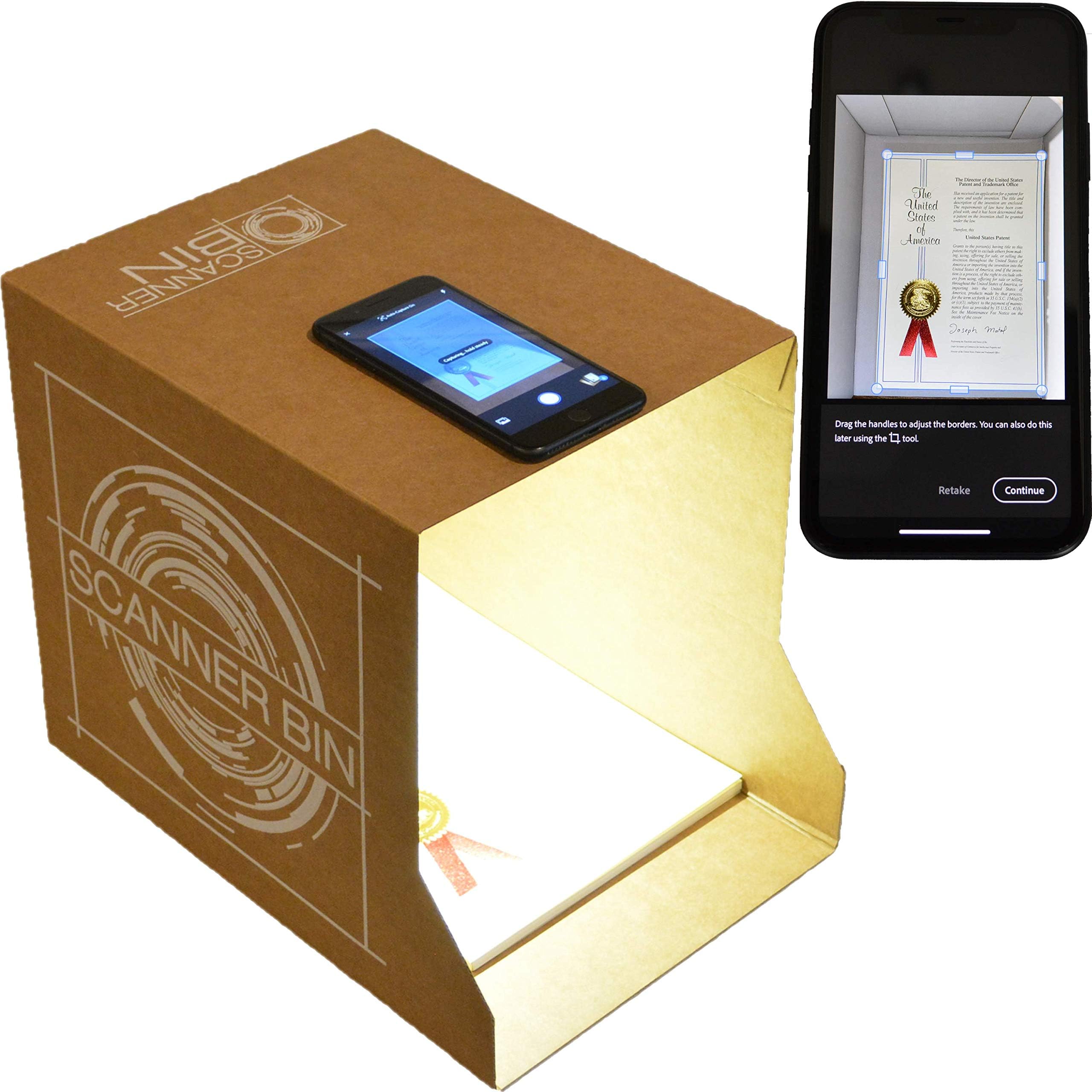
The Scanner Bin is a cutting-edge document scanning solution that outperforms traditional flatbed scanners. With a resolution of 1200 DPI, it offers superior color rendering and edge detection, making it ideal for scanning a variety of documents. Its eco-friendly design reduces e-waste, while its dual-purpose functionality allows it to serve as a desk-side bin when not in use. Compatible with popular free scanning apps, it is user-friendly and accessible for individuals with visual impairments or movement disorders.
B**H
Great for the Visually Impaired
I bought this product as a lightweight, inexpensive scanning tool for my grandma who has very limited sight. She has struggled in the past with bulkier plastic scanning tools that were more expensive and less effective than the Scanner Bin. I set the bin up for her and she was immediately able to scan documents for her apps to read back to her. Since she is easily able to scan documents without fiddling with the bin for too long and is able to store away for when guests come over, the Scanner Bin is a great product that has all the capability of a more dedicated scanning stand for a fraction of the price. My only issue with the product is that it is a little hard to set up if you have trouble seeing, but there is no way around this issue because if the product shipped assembled it would run the risk of getting damaged in shipping. Otherwise, the Scanner Bin is a cheap, easy to set up tool that gets the job done.
J**E
FAST & EASY SCANNER FOR MULTIPLE ITEMS
I am ecstatic with how this simple way of scanning pictures & documents works! I transfer my pictures to my I-Phone and the phone does all the work of aligning for me. I just have to use my forefinger and thumb to stretch the picture to the right size by placing my fingers on my phone. The phone does all the work. It takes less than a second. I then have the picture captured in my phone, send it to my email. From my email, I transfer the picture to one of my picture files in my computer. It is so quick & easy. For a document, I place the document in the box, adjust it as described for pictures and am able to save it to my documents in my computer. The documents & pictures stay saved in my photos of my I-Phone until I delete them. I've been using this mainly for my genealogy. The price is extremely low and worth every penny I spent on it. The diameter of the box is 9-1.2" by 11-1/2". The picture of it & it's description are pretty clear.
C**.
Inexpensive solution
Purchased this because our most recent printer does not have a scanning function. This is a nice solution, and inexpensive. Works well as long as one points the open end towards a bright light or window to make sure that there is sufficient light to take the scan. Once you have it set up with the phone properly aligned, it is easy to use. If storage is an issue, it collapses and reassembles quite easily.
A**H
Easy to use with many apps.
Great for vision impaired.
L**T
Portable Scanner Boc
I drive a truck for a living. I get a lot of BOL's (Bill of Ladings). After I deliver a load, I need to send a copy of the BOL to my company. The problem is trying to take a clear picture of the BOL to send back to my company.This simple box as made that process very easy. I place the BOL in the box and then use my phone to take picture of the BOL. By using this scanner box, it eliminates any blurry pictures. Because the picture of the BOL is always steady and at the same distance.
2**W
Wanted to like it but…
I really wanted to love this thing bIt I tried and tried and can’t get better result that the one I get when I take picture using scanner app without this box. My issue was that a light was blocked and I couldn’t get bright image when I take a picture on my scanner. Might that it doesn’t work with my current iPhone 11?I think it might be helpful to people who don’t deal with scanner app often and have issues getting pages scanned properly and evenly. I started using scanner app on my phone since they created them and since then became a pro and know how to angle my phone to get an even picture. So, in this case I can’t say anything about this product. Didn’t work for me.
S**R
Just short of a ‘marvelous’ invention!!
A clever and fully-functional ‘device’. I use Scan Pro on my phone. Within seconds one sticking a sample sheet in the box, I made sure flash was on and centered the iPhone lens over the hole/document and an incredibly clear scan was off to my file folder.I will be interested to see how quickly I can produce a bank-acceptable scan of a check to be deposited.I have 3 scan-capable printers - 2 with multi- sheet feed. I think using this method will be easier and more convenient to use for a limited number of pages.1. There was only 1 rubber bumper in my box. I didn’t use it but it might be more convenient to do so in the future.2. The bin is not quick to assemble or dis-assemble. I can see sticking it on a table in the corner in its full upright state and ‘storing’ stuff to be scanned. Those who are tidier than I (okay, all of you) might want a bin that is more easily collapsed.Good product. Individuals and small businesses could benefit by owning one or several.
E**R
GENIUS Scanner Solution!!!!!
In a world of high tech gadgets, this takes the cake - using a genius card board box! I wanted a scanner to do a cookbook project & didn't want something big & bulky or expensive b/c I already have a printer in another room but didn't want to STAND at it for days while it labored reading line after line, page by page. Thankfully I found this invention! I downloaded the Adobe Scan app (use your favorite scan app) on my phone and set it to automatically capture each page once I hit the continue button. As fast as I can put a new sheet in the box or turn a page and hit continue, it uses my phone to snap a picture! No waiting for a copier to scan a page! BRILLIANT! When I'm finished, I tell it to save a PDF [this is what a scan app will do for you vs just taking a photo and capturing a jpg (photo) which will use up all your printer ink if you later need to print the document.] My documents are crystal clear and always have the correct lighting without glare if you have to flatten a piece of paper using the handy "transparent paper weight" provided. It comes with 2 bumpers to help you always use the best document positioning inside the box based on your phone. However, based on my iPhone, I found that I can simply shove all my documents into the corner of the box so I used the bumpers to mark where I should put my phone instead. When you get the instructions, you'll also learn that the inventor is passionate about additional uses of this product for helping those with disabilities so I hope folks will find this and share it to promote it. My folks have a scanner that no one knows how to use so they always need help for healthcare documents, etc. but even they can use THIS!! Hats off to the inventor!! I hope you make millions!! -Stacy
T**S
My simple view of Scanner Bin.
- I liked the ease and accuracy of taking a picture of a document.- I didn’t like the fact that it is not foldable, hence not portable.- I wish it had an internal light source even at extra cost.- the quality of the cardboard could be improved and be more durable.
B**Y
Don’t know
Still need to get light right
S**D
Great cat toy!
I really can’t believe I bought this. The apps for scanning are fine without using this. This is a cardboard box with holes. Period. My cats love it though! Great cat toy.
T**S
Highly Recommended!
I ordered through Amazon.ca and it was shipped from the US. It took a little longer to reach me but was certainly worth the wait. The cost is very reasonable. Like many during the pandemic, I have begun working from home full-time. I was beginning to think I might need to get a scanner for occasional use. But then I realized that I have a company-provided iPhone 11 Pro that has more cameras and processing power than any inexpensive scanner: pair that with the free Adobe Scan app and I already have everything I need. These document scanning apps use image processing to correct for camera shake and skewed images, however the results aren't always satisfactory. The main problem you'll have is with lighting: holding your phone camera directly over a document interferes with the lighting and exposure setting. Enter the Scanner Bin. There are a few other devices for sale that offer similar functionality but, after reviewing them all, I feel the Scanner Bin is the best. It is certainly the best when dealing with the lighting issue because it blocks out most exterior light, allowing your phone camera to set the optimal flash and exposure settings. I took the time to place my phone in the best position (I recommend you remove your phone case if you have one) and set the bumpers so that it's same time. Very easy. You won't be sorry for buying it.
J**J
Simple!
This is so simple-and it works! I had my doubts at 1st,but it really works-for documents and photos. i was amazed. You dont need the LED lights,you can use the light from a lamp-we did,lol.When ur done,fold it up,keep it flat and put it away-so dam simple to use,lol.
ترست بايلوت
منذ أسبوع
منذ شهرين