🚀 Elevate your home Wi-Fi game—stay connected everywhere, effortlessly!
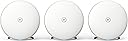
BT Whole Home Wi-Fi is a premium mesh networking system featuring AC2600 dual-band technology and three discs that blanket medium to large UK homes with fast, reliable Wi-Fi. Compatible with all UK broadband providers, it offers seamless roaming, intuitive app-based control for device management and scheduling, plus a 3-year warranty—perfect for professionals demanding flawless connectivity and smart home integration.


| ASIN | B01NBMMVG7 |
| Are Batteries Included | No |
| Best Sellers Rank | 5,819 in Computers & Accessories ( See Top 100 in Computers & Accessories ) 22 in Whole Home & Mesh Wi-Fi Systems |
| Brand | BT |
| Colour | White |
| Connectivity Type | Wi-Fi |
| Customer Reviews | 4.4 4.4 out of 5 stars (4,719) |
| Date First Available | 20 Dec. 2016 |
| Guaranteed software updates until | unknown |
| Item Weight | 1.7 kg |
| Item model number | 88269 |
| Manufacturer | BT |
| Operating System | RouterOS |
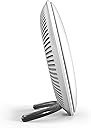
| Product Dimensions | 16.5 x 7.7 x 16.5 cm; 1.7 kg |
| Series | 88269 |
| Wireless Type | 802.11ac |
J**R
BT have a winner here...
BT Whole Home WiFi for £189. Summary to save reading the rest: The kit arrives in an excellent package which feels very upmarket so initial impressions was good. It is expensive compared to wifi plugs but it initially looks like money well spent especially at the price I paid rather than the original £299. It has managed to get wifi coverage everywhere in my house on a single SSID and with better performance than before. Would have been a 5 star review except for the mandatory BT app which let's it down in my opinion. ** After submitting the review with 4 stars I decided the BT app did not warrant losing a star so I've put it to 5 stars. Background info: I have BT Infinity2 (unlimited data and upto 70Mbps). When hardwired to the router I get 62Mbps via speedtest regularly. My house is really bad for WiFi. To visualise it, imagine a rectangle split into equal thirds. The BT HomeHub5 sits just inside the left third and wifi in this section is strong. The middle third starts getting patchy and the final third which happens to be where my lounge and bedroom are is usually no reception. I used a Solwise repeater in the middle third to help until now which has been great but when at the furthest point from it in the bedroom it was sometimes hit and miss. Plus we had three different SSIDs in the house. Setup: Opened the great bit of packaging and the feel of each disc was of really good build quality. I had already read that the BT whole home app was required so I had downloaded it already on Android. For me this is the only reason I haven't awarded it 5 stars. The first issue I have with the app is that it requires location services to be on or it just wont start. WTF? Why does it need to know where I am? I know I'm in my house and the devices are connected to the hub in my house and my broadband is in my house. I don't have location turned on as it eats my battery plus I'm paranoid about being stalked ;) So now I have to switch that on, tell google to take a run when it then wants me to allow all and sundry to access my location just so the app will start (and also having to remember to shut it off when I'm finished). That was issue one with the app. After that the setup was easy, plug ethernet cable into the router, plus other end into the first disc, power it on, wait 2 mins until the LED went solid blue and then I had a new SSID which I could connect to using the key that you get on the card that slides from the back of the disc (like with all BT hubs). The app then offers you to add more discs. It says go the spot you would like and click test. It tells you if you are in a good area or not. Once you have a good location for disc two, power it on, wait 2 mins for solid blue, then onto the third disc (same procedure). Once I had all three in location, using the app I changed the SSID to a different name and also changed the admin passwd (on the pull out card). I also clicked check for new firmware and it found some, download and install took a few mins. That was it for setup. You could easily do it in under 30mins but I tried a few locations and made sure I had it looking tidy with cables out of sight, etc so spent a bit longer. Testing: I used the speedtest app on my Sony Android phone for measurements. For reference - My usual results from speedtest show no more than 30Mbps down and 18Mbps up in the house when I have peak performance. The BT app shows you a graphic of devices connected to which disc so I could see where I was connected for my testing. I did various runs from different locations connecting to different discs and my performance generally was higher than I've ever had before with an average of low 40s for download and a peak of 58. uploads were a bit down though never peaking above 16 and sometimes in single figures. Not too worried about this as the majority of wifi traffic in my house is download. The only issue I experienced and it could be just the bedding in phase is that sometimes when I moved around the house and the passing on function of the devices (to the better reception) seemed to take a while so my first attempt at speedtest had network comms error. I will see how real life usage and movement affect the device over the coming days. BT app: i have already mentioned the app is mandatory which is acceptable to me although as they each have an ethernet socket you should really be able to connect a PC direct but most of us have mobiles so whatever. I also said I hate the fact you need location services turned on. My other gripe is that you cannot control the hub settings in particular parental controls. I have this set on the hub to stop my kids being on their phones all night. The only option via the app is the whole wifi off or on which will then affect sky, fire tv, my phone,etc... I think the hub still controls their access but I would like this ability on the app. I can also see devices connected to each disc but cannot do anything such as block them. Conclusion: Although I only set this up in the last 24hours from my initial impression of the hardware, through the ease of setup and resulting in wifi coverage getting the whole house with a single SSID, I am very happy with the outlay of cash. The bonus that the download performance has increased too is the cherry on the cake. I hope I have not reviewed too early and I don't start getting problems but if I do I shall report back. I highly recommend this as a solution if you had issues like mine especially as if it turns out not to work in your case you can simply box it back up and return to Amazon (that was my plan if it failed).
J**S
Highly recommended - reliable, flexible and it works .... and for non BT broadband
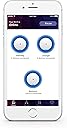
I live in an old house and the location of the single master BT point is in the lounge - the oldest part of the house, and the room with the thickest walls. Brilliant for insulation, a nightmare for wifi. When I moved in I chose BT to provide broadband (a rural location, so figured BT would be the best choice as I would be ahead of the queue when they upgraded the exchange to 'real' broadband), and worked through the BT hubs 4, 5 and 6. None of them were able to penetrate the thick walls and give me wifi throughout my property - which I understand: I don't doubt they are predominently designed for newbuilds with walls that allow the signal to penetrate. I have tried numerous signal boosters, but all have suffered from one draw back or another, and none have proved reliable. I also replaced the BT hub with an [expensive] ASUS gamer router with multiple antena - again, it was not able to provide a good signal throughout my property, and definitely wasn't as reliable as the BT hub .... but that is the subject of a different review! About a year ago (when I moved from BT to EE for my broadband provider) I invested in a BT 2 disk system, on the assumption that I could use the second disk to utilise mesh technology and provide a decent signal to the rest of my property. Hey presto - it works! The 'base' disk is plugged directly into the router, and the second disk has a decent line of sight to the base router, and this provides more than a good relay signal (completely workable) to the rest of my property. Move on another year, and I decided to go with Blink cameras for security. To explain for the purpose of this review, the Blink cameras (located outside) need a good wifi link to my broadband in addition to a good link to the Blink hub - something which I would imagine is difficult in many households, and although my two disks provide me with a 'good' signal throughout my property, the second disk doesn't provide a great signal throughout - I don't blame this on the device but on my very thick and old walls! Given previous positive experiences with the BT disks, I invested in the three pack to expand my existing network, locating the disks in rooms near the Blink cameras. The results? I now have EXCELLENT wifi throughout the whole of my property, which extends to the nearby perimiter completely sufficient for the Blink cameras which show a 5 bar wifi signal .... and inside, I have absolute coverage of excellent strength wifi in all rooms. I haven't needed to contact support, hence no rating, but I would happily recommend this product as a best buy for a number of reasons: 1) if you can have 'rough' line of sight between some of the disks, they can extend your wifi signal transparently to all devices throughout your household (my smart home technology just links to the best signal, and yes, I have seen an improvement in responses since I expanded 'the mesh'). 2) even if you don't have line of sight, you could potentially use a network over mains adapters to connect the devices remotely to your base router and share the signal throughout the house - I have tried this with numerous options, but I really didn't find it as reliable as allowing the disks to be able to relay themselves. In my experience, providing one disk has a semi-decent line of sight to the 'base' disk, the others all work very very well and provide a good signal: useful if your phone point it located somewhere with thick walls. 3) numerous devices nowadays need a wired connection to your router - I have an alarn and CCTV (separate to the Blink) which need a hardwired connection to 'the router' - the RJ45 network connection on the back of one of my disks (each disk has a connector to plug in a network lead) works perfectly well, and each devices 'believes' they are plugged in to the router. 4) I really like the guest wifi option - this is a separate wifi network you can set up which is kept isolated from your main wifi network, so guests can connect to the internet without being able to connect to any of the devices on your home network - great, as you don't have to rely on your guests having antivirus and malware protection, and potentially infecting your network devices (it's also useful for connecting 'suspect' devices to your network when the company doesn't have a clear privacy and security policy, e.g. IoT monitoring cameras, though I'm not talking about Blink ... of which I'm a huge fan!). 5) linked to 4, you can switch the guest network on and off without impacting your main network, and you can also pause your network - stopping internet access - the nice part being you can specify which devices this affects. I would imagine this would be useful for adults with kids, or guests who are streaming annoying music! 6) I like the phone app (also available via a web portal) that allows you to see what/who is connected, the signal strength between the disks, and to easily control reboots, guest network and numerous other settings such as if the disks lights are on or off. 7) I like that you have the ability to block specific devices from connecting to your wifi - my guest wifi is setup with the default BT Hub 4 settings, as this is what my guests previously connected to. As the network is quite easy to hack, several uninvited guests took the opportunity to utilise my broadband connection - I don't blame them ..... but their MAC addresses are now blocked. Not infaliable, but it makes it harder and so hopefully they will move on to another wifi network. The only downside, and I wouldn't say this is a reason to not purchase [more feedback for BT], is that there is no option (currently) to turn off the LED on one disk - the option is for all disks and it is either off, low or bright - personally, I want to keep the LED switched on for my disks as it is a good indicator that things are working well (or not!), but for the disk in my bedroom, I would like to be able to switch it off - but you currently can't for a single disk. In the meantime, duck tape means my bedroom isn't lit up with the [good status] blue LED. No matter who your broadband provider is, I would highly recommend this product - it's REALLY easy to setup either via the web portal or preferably the phone app, and it works. I am a very satisfied customer.
A**W
Excellent signal, fast set up and great value for money - wished I'd done this sooner!
I took a long time to decide which mesh wifi system I was going to use to replace the poor performing latest Virgin Media wifi that was causing much hassle for me and my family. In the end, the cost was the clincher and the ability to get 4 BT Whole Home units for about £190 made it even better value than the more expensive alternatives. The units arrived quickly with Amazon's great prime delivery service. I downloaded the app for my phone and simply followed the instructions. It was as easy as that. Even connecting up two discs from a new box didn't stump the mesh set up and after about 20 minutes I was up and running. This time included several trips up and down stairs to position and connect each of the 4 units. The main disc connects to the Virgin wifi modem/router by an included ethernet cable. I didn't put my Virgin router into modem only mode as I wanted to keep using the other ethernet ports for other devices like my NAS. I just turned off all the wifi signals. We don't have a large home but it did seem to suffer from some wifi "not" spots before. Not any more - fast and reliable wifi throughout the house. A good signal strength in every room and decent speed, even from the most remote discs. The disc connected to my router is the fastest but the others are all pretty good too. Roaming around the house with a single SSID is great and makes the connected devices behave much more reliably. The system has been up for well over two weeks now and now problems at all. Much more than could be said for the Virgin wifi... My only regret on this purchase is that I didn't do it earlier. I am very happy with the BT Wholehome system and would highly recommend it.
ترست بايلوت
منذ 5 أيام
منذ شهر