We remain fully operational. Our teams are working around the clock to ensure your deliveries continue safely.

قم بتنزيل التطبيق


معلومات عنا
حقوق الطبع والنشر © 2024 Desertcart Holdings Limited
قم بتنزيل التطبيق


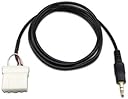


🎧 Unlock your Mazda’s hidden audio potential—plug in, play on, and never miss a beat!
The AUX 3.5mm Cable Connect is a 2-meter long, black audio adapter cable designed specifically for 2006 and newer Mazda vehicles with external CD changer ports. It enables direct MP3 and phone audio connection to the car player, offering clear sound quality and easy installation behind the glovebox without removing the head unit. This affordable upgrade is highly rated for enhancing in-car audio experience, especially for Mazda models including those with Bose systems.
| ASIN | B006FFCONA |
| Best Sellers Rank | 574 in Car Audio & Video Input Adapters |
| Brand | Goliton |
| Colour | black |
| Customer Reviews | 4.1 4.1 out of 5 stars (1,581) |
| Date First Available | 7 Dec. 2011 |
| Guaranteed software updates until | unknown |
| Item Weight | 0.02 Pounds |
| Item model number | E-EMTU-MAUX |
| Package Dimensions L x W x H | 10.3 x 10.2 x 2.4 centimetres |
| Package Weight | 0.04 Kilograms |
| Part number | E-EMTU-MAUX |
| Product Dimensions L x W x H | 12 x 10 x 1 centimetres |
R**N
Perfect!
Mega fast delivery. Fitted to my NC MX5 in twenty mins as suggested by other purchasers without removing the header unit. You do need nimble fingers and be quite flexible to get your head up behind the glovebox to see. I recommend you tape this harness to an existing loom just in case it gets accidentally pulled as the wires leading into the plug are quite fine. Works perfectly well , good audio quality. Cheap and very effective modification. Very pleased :-) cable length is very good too. I recommend you remove the aerial lead to fit the plug then re fit. Best 10 quid I've spent for a while!
U**N
Wonderful product..only if the mazda knew abt this hack!!
Works perfectly on my Mazda6 2007 model which has a Bose audio system. Thanks to some of the reviews here which confirmed that this is compatible with the Bose unit. Taking off the glove box is super easy, and it takes about 10 mins to locate the socket in the back of it where this fits..have a flash light, it helps. Or like I did slid my phone camera into the narrow space and took a picture with the flash on to get an exact bearing of the socket..and then its a matter of using us fingers to carefully insert the cord into the socket. Works like a charm!!! Update after 1 year - like some user reported it starts showing probs after a few months..mine did after a full year. First the right speakers only output sound..after many twists and turns, alternating between left and right speakers, now there is complete silence!!..
A**R
the cable length is just perfect. there are a lot of videos on youtube ...
the cable length is just perfect. there are a lot of videos on youtube how to mount it yourself - fairly easy, anyone should be able to do it. some people say that the sound quality is inferior but i can not hear any difference when comparing to CD. my only concern is how long will the cable last. outer coat is rather stiff so i'm afraid it might break after time. + perfect length - cable a bit too stiff in my opinion + easy mounting + good sound quality very good product in total. i can absolutely recommend it. i've tried some FM transmitters but the sound quality was not sufficient to me. it's simple, inexpensive and does the job.
B**P
Works fab with my Amazon auto
I've never written a review on Amazon before, but I couldn't find an answer for my query so I'm doing it now. I've installed this in my 2007 Mazda 6, and having looked online to find the easiest way to do so, I found pulling the glove box out and find my way to the back of the stereo the easiest of them all. Took a whole five minutes to install and plug into my Amazon auto and now my wee old car has Bluetooth at a fraction of the cost of a new stereo! The sound quality is fantastic and you would think it was always there. I would highly recommend this wire, and don't be scared to install it yourself.. I'm not a mechanical wiz and I could do it! I'm more a plumber 😂😂
S**N
Does exactly what it says on the tin! UK Mazda 6 Sport (55 plate)
An excellent and simple solution to an annoying problem. Fitted this to my UK Mazda 6 Sport (6 CD "Bose" in-dash changer) in about two minutes flat and it worked first time! :) If you have a UK (right hand drive) car then ignore all the Youtube videos that say you have to dismantle the entire centre console to fit this! Because RHD cars have the glove-box on the LEFT (next to the socket on the back of the radio), all you have to do is pop out the glove-box and reach in round the back with your left hand to find the socket. It's just to the right (looking from the front of the radio, where you are) of the aerial lead that goes in on the far left. The supplied plug fits in upside-down (ie. with the little lug on the bottom) and unless you already have an external media device connected (in which case, why would you need this?) it will be empty and ready to pop the plug right in. (I also looped the lead around the big cable bundle that goes behind the glove-box and passed it through itself to tie it off so that if anybody tugs on the lead it won't pull directly on the pins going into the plug, but that's probably just me being over-cautious.) Sound quality is uncompromised - it's a direct audio connection to your media device, so whatever comes out of the headphone socket goes straight into the AUX socket with nothing to mess up the quality. Of course the prev/next track buttons on the steering wheel don't change tracks (this is just an audio connection, after all) but the volume buttons work fine and that's really all I needed. Very satisfied.
D**E
Worked for a few months only
I bought this a year ago for my Mazda 3 MPS. Fitting it was easy and took about 15 minutes. Ok for what it did, but after a few months it began to only play music from one side. I checked the balance on my radio setting wasn't out and found it wasn't. If I tilted my phone slightly the music would play as normal but with it being in a car going around corners quite a lot the phone would move ever so slightly causing the sound to disappear from the one side again. The cord was intact but had become faulty I suspect from being plugged into my phone and bending near the jack. So now I'm back using CD's which is not great.
R**N
Le câble est livré dans un sachet. Il s'adapte parfaitement sur le connecteur libre de l'autoradio d'origine de ma Mazda 5 de 2007. Le démontage de l'autoradio se fait a l'aide d'un tournevis cruciforme et ne prends que 5 min. Tuto disponible sur Youtube. Le son du téléphone devient alors accessible sur l'entrée Média (Aux) aussi bien en musique (Spotify) que téléphone (son de l'appel dans les hauts parleurs). Mon tél est un Oppo Reno 2 (Android)
D**O
Funciona bien. Mi coche es un mazda 3 sportsedan del 2007 y no he tenido ningún problema. Además en Youtube hay vídeos donde explican como instalarlo tu mismo. El problema es que es un poco trabajoso porque hay que desmontar algunas cosas del salpicadero del coche pero eso no es culpa del cable. Además la longitud del cable está muy bien permitiéndote colocar el móvil en el asiento del conductor tranquilamente.
マ**ニ
アクセラ BK5Pにて装着しました。MEDIAボタンを押しAUXの表記もされ、音質も問題なく、、AUXのみの為、配線のわずらわしさもなくスマートです。敗戦は中央のドリンクホルダーの四角の場所から出しました。灰皿から出すか悩みましたがこちらにしました。 他社製品、純正品より安いのでオススメです!
A**T
Did exactly what was advertised. My Mazda3 now has aux functionality. Great adition.
B**X
I'll list the good, the bad, and some installation tips. The price of the product is unbeatable, especially since as we've seen with the iphone 5, your iphone integration unit can quickley become obsolete. Just a simple line-in. Works for everything. The sound quality is pretty good. I think a cd sounds better but that's to be expected. But there is no audio feedback from the engine, even when using a basic audio cable extension. The only negative I had was that the cable is a tad short - but that really depends on where you want it coming out. I ran mine through the center armrest box. The cable stretched the whole way, but only had about 4 inches of slack once it entered the bottom of the armrest. If you run yours through your glove compartment or just out the side of the center console (near your legs) you'll be fine. I didn't notice a sound quality difference when I added an extension to mine coming through the armrest. As for installation tips, these will only apply to the 2008 Mazda 6, though I'm sure other Mazda6s of that generation will be similar. Here's a list of tips. 1) Use the GTA car kits video on youtube as a guide. 2) When taking off the 4 front-facing screws that hold in the radio, make sure you get the correct bottom 2 screws. Because I'm tall, I didn't see the actual 2 lower screws and instead unscrewed 2 screws that were holding in the large plastic piece that makes up the armrest. After yanking on the radio for a while and questioning my strength and manhood, I found the correct screws. 3) That being said, if you partially remove that large plastic piece (same piece that makes up the armrest) it actually makes threading the cable much easier. You'll need to remove 5 additional screws (besides the 2 I mistakenly removed). 1 one each side near the driver's and passenger's legs. 1 in the middle near the hand brake, and 2 inside the armrest. Also, disconnect the armrest power outlet. You don't need to take it all the way out, just loose enough at the front so you can thead the audio cable down from the back of the radio. 4) At the bottom of the armrest box you'll need to make the hole bigger to help the cable fit through. The holes are actually a little plastic drain. Just punch out a little bit of the plastic with a lockblade and thread the cable through. 5) To make sure my short cable won't ever fall back down inside, I zip-tied the 4 inches of slack that I had to the little plastic drain at the bottom of the armrest box. It's solid. It sounds complicated but it isn't, trust me. If you are even a little mechanically inclined (like, you set up a Big Lot's bookshelf once) you'll be totally fine. It sounds like there's some improvisation and ghetto-rigging involved, but it's very straightforward. It doesn't take long and it's well worth the effort and money savings. The hardest part is threading the cable down from the radio. Just get a flashlight, stand on your head if you have to, and look for a clear path.
ترست بايلوت
منذ شهر
منذ أسبوعين