🔥 Elevate your streaming game with Roku’s powerhouse stick! 📺
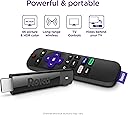
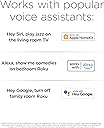
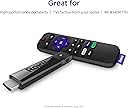
The Roku Streaming Stick+ delivers ultra-smooth 4K HDR streaming powered by a long-range wireless receiver that quadruples your Wi-Fi reach. Its voice remote consolidates TV and streaming controls, making navigation effortless. Compatible with major streaming services and featuring easy plug-and-play setup, it’s the ultimate upgrade for professionals craving premium entertainment without cable clutter.


| ASIN | B075XLWML4 |
| Best Sellers Rank | #6,726 in Electronics ( See Top 100 in Electronics ) #44 in Streaming Media Players |
| Brand | Roku |
| Built-In Media | Remote and power adaptor, Two AAA batteries, USB power cable, USB power extender cable |
| Color | Model |
| Compatible Devices | Television |
| Connectivity Technology | Wi-Fi |
| Connector Type | Mini DIN |
| Controller Type | Remote Control, Voice Control |
| Customer Reviews | 4.7 out of 5 stars 126,405 Reviews |
| Form Factor | TV Stick |
| Global Trade Identification Number | 00829610001951 |
| Item Dimensions L x W x H | 3.7"L x 0.8"W x 0.47"H |
| Item Height | 0.47 inches |
| Item Type Name | Streaming Media Player |
| Item Weight | 0.01 Ounces |
| Manufacturer | Roku |
| Memory Storage Capacity | 16 GB |
| Model Name | 3810R |
| Model Number | 3810R |
| Other Special Features of the Product | Wireless |
| Resolution | 4k |
| Special Feature | Wireless |
| Supported Internet Services | Apple TV, HBO, Hulu with Live TV, Netflix, Prime Video, Showtime and Google Play, The Roku Channel |
| UPC | 829610001951 |
| Unit Count | 2.00 Ounce |
| Video Codec | H.264 |
| Video Output Resolution | 4K |
| Warranty Description | 1 year warranty |
T**1
Great streaming even on slow connection
Here are my experiences with the 2017 Streaming Stick+ Roku. First let me specify my setup. I have a slow 2.4 (typically) Mbps Internet connection. Previously I was using a Panasonic BMP110 Blu-Ray player for what little streaming I did. That was mainly used for trying out the Vudu free movies. It was marginal; with my slow connection, sometimes it would work pretty well, and sometimes it would complain and give up intermittently. I have a Yamaha VX-477 Receiver. And it all feeds into a 2011 Panasonic Plasma TV. Setup: It probably isn’t very important, but the remote uses AAA batteries, not AA. I slapped in a couple of Eneloops and it’s happy. I see people complaining about having to give credit card information to activate their Roku. This is not necessary. Go to the page made for this option: my dot roku dot com/signup/nocc, and you can create a Roku account without entering any credit card or PayPal information. I know, because I did it. If you’re wondering about using the Roku with an A/V receiver, that works. I plugged the stick into one of the HDMI inputs on my Yamaha, and it works just fine. 4K wouldn’t cut it, because my receiver doesn’t really support it. But my TV isn’t 4K anyway, so that isn’t a problem. Some people are complaining about HDCP errors. This is probably because they’re trying to use 4K video on a TV that doesn’t support HDCP 2.2. My five year old TV works just fine, because it’s only 1080p. If you want to see 4K video, make sure your TV really supports HDCP2.2. And you need an HDMI connection that also supports HDCP 2.2. On some TVs that’s only one port. If 1080p24 is important to you, Roku says only the 4K devices can do it. I had to turn it off; when the movie would break for commercials, the receiver usually flaked out. I would have to switch HDMI inputs on the receiver, then switch back to the original. The guide says the screen may flash black; mine mainly went to snow, and wouldn’t recover. So I’m doing without 1080p24. It might work better for people who plug it directly into the TV; I didn’t try that. The specs talk about 802.11ac, but it works just fine on my old router without ac. To set this thing up, look at the Quick Start Guide, or just go to the Roku page about your specific device. Basically I just plugged the stick into an HDMI input, plugged the power adapter into my UPS, and connected the cables. It started right up. I haven’t tried different models, so I can’t offer a comparison. But the Streaming Stick+ works great. First you have to pick a wireless network, and provide the password. Then the stick downloads the latest firmware. When it restarted, mine didn’t connect the first time, even though it indicated it still remembered the password. After sitting for a while with a spinning wheel, it finally gave a 014.40 error, and suggested some alternatives. I just unplugged the power cable and plugged it back in. It restarted, and everything was fine. It will go through a few screens, and give you a four letter code. Go back to the page you end up at after creating your account online, or the page they refer you to. Enter the code, and you’re all set. You can select some channel options. Your stick is now busy setting up channels. And things seem to be working great. It does fine showing a movie in standard definition. It has trouble with the commercials; I wonder if they’re a higher definition. But it gets over it quickly. Things like rewind and fast forward are far better than on my old Blu-Ray player. So far I’m just using things that are free. Look around online at the Roku site, and you can see what’s available. So in summary: This thing works surprisingly well with a slow connection. You don’t get 4K video, but it looks pretty good in old-fashioned 1080p (which is probably really a lot less, as in standard def upscaled to 1080). It works plugged into a receiver that then separates out the audio, and passes the video on to the TV. It works with old routers that don’t have 802.11ac. And it works with new routers that have 5GHz ac. You can create an account without providing any credit card information. I recommend this device to anyone that needs a streaming connection.
L**E
The REMOTES are JUNK in less than one year!?!?!
Update on 7/25/2020: 2 Remotes have quit working within 8 months of my purchase. I have replaced batteries, tried to resync and nothing solves the issue. We now have to use my cell phone and Roku app in 2 different rooms of our home just to use the streaming sticks which are our only source of TV news and movies. I purchased 2 replacement devices about one month thinking I was giving us backup devices and now I am past their return window and I know those remotes are going to crap out on me too...NOT HAPPY with dropping a total of $250+ when the remotes last less than 1 year. Update on 01/07/2020: We now have three if these because our Daughter’s “smart” TV that is just over a year old suddenly decided to have issues with all of the built in apps. This stick is perfect for those who have this happen, or have a TV without built in apps, or those like me who used their game system for streaming until too much use fried an expensive console and caused the loss of hundreds and hundreds of hours of save game data! I recommend these to everyone because they are perfect for our streaming only household. Orig Review: Okay...I absolutely fried my PS4 because as much as I would use it to game on I would also use it to fire up my Amazon Prime, Netflix, Hulu, etc. I never checked into these types of devices before because I guess I just thought my PS4 would be eternal (LOL). As all things tech related eventually do, my PS4 completely crashed and hundreds of hours on my games were lost to me, but in that awful sad moment I decided to replace my PS4 AND go ahead and buy 2 of these to use here at home so that our XBox One wouldn't suffer the same fate in our living room. I know...I'm terrible, huh? Anyways - ROKU. LOVE IT, LOVE IT, LOVE IT! So easy to setup, easy to add apps to your menu, easy to navigate, quick to load the apps and most important of all I no longer have to worry about using my gaming consoles as entertainment beyond the games they are meant to play! Win Win!!!! I am seriously amazed at how quick the apps launch/load - it's darn near immediate and the interface is clean and easy to use. I love that I can add apps/manage everything from anywhere even when I'm not at home - adding and removing channels is a breeze. It even recognized our TVs without any issues and even some of the universal TV remotes we've bought cannot do that as efficiently as the ROKU did. We are definitely going to be long-time ROKU fans and will buy new ones when needed because they are well worth the price. My husband loves the one in the living room and he has never watched as much TV as he has since I installed the ROKU out there. If we had more TVs we would have more ROKU's.
K**R
From a value perspective, this might be the best Roku yet...
I'm a long-time Roku user, having purchased devices from every generation throughout Roku's evolution. I've had the very original Roku N1100, Roku 2 XD, Roku 2 XS, Roku 3 (2013 version), Roku 4, a TCL Roku TV, Roku Ultra (2016 version)...and now this Stick +. While I've only had it for a couple of days now, this might be the best Roku I've seen from a value perspective. My house is a Roku house. We have 5 televisions but don't have a cable or satellite subscription.. One of the TV's is a Roku TV and the other 4 all have a Roku attached to them. Literally everything we watch is delivered via the Roku. Our OTA material is delivered from a Tablo DVR to our Rokus. Our local media is served up via a Plex server to the Rokus. We also have PS Vue, Netflix, Amazon video, etc. etc. Bottom line, we use Roku a lot, and I'm very familiar with them. I wouldn't consider myself to be a Roku "fan boy", though. While most of the Roku's I've had have been great...there have been some clunkers. The Roku 2XS was a turd that never got any better. The Roku 4 was a turd at the start, but gradually got better with each subsequent firmware update. Unfortunately, the cooling fan in one of my Roku 4s (The 4 was the only Roku model to ever have one) has begun to make the dreaded "grinding" noise in recent weeks, so I decided to try replace it with a stick+. I've generally been leery about all of the "stick" form-factor devices. They've generally lagged behind the more traditional "box" form-factor devices as far as specs go. The Stick+, with its quad-core processor, HEVC support, and 4K capabilities convinced me that the gap may have finally been closed. So, after a couple of days with the Stick+...here are my thoughts on this device - It's snappy and smooth. It's maybe not quite as quick as my Roku Ultras...but it's every bit as fast as the Roku 4. - The new remote is great.The ability to control the TV's power and volume without a second remote or a universal remote is loooong overdue. - Excellent wireless reception. I had two walls between the Stick+ and my router, but was easily streaming 16mbps local media through Plex. - Powering via the TV's USB isn't optimal. Assuming your TV stops providing power to the USB when turned-off, the Stick+ will have to go through the boot-up sequence and then connect to your wireless before you can do anything with it each time you turn on your TV. This can take ~30 seconds. I highly recommend plugging it directly into an outlet using the provided adapter. So, this is a great Roku device. It doesn't have the same bells-and-whistles that my Roku Ultra's have...but then again, I also paid nearly twice as much for those. This Stick+ is much cheaper, provides basically the same UI/playback performance, and also has a remote that will make having to juggle your Roku and TV remotes a thing of the past. That's why I say, absent some deal-breaker that I haven't encountered yet, this is the best dollar-for-dollar Roku yet.
M**Y
All My Apps and Amazing Picture Clarity
I have 2014 Samsung 55" curved screen TV I bought when I was working overseas. Since I have been home I have had limited streaming apps I could load due to the regional software package it runs on. But the TV is in good shape and I did not want to replace it just because of streaming ad casting limitations. I decided to try out the ROKU stick as an alternative. The one thing this TV does not lack is HDMI and USB ports. Got the ROKU today. It took about 15 minutes to set up. (Have your phone, laptop or both handy to confirm account creation) I added all the streaming apps I currently use and it took me about 20 minutes to open and logged into all of them (again laptop, phone or tablet devices handy for dual authentication steps where required. Everything logged in successfully. I decided to check out some of the free streaming app options that come with the device. A lot of options. Played a movie and was blown away by the quality of the picture. I hadn't realized how mediocre the streaming quality was running on the TV platform apps that I knew were not the most current. The ROKU has really amazing quality. I did not have to power with a plug, the device was sufficiently powered running from a USB port on the TV (The port is rated at 5V) This is well worth the price and an excellent option for anyone looking for solutions to upgrade their streaming capability of older TVs or those like mine that are from another global region limiting the app and casting compatibility with US stuff.
S**K
Done with Chromecast
I bought this because I don't have an HD receiver in my bedroom and I want to stream sports in HD quality to my HD TV in my bedroom. My family used to be able to watch sports on the one TV in the house with an HD receiver, but we have had family members move in and completely ruin the experience. I have used Chromecast for years, and there have been so many issues with it but it generally worked well enough. But since football season started, I have been especially frustrated with a lack of smooth streaming, and I knew I couldn't go through a whole football season struggling with streaming issues. To top it off, we switched several months ago from slow DSL to a much faster ISP, and we should not be having the same types of streaming issues at all...but we were, at least with respect to Chromecast performance. So, I decided to look up Roku and I was curious about what channel apps were available. I read that any channel that has an app would be available on Roku, so that was good enough for me and I purchased it. It has worked great...very few streaming issues at all, and the little bit that exist clear up pretty fast and then you have a smooth streaming experience. A few problems, though, most of which have been fixed/worked around at this time: 1) The BTN2Go app does not play live TV. It says, "This video is currently unavailable. Please check back later" every time. Thankfully, you can watch the Big Ten Network through the Fox Sports app. 2) It takes a little too long for each app to start up. This is pretty annoying when you're trying to flip back and forth between various games. 3) Roku does not, in fact, have every app associated with streaming live TV. If you want to watch CBS and CBS Sports Network games, it's pretty hard to do so because Roku does not have the actual CBS Sports app. They have this crappy, worthless CBS Sports HQ app that does not show any games, and they have the CBS app that expects you to pay monthly to stream CBS programming. Yet, the CBS Sports app and the CBS Sports site both let you stream SEC games and games on CBS Sports Network (usually AAC and military academy games) for free. I spent hours on Saturday trying to figure out how I can get around this issue and finally figured out how to mirror my laptop screen to Roku. But I really had to dig around online for this info. I really would rather not have to mirror my laptop at all for games; I'd like the real CBS Sports app to be available on Roku. 4) It's pretty annoying how every time you want to use an app for the first time that requires your TV cable subscription info, you have to go to your phone or PC/laptop and go to some link to get access. 5) I did have an issue with the Roku connecting and disconnecting repeatedly when I first hooked it up and went through set up. Once I reset the stick, unplugged it and plugged it back in and went through setup again, this issue was resolved. -- After getting these issues figured out, except for the slow app load times, there's nothing wrong with Roku at all--it's the best $60 or $70 you'll ever spend. Great video quality and great performance. It has saved my football season, and probably my basketball, tennis, softball, etc, seasons, as well. It works so well that it's easy to leave it on and stream up my internet bandwidth usage because I forget it's not the actual cable. It just streams seamlessly.
C**.
Works fast and reliable
Will purchase again. Great remote just plug it straight to your TV. Go to settings we are HDMI #1 and all the apps showed up. Must pair the remote to your TV, their are videos also on YouTube to help pair your remote enjoy
R**S
my journey to 4k hdr 60hz with a sony tv, yamaha surround sound receiver and this roku stick
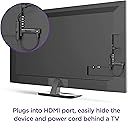
Ok. This is going to be long…but maybe something through my experience will help you solve something faster than me. I ended up with the Sony x800g 75” led 4k UHD HDR10 tv. Lots of numbers there. And often times you will hear stuff used interchangeably. • 4k isn’t all the same. So the term 4k related to the number of pixels on your screen. o 1080p was previous HD (high definition) and was 1920x1080 pixels. o 4k is generally 3840x2160 • UHD is ultra high definition which also refers to the resolution of 3840x2160, however there are two versions of this. o One is 30hz. Normal movies and tv look “normal” o 60hz is great for action movies and fast movement such as sports • HDR/HDR10 also has two versions, but in simple terms, HDR is used to describe a certain grouping of picture settings to make your 4k look better. Higher contrast rates(darker black and whiter white). However there are 2 versions of this also o 30hz for traditional movies and tv o 60hz is great for those action movies and sports. What happened for me. It was time for a new tv. I already had a Yamaha surround sound receiver that all my consoles, and fire/roku sticks, and blueray players plugged into, and one single cable going to my tv. So the setup of a new tv was going to be fairly painless. Find the tv, buy the tv, remove the old tv and replace it with the new one. I got home, got the new one in place and hooked up with one hdmi connection…and it didn’t do 4k. WTF! So I did some research and realized the roku stick that we use for amazon prime, hulu, and Netflix…wasn’t 4k compatible. So I went online, ordered a Roku Premier. I got it the next day, thanks amazon. Hooked it up, and it worked well…but the remote had to be line of site with the roku box. Unfortunately, my home theater setup made this a huge pain in the butt because the roku was hidden behind the Yamaha surround sound receiver. So, I returned this and ordered the Roku Streaming Stick +. Because these are meant to plug in behind the tv or to a surround sound receiver. This in place, and I ran the setup on the roku stick for display and it would do 4k uhd but only in 30hz. Fearing I had bought the wrong one. I took it upstairs to my lg 40” tv and plugged it in, turned on the tv. And the tv recognized the roku stick and I saw the screen go from normal black screen (kinda dark grey really) to true solid black with the HDR logo flashing on screen. When it showed the roku menu, I ran the same display setup and it clicked green check marks next to 4k uhd 30hz, 4k uhd 60hz, 4k hdr 30hz, and 4k hdr 60hz. And the movies (6 underground on Netflix) was just a freaking work of art. So now I knew that it was not the roku stick. So doing more research I found out that my Yamaha rx-v685 surround sound receiver would accept this beautiful signal and would pass through 4k but that the configuration had to be adjusted to do this. So I dug around in the menu, found the setting and clicked it into 4k. It looked okay on the new screen, but didn’t look amazing. So I went back to the google, and found out that my receiver would pass through only 4k uhd 30hz. So…it would look okay. But wouldn’t be jaw dropping. Did some research and found that I needed to buy the newer version of the receiver the RX-v683BL, that was $400 on ebay for a new in box one. It showed up a week later in a damaged box, but was fine cosmetically and functionally. I installed this new receiver with all the same connections and such. And ran the same roku display test, got it to do 4k uhd 30hz, and 4k uhd 60hz but it wouldn’t do 4k hdr 30 or 60. Annoyed at this point, I started scouring everything I could, and started seeing that folks said they solved this problem with better cables. I figured why not. So I found a set that had great reviews on amazon (info below) and those showed up two days later. I ran one of these from the new Yamaha receiver to the tv. Because the roku stick plugged in directly to a port on the back of the tv. Ran the test and got the 4k uhd’s working but only the 4k hdr 30hz working. I wanted the last step because I wanted the 4k resolution with the hdr picture quality with the 60 hz for high speed smooth movements. Annoyed again, I found that the tv instead of using HDMI port 1, needed to have me use HDMI port 2 or 3. I tried that, same. Then I went into the menu for the tv and found that there was a picture setting under settings>watch tv>external inputs>hdmi signal format>select the port 2 I was plugged into now and change it from standard to enhanced 4:4:4 or 4:2:2 mode. Tried again, the image was looking better but the roku still wouldn’t let me have the 4k hdr 60hz. So I checked the Yamaha receiver and the HDMI mode had to be in mode 1 as well as the roku stick had to be in ports 1-5. I ran the test again…still no luck. A final run at google and someone said there was a buried adjustment within the settings>advanced system settings>HDMI output and it also had to be set to the 4:4:4 or 4:2:2. Ran the settings and success! So when I boil it all down, when hooking something up to a 4k UHD HDR10(60hz) tv you need to have the correct device, the correct settings on the device, the right cable, the right port plugged in for the device, and also have the settings enabled for that device. I know that was long winded, but I figure I’ll use this story in the amazon review and maybe it helps someone sometime.
B**R
So good, I bought two!
I originally got one Roku Streaming Stick+ for the living room—and I was instantly impressed. The setup was effortless, the 4K picture quality is crystal clear, and the long-range Wi-Fi connection is strong, even through walls. The voice remote makes browsing easy, and the dedicated app buttons are a nice touch. I loved it so much, I got a second one for the bedroom. Now both TVs feel like smart TVs without having to buy new ones. 🔄 Switching between Netflix, Hulu, and YouTube is super smooth. 🎯 Reliable, compact, and travel-friendly too. Highly recommend—especially if you want to breathe new life into older TVs. Two thumbs up!
ترست بايلوت
منذ شهر
منذ شهر