

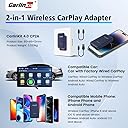

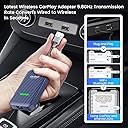

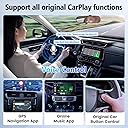
CarlinKit 4.0
Product ID: 439972182
Details
- Compatible DevicesSmartphone
- Connector TypeUSB Type C
- BrandCarlinkit
- Item Weight0.12 Kilograms
- Number of Ports1
⚡Ultra-fast data transfer
📶Seamless wireless connectivity
🔄Instant system integration
🚗 Drive the future today with CarlinKit 4.0 — where connectivity meets convenience!
CarlinKit 4.0 is a cutting-edge wireless adapter designed to seamlessly integrate your smartphone with your car’s infotainment system, offering ultra-fast data transfer and effortless plug-and-play setup for a smarter, more connected driving experience.


| ASIN | B0B1V3F1CF |
| Best Sellers Rank | #398,877 in Electronics ( See Top 100 in Electronics ) #13,255 in Car In-Dash Navigation GPS Units |
| Brand | Carlinkit |
| Compatible Devices | Smartphone |
| Connector Type | USB Type C |
| Customer Reviews | 3.4 out of 5 stars 111 Reviews |
| Item Package Quantity | 1 |
| Item Weight | 0.12 Kilograms |
| Manufacturer | Carlinkit |
| Model Number | Carlinkit 4.0 |
| Number of Ports | 1 |
| Package Quantity | 1 |
| Power Plug Type | Type A - 2 pin (North American) |
H**L
Drive Wireless with Ease: CarlinKit 4.0 Adapter for a Seamless CarPlay and Android Auto Experience!
Transforming your car’s connectivity has never been easier with the CarlinKit 4.0 Wireless CarPlay and Android Auto Adapter. I recently incorporated this device into my daily drives, and it’s been a stellar addition to my vehicle. Initially, I was skeptical about upgrading from my wired setup, but the CarlinKit 4.0 exceeded my expectations. The installation was straightforward—just plug it in, pair with your phone, and you're ready to go. The setup process was smooth and hassle-free, which is always a plus. The best part about the CarlinKit 4.0 is its reliability. Whether I was navigating a new route, making hands-free calls, or enjoying my favorite podcasts, the connection remained stable and responsive. It works flawlessly with both CarPlay and Android Auto, making it versatile for different types of vehicles and users. One memorable moment was when I was heading to a last-minute meeting. With the CarlinKit 4.0, I was able to access my calendar and directions without any fuss—just a smooth, wireless experience. For anyone looking to upgrade to a wireless setup and declutter their car's interior, the CarlinKit 4.0 is a fantastic choice. It offers the convenience of wireless connectivity with the performance you need to enhance your driving experience.
T**.
Doesn't work good with android auto.
This item connects easily but, does not work well for Android auto. It shows up as Apple car play and does not go full screen on my car like wired android auto. The website to update firmware also does not work any longer. If you have an iPhone this might be perfect for you, if you have an android I'd go a different route.
O**K
Works Great In MY 2020 Lexus NX300
I was very pissed when Lexus Discontinued the APP Scout GPS for my Navigation and didn't replace it with something else But my car did have Carplay, however I wasn't about to spend $1200 for a Iphone not that serious for me when all I do is Talk and Text. Vola Vola.. Carlink the perfect match for my Android Phone. The setup was weird because it showed something like Volkswagen... But connected like it should have and since I have the new Android Auto (Cool walk) on my phone and Android 13 it was a Breeze... So far so good. We will see how long this last. The Navigation has a awesome view on the screen and I don't have to worry about a bunch of wires running all over the place. Have to click Carplay on the screen sometimes when I am not using it (Not a big deal). My Lexus has a Mouse that I use and not the touch screen and it's a little cumbersome. All in all great product so far. The jury is still out...
A**R
Not a Perfect fit
Although I do like the product it has a major flaw in my use case. I have a Lexus vehicle with The large screen and when Using Android Auto it shrinks the screen to 800x400 adding black bars on either side. If I choose 1280 x 720, it fills the screen but is overblown and cuts off the top and bottom screen. There is a custom resolution setting but that doesn't seem to do anything no matter what I enter. THERE IS NO Method of making it 1280x400 through the settings.
J**5
Works Perfectly. Turn off VPN
It was plug and play. Very easy on my 2020 toyota corolla. Just make sure to delete your original toyota Bluetooth connection and if you have a VPN make sure to turn it off or else android auto will not work. Turn on Bluetooth and wifi on your phone as well!
C**H
Not compatible with Volvo and Android Auto
Giving this 2 stars because it works pretty flawlessly with Volvo's Sensus system if you use Apple Car Play. I have an Android though and all you get is a glitchy screen if you try to connect to the device on a Volvo. Seems to think it should still use CarPlay or something, rather than Android Auto. So not as advertised. Seems like maybe a firmware update could possibly fix the problem.
J**9
Provides Android Auto for my 2019 Toyota Corolla
I love it. I thought that I was out in the cold when Toyota abandoned Entune, and then the Dealer in Apex, NC refused to help me, even though I had purchased the Corolla new from them. I was left with virtually nothing working or available for my car screen unless I was willing to switch to iPhone. I didn't know that Toyota could be so rude and uncaring. (something I'll remember for my next car purchase) But then I discovered Android Auto in a rented Jeep and knew I wanted it. This device makes my car believe it is connected to Carplay, but then connects to my Pixel phone and allows wireless Android Auto. I get Google Maps and Syrius XM simultaneously. It functions just like it did in the rented Jeep. Thank you CarlinKit 4.0!
M**N
Electronic reset every 5 minutes
Good product but electronics failed and no tech support
L**R
Funciona muy bien con Android y iOS.
Pros: compacto, funciona bien, es económico. Contras: se calienta mucho, a veces se traba, deja de funcionar si no hay señal celular, tarda mucho en conectarse, más de 30 segundos.
D**V
ANDROID AUTO INALAMBRICO
Hola, yo tengo una Seat Ateca FR 2020, lo compré porque lo recomendaban bastante, y sí, se cumple la función de ser inalambrico, pero les diré las limitantes: 1. El aparato usa la interfaz de Carplay, y sobre de eso conectas ya sea el iPhone o Android, en mi caso uso un S22 Ultra, y se supone la interfaz de android auto debe ser igualita, pero no, todo es más pequeño, los iconos, los mapas, todo, y por lo que veo no existe configuración alguna para cambiar eso, y en realidad sí afecta bastante. 2. Tiene un lag como de 3 segundos, entre que cambias de canción y pone la otra, o cuando quieres mandar mensaje de voz, en el celular ya esta grabando y en la camioneta tarda por ese lag, en quitarse la música y empezar la grabación. 3. Por consecuencia, también al mover en la pantalla tiene lag, no responder al instante. 4. Puedes usar perfectamente los mandos del volante, pero si quiero poner en la pantalla de mi virtual cockpit (tablero) la sección de teléfono, no puedo usarla, me pone que está conectado a carplay y no me despeja llamadas ni contactos ni nada, en mi caso es algo que sí usaba ya que llamaba usando el volante y ahora debo tomar el celular o desde la pantalla del stereo. 5. Hay veces que tarda mucho en conectarse, hasta el punto que debo desconectar el carlinkit de la camioneta y volver a conectarlo. 6. En relación al lag, me di cuenta que cuando llamas usa el Bluetooth, por lo que ahí no existe lag, así que por eso no se preocupen. Trataré de subir un video después, para que puedar ver como es.
Trustpilot
2 days ago
2 weeks ago