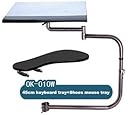
🪑 Level up your workspace—comfort meets convenience in one sleek mount!
The MagicHold Computer Keyboard Stand Laptop Mouse Mount is a versatile, ergonomic accessory that attaches to chair gas cylinders or round bars up to 1.96 inches thick. Made from durable aluminum, it supports laptops, tablets, keyboards, and mice, enabling a comfortable, space-saving workstation or gaming setup. Adjustable in length and angle, it helps reduce strain during long hours of work or play, making it ideal for professionals and gamers seeking a clutter-free, efficient environment.


| ASIN | B06Y5JMHTZ |
| Adjustable Length | Yes |
| Antenna Location | Gaming |
| Best Sellers Rank | #529 in Laptop Stands |
| Brand | MagicHold |
| Color | Silver |
| Compatible Devices | Tablets |
| Compatible Phone Models | Ipad |
| Customer Reviews | 3.8 out of 5 stars 519 Reviews |
| Enclosure Material | Aluminum |
| Fastening Type | Clip Holder |
| Form Factor | Laptop |
| Item Dimensions | 21 x 5 x 10 inches |
| Manufacturer | Magichold |
| Mfr Part Number | OK011B |
| Model Number | 4328599642 |
| Mounting Type | Chair Mount |
| Number of Items | 1 |
| Other Special Features of the Product | Ergonomic |
| Style Name | Detachable |
| Theme | Movie |
| UPC | 047393849687 |
V**L
Best for non desk users
OK, it’s going on 3 years since I’ve purchased this. I stand by it; I still absolutely love this. I’ve had to buy a new mouse pad and cut it to size, but I mean, 3 years, yeahhhh, it gets dirty. I would like the keyboard tray to have a better design attachment, but I just tied it with some string to make it tighter, given it was a little wobbly before. I do have to say I recommend it to everyone, but they either look at me crazy for not having a desk or they say it’s Neato. Oh, I also vinyl-coated the keyboard tray to match the countertop.
A**R
Exceeded expectations but expectations were not high
My initial expectations were low. Various reviews talked about cheap quality plastic, poor metal casting, and cheap looking metal fasteners. Needless to say, I walked through the installation gingerly fastening things together. I was trying to avoid over torquing any element. Instructions challenged my assumption that I knew English. I'll let you judge for yourself if it's just me (see pictures). I did not watch the youtube video(s). But I would say if I needed good instructions the physical instructions would have been a strain to understand. Thankfully the process was pretty self-explanatory for me. After slowly torquing each joint I was finally able to get the keyboard stand sitting in a comfortable position over my laptop. There is some slight bobbing while I type but it's tolerable. Unless you have really thin thighs you probably won't find much comfort in having the keyboard as low as I have it in the picture. Right now the keyboard arm is somewhat like a seat belt over my lap. That being said if you have a larger lap/larger thighs or are in a reclining chair like the one I'm showing this might not be as ergonomic as you desire. The mouse stand/pad/tray was a bit of a challenge to integrate with this chair ("VUYUYU Massage Video Gaming Recliner Chair"). The primary reason for that is the design of the arm rest does not leave much for you to secure around the arm rest with. The only option I saw was to drill into the armrest. Additionally, due to armrest design and not having the exact length of screw required, I had to saw off the end of 2 of the screws to get it secure correctly. Time will tell if this thing holds up. Since this is only day 1 for me I will have to follow up to provide updates on how the product handles normal use. So far I am pleasantly surprised that it's comfortable and nothing has broken so far (as a number of people have described in their reviews).
C**L
If you want a comfortable gaming experience, this is it.
First off: this thing is AMAZING. However, there are some caveats. Here we go... I'm using this with a Herman Miller Aeron. Your mounting experience could vary based on your chair, but should be generally similar. BIGGEST NEGATIVE: the mousepad. - flimsy, especially compared to how sturdy the keyboard tray is - relatively small - mounting bracket is too small for many armrests. I had to zip-tie it to mine. - not adjustable - mousepad can easily get pulled off, even by just brushing it with your elbow That being said, it still works, and in the end is super comfortable. I usually play with very high sensitivity anyways, so the size wasn't a problem. However, if you like a large mousepad, this won't be ideal. You may need to get used to higher sensitivity. Otherwise, the keyboard tray is SUPER sturdy. Installation is a bit of a pain, and the instructions are super vague, but an hour should have this thing set up. I'm typing this review on the keyboard tray right now. There's obviously some wobble, but it's surprisingly minimal considering this is a floating tray mounted the way it is. Overall, I would ABSOLUTELY recommend this. Surprised I don't see more people with something like this.
A**I
Flimsy and cheap
The only thing sturdy about this is the steel poles that attach to the chair. The keyboard tray is made of cheap plastic and the mouse tray is the same. The mouse pad isn't even attached to the tray! I'm seriously disappointed at the amount I paid for this and the quality of the product.
R**R
Love And Hate With This Product
Reviewing MagicHold item model 0K-010W. This is an interesting solution to the problem of having a keyboard and mouse at the fingertips while setting in one's office chair but not at a desk. However, there are some problems. The first issue in functionality is that the keyboard is too high. There are two way to adjust the support arms. The first is to swing the arm from top bend across the user's upper leg. This allows the tray support to center more to the chair, but then that arm touches the user's leg. The second is to swing that same arm parallel with the side of the seat, and then the top bar holds the tray off-center to the chair. This then forces one hand and arm to reach farther for the keyboard. The flaw is that the side support post is too short, and the tray-holder arm is too high. The easy solution would be to first make a side support tube taller. Second would be to make the tray-holding mechanism hold the tray from the front rather than the bottom. The user may wish for a keyboard more at lap height, with even a negative cant away from the user so that the fingers are pointed downward over the keys. Such a position is more ergonomic and relaxing. Another issue is that the clamp around the top of the lower tube is too small. An unscrewed bolt is extremely difficult to reinstall. Also, the knob that holds the nut on the other side of the bolt can split easily and is not really needed. The included wrench can directly hold the nut if it needs it. The arms and attachment to the seat support tube is good and stable enough for the use. The slide-up, spring-loaded palm rest is interesting, but not very useful. The mouse tray is good, but needs taller lips to keep the mouse from sliding off. When having to use the zip ties to hold it on the chair arms (which would likely be necessary on most available chairs), the user can feel the ties under the tray pad, but it is not a deal breaker. The flaw here was that the design failed to have a slot formed over the tray to capture the tie band as it crossed under the pad. I did like that the zip ties had release levers built in should reattachment be necessary. A tip I found is that of putting the long strips of Velcro on the keyboard and the round ones on the tray. Also, where there is a lever locking over a washer mechanism, the black curved part goes towards the lever, and the big flat metal goes away from it. UPDATE: As I use it more, I find that it does not feel solid under my palms and is difficult to position correctly.
A**A
Absolutely perfect solution to have your keyboard follow your chair rotation!
Exactly what I needed to work at my three monitor desk. I have two 24" monitors, landscape side by side, and another smaller one that sits off to the side on the desk that I use only occasionally. This setup was killing my neck when I would turn my head to look at one monitor while typing as I often bounce back and forth between both monitors. My chiro suggested I put a sticky note on the top of one of the larger monitors reminding me to 'Turn Your Chair', however, that wouldn't solve the issue of keyboard placement (which used to sit on an undermount keyboard tray). He also suggested I try a different monitor setup, such as stacking them landscape, which I did, but this wasn't working for me either as I would have to look up too far (also straining my neck). I looked into other possible solutions, but when you realize you need the keyboard to pivot along with the turning of the chair, a chair mounted keyboard stand is really the only solution. So, after doing some research, I took a chance and bought this keyboard and mouse tray, despite the up and down reviews. I installed on my desk chair in about 20 minutes total, and it was pretty easy (eliciting my husband to help with the screws didn't hurt either). Since I wanted the tray to move along with my chair rotation, I mounted it to the smaller tube. The height of the chair is where I want it, but if you move your seat up and down a lot, you'll probably have to mount on the larger, outer tube because you lose that functionality when mounting on the smaller tube. It's very sturdy, even when typing...no bouncing at all, and the mouse pad is quite comfortable to use. I have no trouble putting my feet up on the footrest of my chair without hitting the tray, but I could see this potentially being an issue for others. I can also move my chair close to the desk and allow the keyboard tray to fit under it. Very, very pleased with this purchase!! My neck and back are happy again.
M**.
Works, but not very sturdy
I'm trying to be more ergonomic and wanted a keyboard that would move with me between two large screens. In that regard, it does work, but the design makes it so that the keyboard is higher than it should be due to the connecting metal being under the keyboard tray, putting it higher above the thigh than it should be for proper ergonomics. The keyboard slides around on the very slick tray and the tray is flimsy enough that it will bend your your hands, causing the keyboard to rattle as it hits the uneven tray. As well, the whole structure moves around when you move the base of the chair, as it is connected there, so it's not each to move without reorienting the entire keyboard location. After a couple months of use, the tray now spins in a circle without any resistance and I can't seem to tighten anything to keep it stationary, or at least less mobile. It still works, but I'm starting to look for another solution to replace this with, as it's not working as ergonomically as I had hoped.
P**S
Love it, though hope it holds up!
This is exactly what I needed for my work style and desk setup. I was having horrible back and neck pain from straining due to leaning too far forward and also had wrist and arm pain from reaching for my mouse. There are a few things to be aware of though. I have a chair where the arms move up and down. If I didn't have this, I think I would find this to be really irritating to use because it would be hard to get in and out of the chair. You can obviously loosen the keyboard tray and move it anywhere and in any direction, but I would hate to have to loosen and tighten every time I had to get up. When you push back in a rolling chair, it often spins everything around, so it's hard to exit from the front rather than the side of the chair. Also, if you have a wired keyboard it's hard to back out without yanking the keyboard off. Another "hazard" to be aware of is the mouse. If you push a rolling chair back and the keyboard swivels on it's own, it has a tendency to push the mouse off of the armrest. I actually broke TWO mice the first week I had this until I got used to moving my mouse to my desk before standing up or before moving the chair in any way. The keyboard tray feels flimsy I don't really put all my weight on it, but it seems like it will hold up just while typing. I wish I could lean on it occasionally though but it's probably good I can't since it's better for posture to remain upright rather than leaned over. Overall, I recommend this to anyone who is needing the same type of set up as I do. It's the only thing like it on the market that I've seen, aside from the crazy chairs that cost $2k and up, so it's a great alternative for now. If anything more sturdy comes around, I'll likely switch to that but I'm super happy in the meantime!
ترست بايلوت
منذ شهر
منذ 4 أيام