We remain fully operational. Our teams are working around the clock to ensure your deliveries continue safely.

قم بتنزيل التطبيق


معلومات عنا
حقوق الطبع والنشر © 2024 Desertcart Holdings Limited
قم بتنزيل التطبيق

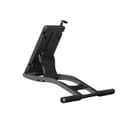
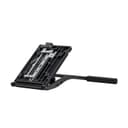
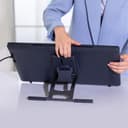
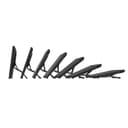

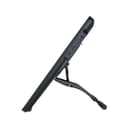
🎨 Elevate your art, not your pain — Stand tall with HUION ST100A!
The HUION ST100A is a versatile, ergonomic VESA mount stand designed for Kamvas pen displays and other 15.6"+ drawing monitors. It offers adjustable tilt angles from 20° to 80°, anti-slip mats for stability, and supports both 75mm and 100mm VESA mounting standards, enhancing comfort and productivity for professional digital artists.


| ASIN | B09C5YJFGS |
| Adjustable Length | Yes |
| Age Range Description | 13 years and above |
| Antenna Location | Tablet |
| Best Sellers Rank | #773 in Tablet Stands |
| Brand | HUION |
| Color | Black |
| Compatible Devices | Kamvas 20, 22, 22 Plus, 24, 24 Pro 24(4K), drawing monitors over 15.6 inches |
| Compatible Phone Models | Tablets |
| Customer Reviews | 4.7 out of 5 stars 137 Reviews |
| Enclosure Material | Plastic |
| Fastening Type | Clip Holder |
| Finish | Powder Coated |
| Form Factor | Tripod |
| Item Dimensions | 12.01 x 7.28 x 1.97 inches |
| Item Weight | 0.46 Kilograms |
| Manufacturer | Shenzhen Huion Animation Technology Co. Ltd. |
| Mfr Part Number | HUION US ST100A |
| Model Name | ST100A |
| Model Number | ST100A |
| Mounting Type | VESA Mount |
| Number of Items | 1 |
| Other Special Features of the Product | Adjustable, Ergonomic, Portable |
| Style Name | Ergonomic |
| Unit Count | 1.0 Count |
R**N
The Huion ST100A... This just works!!!
I've tried desk and wall-mounted monitor stands before finally buying the Huion ST100A stand. In the previous solutions, I always contended with wobble and shaking. With the Huion ST100A, it is different. It is sturdy and has no perceived wobble. I have a wide range of maneuverability. I can lay my display tablet nearly flat or have it eighty degrees. For the price, it has made an enormous difference in my drawing, my posture, and my frustration level. The only thing I don't like about it is that I have to pull the display tablet closer to me before I lower it into position and slide it back when done, nor rotate it from landscape to portrait orientation. But this is expected as it is a stand, not an arm. For anyone who wants a wide range of flexibility with their display tablet that the built-in legs of your device don't give you. If this stand fits your tablet, then I highly recommend it.
E**S
Functional mounting stand
Easily mounts. Sturdy. Fair price. Looks and functions exactly like the one that came with a 22" screen I'd bought. This was placed on a 24" and, other than being almost vertical when fully extended, it is very stable. This really should have been part of the screen as opposed to the flip out tabs.
J**Y
Solid
I'm trusting my $3000 Cintiq 22 Pro with this stand. Before I had it mounted on an XP-Pen stand and with the tablet locked at near-vertical drawing with moderate pressure would cause the display to slowly slide across the table. But no more! The rubber legs on the back of the ST100A are grippy enough to keep it in place while I work. The adjustment tab isn't as comfortable to use as the big paddle on the XP-Pen but it gets the job done and is almost impossible to trip by accident. It's also positioned well: I keep my pen holder mounted on the top-right of the Cintiq and the tab peeks out to the left where it's unobstructed. Most of the important bits are made of metal except the part that connects the legs to the VESA mounting body. I'm not sure why they did that but it seems sturdy enough. This is a good solution at a good price. If you try to spend more you'll be looking at ergotron arms (which are wobbly) or Wacom's ergo stands (which are outrageously priced, and allegedly still wobble). I'm glad I bought this so I can stop thinking about those options and get back to drawing.
P**O
Excellent.
Worked great with my xppen artist pro 19, be careful with the screws, the ones that come with the base are too long, and the ones that come with the pen display are too short, other than that, it works like a charm.
N**S
Works with the cintiq 24 pro (with VESA Adapter)
TL;DR: Great product that I highly recommend, but it has some minor issues. A heck of a lot cheaper than the borderline criminal prices of Wacom's stands. You do need the VESA mount adapter, but it was simple and straight forward to setup. It's not as fancy as the officially supported stands, and it does have some short comings, but it seems to work good enough. One of the issues I've run into is the stability when it's flat. The mount has a tendency to rock a bit when it's flat due to the size of the tablet. The good news, though, is that you don't want it flat: you want the tablet angled up and that's where this stand shines. When propped up, the bottom of the tablet helps support the stand. This makes it it feel very stable and it doesn't slide around easily. However, one annoying problems is that it does require a considerable reach around to grab the adjustment mechanism. And because of the weight of the tablet, it's not as smooth as one would hope. To get it to adjust smoothly, you need to reduce the weight on the stand as you adjust, which is a bit of awkward when maneuvering a 16lb slab of expensive tech. But if you're like me, you find an angle that works most of the time and leave it. Another issue I have been running into is it does make it a bit more awkward to reach the bottom of the screen when drawing. Because the bottom of the screen is used to keep it stable, it does reduce the available drawing space a bit, but this can be overcome easily by moving the digital canvas or sliding it closer to the edge of the table (spiking my anxiety about it potentially falling off). The last of my concerns I had was weight compatibility. I didn't see anything which listed the supported weight of the stand. The cintiq weighs ~2lbs ( roughly 900g) more than the kamvas pro 24, so I was worried it might be a bit too beefy. But everything seems to be holding up just fine. After setting it up and using it once, I immediately noticed a difference in back pain relief due to a more proper posture. The tablet went from it's default 20° angle with the built in stand to around a 70° angle and it has made a world of difference. I cannot express how important I this change has been. Please, do yourself a favor and get something, it doesn't have to be this (even though I strongly endorse it), but just something to avoid that shrimp posture. You will thank yourself. Overall, I'm very satisfied with this product. The stand does what it's supposed to extremely well. It does have it's issues, but those issues can be easily overcome with minor adjustments or just a bit of work. Well worth the price. By going with the VESA mount adapter and this stand, I saved over $220.
K**H
Great Stand.
I love Huion. The stand is great. It does its job. Also, I like the darker metal color. These things use to be silver. I’m just REALLY annoyed that with the Huion Kamvas 19 pro it didn’t already come with this stand. It’s such an obvious money grab. You give ALL your other tablets a proper stand - but my pro, touch screen tablet doesn’t get one? Just thought Huion had more respect to their customers.
M**.
For more then just drawing tablets
This is a solid stand. I have been using mine for the better part of a year or so now and am quite happy with it. Whole thing is made out of metal and doesn't move around. I currently am using mine to hold my NEC monitor in place and its fits perfectly. Since this uses a common VESA size, any monitor that uses that size will work with this stand. A very cost effective stand that allows for a good range of tilt.
M**N
Great
Got it for use with the Huion Kamvas Pro 19. Simple, easy to install and use, does the job perfectly for my set up. My only complaint is that it makes the tablet somewhat less portable. On the other hand, it's unlikely I'll ever take it anywhere, so that's hypothetical in my case.
ترست بايلوت
منذ 3 أيام
منذ 3 أسابيع