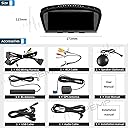
🚗 Upgrade your BMW cockpit with smart tech that drives your digital lifestyle!
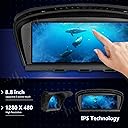
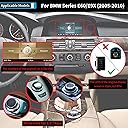
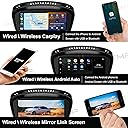
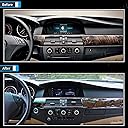
The PEMP 8.8-inch IPS Android 10 head unit is a custom-fit upgrade for BMW E60/E90 CCC models (2005-2010), featuring a Qualcomm Snapdragon 625 8-core processor, 4GB RAM, and 64GB storage. It offers a sharp 1280x480 capacitive touchscreen, wireless CarPlay, wired Android Auto, dual-band WiFi, 4G LTE support, and integrated GPS navigation. Designed for seamless integration with original AUX audio, it transforms your driving experience with modern connectivity and multimedia capabilities.
| ASIN | B08V8T22KV |
| Are Batteries Included? | No |
| Audio Output Mode | Stereo |
| Box Contents | Power cable,user manual |
| Brand | PEMP |
| Brand Name | PEMP |
| Compatible Devices | Speaker |
| Compatible with Vehicle Type | Car |
| Connectivity Protocol | Wi-Fi |
| Connectivity technology | Wi-Fi |
| Control Method | Touch |
| Customer Reviews | 4.0 out of 5 stars 30 Reviews |
| Display Type | LCD |
| Human Interface Types | Touchscreen |
| Item Weight | 2 Kilograms |
| Manufacturer | ALEX |
| Map Coverage Type | North America |
| Memory Storage Capacity | 64 GB |
| Model Name | 8.8 inch IPS Screen Android 10 |
| Model Year | 2005 |
| Model name | 8.8 inch IPS Screen Android 10 |
| Mounting Type | Dashboard Mount |
| Network Connectivity Technology | Wi-Fi |
| Operating Systems | Android, Android 10 |
| Product Features | Built In Wi Fi, RCA, Rear |
| Product Warranty | Manufacturer warranty for 90 days from date of purchase |
| Resolution | 1280 x 480 |
| Screen Size | 8.8 Inches |
| Screen size | 8.8 Inches |
| Special feature | Built In Wi Fi, RCA , Rear |
| Supported Satellite Navigation System | GPS |
| Touch Screen Type | Capacitive |
| Vehicle service type | Car |
S**N
Great product but Bluetooth hardly connects
Beautiful graphics. Too much wires. Very hard to get head unit back in place. My I drive for the ccc does not work at all. I have been able to connect via Bluetooth 3 times in the 2 months I have had it. All 3 times it disconnected and would not reconnect to Bluetooth. No manual for apps or extra accessories. The instructions suck. Good product but can’t work the features without a manual. And of course I would like to know why although it has a wire that is identified for the I drive, it does not say or show where the wire is to be connected too. It’s been a very aggravating process
D**L
The perfect upgrade for BMW 2007 650i
I have a 2007 BMW 650i and I love this screen. It Integrates perfectly with my iDrive controller and looks great. You can still access the original Factory settings menu, but once you have everything setup there is no need to. The first mistake I made was thinking I didn't need to install the GPS, 4G, and USB cables. I ended up reopening everything and running them. Trust me just do it. There is a direct path from the right side behind the screen to below behind the glove box. You just need to remove the cover under the glove box, then use a coat hanger or something similar to fish it down. Then tape each cable to the coat hanger and pull them up one by one. The only UI (User Interface) I was able to get a pretty good use of my iDrive controller, was UI_EVO_ID5. I highly recommend this UI. Follow the pics I uploaded to get to the factory settings. When you select UI_EVO_5, wait 10 seconds, then power down and power back up. If your having trouble connecting bluetooth, follow the pics, and make sure BT is selected and Android Bluetooth is selected. Then the hard part: You have to go into the Android settings, all apps, selected additional apps, find BT, Force it closed, then Open it. You will then be able to find GOCSDK on your phone. When you select to connect, you phone may have a random number for the code, but the device will have "0000", just connect it will work. Now you can push your iDrive Menu button to go back to the main screen and look for Phone Connect. To go through the main menu of UI5 down and up on iDrive goes left to right, hopefully someone will change this to rotate, it would be way more comfortable. Left and right on iDrive selects between multiple screens left and right. Of course push down is select. There is always the option of using the touch screen, but I DO NOT recommend using it while driving, I have to get one of my very expensive rims repaired now, lol.
K**N
Top
Lohnt sich , ich sag nur längere Fahrten angenehm dank Youtube und Co.
E**L
Great CCC replacement for my 2008 BMW 528i
I love this unit, it’s a game changer, especially with the wireless CarPlay. The touch screen is great and I paired it up with their backup camera and it works flawlessly, along with great resolution. I was concerned the handle opener wasn’t going to work well based on reviews, but mine works great. Per one of the reviews I read, it worked without connecting the aux cable, but connected it anyways just in case. The only issue I have is I don’t know how to program it to startup with CarPlay so if I turn off my car I don’t need to launch the zlink app again. I wrote the company to see what they say. 100% recommended over the old unit and the old CCC controls still work without issues.
A**R
Good but not great
The software does not connect to my phone correctly. It does something different every time. But once it is up and running it's nice to have the Android auto in an older car
ترست بايلوت
منذ شهرين
منذ أسبوعين