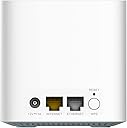
Update 2: I recently tried to change the extender settings to a different router. It was a painful experience as when it had issues with connection I could not login to it to make configuration changes again. The webpage came up, but it would not take the configured password nor the default password. I had to do a factory reset and reconfigure them again. A very frustration experience, but not the only current dlink AX product that is now having password configuration problems that I have used. I am lowering my rating to two stars as noone should have to suffer through so many dumb configuration issues. I am looking for a replacement for home since they also do not respond to any of my problem reports or even acknowledge the submissions for any of these products. Update: I have now installed three sets of these (2@2pks & 1@3pk). They are still difficult to setup, as the app instructions are wrong and no matter since the final result is not manageable. I installed all of these as mesh extenders, with the last 3pk replacing a much more expensive ORBI tri-band system. These support the "EasyMesh" standard by the WiFi Alliance... which allows you to use products from different vendors together. So far, most DLink devices, a few Netgear Nighthawk mesh systems, and several Linksys devices support EasyMesh and those are all that I can find. It is impressive that the DLink M15 version can use your existing router signal and create a mesh without issues... though with some caveats. As, a router it is best to plug your internet into the master device and then use a computer web browser to update the settings for the router. For each satellite or "extender", it is best to disable your computer's WiFi, plug the local network port into your computer, determine the device IP address from "ipconfig /all", and log into it with a browser to configure it (usually 192.168.0.50). After you are attached to your network, you can place the device and move onto the next node. Notes: when configuring with a non-DLink AX router, be sure to pick the 5G band to extend and to rename the 5G WiFi SSID to something unique for just these devices. You can turn off smart connect and rename the 2.4G WiFi SSID to another unique name if your devices have issues. While I have connected them to several brands of routers and verified the firmware is creating some semblance of a mesh as expected, this device does still have some limitations: there is no supported guest network which they should hopefully still add; you cannot control any of the bands on the non-extended channels (so your secondary nodes may use a different channel on each extender for non-extended channels), hopefully this will be added as well; there is no option to control all of the DLink devices from a single node (unless you use a dlink mesh router in router mode), you must login to each and make changes (even on the app); and there are no really advanced controls. For all of these limitations, it still works better for my network than the ORBI triband system that I had previously... it is just much more difficult to setup. I have recently been able to add all of the extender nodes to the app just by discovering them, clicking on them, and logging into them each individually when on the same local network. This does allow me to see the status of each remotely in the app, but it does not allow full access to make significant changes even when connected to the local network (and it got worse with later updates). It allows you to view hardware and firmware details, IP addresses, timezone, associated network clients, to change device passwords, status LED power, flash the status LED, and to restart the device. If you have a DLink R15 router, another one with the Eagle AI, or use one of these as your main router, you will get more features and reports from it when used in the app. While I am happy with these, they are comparatively inexpensive, they have a web interface, and they work for my purpose, I still cannot increase the three star rating as they are difficult for most people to setup, have numerous limitations, and a poor app. If they fixed the setup issues in the app, they would have a winning system that could outperform many of the other mesh products at a fraction of the cost for most typical broadband connections. --- I ordered this to extend the WiFi signal in an old house with lots of sturdy walls. After lots of effort, it works at providing a signal as well as overpowering the neighborhood signals in the unit. Luckily, it has a web interface as well as a phone app, or I would never have gotten it to work even though the router that it is paired to is the same series as the mesh and is recommended. I already had the app installed, and it works properly with the initial router. Upon trying to add the new the devices, it asked me to replace my router with the master unit. This caused the phone app to crash later n the process... and I tried it again with the same result. Next, I tried to install it as the primary router using the app again... and again it crashed. I tried again... another crash. I finally gave up on the app and tried webpage login... from here I had no issues setting them up, though I had to provide all of the details for the first one... and then again separately to setup the second one. This left them with no reporting nor control options from the app, and they cannot be connected to the DLINK cloud as far as I can find. While this is not a big deal, it is very annoying as they seem to think it is a feature... and it is a feature that I cannot access now. The devices came in a small DLINK box which Amazon just put a sticker on, so you need to watch your delivery or it may disappear. They are small and light... but they seem to function well as mesh extenders. While the network connection to which they are attached is maxxed at about 100Mbps, they are able to help maximize the connection both by increasing the number of supported network devices, as well as increasing the range. Though they are only dual band, we are running them using the 5Ghz band as backhaul... and naming the 2.4Ghz channel the same throughout the house. The latency, speed, and coverage are greatly improved from the single AX1500 router that was initially installed alone. Each provides an internet port (in case you want to use each as a router for different locations), as well as a LAN port (which you can expand with a cheap switch) for physical ethernet connections to the units. While I think that they are a good value and relatively inexpensive for a dual channel AX router, they would be difficult if not impossible for a typical user to install due to the above issues with the Android phone app. If you are a techie these may be a four star purchase for their value, but I have to rate these three stars at a maximum for everyone without a techie to support them. I would increase this if they could fix the app... but I am running it with the R15 AX1500 router without issue on Moto Android 11, so this is definitely their issue. As always, your mileage and preferences may vary...