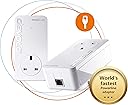
⚡ Power your home network like a pro—fast, stable, and future-ready!
The devolo Magic 2-2400 LAN Powerline Starter Kit delivers ultra-fast internet speeds up to 2400 Mbps using advanced G.hn technology over your existing electrical wiring. Featuring a gigabit LAN port and compatibility with the devolo Magic series, it ensures stable, low-latency connections perfect for 4K/8K streaming, online gaming, and seamless home working. The kit includes two adapters and LAN cables for immediate setup, making it an ideal solution to extend high-speed internet throughout your home without new cabling.
| Brand | devolo |
| Product Dimensions | 4.2 x 6.6 x 13 cm; 529.8 g |
| Item model number | 8262 |
| Manufacturer | Devolo |
| Color | White |
| Are Batteries Included | No |
| Item Weight | 530 g |
F**S
Devolo claims "up to 1000Mbps LAN speed". I've tested multiple combinations of power sockets across rooms, real world speeds I got: - 35 Mbps - 58 Mbps - 98 Mbps - 115 Mbps - 237 Mbps - 289 Mbps Even when connecting both devices at neighbour outlets, the "best" it can give is ~500Mbps. This is at best, false advertisement, at worst, malice. If they were upfront saying "real life speeds between 35-250Mpbs", I'd never have bought it. Glad to have used Amazon, returning it.
I**S
Great item. Using for both Powerline and Wifi in a rental. Great coverage with the Wifi Mesh 2. Allows for a second SSID for guest IOT stuff. It also supports WPA3 as well as WPA2 etc and 2.5/5ghz Wifi. There is also support for 802.11r 'Fast Roaming' which works fine. It also has parental controls (not used) and wifi schedules (not used), along with some basic neighbor detection logging. To configure, I did not use the app as its pretty awful on Android and Windows. You can use http/https to access the device when it has an address. You can use HTTPS but it does not force redirect. Some settings are synced between devices others are not. I'd really like to find the API as think that would help. Support appears to come from Germany and is not so good. I had an issue where the first adaptor had updated to the latest firmware and the other two would not (was DNS related) The product seems to be called Mesh Wifi 2 sometimes and the product support page as little or no firmware downloads Easy to deploy, stable and has pretty decent speeds. I'd like to see a CLI, logging (even syslog) and additional SSID support, even if it were multiple guests.
J**N
So nearly decade later and AV2 Homeplug Powerline has moved over for the ITU G.hn standard. I decided to buy the wired version (too many reviews of pain with the WiFi) and give them a go. They worked out of the box, and I had no issues during set-up. They did require a firmware update, but that was about it. To be clear, I bought a Devolo Magic2 LAN Triple. This contains ONE triple port, and ONE single port adapter. I think the box art on this is very deceptive. The triple port adapter is slightly bigger than the single port, both are bigger than AV2 and both run much hotter - for better or worse. Also, I ordered an Amazon Warehouse deal, and the first one Amazon sent didn't actually have any triple port Magic2 in the box (just two single port ones) , so I had to return and re-order. I've discovered they're happy to run in parallel to AV2 adapters without any noticeable loss, and bizarrely the Devolo Cockpit software even spots AV2 and Magic2 adapters. There's also web-page access to the adapters via their ip address, and the ability a set password if you don't trust people on your network. The iPhone Home Network app is okay - but it doesn't display any link speed information despite telling you it will. In tests at range I discovered a few surprises. AV2 is in the same location for reference, tests using iperf3: - TP-Link AV2 600 Two-Port ~16Mb/s (appears to split bandwidth across both ports rather than share it) - TP-Link AV2 600 Single-Port ~32Mb/s - Magic2 Single and Triple Port ~80Mb/s If range is reduced, speeds jump quite quickly up to 200Mb/s and then on to about 350Mb/s if distances are close. As a rule, expect 150 to 200Mb/s in a new-build four bedroom, but be prepared for slower. You'll still beat an AV2, but it might only be on range, or a factor of two. And in some cases, I suspect AV2 1300 will beat the Magic2, but not necessarily if you have older AV2 kit mixed with new stuff, which is why I was testing the Magic2. Will I keep them? Well that depends on whether they're stable. They solved my problem and increased my setup by speeds by about 7 or 8 times. I'm concerned about the temperature they run at (50C on the back, 35C on the front, 0.3A@240V = 7W), but they do have a three year warranty in case they melt down though. Note - if you're looking for adding WiFi Access Points to parts of your house, I wouldn't recommend the Magic2, simply because you'll be crippling any broadband gains you may be looking for, go for WiFi Mesh and Access Points with a dedicated third back-channel, or run Cat6 cabling (budget vs effort). The Magic2 is about easy of use, and getting the best out of something while doing very little. It does achieve this very well. Better than AV2 600 for sure, but it's not a "magic" bullet (sorry - groan now).
M**S
I have had previous generations of Devolo tech so this was a next step into full mesh home setup. They’ve made the setup of the products and network really simple and effective through the Devolo Home Network app and in 10 minutes, I had both a three and a two unit set paired up to be a home network of five of these really easily. (Devolo setup used to be a nightmare of trial and error, so they’ve really sorted this out). What’s important to know is how Devolo achieves its ‘mesh network’ and that’s through powerline connection and wifi hotspot units that broadcast the powerline connection and mesh it together that way. The unit that connects to the router with ethernet sends the powerline connection to all other mesh units and these each create their own meshed wifi zones. Lots of other companies use wifi rebroadcast to create a mesh network. There are pros and cons to both approaches but I expect the Devolo mesh network to be pretty stable (a speed test on each unit is reporting maximum up and down mbps). From experience with older Devolo units, the odd power demand from an appliance (a boiler starting, for example) can cause brief outage; but only for a second or two). Watching which unit my phone is connecting to as I walk around the house (using the Devolo app) shows it switching efficiently to the nearest unit without dropout of connectivity. Where the system falls short for me is that you have to have a house and grounds where everything is on the same electrical circuit. I needed one of the units to give a wifi mesh zons in our garage (gym space) but because the garage is on its own electrical circuit, the powerline doesn’t work). I had (mistakenly) thought that Devolo Mesh used powerline and/or wifi rebroadcast to give a double layer of network connectivity and so assumed (though to assume makes an ass out of ‘u’ and ‘me!) it would be possible to disable powerline connection to just have that garage unit take a wifi rebroadcast. No such luck - this isn’t possible and so is something to be aware of if having multiple electric circuits in your home/grounds applies to you. My own solution in the end was to add a TP-Link Mesh Extender in the garage gym that is now successfully rebroadcasting wifi from the nearest Devolo unit in the house. Not perfect but working well. My only real negative in the whole Devolo setup was the brief call to Devolo’s customer support number. I explained my want with the garage gym and asked if it were possible to disable the powerline connection on the garage unit to just achieve wifi rebroadcast connection. A German company has a German call centre which is expected and fine but the person didn’t seem to understand the nuance of my query and sort of mansplained me saying ‘powerline is how mesh networks work’. In truth, that’s how Devolo’s mesh networks work and mine works very well thus far but it’s not how all mesh networks work so I felt a bit patronised and ‘told’ rather than helped. On balance though, so far this is a solid and efficient setup that was easy to get going with. (Just note the point about outbuildings and potential of separate circuits).
O**E
Bought this to replace a TP Link system where it became impossible to link the 3 units so that they showed as one system throughout the house. The Devolo (2 units plus the main wall/pc unit) set up within minutes and the mesh system within the 3 mins suggested. The 'Cockpit' software allows you to manage the system and there's both a smartphone and a PC verison (the PC version is better). Check the clearance you have if fitting behind a desk, because the system is the size of a Volvo estate! The only downside is that the 'brick' comes up above the mains socket (German plugs can be fitted either way, but Devolo haven't changed the plug so that the 'brick' drops down from the socket, but that's a v minor issue. The additional 3rd unit was quickly incorporated into the mesh network as easily as the kit did. Good wifi throughout the house and having set up as a Mesh system, our phones automatically move to the strongest signal as we walk aimlessly around the property. Netflix and YouTube stream really well. Not the cheapest, but excellent kit and an on-line review said that it was the best in the UK for 2021.
ترست بايلوت
منذ يومين
منذ شهر