







KVM SWITCH
Product ID: 273580594
Details
- BrandABLEWE
- Connector typehdmi usb
- Contact typeNormally Open
- Current rating1 Amps
- Item dimensions L x W x H20 x 12 x 3
- MaterialPolycarbonate
📺4K@60Hz UHD support
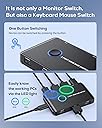
🔄one-button switch
🖥️2-computer control
🔀 Switch Smarter, Work Faster — Own Your Dual-Screen Domain!
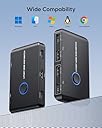
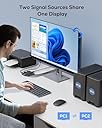
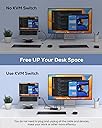
The ABLEWE 2-Port HDMI KVM Switch empowers professionals to effortlessly toggle between two computers using a single keyboard, mouse, and monitor. Supporting ultra HD 4K@60Hz resolution, it delivers crisp visuals ideal for multitasking and multimedia. With broad OS compatibility and plug-and-play convenience, it’s designed for seamless integration in offices, gaming setups, and creative studios. LED indicators provide clear active device status, while included cables ensure a ready-to-go experience. Elevate your workspace efficiency with this compact, driver-free switch.


| ASIN | B08NVKHRRT |
| Batteries Required? | No |
| Batteries included? | No |
| Best Sellers Rank | 102,379 in Computers & Accessories ( See Top 100 in Computers & Accessories ) 333 in KVM Switches |
| Colour | Black |
| Customer Reviews | 3.6 3.6 out of 5 stars (5,810) |
| Date First Available | 26 Nov. 2020 |
| Item Package Quantity | 1 |
| Item Weight | 272 g |
| Item model number | KVM-Switches |
| Manufacturer | ABLEWE |
| Part number | A-KVM-HDMI |
| Product Dimensions | 20 x 12 x 3 cm; 272 g |
| Switch Type | 2-way |
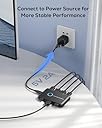
| Wattage | 480 watts |
E**V
Connected to a hub - no longer works
I connected my powered hub to it plus my monitor, then attached it to my PC and to my Laptop as green and blue. I switched a few times, soon after the device failed and now it will no longer switch the HDMI, only the USB gets switched. So it's pretty much broken. I opened it up - there is NO thermal pads or anything to handle thermal stress, hence I believe it's likely that one of the controllers inside burnt. I can't return it sadly because I tested it out too late. I must say tho - The device does say KEYBOARD and MOUSE, not really HUB, so you could say I didn't follow instructions, but there was no reason for me to believe it wouldn't handle a hub. UPDATE: I finished it out of the trash for another try as I didn't want to give up. After many more attempts it started to work and it works flawlessly now. Idk why it didn't work before. My head hurts and I'm tired but it I setup everything and it works great. This time I didn't wire my powered hub to it, as I assumed it may have damaged it.
A**R
Small and effective
Using this KVM so I can switch easily between my desktop and laptop while using the same monitor, keyboard and mouse. This is a small unit (approx 10cm x 6cm x 1cm) with a button on top to switch between devices (lights up either green or blue so you can tell which one you are using). As usual with KVMs the cable connections are a bit untidy (3 on the front, 4 on the back) but it can be tucked away in a corner. Only gripe thus far is that the mouse connection can be a bit temperamental. Works perfectly most of the time, but occasionally won't recognise the mouse at boot-up, requiring the mouse cable to be unplugged and reinserted. Similar grip with a wireless mouse - mostly great, but occasionally disappears. Overall, pretty reasonable for the price and size.
D**D
Not A Successful Product For Me -- Video Signal Unrecognised By My Monitor
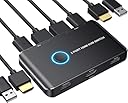
I was a little surprised at the number of positive reviews for this product. Perhaps I have been unlucky in my own case. Here is my (regrettably negative) experience with this product. =========================================== Usage Parameters: I needed a simple KVM switch to allow me to switch quickly between my personal desktop computer, and my work laptop, while using the *same* keyboard, mouse and monitor for each. Hypothetically, this product *should* have allowed me to do that. =========================================== Positives The unit is very simple and intuitive in its design. =========================================== Negatives (1) Most importantly, the unit I received did *not* work properly for me. USB connectivity and signal over both my systems was successful. *However*, video output, to my monitor, was unsuccessful over both systems. My monitor would not recognise a video signal from the KVM switch unit. (2) Build quality, as I expected it to be, was cheap, light-weight, and plasticky. This is clearly a cheap unit, built to a price-point. It's not the *worst* build quality on the market, but there are better built units out there. In particular, there are many other KVMs switches sold on Amazon with better build quality, at a similar price. Many of them have reasonably good quality metal housings for instance. (3) Port placement results in a messy overall solution on your desk. Ports are placed on the front *and* rear, resulting in messy cable routing. Admittedly, this is a problem with a number of KVMs on the market. =========================================== Neutral Observations (1) The unit is *unpowered*, if that is important to you. (Personally, I don't mind using either powered or unpowered KVM switches, as long as they are reliable and work properly.) (2) Bundled cables are cheap and generic. This is the case for all KVM switches on the market. This one is no different. Usually, I use the provided USB cables, but use my own (separately purchased) HDMI cables. (3) As the pictures indicate, the bundled USB-cables (and connectors on the unit) are USB-A to USB-A. (4) Some reviewers have asked for a better manual/documentation. (Personally, I don't think you need an extensive manual for a simple KVM switch like this.) =========================================== What I Did In The End, Plus Some General Commentary on KVM Switch Units Sadly, this product was unsuccessful for me. In the end, I switched to an alternative KVM switch product, which worked successfully. I won't advertise the other unit, as there are many different -- and perfectly feasible looking units -- on Amazon, from which you can take your pick. Overall, KVM switches can certainly be a mixed-bag in terms of product quality and reliability. In my own case, I had to buy a small sample of units, then work my way through them until one of them worked reliably. Also, some have failed after about 1 year, and needed replaced. At time of writing, the KVM switch market is a strange one.
C**K
Works perfectly with DP to HDMI adaptors for 2 computers to 1 monitor.
So this item saved me a lot of trouble. I have 2 Linux computers, and 1 monitor, I only have Display ports out on the 2 computers, monitor has no Display ports. So the answer was get one of these KVM switches, no other HDMI switches worked for me, they didn't have enough power to switch the 2 computers even with 5v mains! So I got 2x DP male to HDMI female adaptors, around £6 each, and connected it up and prayed, it worked straight away with a good blue light on the select button for 1 computer, and a green light for the second computer. Due to the fact that the item comes with 2x USB cables, this gave the power to switch the computers. The only thing that was not good is that the item arrived in it's display box with the usual sticky Address label firmly fixed, good job I didn't need to send it back for a refund! Also on the back of the box was another part sticky Address label showing some Reverend's name in Newton Abbot! To be fair the contents showed no sign of being used though. So a brilliant simple item that actually works, all connected in under 5 mins, you cannot go wrong if you have similar set up to mine, it will of course do the same thing on other O/S
C**N
Muy sencillo de instalar y funciona perfectamente. Ningún fallo al detectar los dispositivos. Yo lo he comprado para poder ampliar la pantallas de mi portátil con el monitor sin tener que desmontar cableado. Fácil de usar y ágil para identificar que equipo estás usando gracias al color de la luz. Además el fabricante te da 3 años de garantía.
R**Y
My Setup Two laptops each with a full-size HDMI port Logitech wireless mouse Steelseries USB keyboard 27" Samsung 4K monitor (shared by KVM) 24" Dell 1080P monitor (dedicated--not shared by KVM) The Dell monitor has two USB ports. So, I plugged the two cables from the Steelseries USB keyboard into it. Then, I ran the USB cable from the monitor to the KVM USB keyboard port. I plugged the small Logitech wireless mouse transmitter into the KVM USB mouse port. Finally, I ran the HDMI and USB cables for PC1 and PC2 to the two laptops. Question Why not buy a KVM that supports two monitors to two computers? I didn't want to spend that much. My second laptop doesn't support two monitors without additional hardware First Impressions The KVM does not take up much desk space. I like that the light in the button changes color depending on which PC I have active--green for one and blue for two. You must use the button to switch between PCs--it doesn't have any other method for switching. I knew this when I purchased it. If you want a KVM with a keyboard shortcut, you'll have to pay a little more to get it. The Ablewe Two Port HDMI KVM Switch does not have any cable management or mounting capabilities--it's designed to reside on your desk. You could probably stick some double-sided tape on it (or use super glue) to mount it on another surface. I have not noticed any heat build-up on the KVM I purchased. So, it's probably safe to use a DIY mounting mechanism (obviously, you do so at your own risk). I don't mind the minimal desk space it takes. When switching from PC1 to PC2 (or PC2 to PC1) it takes about 3 - 5 seconds for it to complete the switch. Not a deal breaker for me--especially at this price point. It does have one annoyance, however (on Windows at least). All the applications on the shared monitor (the 27" Samsung) for PC1 (which does support dual-monitors) move to the Dell (dedicated to PC1) monitor. Based on my previous experience with KVM switches, I knew this might happen. I don't know of any consumer-grade (less than $500) KVMs that would maintain an "active" monitor signal to the inactive PC and prevent this annoyance. Question Does the KVM still work if you power off one of the two computers? Yes. It does. Verdict 5/5 - If you need an inexpensive 2-port HDMI KVM, buy it!
V**I
sodisfatto facile da montare lo uso per due pc desktop da un pc all'atro il cambio e veloce per ora non mi ha dato nesun problema
L**.
No podría estar más contento!! En dos computadoras puedo compartir un mismo monitor y los periféricos para cambiar de una a otra cuando yo lo requiera lo uso para trabajar en la personal y en la laboral prácticamente al mismo tiempo. Es muy efectivo y es económico cualquier persona estaría satisfecho con este producto
A**N
Idéal pour switcher de mon ordinateur privé à professionnel : 1 écran externe et un clavier/souris externe. Juste parfait !
Trustpilot
1 month ago
1 month ago