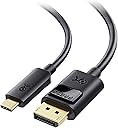
🚀 Elevate Your Display Game with Future-Ready 8K Clarity!
The Cable Matters USB C to DisplayPort 1.4 Cable (6 ft) delivers ultra-high-definition video output up to 8K@60Hz and 4K@240Hz, compatible with USB-C and Thunderbolt 4/5 devices. Featuring locking DisplayPort connectors for secure connections, it supports advanced audio, multi-monitor daisy-chaining, and is built for durability—perfect for professionals and gamers demanding flawless, high-performance visuals.


| ASIN | B01J6DT070 |
| Best Sellers Rank | #15,931 in Computers ( See Top 100 in Computers ) #17 in Thunderbolt Cables |
| Brand Name | Cable Matters |
| Cable Type | USB-C, Displayport |
| Color | Black |
| Compatible Devices | Devices with USB-C port and DisplayPort port, such as laptops, monitors, and possibly some docker stations |
| Compatible Phone Models | Iphone |
| Connectivity Technology | USB |
| Connector Gender | Male-to-Male |
| Connector Type | Usb Type C, Displayport |
| Customer Package Type | FFP |
| Customer Reviews | 4.6 4.6 out of 5 stars (4,654) |
| Data Transfer Rate | 1.5 Gigabits Per Second |
| Ethernet Cable Category | Cat 5 |
| Frequency | 60 Hz |
| Global Trade Identification Number | 00682017352923 |
| Indoor Outdoor Usage | Indoor |
| Item Shape | Round |
| Item Weight | 0.1 Pounds |
| Manufacturer | Cable Matters |
| Model | 201036-BLK-1.8m |
| Model Name | USB-C to DisplayPort Cable |
| Number of Items | 1 |
| Number of Pins | 44 |
| Other Special Features of the Product | Data Transfer, High Speed |
| Outer Material | Rubber or Plastic |
| Recommended Uses For Product | Connecting computers to monitors or projectors, high-resolution video output, audio output, daisy-chaining multiple monitors |
| Specification Met | Industry Standards |
| UPC | 682017352923 |
| Unit Count | 6 Meters |
| Wattage | 20 watts |
D**O
Great cable
Overall, it's a great cable. Thus, white connecting from RTX 4080 to LG Ultrafine 5k monitor, I got only 4k. So I have to return. But the quality is great!
A**R
"Flawless 5K Clarity: The Cable Matters USB C to DisplayPort 1.4 Cable delivered beyond my expectations. Crystal-clear 5K resolution with vibrant colors makes every viewing experience breathtaking." "Seamless Connection: This cable is a true plug-and-play marvel. Instant and steady connectivity between my USB C device and DisplayPort monitor, no hiccups whatsoever." "Robust Build: The Cable Matters cable boasts durability. Reinforced connectors and sturdy construction reassure me of its long-term reliability." "Versatility at Its Best: With support for audio and video, this cable is a versatile powerhouse. Whether for work presentations or gaming, it handles every task impeccably." "Future-Proof Investment: With DisplayPort 1.4 capabilities, I'm ready for the future of high-res content. This cable ensures I stay ahead in the tech game."
N**0
Service client particulièrement réactif et produit d’une qualité exemplaire. Une recommandation sans réserve.
J**N
Works like a charm!
V**R
Cabo funciona perfeitamente.
P**O
UPDATED REVIEW Cable Matters sent me the HDMI version of this cable to try out. I am using it with my home monitor an 4k LG - so far so good with no connection issues and I am getting the same quality picture - although a bit more deep color using the default setting for HDMI2 port compared to the on the display port port. But it can be adjusted. I am now using the CM display port cable at work - with another LG 4k monitor - with no issues there as well. It connects each time. ORIGINAL REVIEW This is just a PSA. Connecting to an LG monitor and Macbook usb-c this cable sometimes will not show anything on the external monitor since LG does not recommend using a cable that converts one format to another. In this case LG only wants you to connect display port to display port. Otherwise they cannot guarantee that it will always work. I dont know if this is an issue with this particular cable or all display port to usbc cable, but most likely it is since I have the same setup at work (albeit older model LG, but same specs) and this issue happens with a different brand cable. The issue here I think is that the OS gets confused as to what's connected to the computer so the usbc port is displaying somewhere in a parallel monitor universe and something within the config needs to be reset. This happens when you wake up your computer from sleep or switching from one monitor to the next. At work, we constantly connect and disconnect monitors - when going to conference rooms and back to our desks. So this is really a setup that has to work 99.999% of the time. Otherwise it gets frustrating having to restart your computer. Your monitor is fine - its not broken. When connecting the LG Monitor > HDMI > Apple HDMI/usbc adapter > Macbook during the issue you will get a green screen with a fat cursor as pictured above. My coworker experiences this issue as well and he only uses the HDMI with adapter setup. So like I said its a PSA, converting from one connection type to another is not recommended.
ترست بايلوت
منذ 5 أيام
منذ 3 أسابيع