

Desert Online General Trading LLC
Warehouse # 7, 4th Street, Umm Ramool, Dubai, 30183, Dubai
Desert Online General Trading LLC
Warehouse # 7, 4th Street, Umm Ramool, Dubai, 30183, Dubai



❄️ Stay cool, stay ahead — MasterAir Pro 4 keeps your rig frosty and your workflow flawless.
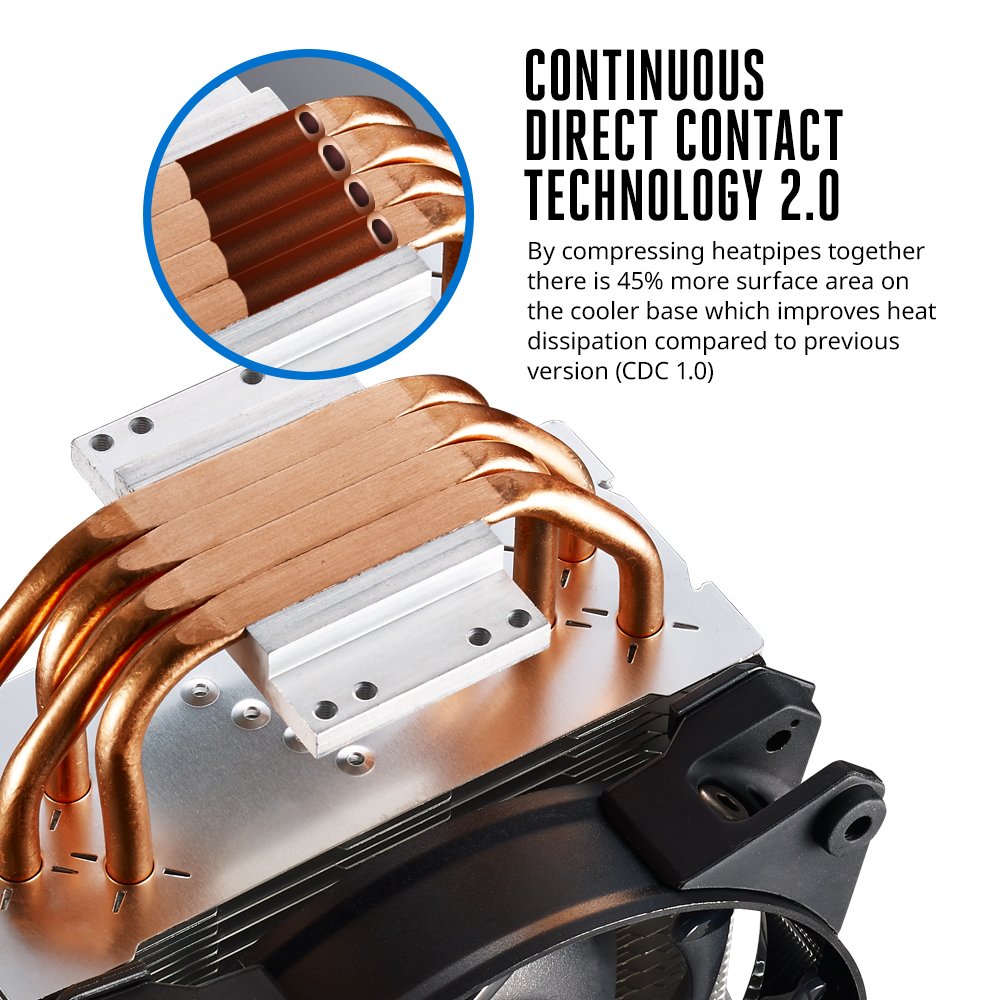
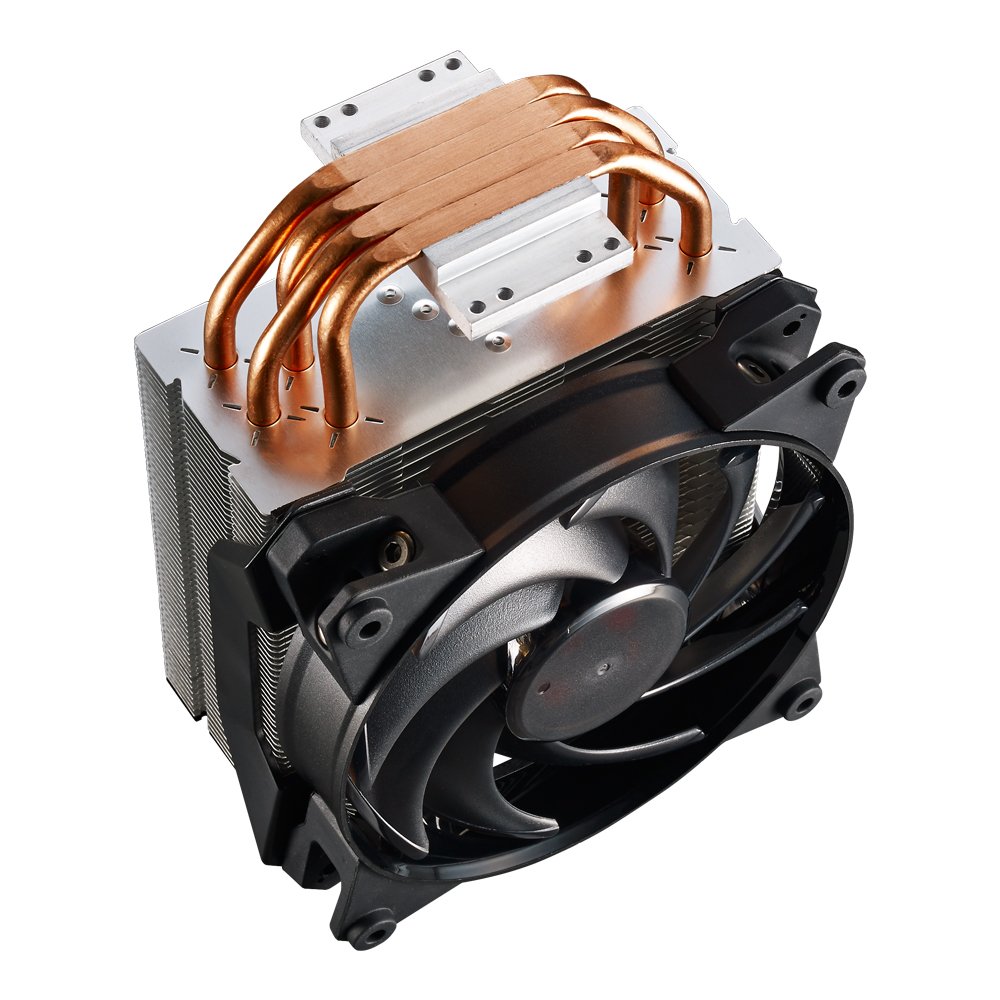
The Cooler Master MasterAir Pro 4 CPU Air Cooler features Continuous Direct Contact Technology 2.0, increasing heatpipe surface area by 45% for superior heat dissipation. Equipped with a 120mm fan delivering 66.7 CFM airflow at a quiet 30 dB noise level, it supports a broad range of CPU sockets and combines lightweight aluminum construction with 4 heatpipes and stacked fins for efficient, silent cooling.
| Brand | Cooler Master |
| Power Connector Type | 3-Pin |
| Voltage | 12 Volts |
| Cooling Method | Fan |
| Compatible Devices | Desktop |
| Noise Level | 30 Decibels |
| Material | Aluminum |
| Maximum Rotational Speed | 2000 RPM |
| Air Flow Capacity | 66.7 Cubic Feet Per Minute |
| UPC | 884102029271 |
| Global Trade Identification Number | 00884102029271 |
| Manufacturer | Coolermaster |
| Colour | MasterAir Pro 4 |
| Item Height | 6.24 Inches |
| Item Width | 5.07 Inches |
| Product Dimensions | 8.38 x 12.88 x 15.85 cm; 775.64 g |
| Item model number | MAY-T4PN-220PK-R1 |
| Are Batteries Included | No |
| Included Components | MasterAir Pro 4, Mounting Hardware, User Guide |
| Item Weight | 776 g |
K**N
Using since 5 years and even works on new gen CPUs.. read below
OLD review when I used amd cpu - I have AM3+ motherboard, and this thing is very easy to install on that. You only need to use the clip-lock thing which comes with it, which we also had on stock amd heatsink. This literally keeps my PC under 45°C max on heavy load(games) but I prefer leaving my cabinet open since that has been my preferred way since years. You don't need to keep it open. During this summer days it keeps my cpu at 40° that is totally my money's worth. Trust me if you're building a gaming PC, a cooler like this is recommended, or else constant over heating CPU can reduce it lifespan. Btw I use AMD FX6300 cpu. No OCEdit - i finally upgraded my pc to Intel now with 12400f cpu the stock cooler is shit and cpu easily jumps to 100c which was not acceptable, luckily I tried to use this old cooler and it still works all the needed back panel and all were included in the box itself and now my cpu doesn't go above 60c it's just amazing !!
S**H
it is the best cooler in market i order it today and i recieve next day . working like charm
the best cooler in market i order today and i recieve next day . i use this for my new ryzen5 3600. i overclocked my ryzen to 3.6 to 4.4 ghz . help of this coller its decrese my proccesor temprature upto 30cc to 35cc easly, its is 10000% beter then stock cooler and i over clock my ryzen upto 4.4 ghz easly,still after over clock my cpu temprature max reach 65cc temprature.iam really surprise its perfomance cooling. i prefer to every one for this cooler,.dont think and buy this coller u will defenatly feell happy after instal this coller. yes its support amd all new AM4 sockets, and all intel socket.packing is perfect packing by amazon no damage on it.even not a single scratch on it. i will upload pic its a beautifull beast cpu cooler.for those who want overclock there cpu at its bestt perfomance range,ideal tempratute 35cc and max 65 after full load. a must buy product for performance increase ,cooling.thanx amazon thanx a lot.
V**R
Very efficient, slight issues with Form factor slight pressing against RAM
Product cools very efficiently, I reached 52 celcius max (open cabinet) hen I ran Adobe premier video export , which spikes my AMD cpu at 95% for 2 mins.. when it completed, it was 30 celcius on HWCPU app, Very silent compared to stock AMD cooler. The new sink didn't heat up much. It had all the required kit to do comfortable install. Installation requires patience along with reading manual, but it pays off after you install, just do hand tight of screws..1st dislike: I dislike is it protrudes outside (my cabinet outer width is 7 inches) so can't close it, BTW since it's worth I am planning to cut the side sheet metal and install. As it's worth doing now.2nd dislike: it (fan) slightly pushes the RAM , CM could have made note of it, mine is ASUS M5A99FX 2.O MoBo, but still the RAMs worked besides being pressed by the fan.The product is more worth to buy compared to the stock AMD fan (they also are CM makes only)Watch my photos on cooling & performance efficiency, and better connect the fans directly to the mother board's CPU_FAN and CPU_OPT FAN, just my opinion
R**N
VFM CPU cooling for the Hot Indian summers
In over 10 years of building PC's this was my first time buying a CPU cooler, and by god I should have started earlier.I was a strong believer that aftermarket Coolers are only meant for people who would be overclocking their CPU's, but I was so wrong, especially since Intel has reduced their Bundled CPU coolers in size and quality over the years.With Skylake CPU's price settling down, I was contemplating upgrading, but decided to try an overclock before I retire my old hardware. My i5 3570K at stock speeds was hitting 83*C under peak load. Pushing the CPU to 4Ghz peak temps rose to 103*C (Intel CPU's shut down at 105*C).I realized overclocking was impossible on the stock cooler, and bought the classic CM 212 Hyper that I had heard a lot about over the years.With this cooler, Peak Temp at 4Ghz was 65*C. Thats an insane drop of 42*C in peak temps compared to the stock bundled cooler. I currently have the CPU at 4.3GHZ still running under 70*C under load, and at these speeds, I do not need to upgrade for another couple of years atleast.Bottom Line : Stock CPU Coolers suck, replace them with an aftermarket cooler of repute like this one. Even if you dont want to overclock.Suggestions from Personal Experience :- This is a pretty large cooler, and barely fits inside my case, check before buying. Also, this may cover/block the first RAM slot depending on what motherboard you have- Instructions aren't very detailed if you haven't installed a CPU cooler before. Search for and watch a youtube video before getting started.- Do not add a second fan to the heatsink, it hardly makes any difference to the cooling performance and is a waste of money.- You do not need to purchase thermal paste, the one bundled with this is great.- Change the fan direction based on the air flow direction inside your case for optimum cooling.Pros: Huge drop in temps, Efficient, Silent, Comes with everything you need for installation including good quality Thermal Paste, brackets and even damping pads (to reduce fan vibration) provided for an extra fan, Cheap ( bought it for 2.6k from seller BooyahChicago, wait for the price to drop)Cons: Instructions manual not very detailed, Large cooler and may not fit all cases/may cover a ram slot, Price fluctuates a lot.
A**A
Kept my rig cool even... Unexpectedly Amazing!!!
Hey there! Those of you willing to buy hyper 212 led and are building a gaming or performance rig especially Amd...I wholeheartedly recommend this cooler. My Cpu temp idle is 28.7 and on max load never exceeds 64. I have seen a negative review or two...they may have faced heating issues due to uneven application of thermal paste. Please follow the instructions here as you may not find some place else:1. Apply pea sized thermal paste on the Cooler base and NOT on processor.2. Spread the thermal paste evenly on the surface and wipe out any extra on the edges as thermal paste may spill, if applied extra and cause heating issues.3. Do not leave any air gap and firmly secure the cooler on to the processor through brackets or clamps based on your motherboard form.4. A balanced air flow to the system is highly recommended.If you follow above steps...your Cpu may give best performance and less heating. Enjoy!
ترست بايلوت
منذ أسبوع
منذ شهر