🚀 Elevate your network game with Linksys N300 – speed and reliability that keep you connected!
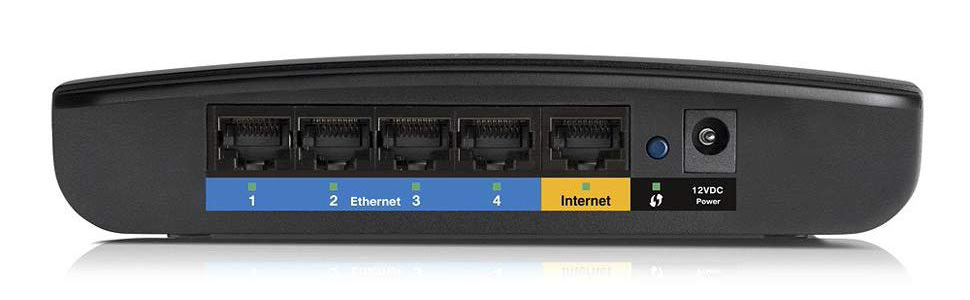
The Linksys N300 Wi-Fi Wireless Router (E900) delivers up to 300Mbps wireless speed with advanced MIMO antenna technology for reliable coverage. Featuring 4 Ethernet ports for wired connections and an energy-efficient 4.2-watt design, this compact router is ideal for fast, stable internet in home or office environments.


| ASIN | B007IL764W |
| Are Batteries Included | No |
| Best Sellers Rank | #140,752 in Computers ( See Top 100 in Computers ) #1,722 in Routers |
| Brand | Linksys |
| Color | One Color |
| Computer Memory Type | DRAM |
| Connectivity Type | Wi-Fi |
| Customer Reviews | 3.9 3.9 out of 5 stars (976) |
| Date First Available | 6 August 2012 |
| Hard Drive Interface | ATA |
| Item Weight | 202 g |
| Item model number | E900-EU |
| Manufacturer | Linksys |
| Number of Ethernet Ports | 5 |
| Operating System | Windows |
| Processor Brand | ReferManual |
| Processor Count | 1 |
| Product Dimensions | 7.62 x 24.13 x 19.05 cm; 202 g |
| Series | E900 |
| Voltage | 12 Volts (DC) |
| Wattage | 4.2 watts |
| Wireless Type | 802.11n |
C**X
Yedek/ikinci/ana router olarak da rahatlıkla kullanılabilir, ancak kablolu mesafe arttırıcısı olarak kullanmak icin ideal. Kablosuz üç duvar üzerinden bağlanıldığında %10-30 civarında, düşük fakat tüm ihtiyaçlara yeterli bağlantı gücü sağlıyor, yüksek miktarlı data kullanımı dahil (HD, FHD film) ihtiyaca cevap verebiliyor. Kabloyla evin merkezine çekip kablosuz bağlantıyı üzerinden yaptığınızdaysa zaten %80-100'lük yüksek güçle bağlanılıyor. Ödenen paranın karşılığını fazlasıyla veren bir ürün. Artıları: - Uygun fiyatı. - Kablolu (LAN) bağlantıda yüksek, güvenilir performans (kopma, kesilme, yeniden başlatma gerektirmemesi). - Sadece uzun menzilli kablosuz N300 router olarak piyasada giderek azalan bir model olması. - Cisco'nun (Belkin) ev kullanıcılarını hedefleyen Linksys serisinin kaliteli, güvenilir bir ürünü olması. - Güvenli (HTTPS) bağlantı üzerinden kolay kurulum ve yönetim. - Özellikle kablosuz mesafe arttırıcı olarak kullanmak için uygun bir ürün. - 7/24 açık kalan bir cihaz olduğundan, çok düşük elektrik harcaması (Normal/Idle 4.70 watts,Bekleme/Standby 2.40 watts) Eksileri: - Kablosuz bağlantı gücü (mesafe/performans oranı) düşük. Ancak HD (720p) film dahil bir sorun yaşamadım. - Komut satırından yönetim konsoluna erişim yok. - Linksys'in Türkiye'de Teknik Servisi yok (Ancak Amazon'un kendi sattığı ürünlerden biri olduğundan arkasında Amazon garantisi de var. Sunduğu daha avantajli fiyatlar da hesaba katildiginda, doğrudan Amazon'dan almak daha avantajlı. Not: Tomato Shibby firmware ile telnet üzerinden yönetim.
J**N
Croyant acheter un article neuf, quelle désolation en ouvrant la boite de constater que cet appareil avait deja été utilisé
L**H
Routeur WIfi soit disant Haute gamme mais performance du signal WIFI à peine meilleur qu'une livebox4 !!! mesure à 3 mètre: livebox4 : -35 db MR9600 : -30 db à 7 mètre : L4 : -65db MR : - 60 db
F**A
We recently switched to a different internet provider who was able to hook us up with a way faster connection speed than what we had been using. But we had to buy a router in order to have wireless access since the new company doesn't provide their own. When the computer was hooked up directly with an ethernet cable our speed was clocking at least 30 Mbps and usually closer to 50 or 60. After reading up on the various brands of wireless router available, we went down to a brick and mortar store planning to buy this precise Linksys model. But they didn't currently have it in stock. Impatient to get wireless, we instead bought a seemingly comparable Netgear router from the store and hooked it up the next day. It seemed to work well enough at first and although it did reduce our speed significantly we had sort of expected this so no big deal. BUT within a day or two of use the Netgear device was dropping the internet connection about once every other day. Not a huge problem, we just reset the router and once it booted up again it worked fine for another day or two. But we had just been through this kind of dropped-connection drama with our previous internet provider and were not really as tolerant of it as we might have been. Besides which, the Netgear reduced our speed so far that actual downloading was only around 300 Kbps. So we researched again, saw this router with the tip in the comments about how to adjust the settings to boost the speed and performance and ultimately we decided that this really was the one we wanted and had from the beginning. So we went ahead and ordered it on Amazon and while waiting for it to arrive continued to use the Netgear, which continued to perform pretty much the same. Once the Linksys came we set it up and crossed our fingers. Sure enough, the Linksys was only giving us around 600 Kbps. But we went ahead and followed the directions given by another reviewer here and changed the settings. The directions were as follows: "Go to [...] and login to your router. If you've never done this, look for instructions that came with your router or do a google search to find the default username and password. Find a page that has QoS settings. For the E1200, you need to click on "Applications & Gaming" and select the "QoS" sub-menu. (It is the same for the E900 as well) Disable WMM Support. Click save." Once we did this the speed immediately went up to the 25 to 35 Mbps range and has stayed there since. No dropped connections, faster speed than we even expected, and the extra reassurance of knowing that if we do have a problem customer service will be available indefinitely, rather than having to pay for it after the first 90 days (as was the case with the Netgear router). We couldn't be happier with this router, it has made the internet a pleasure to use again and I just wish we had bought it in the first place!
R**X
Llegó sin fallas e impecable, pero lo que yo quería era un repetidor de señal, así que me equivoqué, pero todo bien.
ترست بايلوت
منذ شهر
منذ شهر