We remain fully operational. Our teams are working around the clock to ensure your deliveries continue safely.

قم بتنزيل التطبيق


معلومات عنا
حقوق الطبع والنشر © 2024 Desertcart Holdings Limited
قم بتنزيل التطبيق

Buy anything from 5,000+ international stores. One checkout price. No surprise fees. Join 2M+ shoppers on Desertcart.
Desertcart purchases this item on your behalf and handles shipping, customs, and support to Morocco.
🚀 Upgrade your desktop’s wireless game — speed, stability, and style in one card!
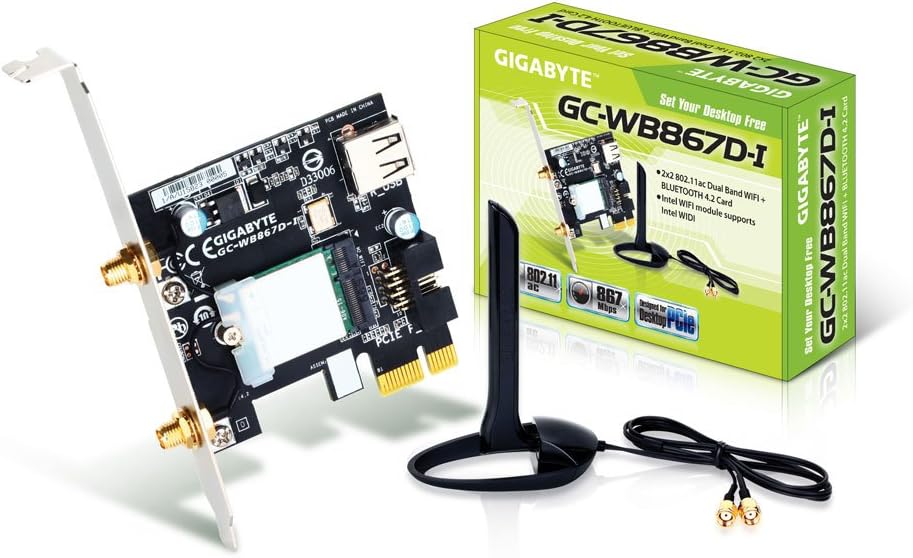
The Gigabyte GC-WB867D-I REV 4.2 is a high-performance dual-band PCIe wireless expansion card delivering up to 867 Mbps WiFi speeds on 2.4GHz and 5GHz frequencies. Featuring a USB interface for enhanced connectivity, an external magnetic antenna for superior signal strength, and Bluetooth 4.2 LE support, it ensures fast, reliable wireless and Bluetooth connections. Designed for easy installation and equipped with advanced security protocols, this card is ideal for gamers, streamers, and professionals seeking a robust desktop wireless upgrade.


| ASIN | B00HF8K0O6 |
| Best Sellers Rank | #2,355 in Internal Computer Networking Cards |
| Brand | GIGABYTE |
| Color | blue |
| Compatible Devices | Desktop |
| Customer Reviews | 4.5 4.5 out of 5 stars (2,743) |
| Data Link Protocol | Bluetooth, IEEE 802.11ac |
| Data Transfer Rate | 867 Megabits Per Second |
| External Testing Certification | UL, C-UL, CB |
| Global Trade Identification Number | 00818313019295 |
| Hardware Interface | USB |
| Item Dimensions L x W x H | 9"L x 6"W x 3"H |
| Item Weight | 0.6 Pounds |
| Manufacturer | Gigabyte |
| Mfr Part Number | GC-WB867D-I |
| Model Number | GC-WB867D-I |
| UPC | 321212543230 132018353745 872182688389 673977074871 057273285481 333755067968 172304354926 044111230017 163121435547 796594526780 818313019295 807320214601 088022167123 |
| Warranty Description | As labeled |
E**C
Great WiFi/Bluetooth card for my new gaming PC
After using the Gigabyte Bluetooth/WiFi Expansion Card for a couple weeks, I can say that this card does the job very well. Pros: easy install, plug n play, great signal strength, bluetooth works fine, magnetic desk/pc mount, price for performance Cons: I have had no issues with it, so none Other: I built a computer for gaming and streaming performance, and was worried about signal strength since I was unable to drill a hole through my wall for an ethernet connection. There has been no lag, although I am not far from my router, about 8-10 feet on the other side of a wall. I actually have done some testing, and found that my download speed with this thing was the same/if not a little better than an ethernet cable. For the price, this was the best WiFi card I could find, and it seems to go out of stock everywhere quickly. The bluetooth also worked instantly with my Jambox Mini portable speaker and Galaxy S6. I am not sure about the distance factor for either since that wasn't a concern for me. 10/10, would recommend. Edit: If you are having any problems, make sure to download the latest drivers from the Gigabyte website. Also, any bluetooth audio problems with your phone should be fixed by getting the Qualcomm Atheros BlueTooth driver Version V8.0.1.326
J**D
Amazing Product, even though I had problems at start.
I ordered the product with free shipping, so it arrived in around a week and a half or so. The packaging could've been a little more secure, but nothing to worry about! Open it up and it comes with the wireless adapter card, a disk with drivers (didn't need to use), an antenna, a USB connector to plug it into the motherboard, and an instruction manual. Setup: Setup was fairly straight forward. The manual gave exact instructions. You literally plug it into a PCI-e slot on the MB and then connect the USB connector to the MB. Once its in, you're done... For real. Super simple. Put the PC back together and then make sure everything is good to go and start it up! Wifi kicked on instantly, and the connection was pretty decent. Setup after setup: After you have your computer up and running, it's advisable that you use the antenna that comes with the wireless adapter. It screws onto the two yellow nut looking things on the back where you would expect them to, doesn't matter which is which, just screw them on. Once they're on, your wifi signal will go WAY up. Troubleshooting: I had been having some issues with the wifi getting dropped every few seconds or so. Not bad for daily life and browsing and streaming, but for gaming this was not ideal. I tried many things, I updated the drivers (the best way to do this is to go into device manager -> Network Adapters -> and then right-click the dual-band wireless and look for an update and install it. No need for the disk. Although the drivers weren't updated, I would recommend keeping them installed for maximum efficiency. This did not help me, and I had no idea what to do. I looked around the internet and couldn't find anything, so I just tried stuff. This is what helped me... I went into device manager -> Network Adapters -> and then right-click the dual-band wireless and click properties. Once there, go to advanced and there's a list of big words and options. Don't worry. Just focus on the very first option on the left, 802.11a/b/g wireless mode. Click that and then for the dropdown box on the right I just changed it from dual-band to -options 4- 2.4 GHz b/g. My 5G kept dropping, and since it was running on dual-band, this would make the ping drop. Since turning it to only 2.4 I have had 0 problems. If you have any questions, feel free to let me know. I highly recommend this product, plus, the antenna has a magnet on the base, so you can stick it on the PC! Antenna cable is shorter than expected, so you cant set it far from the port, but no biggie
A**M
Stable, fast, and so far reliable. Works great! It does not include a low profile bracket though, only full size.
Was going to get the v2.1 version with the 7260 card in it, but this became available on the exact day I went to order it, so I decided to chance it, and haven't been disappointed. In the three weeks I've had it, it's been very reliable and fast. The card has only a full height bracket, so unless you feel like modifying the bracket to make it fit a half height case, I would advise finding a different card. The antenna cable is only about 2.5', so if your PC is on the floor, the antenna won't go much higher than the top of your desk surface. Installation of the card is no problem. It fits snugly enough in the slot, but it still needs to be secured. Once the bracket is secured it's rock stable. It comes with the USB header cable which is used to connect Bluetooth. It also has a convenient USB port (you need your own A-to-A cable for this) to plug into if you don't have a free USB header to enable Bluetooth. If you don't want Bluetooth you don't need to connect the USB header or port. You have to connect one or the other for Bluetooth to work though. Drivers are included on a CD, though I didn't use it and just downloaded from Gigabyte's site. The WiFi and Bluetooth drivers were easy to find, though they appear to just be stock Intel drivers anyway. I recommend using the Intel ProSet software, which requires you choose the custom install when installing the WiFi drivers. Otherwise it just installs the driver and leaves Windows to manage the connection. The ProSet software works better than letting Windows manage it, plus it gives you a tray icon that when you hover your mouse it will show the SSID, signal strength (which is also conveyed by the icon), link speed (nice!), and Internet status. Performance has been great when connected to an ASUS RT-AC68U on 5GHz only at about 40 feet through 2 walls. I can't quite manage the full 667MHz link speed (though another three feet closer and I can, but I can't keep the antenna there), but I still see 585Mbps 100% of the time. File transfers between this PC and a Gigabit wired PC are about 40-60MB/s on 2TB 5400RPM drives. So I'm peaking at about 480Mbps transfer rate on file transfers, which is acceptable, considering the rotational drives and network overhead. My Internet peaks at only 150Mbps, so I have no issues with Internet. Ping times are the same as my Gigabit wired PC to within three tenths of a millisecond, and I've not had a single loss of connection. I frequently access my PC from my phone via VPN, and this is usually where I would see problems on other wireless devices, yet the connection is stable, even for streaming 1080p media over the VPN to my phone. This card also supports both the lower and higher channels for 5GHz AC. I bought this card to replace an ASUS card that wouldn't connect to the high channels for 5GHz AC, as it turned out it wasn't supported. All in all, it has been exactly what I needed. I don't need AC1900 speeds, so for 1/3 the price of those cards this works perfectly. At about half the speed of Gigabit, it's more than acceptable. Great setup.
D**S
SLOW, UNreliable, And cant seem to get bluetooth to work with windows 10. Been like it for months
T**S
Love this little gem. Most people have covered the performance/install side of it.....What I found to be the best part about it, something that no one touched on, is the ANTENNA!!!!!!!!! I love it, was worried about having and external antenna but lemme tell you, this bad boy does not dissapoint. 1) It does not feel cheap, in fact it seems to be built rather nicely. 2) the antenna part swivels!!! it goes from laying flat, to a 90 degree upright stance, back down to laying flat on the other side. 3) the base is magnetic. a good magnet as well 4) the best part, and what made me write this review, is that i can lay the antenna flat, and stick in on the side of my case!!! makes it look like my case is wearing some super weird looking bluetooth earpiece. love the look of it. I was expecting to be taking it on and off everytime i moved my rig but the thing just stays there now looking like some hot shot CEO racing down the road in his drop top red ferrari K im done now. Dont let the antenna kill your vibe. Buy it. Also the BT works great with my wireless DS4 !!!!!
R**V
I use Windows 10 Pro. Good Coverage. I have stopped using WiFi extender now. Good Speed Both Bluetooth and Wifi work well. Bluetooth gave initial trouble. After re-seating the USB connector, it started working
S**T
Does the job well. Im getting the advertised speeds. thank you
C**E
Its super easy to setup, the wifi connection and the fact the antenna is magnetic make it super conventient. The bluetooth connection also works really well with no lag or signal interference within at least 10 feet and a whole lot of other electronic devices in between.
ترست بايلوت
منذ شهر
منذ أسبوعين