We remain fully operational. Our teams are working around the clock to ensure your deliveries continue safely.

قم بتنزيل التطبيق


معلومات عنا
حقوق الطبع والنشر © 2024 Desertcart Holdings Limited
قم بتنزيل التطبيق


🗺️ Master the wild with precision — don’t just explore, own every step!
The Garmin GPSMAP 65s is a rugged handheld GPS device featuring a 2.6” sunlight-readable color display, multi-band GNSS support for superior satellite accuracy, and ABC sensors (altimeter, barometer, compass). Designed for serious outdoor enthusiasts, it offers preloaded topo maps, Bluetooth and ANT+ connectivity for seamless syncing with Garmin Explore, and runs on replaceable AA batteries providing over 16 hours of battery life. Its button-operated interface ensures usability even with gloves, making it an essential navigation tool for hiking, camping, and backcountry adventures.

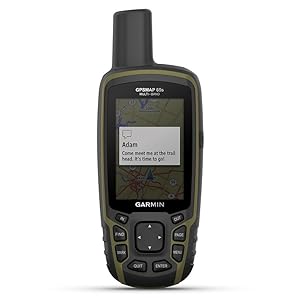


| ASIN | B08HR5CXCK |
| Additional Features | Multiband frequency support, ABC sensors, preloaded topographic maps, public land boundaries, smart notifications, geocaching |
| Are Batteries Included | Yes |
| Audio Output Mode | Digital |
| Battery Average Life | 16 Hours |
| Best Sellers Rank | #10,614 in Electronics ( See Top 100 in Electronics ) #5 in Handheld GPS Units |
| Brand | Garmin |
| Built-In Media | GPSMAP 65s; USB cable; Carabiner clip; Documentation |
| Compatible Devices | Smartphone |
| Compatible with Vehicle Type | Truck |
| Connectivity Technology | BLUETOOTH, ANT+ |
| Control Method | App, Push Button |
| Customer Reviews | 4.5 out of 5 stars 378 Reviews |
| Display Type | LCD |
| Human-Interface Input | Buttons |
| Item Dimensions L x W x H | 7.04"L x 5.44"W x 2.29"H |
| Item Type Name | Handheld GPS |
| Item Weight | 7.68 ounces |
| Manufacturer | Garmin |
| Map Types | North America |
| Memory Storage Capacity | 16 GB |
| Model Name | GPSMAP 65s |
| Model Year | 2020 |
| Mounting Type | Handheld |
| Operating System | [Predicted] Système d'exploitation Garmin embarqué |
| Resolution | 160 x 240 |
| Screen Size | 2.6 Inches |
| Special Feature | Multiband frequency support, ABC sensors, preloaded topographic maps, public land boundaries, smart notifications, geocaching Special Feature Multiband frequency support, ABC sensors, preloaded topographic maps, public land boundaries, smart notifications, geocaching See more |
| Sport Type | Camping & Hiking, Hunting, Outdoor Lifestyle |
| Supported Satellite Navigation System | GPS |
| Touch Screen Type | Resistive |
| UPC | 753759257866 |
| Unit Count | 1.0 Count |
| Vehicle Service Type | Truck |
| Warranty Description | 1 year limited warranty |
E**E
The GPSMAP 65s is a good navigation device
If Storm De Beul had had any Garmin navigation device to guide him in the dark of night during a winter storm, then he might be still alive today. His backpack reportedly only contained a toothbrush and a sleeping bag when his body was found by people. His nose was injured, probably from falling. He could have worn ice cleats over his shoes, but he apparently wasn't expecting the sudden blizzard. There are flashlights that will last more than the 4 hours it would have required to reach his car from more than 8 miles away. The LUMINTOP Tool AA 3.0 flashlight can continuously operate for over 31 hours on one AA battery in the lowest power mode. A Garmin navigation device can also be used as a dim torch by always using day time colors in the settings. Storm De Beul would be more likely to be alive if he had worn boots instead of shoes or if he had improvised coverings over his shoes and legs by tearing up his sleeping bag. An alternative would have been to put one leg in his sleeping bag and put his other foot into his backpack to minimize the intrusion of snow into his shoes and walk to his car. The sleeping bag could have been zipped up to his crotch, and the rest of the sleeping bag could have been used to cover part of his chest and held to his body with his hands. Another alternative would have been to wear the sleeping bag upside down with his belt around the outside of the sleeping bag at his waist as he walked to his car. He could have worn polypropylene socks or Merino wool socks. Before he started his camping trip, he could have packed some waterproof materials that could have been used to cover his feet, such as plastic shopping bags, plastic garbage bags, Mylar emergency blankets, or Tyvek shoe covers. Tyvek is a breathable plastic fabric which resists tearing and lets water vapor pass through but blocks liquid water. Tyvek 10"x13" (25.4cm x 33cm) catalog envelopes used as foot covers between 2 layers of socks make my feet feel warmer. Storm De Beul's feet were frozen, but his hands were not frozen. He might have used heat packs to keep his hands warm. Some people have survived wet feet in winter by putting heat packs into their shoes or boots. He might have survived if he had put hot water or soup in a thermos to drink. Building a fire was most likely prevented by high winds and snow covering all available wood. Storm De Beul wore shoes instead of boots, underutilized his sleeping bag to keep warm, might have given higher priority to the warmth of his hands instead of his feet, and apparently had no means of navigating at night before his feet froze and immobilized him. A lesson that everyone can learn from Storm De Beul's experience is, regardless of what equipment you have, you should not travel so far away from shelter that you can not return to shelter in time to save your own life in the event that an unexpected storm happens or some other emergency happens. Also, modern weather forecasts tend to be accurate, so check the weather forecast before you go on a camping trip or a long hike. In Storm De Beul's case, high winds made the cold temperatures feel much colder and prevented a rescue by helicopter. Ideally, any handheld satellite navigation device should have replaceable batteries. If you have a satellite navigation device with non-replaceable batteries that are drained but you have an emergency need to use the device now, then you potentially are going to die. Storm De Beul had a cell phone which could have been used as a dim torch or as a navigation device, but the cell phone did not have the battery life of a dedicated flashlight or a dedicated satellite navigation device. Even though he knew the general direction of his car's location, he might have spent the last moments of his life wandering in the dark, walking in circles, not knowing exactly where he was or traveling a suboptimal path, because he could not see in the pitch black darkness and falling snow. All of the landmarks and his former footprints that had been visible during the day time were no longer visible or were covered in snow. If a satellite navigation device has drained batteries that can be replaced, then you can put in a new set of batteries to guide you to shelter even if the batteries are of lower energy density than non-replaceable lithium batteries. The amount of time required to get a handheld navigation device operational again when the batteries are drained potentially is a matter of life and death. You might have a few hours to live in winter with wet feet. If you can replace the batteries of a navigation device, then you can start moving in the correct direction and are more likely to survive. I use 2 AA 2500 mAh NiMH batteries from Duracell in each of my Garmin devices. The polarity of the battery terminals in the GPSMAP 65s is the opposite of the polarity used in the eTrex 20x and eTrex 32x. The following timings happened in temperatures above freezing with the same pair of AA 2500 mAh NiMH Duracell batteries. You should expect lower battery life in cold weather. Garmin advises using lithium batteries in cold weather. The GPSMAP 65s lasts over 27 hours in Battery Save mode with GPS only. Battery Save mode turns off the screen like a screen saver after a timeout interval of 30 seconds, 1 minute, or 2 minutes after you touch a control. The GPSMAP 65s lasts over 23 hours in Battery Save mode with Multi-GNSS and Multi-Band reception On. The GPSMAP 65s lasts over 19 hours with the display constantly on with 0% backlighting, with GPS only. The GPSMAP 65s lasts over 17 hours with the display constantly on with 0% backlighting, with Multi-GNSS and Multi-Band reception On. The GPSMAP 65s lasts over 13 hours with the display constantly on with 50% backlighting, with GPS only. In this mode, I was not moving as the GPSMAP 65s initially depicted me as flying southwest for a few seconds before showing my true location. The GPSMAP 65s also displayed a message several times indicating the loss of GPS signal reception. The GPSMAP 65s lasts over 13 hours with the display constantly on with 50% backlighting, with Multi-GNSS and Multi-Band reception On. The GPSMAP 65s lasts over 10 hours with the display constantly on with 100% backlighting, with GPS only. The GPSMAP 65s lasts over 10 hours with the display constantly on with 100% backlighting, with Multi-GNSS and Multi-Band reception On. The eTrex 32x lasts over 50 hours in Battery Save mode with GPS satellites, WAAS turned off. This is the only configuration in which turning off WAAS resulted in more than 2 hours of difference in battery life. The eTrex 32x lasts over 47 hours in Battery Save mode with GPS satellites, WAAS turned on. The eTrex 32x lasts over 40 hours in Battery Save mode with GPS and Glonass satellites, WAAS turned on or off. The eTrex 32x lasts over 38 hours with the display constantly on with 0% backlighting, with GPS satellites, WAAS turned on or off. The eTrex 32x lasts over 32 hours with the display constantly on with 0% backlighting, with GPS and Glonass satellites, WAAS turned on or off. The eTrex 32x lasts over 30 hours with the display constantly on with 50% backlighting, with GPS satellites, WAAS turned on or off. The eTrex 32x lasts over 25 hours with the display constantly on with 50% backlighting, with GPS and Glonass satellites, WAAS turned on or off. The eTrex 32x lasts over 13 hours with the display constantly on with 100% backlighting, with GPS satellites, WAAS turned on or off. The eTrex 32x lasts over 13 hours with the display constantly on with 100% backlighting, with GPS and Glonass satellites, WAAS turned on or off. This review is primarily for the eTrex 32x and GPSMAP 65s which I purchased from Amazon. I purchased the eTrex 20x from eBay. The GPSMAP 65s is using a 32GB Sandisk Ultra microSD card. The eTrex units are each using a 32GB class 4 Sandisk microSD card. I have found the microSD card loose in the battery compartments of these GPS units after removing the batteries. The piece of metal which is supposed to retain the microSD card was sticking up. I could have sworn I had slid the piece of metal to keep the microSD card in place. The card had been functioning. One time, the microSD card fell out of my eTrex 32x as I changed the batteries. I recommend using a piece of tape to keep the microSD card in place in addition to the metal retainer so the card doesn't fall out when you change the batteries. If the memory card falls out in a field, then you might never find the tiny memory card. The batteries are harder to remove from the GPSMAP 65s. You can fold a piece of electrical tape along its length to create a ribbon to lay under the batteries to make the batteries easier to remove by pulling on the tape. The Garmin eTrex 20x, eTrex 32x, and GPSMAP 65s all become inoperative when OpenStreetMap *.img files are loaded onto a microSD card in a folder named, "Garmin", and a point of interest is searched or a route begins to be created on the device. The screen becomes blank and the GPS device becomes unresponsive. Removing and reinserting the batteries and pressing the power button causes the GPS device to start, but the screen again becomes blank, and the GPS device does a very good imitation of a brick. To recover from this situation, you have to remove the batteries and microSD card, reinsert the batteries without the microSD card, power on the GPS device, and stop navigation. To stop navigation on the GPSMAP 65s, you press the physical button labeled, "Find", and then select, "Stop Navigation", from the menu, and press the physical button labeled, "Enter". To stop navigation on the eTrex 20x and eTrex 32x, you press the joystick on, "Where To?", and then press the joystick on, "Stop Navigation". The GPS device can then be turned off, the batteries can be removed, and the microSD card can be reinserted. If the user does not know that removing the microSD card will make the GPS device functional again, then the inoperative GPS device can lead to the death of the user and anyone else with them. A GPS navigation device should never behave like a brick even if the device receives faulty data or too much data. My eTrex 20x is using software version 3.00. My eTrex 32x is using software version 2.90. My GPSMAP 65s is using software version 4.60. The GPSMAP 65s has a, "Garmin Spanner", USB Mode and the eTrex 20x and eTrex 32x have an equivalent, "Garmin", USB Mode in Setup / System which makes the Garmin device ask, "Would you like to go to Mass Storage?", when you connect the Garmin device to a computer or to some other power supply with the USB cable. If you answer, "Yes", then the computer sees the Garmin device as one or two flash drives depending on if you have a microSD card installed. If you answer, "No", then the Garmin device will be powered through the USB cable and be able to function normally while also functioning like an Earthmate GPS receiver to feed the current GPS coordinates to a DeLorme map program. I downloaded, "USBDrivers_2312.exe", from Garmin's web site and ran the program on a Windows 7 64-bit laptop computer to install the USB driver software. Each Garmin device then worked with the DeLorme map program. I plugged each Garmin device into a USB port of the laptop computer and answered, "No". For each Garmin device, I ran DeLorme Street Atlas 2010 on the laptop computer and selected, "Garmin/Garmin", as the device from the Options window of the Street Atlas 2010 program. A green dot then appeared on the screen showing my location on the map. You can turn off each GPS device with the Street Atlas 2010 program, but turning the GPS device back on in the Street Atlas 2010 software doesn't work until you physically turn off and turn on each GPS device. The satellite view seems to be unavailable within the Street Atlas 2020 program, but you can see the satellites on the Garmin device. My Windows 10 laptop computer seemed to recognize each device ("Garmin USB GPS" in Device Manager) without having to load the special USB driver. Perhaps the most important aspect of answering, "No", that is not documented by the owner's manual is you can power each Garmin device with an external power bank, a solar panel, a computer, a USB AC adapter, a USB cigarette lighter adapter, or any device that provides power through a USB port. You can connect the external power supply to the Garmin device with the USB cable that comes with each Garmin device and continue to use each Garmin device with all of its functions even if there are no batteries inside the Garmin device. This might be important if your AA batteries are dead or you want to save the AA batteries for later when you are no longer in a vehicle. You might already be carrying a power bank for recharging your cell phone that you could also use to power your Garmin device. Some laptop computers continue to supply power to one of the USB ports when the computer is in sleep mode. This option might have to enabled in the BIOS of the computer which can usually be entered by repeatedly pressing a particular key on the keyboard as the computer starts up or reboots. The key you have to press to enter the BIOS varies by computer. I like the GPSMAP 65s for its speed, accuracy, ability to navigate with an obstructed view of the sky, long battery life, and Garmin Spanner mode, which provides more options for powering the device with an external USB port and using the device as an upgraded successor to the Earthmate GPS receiver. Do not interpret the, "6 ft", of accuracy that is often displayed on a GPSMAP 65s as a literal indication of accuracy. The, "6 ft", is only an estimate. OpenStreetMap maps show the outlines of individual buildings, and the track clearly drifts sometimes by more than 10 feet even though, "6 ft", is displayed during that time. All of these devices have physical buttons, so you don't have to take your gloves off to use the devices in cold weather. All of these devices have a built-in clock, an alarm clock that can wake the device up at a set time and sound an alarm, a stopwatch, a calendar, a display of sunrise and sunset times, a display of moon rise and moon set times, and a 4 function calculator. The GPSMAP 65s has an air pressure sensor and an altimeter based on the air pressure, which mountain climbers might find useful. A GPSMAP 65 without the letter, "s", at the end lacks the electronic compass and air pressure sensor. The Garmin web site indicates the glass of the GPSMAP 65s is chemically hardened, so it might not be necessary to buy a separate tempered glass cover. The eTrex 32x can have almost twice the battery life in Battery Save mode than the GPSMAP 65s. The eTrex 32x model is small enough to be stored in a shirt pocket under your winter coat to keep the batteries warm and ready to maximize their power output. Although it would be nice if the eTrex 32x were faster, the greater speed of the GPSMAP 65s comes with reduced battery life. If a Garmin navigation device is your only source of light in complete darkness, then having a few extra hours of battery life with the display constantly illuminated gives you a greater chance of successfully navigating in the dark to shelter or out of a cave. At the time and place near the Arctic Circle where Storm De Beul died, the night lasted 16 hours.
A**S
Accurate and Reliable GPS Unit
While I normally use my phone to navigate, I decided that it was time to add a dedicated GPS receiver to my kit and I'm glad I did. Having a dedicated GPS saves my phone's battery for emergencies, plus it's always good to have multiple navigation items (GPS units, Map and Compass)when you are relying on them for life and death situations. The accuracy of this unit is outstanding, normally around 6ft, and satellite acquisition is very quick. This unit feature multi-band support and multi-GNSS, which supports GPS, GLONASS, Galileo and QZSS. There won't be many situations where you will have difficulty getting a satellite lock. I've even been impressed by the accuracy indoors, a feat I would never have attempted with the GPS units of yore. The interface is a little dated, but intuitive enough and easy to read. This unit has dedicated buttons, which is vastly superior to using a touch screen in bad weather and/or with gloves. The build quality is rugged and weather resistant, I have no doubt it will survive tough outdoor use. Battery life has been great for me, even using alkaline batteries. I like having the option to use standard AA batteries. Integrated Li-Ions have a finite life, with AA's I can replace the batteries and extend the life of the unit. This was a selling point to me. Be sure to perform a firmware update before using the unit. This can either be done via the mobile app or on a computer via USB with the Garmin Express app. The built in Garmin active topo maps are pretty good. You can upload your own custom maps as well. I'm looking forward to using this unit on many upcoming backcountry adventures, it fits all of my needs and is relatively affordable. If you compare it to the cost of a subscription based GPS phone app, it will pay for itself in a few years.
N**1
Works great
Works great. Batteries lasted a couple of hikes only. It's a little difficult to work, but very useful and helpful. Price was good.
J**Y
Garmin Leads the Way!
This unit is well constructed and has many features for hikers and back country explorers. The waterproof rating (7) is terrific for downpours and steady rain. Battery life and visibility has improved over the years for these units and Garmin often leads the way. Customer support is great! There are tons of videos and plenty of documentation to help new users to become more efficient and more skilled at utilizing the many features this 65s offers. Thank you for always being there for my outdoor safety needs, Now in my retirement years, Garmin remains a terrific value and a great fit for my back-country adventures!
C**C
Need to have. Not a want
Best for hunting. I got the map upgrade from garmin. Allows me to know what and whose land I’m on. This gps is easy to operate. Flawless so far. I love it. Get what you pay for.
B**J
Nice Device
Nice GPS. Very accurate and easy to use
P**R
It works the GPS very Good
It works very Good
A**O
La marca es la mejor !!!
Excelente producto llegó muy rápido
ترست بايلوت
منذ أسبوع
منذ أسبوعين