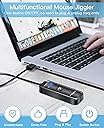
🖱️ Keep your status green, stay in the zone, and never miss a beat!
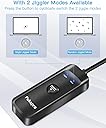
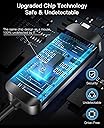
The Pukapro Mouse Jiggler is a compact, driver-free USB device that prevents your computer from going idle by simulating mouse movement. It features two selectable modes—subtle jiggle and random pointer movement—while remaining completely undetectable to IT systems. Compatible across major operating systems, it’s the perfect tool for professionals working remotely or in locked-down environments who want to maintain active status without compromising security.


| ASIN | B08HSCVLQT |
| Additional Features | Lightweight, Portable, Water Resistant |
| Antenna Location | Gaming, Office |
| Are Batteries Included | No |
| Are Batteries Required | No |
| Best Sellers Rank | #503 in Computer Mice |
| Brand | Pukapro |
| Built-In Media | Mouse Jiggler Mover |
| Button Quantity | 1 |
| Color | Black |
| Compatible Devices | Laptop, Personal Computer |
| Connectivity Technology | USB |
| Customer Reviews | 4.4 4.4 out of 5 stars (1,564) |
| Enclosure Material | Plastic |
| Hand Orientation | Ambidextrous |
| Hardware Platform | Linux |
| Item Dimensions L x W | 2.95"L x 1.14"W |
| Item Weight | 29 Grams |
| Manufacturer | Shenzhen Punk Digital Technology Co., Ltd. |
| Model Number | PunkFM302 |
| Movement Detection | Optical |
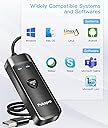
| Operating System | Android, Chrome OS, Linux, Mac OS, Windows |
| Power Source | Corded Electric |
| Range | 5.0 meters |
| Style Name | Modern |
| UPC | 748303985098 |
| Unit Count | 1.0 Count |
| Warranty Description | 6 Months |
U**7
Simple and effective!
I bought this to prevent MS Teams from continually showing me as idle after work established a 5 min timer on it. If I'm reviewing a document or on a phone call, it kept showing me as "idle" which was frustrating. Not that my boss is a micro-manager, but I didn't want to perception with working from home now. I found this little guy by doing a search, and the reviews were promising. Price was acceptable, too. I received it, plugged it in (through a USB hub, not even directly into laptop), and away it goes. It's been flawless -- works exactly as it says, and the "jiggle" mode is imperceptible. If you put it on the "Move" setting, you can see the mouse pointer moving across the screen randomly, but I never use that one. Jiggle keeps the computer from locking and keeps Teams showing "green". Perfect! It doesn't "install" anything nor trip any safeguards on my pretty well locked-down work laptop. As they say, the laptop seems to consider it another mouse, which is great. The instructions did say that there are certain times when the laptop may stop registering the device (after sleep mode, I believe), but a simple unplug-replug (which they recommend) fixes that issue. It's only happened once since I usually leave the computer on. Only issue is don't forget to turn it off at the end of the day. It might be obvious that you're using one if you're "green" all night!
T**A
Works great and does exactly what it needs to do!!
I WFH and my computer is programmed to lock the screen if I don't touch any keys or move my mouse in 15 minutes. We are in the slow season and I tend to doze off lol and may miss an incoming call. I know quite a bit about computers so I checked the display settings to see if I could change the settings but IT has it on lock. So I thought to myself I know there has to be a way to keep my computer awake so I Googled it and came to my favorite shopping place and found this product. Now if I accidentally doze off and a call come in my computer is still up. I don't need to use the move mode because the jiggle mode does the job. I feel the move mode will raise a red flag. I highly recommend this product if you may experience this issue. Thank you Pukapro for making this well designed product. And making it affordable for ones that are on a budget.
S**0
Do it, you wont regret it.
This thing is the best!! I have had it for over 3 years. I WFH, and use this daily. My Only complaint is if my computer gets shut down, or restarted, this device does not always kick back on. but a simple unplug and plug it back in and it works fine. Small complaint for a huge benefit. I use it so my Teams doesn't turn me yellow or if I am away after 15 minutes it will log me out. the only reason I am getting another one is after 3 years, seems to be working intermittently and I am needing to unplug it and plug it back in more often. But at this price I would buy one yearly if I needed to.
A**I
Awesome Product
Didn't know such a thing exist! My brother told me about it! Works great during my lunch breaks working remotely as I used to have to run back to the computer to move the mouse so my computer won't lock up on me as it's a pain to have to log back in after lunch. This keeps my computer from locking up during lunch break! The best thing ever! Also very easy to use and works great!!!
E**A
Works great
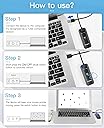
I use a computer for documentation at work. It tends to log me off when not in use, while I’m away. I’m never away for too long and it seems that the computer just likes to shut me out after 10 minutes. This mouse juggler fixes the issue quickly. You plug it in. Your computer takes a second to recognize the device. You push the button and the mouse moves from left to right, keeping your computer awake and from logging you out. It’s great that it has 3 additional USB ports as well. When activated, a blue light pulsates letting you know it’s working. When off, it’s a solid blue. It comes with a lanyard, which is nice but I don’t use it. Simple and does the trick. Can’t complain.
R**N
Keeps your computer awake
I have been working from home, and my company monitors my work through the Microsoft Teams application. With a five minute timeout, I’m always terrified that I will be away from my desk getting a cup of coffee and my boss won’t think I’m doing my work. Which, if I’m getting coffee, he is technically right. Lol. This device works perfectly, and keeps my computer awake. It has a sensitive setting and then a very sensitive setting. The sensitive setting makes little teeny movements that you can’t see, this makes it so that the device works without interfering with the mouse. The other setting makes the mouse go crazy all over the screen. This thing works, buy with confidence!
G**E
Amazing! Just wish that it didnt have a cable because it went bad quick
This is an amazing product. It does exactly what it is supposed to do. However, the cable cant be moved around too much or it breaks, I wish it was more in the form of a USB stick with no cable that you just pressed the button when ready to use.
M**1
Garbage. Worked once- ONCE! Then "USB Malfunction" Error and Now it does nothing.
I purchased this and plugged it in 2 days ago when it arrived. It worked just as it said it was supposed to. I plugged it in again on Monday morning (this morning) and I saw an error quickly pop up on my screen "There has been a malfunction in your USB Device and it is not working properly" -- I restarted, disabled USB Hub options in the control center, etc. and it simply does not work. I needed this to work this week! Of all of my purchases this is by far the most disappointing piece of garbage and waste of effort ever. Thanks for taking my money for absolutely nothing !
A**�
Pros: Works well. I hate that your online presence is based off of your mouse activity. It has two modes, one is a slight jiggle and the other moves your mouse cursor randomly. You can use your actual mouse while it's on (jiggle mode), so there's no interference. In the video I made my cursor size HUGE so you can see how small the shift really is. Unless the price increased, I bought this for under 10$, which, at the time of the Pandemic™, it was really worth it. Cons: I wish the actual device was a bit smaller, but it doesn't really bother me.
C**N
Cumple su trabajo a la perfección.
M**S
Buenísimo y súper útil.
A**R
Works!!!!
T**S
No me funciono, windows 10 ni siquiera lo detecta.
ترست بايلوت
منذ شهر
منذ 3 أيام