Desertcart purchases this item on your behalf and handles shipping, customs, and support to Morocco.
🚀 Elevate your home network to pro-level speed and security — don’t get left buffering!
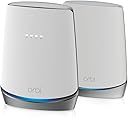
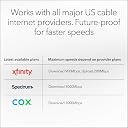
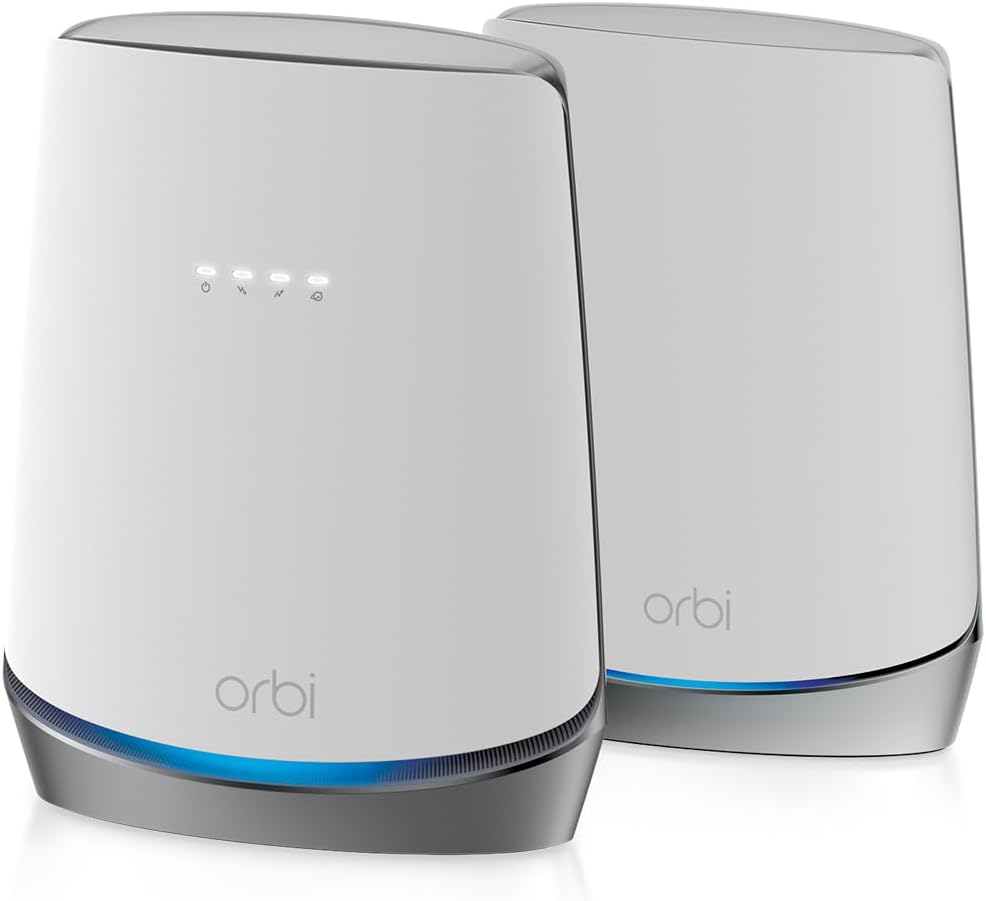
The NETGEAR Orbi CBK752 is a premium cable modem router combo featuring DOCSIS 3.1 and WiFi 6 AX4200 technology. It delivers blazing fast internet speeds up to 4.2 Gbps and covers up to 5,000 sq.ft., supporting over 40 devices simultaneously. Certified for major ISPs like Xfinity, Spectrum, and Cox, it integrates advanced security with NETGEAR Armor and offers seamless management through the Orbi app. Perfect for professionals demanding reliable, high-performance connectivity throughout their home.


| ASIN | B08GWFH4J6 |
| Antenna Location | Home |
| Antenna Type | Internal |
| Best Sellers Rank | #5,487 in Computers & Accessories ( See Top 100 in Computers & Accessories ) #14 in Modem Router Combos #32 in Computer Networking Modems |
| Brand | NETGEAR |
| Built-In Media | One (1) Orbi Cable Modem Router (CBR750), One (1) Orbi Satellite (RBS750), One (1) 19V/3.16A power adapter (router), One (1) 12V/2.5A power adapter (satellite), One (1) 2m Ethernet cable, Quick start guide |
| Color | White |
| Compatible Devices | Gaming Console, Smart Television, Smartphone, Tablet |
| Connectivity Protocol | wi-fi |
| Connectivity Range | 5000 square_feet |
| Connectivity Technology | Ethernet, Wi-Fi |
| Control Method | App |
| Controller Type | ios, vera |
| Coverage | Up to 5,000 sq. ft. |
| Customer Reviews | 4.0 out of 5 stars 1,403 Reviews |
| Data Transfer Rate | 1 gigabits_per_second |
| Frequency | 120 |
| Frequency Band Class | Tri-Band |
| Item Dimensions L x W x H | 11.4"L x 10.3"W x 8.9"H |
| Item Type Name | Wireless Router |
| Item Weight | 8.2 pounds |
| LAN Port Bandwidth | Gigabit Ethernet |
| Manufacturer | Netgear |
| Maximum Upstream Data Transfer Rate | 4000 megabits_per_second |
| Mfr Part Number | CBK752-100NAS |
| Model Name | CBK752-100NAS |
| Model Number | CBK752-100NAS |
| Number of Antennas | 6 |
| Number of Items | 1 |
| Number of Packs | 1 |
| Number of Ports | 4 |
| Operating System | RouterOS |
| Other Special Features of the Product | Internet Security |
| Router Firewall Security Level | Advanced |
| Router Network Type | Cable |
| Security Protocol | WPA2-PSK |
| Special Feature | Internet Security |
| UPC | 606449146295 |
| Unit Count | 1 Count |
| Voltage | 100240 volts |
| Warranty Description | 1 year warranty |
| Wi-Fi Generation | WiFi 6 |
| Wireless Communication Standard | 802.11ax |
| Wireless Compability | 802.11ax |
G**G
Netgear has it pros and cons, but mostly PROS!
I bought a Netgear Orbi CB750 that worked great for about 2-3 weeks! It was a breeze connecting to the Netgear Orbi app and getting the connection process started. Just a few simple steps and then call my ISP (Spectrum) so they can complete the process and get me online. After about 2-3 weeks of great service in most of the house, I tried moving the satellite a few feet down a hall to help extend coverage into the living room and possibly get some juice in the backyard. Unplugged it a few times and connected it to a surge protector, which Netgear does recommend. After a few days, I started having lags in my office, so I put the satellite back in the old spot and connected it back to the wall outlet. After I did this I eventually lost all the connections for wifi on computers, TVs, and security cameras. but our iPhones were still picking up wifi? yes, weird. iPhones must have magical powers :) I was glad that my Hue lights and switches continued to work, just couldn't control them remotely through the app. I immediately started rebooting the Orbi satellite a few times and then resorted to factory resets. Over and over I couldn't get them to connect and then did the same with the Orbi modem unit. I did this so many times that I eventually had to change my passwords for my account and still couldn't get in to access any of the Admin settings in the app. On the third day, I called support, support couldn't figure it what was going on with the app and why I was getting some strange error code when connecting the app to the Orbi. Netgear agent recommended connecting to my MacPro in my office and my Mac got all wiggy and tripped out on me. No connection at all through the ethernet cable, just made my computer do weird stuff. After I got off the phone with Netgear support, I gave it a last-ditch effort, oh the frustration by now after 4 days! Already surfing online for anything comparable to what the Orbi offers or claims to offer, isn't an easy feat, nor for the money and convenience of having a non-component set up with the simplicity of a combo modem/router! I finally gave up and went to Spectrum to pick up one of the modems they offer to customers and decided to go with another brand wifi mesh router to add on to it. When I got home something inside me said to give it another try, and although the app was feeling very slow and buggy during the setup, it was getting me through the process! Wow, I thought I was dreaming or imagining things! I got to the point when the app prompts to wait for the IPS to connect the unit, 10 minutes went by and I got to this point twice before but had no luck, so I called Spectrum support and told the guy what was going on. He had never helped set up an Orbi system before and since Netgear is a third-party product, they don't offer support. I kept talking to him about the problem I was having and he did say he'd try a revision with my MAC address and during the time I was on the line, nothing seemed to be working, so I thanked him and we hung up. And then!!! Just about 5 minutes later I checked back in the app and it looked like it was working!!! Can I mention that there's a god or some friendly spirits watching over me today? I had great coverage throughout most of the house except the living room, and great speeds as well, until I started changing the placement of the satellite Orbi a few times to get more range into the back part of the house and backyard. But something happened and the internet got a bit laggy at times. Eventually, it took a dump and stopped working. The app showed that I was connected but the only wifi I got was our to our iPhones. My office computer is no longer connected, the TV is in another room as well. By the next day, I had to Hotspot my phone just to use my desktop. longer as well as my wifi security cameras. The first time I had the problem I was able to reconnect them but 3 days later it crashed again and over 5 hours of It was so easy to install but I have no idea what happened to the Orbi system, Netgear's support team was amazing courteous, friendly, and determined to help resolve the issue, I've gotta give them a ton of credit there. Even after reading some of the bad reviews from other customers, I can still understand their problems and concerns with issues pertaining to the warranty period or some of Netgear's policy, so I feel fortunate that I was able to figure out the problem with some great Netgear support agents as well as the Spectrum agent to help me through this. It seems somehow it was the combination of technical problems and possibly operator error that got me to this review. Anyway, at this point, I'm very pleased again with the Netgear product and even more pleased with Netgear tech support so I would highly recommend this Orbi router/modem, it's a powerful tool to keep our homes functioning in this current technological age of home automation and to keep those of us who work from home connected!
N**.
Upgrade Firmware Prior to Registering with Xfinity. Don't change router & satellite SSID or PW.
I had a horrendous experience installing the Orbi CBR750 (router portion of package). Registering with Xfinity never worked and trying to get past the Xfinity automated assistant was the worst experience of my life. Something that should have taken 5 minutes, maybe 20, with a real support person, took hours. I used the web interface as I didn't want a trial activation of the Netgear Armour stuff. Before disconnecting your existing cable modem/router, download the firmware for the CBR750 (cable modem/router) and RBS750 (satellite). Connect the CBR750 and power it and the RBS750. Follow the instruction on the quick start guide for installing via the web browser. This seems to be pretty straight forward and worked without issues. Once the CBR705 and RBS750 are pair up as indicated on the CBR750 web interface home page or in attached devices. Go to the Advanced tab and under the Administration section select "Firmware Update", then select "Manual Update" tab. Manually update the satellite first, then cable-modem/router. If after updating the firmware everything still checks out with the router and satellite being paired, then follow the steps to activate the modem for Xfinity. I could not change the SSID for the satellite using the web interface. When you change the cable-modem/router SSID, it is suppose to propagate it to the satellite. Both are suppose to the same SSID as far as I can tell. I tried resetting the satellite, then the router, changing the backhaul password, warm boots, cold boots, changing all fields (read it somewhere), etc. a number of times but nothing worked. Even just changing the Wifi password and leaving the SSID never worked. I finally resorted to keeping the default SSID and password and that worked. It is quite possible changing the SSID and password via the App works properly but I only use the web interface. On my iPhone, it takes a little time to switch to the wifi point that has the strongest signal but eventually it does. Other than the above issues, everything else seems to work but time will tell. May 9, 2024 Update: It been a little over a couple of weeks and all is calm: no wife complaining or kids whining about the Internet, speed, dropped connection, etc. Seems pretty solid connection and speed throughout the house now. We use work VPN, lots of streaming, gaming, etc. without issues. Other than not being able to change the WiFi SSID and PW, all is well. Much improved over my prior Netgear C6300. Upped my star rating. May 28, 2025 Update: All is well. Other than maybe a couple of times during the year where we rebooted the router (possibly due to power outage), everyone seems happy with being able to connect anywhere in the house and the resulting speed.
E**A
Don't do it!
Wanted to update my 5-year-old mesh network with Orbi CBR752 with an additional purchased satellite. I have a 2 story home with a full basement with Xfinity 1gig service. Current setup is a personally owned Arris SBG8200 modem/router combo with the router functionality turned off. An Ethernet connect from the Arris to an Asus AX6100 tri-Band wireless Router that is in my basement. Deployed AX3000 Satellites (3) throw-out my house extends as a Mesh. I was getting between 700-800mbps throughput with this set-up. After deploying the Orbi and using the Xfinity app to register the device on their network, I used the Netgear app to finish the installation. That was where the issues started: 1. The connection of the Orbi Modem/Router to the Satellite was flawless for the first 30 minutes, but then the satellite showed offline on the app. Tried rebooting and resetting but the link between the two would drop. 2. The satellite showed down on the app, however other devices would connect to it like it was online, or new devices during set up would try to connect to connect to the network but only resulted in an error, “Can’t connect to the network.” Once the satellite was unplugged did the device connect to the main Modem/Router and work. 3. Received the additional Orbi Satellite and seems to function properly. The original Satellite is a lemon? 4. Distance seems shotty between the main and the satellite. I don’t believe the 5000 sq ft statement. More like 800 sq ft. 5. Worse of all, I went from 700-800mbps to 90mbps over a Gig service. Tech specs using Xfinity states up to 800mbps, so that’s not correct on the Xfinity ISP platform. 6. The 2.4ghz and 5.ghz are permanently bonded under one SSID with no ability to split the two into separate SSID’s. While awesome for some, others may find older 2.4ghz devices having problems connecting. That includes lights or older wifi thermostats, etc.. Last and not as bad but annoying –the app used from NetGear seems more marketing than tech usefulness. From the Security product they are trying to sell to other add-on products or services is a joke. Using the web-based portal is better but limited in functionality compared to Asus or Arris. End-Result: Do not purchase. If you’re a Xfinity customer –Arris seems stable and a better option.
A**N
So far, I am pleased
After going back and fourth, I decided to pull the trigger on this Netgear Orbi 752 series. I have Xfinity service, and have rented the gateway for several years now. I attempted to purchase the older Netgear Orbi series mesh router a couple years back before AX came out. The setup was very annoying, and I was unsure about the overall benefit, so I returned and stayed with the Xfinity gateway. I went ahead and gave this Orbi series a chance as it was a modem & router combo, with a satellite. The install for me was straight forward, and it gives you specific instructions through the app setup to register your modem MAC address and add to your account. This was all fine. When it finally came time to change my SSID and finalize my setup, it kept giving me an error. After about 15 minutes of frustration, I decided to uninstall and start from scratch again. The second time around, all the settings stuck and it was up and running. If you take anything from this review, it will be this piece of advice. When setting up your SSID and encryption method, DO NOT choose WPA3. It has a disclaimer, "6 GHz WiFi supports only WPA3 encryption". However, this is not a WiFi6E router.... the 6E is the brand new routers that are out that actually support 6 GHz channel. Not to mention, the device support is very limited at this time. Moral of the story, if you choose WPA3 encryption, I noticed all my devices disconnect from the router and then they could never connect back to it. Once I selected WPA2 again, everything reconnected within minutes. As for speed, it seems to be very fast on WiFi, which supports various YouTube videos I've watched comparing different mesh routers. The only thing I am not completely sold on is the ability to recognize that device being closer to the satellite and auto switching to it. I can confirm the range has been significantly increased. I used to have a spotty connection in my garage with about a 14 Mbps DL speed connected to my Xfinity gateway. On my initial test in my garage, that bumped up to 162 Mbps. The satellite is closest to the garage, so I am assuming it worked with my phone auto switching to it and holding a stronger connection. All in all, the setup can be a pain, the app can be buggy, but the product is solid.
S**E
Xfinity Cable Modem Replacement: Not for Novice
I recently purchased this cable modem to replace my personal cable modem with Xfinity. The reasons for replacement: capitalize on Xfinity download speed capabilities, extend the WI-FI range to cover my deck and full house, and connect satellite directly to game via CAT5 (Speed at the game console). If you have never replaced the Xfinity cable modem with your own, I would not suggest you start with Orbi or else plan to hire an experienced person. This is not a task for the novice and will require patience and re-try over and over. The first part is to have Xfinity recognize your Orbit and there are instruction along with two Apps from Xfinity (Account & Xfinity). You will need to follow the procedure in the Add a device in the Xfinity App a minimum of 3 times before Xfinity will connect to the new Orbi router. Do not get discouraged if it take 5+ times. You may get a message on your Account App that the router is offline even though it is working. Yes, setup a service call appointment (as Xfinity suggest) to delete the old router and have them show the new router, “online” or “run diagnostic check.” Note: you will need to add the model and MAC by hand every time you try to connect. Yes, it is the MAC address and not the serial # as you ponder why Xfinity it is not recognizing Orbi. Ok, you can ping the router from Xfinity and see the modem via the Orbi App. Now, it is time to setup Orbi. You can do this via CAT5 or App. Let me tell you from experience, App is the only way to setup Orbi. If you go via Admin, I was not successful getting it to save despite saving it 3 times. The other trick that I learned in my hours with Netgear, setup the satellite next to router before you move it upstairs. It only took me 2 times to get Orbi Wi-Fi up and running after I abandoned the Admin direct as the satellite would not be recognized. After a few hours, I finally got the entire system operational. I was so happy. I connected all the smart devices and then started to tackle the nodes such as ring, Schlage, etc… I went to sleep with Orbi working with 15 of the 18 devices connected, the satellite was working on the deck, life was good. I woke up the next day and the entire Orbi system was down (not Wi-Fi). I immediately thought it was Xfinity so I reset the router but it could not find the router (Oribi). I reset Orbi 3 times and it finally came back up. I was thinking, Wow, is this device this unstable? I noticed that Orbi gave me a message that firmware needed to be updated. This is a message coming through the App as I worked to connect other complex devices. I completed the firmware update as required by the Orbi App, the satellite never worked again. I spent hours trying to trouble shoot it myself and finally called Netgear. In this hour, I tried everything including putting them a foot apart and using CAT5 to see what the satellite could see, nothing! I spent hours, I do mean hours, with Netgear trying to trouble shoot. It was resetting the router and trying to get the satellite to see the router. I could not even get it to work via CAT5. Netgear’s solution was to send back to Amazon. Think about this, I took the other router offline so this means I am hard down and trying to re-connect the old router and configure 18 devices some of which are quite complicated. They determined that the satellite was defective but I think the firmware upgrade was the culprit but have no evidence. All I can tell you, they said they see this problem less than 5% of the time and satellite is defective. After much debate and $16, Netgear plan was to send me a new satellite. At the end of the day, with paying, RMA, etc.., Netgear said for me to send the entire system back to Amazon under the 30 day delivery. I just ordered a new Orbit as I can’t take the existing Orbi down unless I have a replacement because we work from home. I will shut the existing Orbi down when the new system comes to my house. I will start this whole process all over again. Then send back the defective system. Summary: DO NOT DO ANY FIRMWARE UPGRADES! YOU NEED TO KNOW WHAT YOU ARE DOING WITH XFINITY! DO NOT WATCH YOUTUBE AND THINK THIS IS EASY, THEY ARE EXPERTS! BE PREPARED TO DEDICATE HOURS AND ENSURE YOU ARE NOT INTERRUPTING WORK TIME! WHEN IT WORKS, IT IS AWESOME! ORBI APPEARS TO HAVE SW BUGS SO BE PATIENCE. PLAN 4 HOURS FOR THIS SETUP DEPENDING ON DEVICES (18 for me). Note: You may ask why I would go through this process again, why not buy another router. Basically, it does not exist. Second, when it worked, it was exactly what we needed to work on the deck. The router is up and running and the speed with Comcast is something you will need to experience yourself. If we can get this technology running, stable, and satellite working it is pretty good.
A**C
Say goodbye to NO WiFi!
With my job being converted to 100% remote as a result of the pandemic, it was time for a network upgrade. We had a 2.4Ghz dual band Netgear modem router combo from circa de 2012. With pretty much any electronic device now requiring some sort of WiFi connection to at least set the device up, and all of my work gear requiring full time connection at home, 3 kids and a wife with a heavy social media presence, we were stepping all over each other. One child might start a streaming video while wife is on a Zoom meeting and I have to join a Teams call for work, someone is going to end up on the short end of the stick. Our former router/modem was pretty much in the exact center of the house, mostly open so WiFi signal didn't have trouble reaching out so much as just being overloaded by so many devices (multiple TV's, pads of some sort, phones, gaming systems, and laptops). First stop was a speed test and call to ISP. After upgrading our WiFi speed, some improvement but not enough to make a big deal. Commence research, after checking out several options and asking around, I got quite a number of hits on the Netgear Orbi Mesh system. When it comes to internet, I'm not a brand loyalist but I've had decent luck with Netgear products. Right out of the box, looks sleek and modern, very minimalist and easy to understand IKEA like instructions. As long as you follow those instructions, setup and launch is super easy. You'll most likely have a call with the tech dept. of your ISP to register the device, but if they are anything like Spectrum was for me, it was easy peasy. The app for the Orbi Mesh system is extremely easy to use if you're interested in monitoring your home network performance, security, etc. The modem performance completely outperforms any modem your ISP will provide for you, if that is a requirement simply get the Orbi router only system. As far as speed and coverage go, in the way my house was built I haven't found an area where I've lost the main router signal and switched to the satellite. I can go 50 feet out of my back or front door and still be connected to the network. I have way more coverage than is needed in my house, but I couldn't find just the modem/router by itself. ISP speed is 400mbps, modem model is built to handle up to 500mbps. We cannot seem to overload our network! We can stream movies or shows on every screen of the house while playing an online game and hosting a Zoom call and a separate Teams call at the same time without any buffering, glitching, or dropping. I would recommend this home network setup to anyone! Much better than using a WiFi signal booster or extender, you will often drop connection when moving around your house as you lose the main network and have to join the extended. This system puts clear, STRONG WiFi signals out to any part of your house guaranteed. A colleague of mine built a house next door to his mother and put a satellite in her house, so she gets his signal and shares his internet, that's how powerful this mesh system is!
A**R
Vast improvement! Can't believe the difference.
This Orbi system just replaced our Netgear Model C7000v2 AC1900 Wifi Cable Modem Router and two Nighthawk X6S AC3000 Tri-band Range Extenders (Model EX8000). My speeds had not been very fast considering the 120 Mbs I was paying for, and the extenders were dropping often. When we walked from one end of the house to the other, or out into the yard, the signal dropped sporadically and it took minutes to get it again. These were expensive pieces of equipment and didn't work together very well at all. My husband and brother were always complaining. I got frustrated having to continually troubleshoot the problems, so I looked at mesh systems. The reason I went with the Orbi was because I saw that the satellites could be "daisy-chained" to cover our long ranch house and yard. (Placing Satellite 1, then placing Satellite 2 in a straight line from the Router to stretch out the signal for a longer distance rather than grouping them in a circle) This Orbi Whole House WiFi 6 Cable Modem plus three Orbi Satellites delivers FULL speed and complete coverage to the whole house and the yard with no dropping. We can't believe the difference! It was reasonably easy to install using the Orbi app on my iPhone, and I am not a techie. Considerations: The mesh system picks the band (2.4 or 5 MHz), not you; but it hasn't dropped even once so no need to have to switch it based on distance from the router. You can add up to four satellites. I have three and it provides great coverage, even through the exterior brick walls and into the basement. If you put a satellite near a window, it gives coverage for quite a distance out in the yard. (Husband is out watching the ball game while barbecuing.) It also works great for our Ring doorbells. We can now (usually) answer before the person outside just gets tired and goes away. If you pick the same network name (SSID) as your old system, all the existing devices just hop on automatically. The Rokus are screamin' fast at streaming now. This is by far the BEST WiFi we have ever had. It has been almost two weeks without a single drop. It has a Guest network feature so that friends can get on when they come and everyone loves it. I can't say how the Tech Support from Netgear is, because I haven't needed it. If I find any downsides besides the price, I will update this review, but right now we are loving it.
S**N
Works great, but some features require subscriptions
Router (with one satellite) works as intended and is a compatible replacement for the Cox Panoramic router (activation through Cox Communications is required). Provides coverage for my 2,300 sq ft home. Initial setup wasn’t completely plug-and-play. I had some trouble getting the satellite to connect, but after a few reboots and following the instructions carefully, I was able to get everything working. What I did to get it to work, who knows... it just started working. Since setup, performance has been solid with no noticeable connection drops, and it handles 1 Gbps internet speeds without issue. (If your internet speeds are not good, I'd point the finger at the internet provider and their network, not the router) My biggest disappointment is the subscription-based features. Without a subscription, device and parental controls are extremely limited (basically just manual pause), and there are no advanced security features beyond basic network protections like WPA3...etc. You can manage the router standard network setting, ports and some technical network settings using a browser via the router IP address (but not via the app). There are two separate subscriptions (discounts are offered but may only apply for the first year): 1. NETGEAR Armor (Security): $99.99/year (standard) or $149.99/year (Armor Plus) 2. NETGEAR Smart Parental Controls: $69.99/year I can somewhat understand charging for advanced security, but parental controls really should be included at this price point. I should have done more research. If you don’t plan on managing devices or have the need for parental controls, the system works great. But if you like having control over your network and devices, you may want to keep looking. Easy 4 stars if it included the parental controls (5 if the setup was a little cleaner).
C**Z
Muy bueno
Muy bueno
J**E
Buen producto
Es un buen producto.m, desafortunadamente ok tuve que regresar ya que el internet que tengo no tiene salida de cable coaxial y no lo pude conectar
C**O
No funciona
No es de utilidad para Mexico. No deberían de vender algo que no es idóneo para el mercado
Trustpilot
3 weeks ago
1 month ago