
قم بتنزيل التطبيق


معلومات عنا
حقوق الطبع والنشر © 2024 Desertcart Holdings Limited
قم بتنزيل التطبيق

🚀 Elevate your home Wi-Fi game — never miss a beat or a binge!
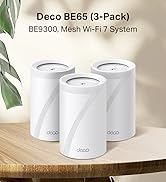
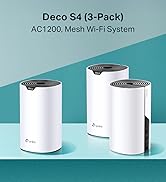
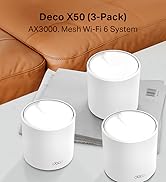
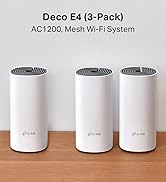
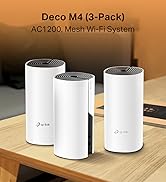
The TP-Link Deco S4 (3-pack) is a powerful AC1200 mesh Wi-Fi system designed to deliver seamless, high-speed internet coverage up to 4,000 sq.ft. With dual-band speeds of 867Mbps on 5GHz and 300Mbps on 2.4GHz, it eliminates dead zones and supports over 100 devices simultaneously. Easy to set up via the Deco app, it offers automatic device handoff for uninterrupted connectivity and advanced parental controls, making it ideal for busy, tech-savvy households.



| ASIN | B0851D6MXY |
| Are Batteries Included | No |
| Best Sellers Rank | 1,060 in Computers & Accessories ( See Top 100 in Computers & Accessories ) 6 in Whole Home & Mesh Wi-Fi Systems |
| Brand | TP-Link |
| Colour | White |
| Customer Reviews | 4.5 4.5 out of 5 stars (14,428) |
| Date First Available | 20 Feb. 2020 |
| Guaranteed software updates until | unknown |
| Item Weight | 1.92 kg |
| Item model number | Deco S4(3-pack) |
| Manufacturer | TP-Link |
| Operating System | Linux |
| Product Dimensions | 16.2 x 9.1 x 9.1 cm; 1.92 kg |
| Series | Deco S4 |
| Wireless Type | 2.4 GHz Radio Frequency, 5 GHz Radio Frequency |
J**H
Amazing system
Bought this for my parents stone built bungalow. The wifi signal would not reach all rooms and this meant they couldn't use their smart tv in the bedrooms and conservatory. Also they Invested in a security system and only one camera worked intermittantly. We tried the TP Link booster and this made no improvement HOWEVER after looking into this further we came across the Deco system. WOW they now have wifi in all rooms, no buffering from smart tv it works perfect. Security cameras all work with no issues, parents very happy. The system is very easy to set up and connectivity is no issue now. Signal strength is great throughout the house. Would highly recommend this system and even looking at getting one for my house.
B**A
Say Goodbye to Wi-Fi Dead Zones! An Essential Upgrade for Any Home.
I purchased the TP-Link Deco M4 Whole Home Mesh Wi-Fi System in July 2025 for £125. While the price has since dropped to £99, even at what I paid, this system has proven to be an excellent investment and I highly recommend it! The packaging was straightforward and easy to open, and the product units looked good right out of the box. The main feature that attracted me was its promise to eliminate Wi-Fi blind spots and extend coverage throughout my home. And it delivered! Setting up the system was incredibly easy: you just plug one unit into your main router, place the other two strategically around your house, and follow the simple, intuitive steps in the Deco app. Previously, I had frustrating dead zones in about half of my house, but now I have a strong, fast connection even out in the garden! The Deco M4 also offers some fantastic secondary features. The app allows you to create multiple Wi-Fi networks (e.g., for personal use, guests, or a general "everybody else" network). In our home, we've set up three: 'this one' for my partner and me, 'the other one' for family and friends, and 'that one' for everyone else. This is incredibly convenient for managing access. Another useful feature is the age restriction capability for specific networks, which is great for households with children. You can also monitor the internet usage of each connected device through the app, which provides good insights into bandwidth consumption (though it doesn't track specific websites visited). The setup process was a breeze, taking less than 5 minutes to get internet flowing throughout the entire house thanks to the app's step-by-step guide. For multi-story buildings, a bit of strategic placement of the units is key. The first unit needs to be close to your main router, though you can use a longer Ethernet cable if needed for placement flexibility. It's important to note that you will end up with at least two Wi-Fi networks in your home – your original provider's network and the new, superior network created by the TP-Link Deco system. The units themselves feel robust and well-made, crafted from strong plastic, indicating good build quality that should last. For the price, the value for money is excellent. My entire house now enjoys very fast and stable internet, which was previously only true when I was standing right next to the main router. Pros: Super Easy Setup: Quick and intuitive setup process via the app. Very Stable and Fast Internet: Eliminates dead zones and provides reliable high-speed Wi-Fi throughout the entire home. Multiple Network Creation: Ability to set up separate Wi-Fi networks for different users (e.g., family, guests). Useful App Features: Parental controls (age restrictions) and device internet usage monitoring are very handy. Cons: You will end up with at least two separate Wi-Fi networks in your house (your original and the Deco network). I wholeheartedly recommend the TP-Link Deco M4 Whole Home Mesh Wi-Fi System. It's a game-changer for home connectivity, resolving Wi-Fi issues effectively and providing robust, fast internet everywhere. Definitely a 5-star product!
S**N
Proper fast and finally sorted the buffering!
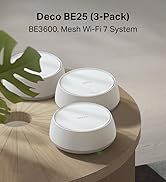
I’ve just upgraded to this TP-Link Deco BE3600 mesh system. I’m not tech savvy at all, so I was a bit worried about setting it up, but I managed to get the whole thing running in less than 30 minutes. It was dead easy to do. Why it's spot on: Separate Networks: It’s great because you can set up different SSIDs for your gadgets. I've got an MLO one specifically for my newer WiFi 7 devices to get the best speeds. No More Buffering: I set up a dedicated 5GHz network just for things like my Firestick. Since doing that, I’ve had zero buffering, which has been a total game changer for watching telly. Smart Home Friendly: I’ve also got an IoT network running on 2.4GHz for all the smaller bits like my doorbell and smart bulbs. It keeps them all connected without slowing down my main gear. Great Coverage: Because it's a 3-pack mesh system, the signal reaches everywhere in the house without any dropouts. Verdict: If you're looking for a way to sort out your home internet without a headache, this is the one. It's fast, easy to set up, and being able to split the devices onto their own networks has made everything run much smoother. Definitely worth the money.
B**K
Great system overall
Overall, this item is very good. I set it up with Community Fibre using a Linksys router and chose to configure it in Access Point mode instead of mesh. The first unit is connected directly via Ethernet to the Linksys router on the ground floor and acts as the main hub. The second unit is set up wirelessly on the second floor, directly above, and the third unit is wired via Ethernet on the third floor. We have a 1Gbps connection, and while that full speed is only achieved on the ground floor where the Linksys router is located, the overall performance has been excellent. The second floor (wireless) gets around 180Mbps, and the third floor (wired) reaches about 580Mbps. While you won’t get the full 1Gbps throughout, the speeds are more than sufficient, especially since most of our usage happens on the ground floor. One of the best parts of using Access Point mode is that I was able to keep the same WiFi name and password as our Community Fibre Linksys setup, so the transition between floors is seamless. Setup was straightforward and hassle-free, which was a refreshing change from my previous experience with Mercusys—never again!
P**X
Vorweg: Manche Rezensionen hier sind schon merkwürdig. Beispielsweise wenn Unwahrheiten / Halbwissen verbreitet werden oder man sich im Jahr 2021 beschwert, dass man zur Einrichtung ein Smartphone braucht. Solche Rezensionen sind leider wenig hilfreich. Auf der Suche nach einem leistungsstarken Mesh-System, bin ich bei diesem System von TP-Link gelandet, welches zwei Freunde schon länger nutzen und sehr zufrieden sind. Verpackung: Die drei "Decos" wurden, wie üblich, schnell und sicher verpackt geliefert. Jeder Deco ist nochmal einzeln eingepackt und liegt stabil im Karton. Einrichtung: Tipp vorweg > Die Einrichtung aller Decos erfolgt an einem Ort. Erst NACH der Einrichtung werden die Decos in die Zimmer / Stockwerke verteilt. Benötigt werden lediglich ein Netzwerkkabel (liegt bei), einer der Decos, natürlich euer Router und ein Smartphone mit der "Deco-App" aus dem App-Store. Einfach den ersten Deco einstecken (Strom), mittels Netzwerkkabel mit dem Router verbinden und der sehr guten Anleitung auf der App folgen. Innerhalb weniger Minuten waren dann alle drei Decos konfiguriert und schon einsatzbereit! Klasse. Zur Verbindung: Der erste Deco ist dann der "Haupt-Deco" und sozusagen die Zentrale des Systems. Von ihm aus wird das WLAN dann zu den anderen Decos geschickt. Diese WLAN-Verbindung zwischen den Decos ist auch zwingend notwendig, um das Signal im ganzen Haus zu verteilen. Man kann das System auch per LAN betreiben, wenn man zB sehr dicke Zwischenwände oder Decken hat. Da müssen aber ein paar grundlegende Dinge beachtet werden, ansonsten funktioniert das System nicht! Mehr dazu ganz unten! Sendeleistung: Sowohl die Geschwindigkeit, als auch der Empfang sind überragend. Ich habe nun in allen drei Stockwerken einen Deco stehen und damit in jeder Ecke des Hauses perfekten Empfang. Es würde theoretisch (bei dünnen Wänden) ausreichen, wenn man nur einen einzigen Deco im EG aufstellt, da die Sendeleistung deutlich besser ist als die Sendeleistung des normalen Routers. Um die volle Geschwindigkeit zu haben, empfehle ich trotzdem, in jedes Stockwerk einen Deco zu stellen. Selbst in der Garage, am Pool und im Gemüsegarten (50m entfernt) habe ich bei geschlossenen Türen/Fenstern immer noch WLAN! Bei billigen WLAN-Systemen erstellt jeder einzelne Sender ein eigenes WLAN-Netz. Man müsste also jedes Mal mit dem Handy/Laptop manuell das WLAN-Netz wechseln. Super nervig! Beim TP-Link Mesh System wird stattdessen EIN großes Netz erzeugt, welches das ganze Haus versorgt. Optik: Das optisch schlichte System lässt sich problemlos mitten in der Wohnung platzieren und stört überhaupt nicht. Auf der Oberseite befindet sich eine kleine weiße LED zur Statusanzeige. Die kann man deaktivieren, aber wir benutzen sie sozusagen als Nachtlicht und schlagen damit zwei Fliegen mit einer Klappe :-) Zuverlässigkeit: Ich nutze das System mittlerweile seit 8 Monaten (Dez. 2020) und hatte noch keinen einzigen Ausfall. Einmal eingerichtet und es läuft bis heute tadellos. Smartphone-App: Wie o. g. ist die Einrichtung per App wirklich einfach. Das bekommt man auch als Laie hin. Über die App werden z. B. auch Softwareupdates installiert, die Netzwerkgeräte und Netzwerkeinstellungen angezeigt, eine Kindersicherung einrichten, Geräte gesperrt usw. Also wie bei einem normalen Router auch. Scheinbar ist das System auch Alexa-kompatibel, habe ich aber noch nicht getestet. Zusammenfassung: Ich bin wirklich begeistert. Das Mesh System von TP-Link ist schnell & einfach eingerichtet, ist super schnell, absolut zuverlässig/stabil, lässt sich innovativ mittels App (und Alexa) bedienen und hat eine sehr gute Sendeleistung. Auch die besagten zwei Freunde, die das System besitzen, sind damit sehr zufrieden. Daher gibt es klare 5* und eine Weiterempfehlung und hoffe, dass Dir diese Bewertung weitergeholfen hat. Hinweis zum Betrieb per LAN: Aufgrund unserer massiven Kellerdecke reicht das WLAN leider nicht in den Keller, weshalb ich im Keller einen weiteren Deco per LAN anschließen musste. Das funktioniert aber ausschließlich (!!!!), wenn folgende Reihenfolge der Geräte eingehalten wird: DSL/Kabel/Glasfaser-Hausanschluss > Router > Deco (Eingang in Port 1, Ausgang aus Port 2) > zum Schluss der Switch/Netzwerkverteiler. Der Haupt-Deco MUSS also unbedingt zwischengeschaltet sein, damit die anderen Decos im Netzwerk erkannt werden. Es reicht nicht, den Haupt-Deco irgendwo im Haus anzuschließen. Ohne diese Reihenfolge klappt der Betrieb per LAN sonst nicht.
R**B
używam kilku takich urządzeń - sprawdza się doskonale. Bardzo łatwa konfiguracja. Możliwość pracy w trybie repeatera albo routera. Dostępna aplikacja na komórkę do zarządzania siecią. Kontrola rodzicielska, alerty bezpieczeństwa, filtry, podgląd do aktywności w sieci. Po prostu działa, bardzo wygodne i komfortowe narzędzie. Nie ma sensu bawić się w jakieś openwrt - szkoda czasu.
R**Y
La semplicità nella configurazione
L**.
Moro em uma casa onde o ponto principal fica bem longe do escritório, ja havia tentando passar cabos, repetidores padrão, mas nada funcionou. Esse aqui resolve. É caro, mas resolve. - O app de gestão é excelente pra quem tem família: tem relatorio de sites mais acessados, função de bloqueio de acesso, voce pode priorizar algum device (ex: eu priorizo os computadores de trabalho) - Da pra programar um horario para os LEDs apagarem (um dos roteadores fica no meu quarto) - À medida que voce vai andando pela casa, ele automaticamente te roteia para o melhor sinal - Não vi nenhum problema de latência até o momento. - Instalação muito fácil. Enfim. Recomendo.
B**B
In my first order one of the pieces didn’t work well. I returned it and bought a new one. That’s working fantastic!
ترست بايلوت
منذ 4 أيام
منذ أسبوعين