🚀 Elevate your home WiFi game—coverage and speed that keep you ahead of the curve!
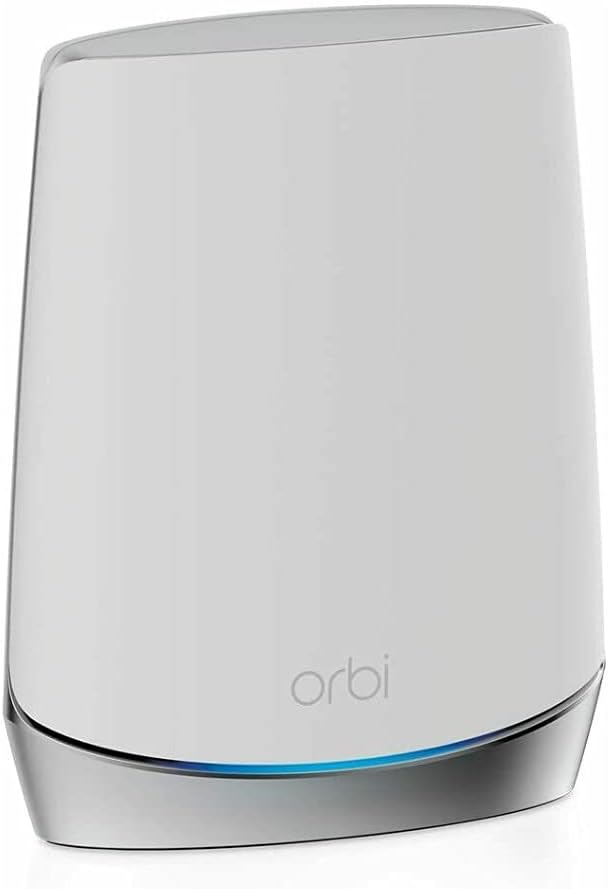
The NETGEAR Orbi RBS750 is a powerful tri-band WiFi 6 satellite designed to seamlessly extend your existing Orbi WiFi 6 system. It adds up to 2,500 sq.ft. of coverage and delivers ultra-fast AX4200 speeds up to 4.2Gbps, ensuring lag-free streaming, gaming, and conferencing. With easy setup and management via the Orbi app, it eliminates dead zones and supports smooth roaming with a single network name, making it an essential upgrade for modern connected homes.
| ASIN | B088B9S52T |
| Best Sellers Rank | #1,108 in Computers & Accessories ( See Top 100 in Computers & Accessories ) #37 in Whole Home & Mesh Wi-Fi Systems |
| Brand | NETGEAR |
| Color | White |
| Customer Reviews | 4.3 4.3 out of 5 stars (1,065) |
| Date First Available | May 13, 2020 |
| Item Dimensions LxWxH | 9.75 x 7.75 x 6 inches |
| Item Weight | 2.69 pounds |
| Item model number | RBS750-100NAS |
| Manufacturer | Netgear |
| Operating System | ZyNOS, Junos OS, Cisco IOS, or RouterOS |
| Product Dimensions | 9.75 x 7.75 x 6 inches |
| Series | RBS750-100NAS |
| Voltage | 100240 Volts |
| Wireless Type | 802.11ac, 802.11ax |
A**R
Better than expected.
Works great. Easy to set up. Much better WiFi coverage. Was able to put one in our mother in law’s house. She uses our Internet. Saves her some money!
R**S
Might need firmware update to sync satellite to router
The review from GUANGRONG ZENG under "Top Reviews from Other Countries" saved me. I made the mistake of buying the Orbi router/modem (CBR750) with no satellites, thinking my apartment was so small I wouldn't need a satellite. Big mistake, the wifi signal from the router in the living room did not reach the bedrooms in the back of the apartment. So I purchased the Orbi stand-alone satellite (RBS750). The instructions for syncing the satellite to the router/modem did not work at all (plugging the satellite in to an outlet and then pushing the sync buttons on the satellite and router). I kept getting the magenta light. So I followed the instructions from GUANGRONG ZENG (who got them from another reviewer). The only change I had to make, was that I found the specific IP address of my satellite in the Orbi app after I had connected the satellite via ethernet. I then entered Admin and Password as the username and password. It then took me to the page in the first image. Next step was update the firmware. I found my router's firmware version in the orbi app under router settings. Then I kept uploading the wrong file (CBR750 instead of RBS750). Once I get the right file uploaded, the firmware updated. See the second image. Then I refreshed and saw the third image. I then refreshed the Orbi app, and instead of saying "Satellites: 0 of 1," it now said "Satellites: 1 of 1." I have copied the original review below so that people can see all of the steps. Can not syn my new satellite for 2 hours, After review and tried C&J review, my system work great now, thank you for the help, i repost his post. credit to him. anyone having this problem, follow the step and give this a shot, thank you. 5.0 out of 5 stars Advanced setup may be required. Reviewed in the United States on October 21, 2023 Verified Purchase I've had good luck with my Orbi 750 system but wanted to expand the coverage with this satellite. I spent over 2 hours trying to get this to sync with my system with no luck. This is what I ended up having to do, and I’d assume this will work for whomever runs into this issue. • Start by plugging the new satellite into the Orbi router with an Ethernet cable. Plug the new satellite into power and wait for it to boot up (usually 2 minutes). • Wait for the light on the satellite to turn blue and then turn off. • At this point open a web browser and log into the Orbis interface (192.168.1.1) enter your username and password when prompted, then select attached devices and find the IP address of the new satellite. • Once you've located the new satellites IP address open a new tab and enter the new satellites IP address into the address bar and login (Username:admin/password:password). • Once you've logged into the new satellites web interface look for the firmware version and compare it to your existing Orbi firmware. If it doesn't match you need to manually update the new satellite firmware. • Open a new tab and search RBS750 firmware. Find the firmware version that matches your current system from the Netgear support site only (not 3rd party). • Once you've located the correct firmware download it to your desktop. When it's finished downloading extract the zip file to your desktop. The firmware file will end with .chk . Now go back to the browser tab for the new satellite and select firmware/update Firmware then select browse and navigate to the unzipped folder you downloaded and select the file ending .chk and update. This process can take up to 19 minutes. • Once the satellite is finished and there is no light coming from the new satellite unplug it from your router and place where you want it and plug it back into power. • After the light on the new satellite finishes blinking it should go blue for a moment then off. If the placement is poor you may get an amber light instead of blue and magenta if it's too far from the Orbi router. • This is how I got mine to work, I hope this helps someone in the same situation. After all this it works great for me.
A**N
Worth the money.
I purchased the new wifi 7 Orbi Mesh router system RBE771/770. It was, as all Netgear products are, easy to set up and install. The Orbi’s speed is unmatched by other routers I’ve had this year, and I don’t have any connectivity issues with it unlike the TP Link Deco WiFi 6e system or Asus Zen WiFi 7 systems. The only issue I’ve ran into so far is updating the firmware, which in my opinion has always been a contentious issue with Netgear. But overall spend a little extra money and purchase the Orbi system, your devices will thank you for it.
S**E
Effective Expansion for Improved Coverage
The NETGEAR Orbi Whole Home Tri-band Mesh Add-on Satellite (RBS750) has been an effective solution for expanding the coverage of my Orbi WiFi 6 System. While it works great and has significantly improved the WiFi signal strength in my home, I was disappointed that I had to purchase it separately to achieve the coverage I needed. The performance of the RBS750 satellite itself is impressive. It seamlessly integrates with my existing Orbi WiFi 6 System, providing a strong and reliable WiFi signal throughout my home. Furthermore, setup and installation were straightforward, thanks to the user-friendly Orbi app. I was able to quickly add the satellite to my existing network and optimize its placement for maximum coverage. However, my disappointment stems from the fact that I had to purchase the satellite separately after finding that the router alone did not provide adequate coverage for my 2,000 square foot home. Despite the router's claim to cover 2,500 square feet, I found that it fell short in certain areas of my home, leading to dead zones and unreliable connections. In conclusion, while the NETGEAR Orbi Whole Home Tri-band Mesh Add-on Satellite (RBS750) is a highly effective solution for expanding WiFi coverage, I was disappointed by the need to purchase it separately after finding that the router alone did not provide sufficient coverage. Despite this drawback, the satellite has greatly improved the WiFi experience in my home, making it a worthwhile investment for anyone seeking to enhance their Orbi WiFi system's coverage and performance.
M**K
Works perfectly! Trust seller 5 stars =)
I can’t say enough great things about this purchase and the seller, Sophia. Before shipping the NETGEAR Orbi Whole Home Tri-Band Mesh Add-on Satellite (RBS750), she took the time to confirm that I actually needed this specific satellite and that it would be compatible with my existing network. That extra step really shows how much she cares about making sure customers get the right product. Once everything was verified, she shipped it immediately. It arrived just a couple of days later, and I had it set up and running in about 10 minutes. The satellite works perfectly and expanded my network exactly the way I hoped. The packaging was absolutely superb—seriously some of the best I’ve seen. The unit was protected so well that it probably could have survived a fall from a 20-story building! I’m extremely happy with this purchase. The item was exactly as described and exactly what I needed. Huge thanks to Sophia for the excellent service and attention to detail. Highly recommended seller!
G**G
Can not syn my new satellite for 2 hours, After review and tried C&J review, my system work great now, thank you for the help, i repost his post. credit to him. anyone having this problem, follow the step and give this a shot, thank you. 5.0 out of 5 stars Advanced setup may be required. Reviewed in the United States on October 21, 2023 Verified Purchase I've had good luck with my Orbi 750 system but wanted to expand the coverage with this satellite. I spent over 2 hours trying to get this to sync with my system with no luck. This is what I ended up having to do, and id assume this will work for whomever runs into this issue. Start by plugging the new satellite into the Orbi router with an Ethernet cable. Plug the new satellite into power and wait for it to boot up (usually 2 minutes). Wait for the light on the satellite to turn blue and then turn off. At this point open a web browser and log into the Orbis interface (192.168.1.1) enter your username and password when prompted, then select attached devices and find the IP address of the new satellite. Once you've located the new satellites IP address open a new tab and enter the new satellites IP address into the address bar and login (Username:admin/password:password). Once you've logged into the new satellites web interface look for the firmware version and compare it to your existing Orbi firmware. If it doesn't match you need to manually update the new satellite firmware. Open a new tab and search RBS750 firmware. Find the firmware version that matches your current system from the Netgear support site only (not 3rd party). Once you've located the correct firmware download it to your desktop. When it's finished downloading extract the zip file to your desktop. The firmware file will end with .chk . Now go back to the browser tab for the new satellite and select firmware/update Firmware then select browse and navigate to the unzipped folder you downloaded and select the file ending .chk and update. This process can take up to 19 minutes. Once the satellite is finished and there is no light coming from the new satellite unplug it from your router and place where you want it and plug it back into power. After the light on the new satellite finishes blinking it should go blue for a moment then off. If the placement is poor you may get an amber light instead of blue and magenta if it's too far from the Orbi router. This is how I got mine to work, I hope this helps someone in the same situation. After all this it works great for me.
M**S
The description says this is 100-240V, but the unit I got is only 110V. If you live in a place with only 220V, then this unit is NOT usable. I had to request a return, which is not a fun process. It is been three weeks now and the request is still pending...
M**T
Good and fast, but coverage area are limited for each unit and barely leaves the room, you need to be near the unit to enjoy fast connection!
B**H
I have a orbi router supported with 2 satellites. This setup gives seamless internet signals in all rooms of our home. I wired one satellite with cat5 into my office. The other satellite is wireless which boosts the basement signal The three Orbi devices send a signal Wi-Fi signal for the entire house. Wireless mesh is the way to go
C**S
Love the ease of setup and the coverage for the entire house and connectivity speeds are blazing fast - would recommend 1 satelite per floor with the main hub being located close to your modem/router. I noticed a massive improvement in upload & download speeds when running a before and after installation test using a third party speedtest app.
Trustpilot
3 weeks ago
1 week ago