Buy anything from 5,000+ international stores. One checkout price. No surprise fees. Join 2M+ shoppers on Desertcart.
Desertcart purchases this item on your behalf and handles shipping, customs, and support to Morocco.
🚀 Elevate your workspace with flawless Full HD connectivity!
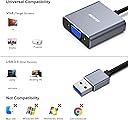
The BENFEI USB 3.0 to VGA Adapter converts USB 3.0 digital signals to VGA analog, supporting up to 1080p resolution at 60Hz. Designed for Windows 7 to 11, this compact and durable adapter enables seamless connection from laptops or desktops to VGA monitors or projectors. It features advanced chip technology for stable video output and comes with an 18-month warranty and dedicated customer service, making it a reliable choice for professionals seeking extended displays on the go.


| ASIN | B085KX97QG |
| Best Sellers Rank | 49,358 in Computers & Accessories ( See Top 100 in Computers & Accessories ) 133 in VGA Cables |
| Brand Name | BENFEI |
| Colour | Gray |
| Compatible Devices | Laptop, Monitor, PC, Projector, Television |
| Connector Type | USB, VGA |
| Current Rating | 1 Amps |
| Customer Reviews | 4.1 4.1 out of 5 stars (6,902) |
| Item Dimensions | 10 x 10 x 10 millimetres |
| Item Weight | 0.04 Kilograms |
| Manufacturer | BENFEI |
| Model Number | 000293grey |
| Number of Items | 1 |
| Number of Ports | 1 |
| Package Quantity | 1 |
| Power Plug Type | No Plug |
| Product Finish Type | Aluminium |
| Specific Uses For Product | Use with USB 3.0 port and VGA device |
| Unit Count | 1.0 count |
| Warranty Type | Limited |
A**H
It works but...
First of all the important bit.. yes it works when I connected USB3.0<>HDMi and also USB3.0<>HDMItoDVIadapter<>DVI. The picture resolution is full HD and perfect quality. I have actually got 3x monitors so 2 of them are on the card (Dsub, DVI) and this third monitor is on USB3.0. Everything was working fine and I was thinking about leaving a 5 star review because there are very few products of this class which actually works... But... here comes the but... I have connected it to my Desktop/Server system where I do lot of work including work on virtual machines so I do not turn off my PC for weeks even months because I don't want to waste time spinning up all VMs and opening all docs and browser pages etc. I normally send it to sleep before going to bed or the PC automatically goes to sleep/hibernate after 2 hours or so... after the installation of this adapter I went away for few hours and when I came back all my monitors were blank and PC was on. No matter what I tried the PC didn't come to life until I did a hard reboot and it all came back with a clean slate. So all work was gone! I then tried to manually hibernate it from start>shutdown>sleep and it went well, all monitors went to sleep but within 2 mins PC restarted! I tried different combination of cables, even shutdown power saving for USB port but it will restart every time if I put it in sleep mode (manually) or it will just hang if system goes to sleep after set duration. As soon as I removed the box the sleep functionality started working as normal. So, for some very odd reason, this box does not work for SLEEP/HIBERNATE mode. If you are a person like myself who does not want to turn off his PC then just consider above issue otherwise the device is fine. = = = I have had a detailed discussion about this issue with Benfei customer services and they have been very helpful in determining the issue and sending me another product to test. The new item they sent did work well with no issues at all (on Windows 10) so I think the previous item may have some issues which was causing the problem. Based on their response and excellent customer services I am elevating the rating from 3 to 5.
S**E
Works fine, but...
It works - but requires a driver. There is a mini-cd, but when plugged in, the driver shows as another hard disk in Windows (not sure about Mac, I guess it won't work on Linux?) If you are not an admin in Windows, don't bother getting this. Make sure it's plugged into a USB3 port. My laptop has two different USBs - 2 and 3. If you get a fixed 800x600 resolution, it's in the wrong port. (Also, make sure your USB hub is USB3 too!) You can only have one of these plugged in. If you plug in a second, the second one doesn't work. I guess they were lazy and programmed a single USBID number, so Windows doesn't know what to do with the second one. Not bad, refresh/update rate seems OK for office work, but I wouldn't go playing games on it.
A**R
Excellent Customer Service
Okay so my review will be a little long. But will be well worth the read if you wish to know about the amazing service I received from the company, and about the product itself. So for a little backstory, I wanted to add a second monitor to my laptop for work but only had one HDMI (that extends the display, not duplicates it). I ended up getting this product and it worked perfectly the first time. However when I unplugged it to fix up some cables it no longer worked. My laptop could recognise that a device was plugged in but no information was going through. I emailed Benfei support explaining what had happened, what troubleshooting I did, and some screenshots. I received a email back from them explaining that the adapter was most likely defective. They went on to say that they would send a replacement free of charge, I didn't even have to go through the trouble of sending back the defective one! They asked for my order details and provided an estimated time of delivery. It ended up coming a day earlier and worked perfectly. Overall while at the beginning it was a little annoying. The amazing customer service made up for it 10 times over. I would heavily recommend this device and the company as a whole. Its honestly refreshing to see a company go so much out of their way to fix the issue.
R**H
So far, excellent
I've had three of this type of devices now. the first two worked, but then stopped working after a couple of weeks. Thought I'd try this model - it's a bit more expensive than the others, but the next option for me is significantly more expensive. This loaded well, using the onboard software, and the image quality is much better than the last one i had and a massive improvement on the first (cheapest) one - which was almost unuseable as a result. This model almost seems better than the HDMI connection i have to another monitor. Highly recommended
R**O
Need to install drivers before use...
Nothing wrong with this to be honest, I wanted it to add an extra monitor to my works pc however it required to install drivers before it would pick up the screen. They would be easy enough to install is it wasn't for my works super tight security that doesn't allow you to add such handy things like a monitor at your own expense. Good enough for the job, not suitable for my work unfortunately due to a problem my side!
K**I
The item works perfectly! Just note you need to install the drivers from the cd (which is also included in the packaging) before the device works. takes less than a minute to install. No quality loss on the 2nd monitor, so you won't be disappointed.
M**M
Jeden jedyny który pracuje beż problemu. Po zainstalowaniu dołączonych sterowników działa 1080p 60hz. Przetestowane wcześniej od innych producentów powodowały klatkowanie albo zero obrazu. Benfei USB-HDMI numer jeden.
F**R
Ich habe mir den Adapter gekauft, weil mein Laptop nach irgendeinem Update über HDMI keinen Ton mehr am Sony Fernseher ausgegeben hat. Nach langer, erfolgloser Fehlersuche, habe ich mich entschieden diesen Adapter zu bestellen und - voila - funktioniert einwandfrei - sogar bei Anschluss über einen USB 3.0 Hub. Bin sehr zufrieden!
R**X
I wanted to add a 3rd screen to my Dell All-In-One desktop (Windows 11). I tried a different USB C to HDMI adapter (no software drivers) and it did NOT work. However, the other adapter worked fine on my LG laptop, so my Dell USB C port apparently does not support video. So, I ordered this adapter based on reviews and thinking that a software driver handling video over high speed USB A seemed plausible. It works PERFECTLY. Drivers come on a CD and are on the device itself, which also appears as a USB drive, so if you don’t have a CD drive just install from the device itself…or download from their website. I installed the driver before plugging in the adapter. I’m not sure about gaming, but everything I do (email, browser, spreadsheets, photo editing, YouTube, Netflix, etc) works 100%.
M**I
Ich habe sofort nachdem ich meinen Bildschirm angeschlossen habe gewusst, dass ich diese Rezension schreiben werde. Ich habe einen Lenovo Yoga 530, bei dem über die USBC Schnittstelle nur Daten aber kein Bild übertragen werden kann. Ratlos habe ich nach einer Möglichkeit gesucht, einen zweiten Monitor anzuschließen. (die Hdmi Schnittstelle war bereits belegt) Es gibt hier auf Amazon unzählige Lösungen für USBC zu Hdmi (was bei mir nicht hilft) und auch USB 3.0 zu Hdmi. Bei letzteren findet man in unzähligen Kommentaren die Warnungen vor Trojanern und teilweise spanische Rezensionen die nach der Übersetzung irgendeinen Bildschirmständer beschreiben... Da ich die Erweiterung nur für Office Anwendungen benötige, reicht das Bild und die Verbindung somit über VGA vollkommen aus, sodass ich wirklich Dankbar bin einen Adapter für einen so schmalen Kurs (€) gefunden zu haben, bei dem auch mal ein Markenname drauf steht und man nicht so ein pechschwarzes Ding bekommt, dass schon auf den Produktbildern nach billig Ramsch aussieht. Alternative Lösungen sollten weit über 50/60€ kosten. In meinen Augen inakzeptabel. Daher: Klare Empfehlung! Ob das ganze bei jedem Rechner funktioniert, weiß ich nicht. Aber ich bin ziemlich zuversichtlich. Der Treiber war blitzschnell installiert, einmal neu starten, fertig. Alternativ liegt eine CD dabei, ist aber vollkommen überflüssig, da sich sofort der Explorer öffnet, nachdem man den Adapter eingesteckt hat. Von mir 5+ Sterne und ich glaube man merkt mir meine Erleichterung an.
ترست بايلوت
منذ يومين
منذ 5 أيام