Buy anything from 5,000+ international stores. One checkout price. No surprise fees. Join 2M+ shoppers on Desertcart.
Desertcart purchases this item on your behalf and handles shipping, customs, and support to Morocco.
🖥️ Elevate your workspace and play zone with BenQ’s 4K all-in-one powerhouse!
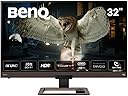
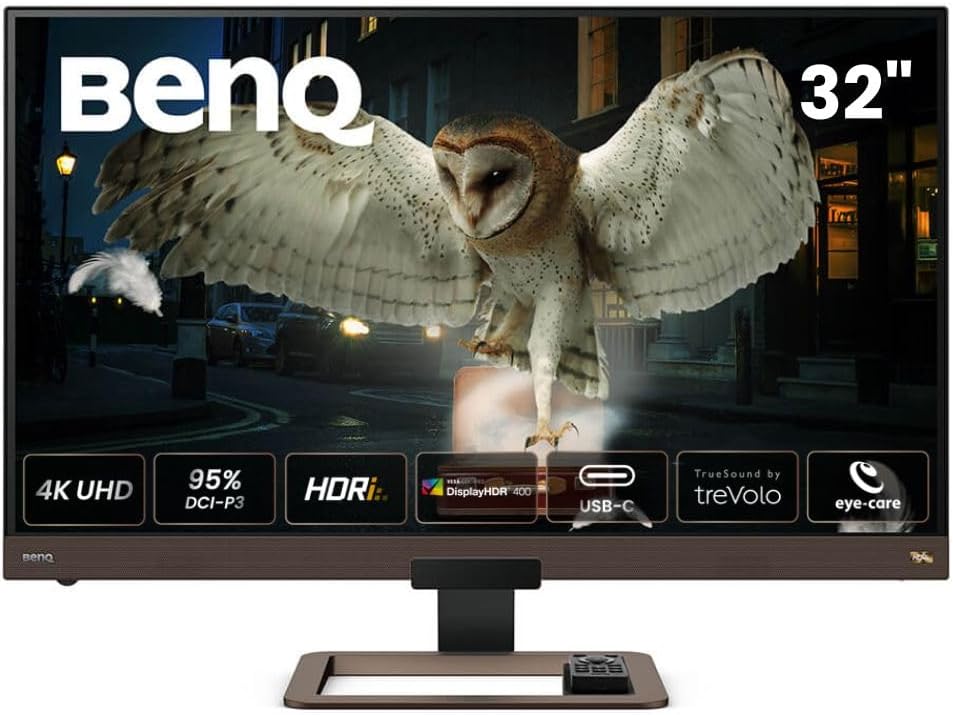
The BenQ EW3280U is a 32-inch 4K UHD IPS monitor designed for professionals and gamers seeking stunning visuals and immersive sound. Featuring HDRi technology, 95% P3 wide color gamut, and built-in 2.1 channel speakers with a woofer, it delivers cinematic image and audio quality. USB-C connectivity supports 60W power delivery for streamlined setups, while eye-care technologies like Brightness Intelligence Plus and flicker-free display ensure comfort during extended use. Adaptive FreeSync guarantees smooth gaming performance at 60Hz, making it a versatile choice for work, entertainment, and gaming.


| ASIN | B082P93LSQ |
| Adaptive Sync | FreeSync |
| Aspect Ratio | 16:9 |
| Best Sellers Rank | 58,701 in Computers & Accessories ( See Top 100 in Computers & Accessories ) 1,010 in Monitors |
| Box Contents | 1 year technical support |
| Brand Name | BenQ |
| Colour | Metallic Grey |
| Compatible Devices | Smartphone |
| Contrast Ratio | 1000:1 |
| Customer Reviews | 4.4 4.4 out of 5 stars (396) |
| Display Technology | LED |
| Display Type | LCD |
| EU Spare Part Availability Duration | 2 Years |
| Hardware Connectivity | HDMI, USB |
| Has Color Screen | Yes |
| Image Brightness | 350 nits |
| Item Dimensions D x W x H | 25D x 73W x 52H centimetres |
| Item Type Name | Monitor |
| Item Weight | 8.12 Kilograms |
| Manufacturer | BenQ |
| Maximum Display Resolution | 3840 x 2160 Pixels |
| Model Name | EW3280U |
| Model Number | EW3280U |
| Mounting Type | Wall Mount |
| Native Resolution | 3840x2160 |
| Network Connectivity Technology | DisplayPort, HDMI, USB |
| Picture Quality Enhancement Technology | HDRi, Brightness Intelligence Plus, Low Blue Light, Flicker-Free, AMDFreesync |
| Power Consumption Size | 60 Watts |
| Product Features | Built-In Speakers |
| Product Warranty | 2 year manufacturer |
| Refresh Rate | 60 Hz |
| Resolution | 4K UHD 2160p |
| Response Time | 5 Milliseconds |
| Screen Finish Type | Flat |
| Screen Size | 32 Inches |
| Shape | Flat |
| Specific Uses For Product | Gaming |
| Total HDMI Port | 2 |
| Total Video Out Ports | 2 |
| Unit Count | 1.0 count |
| Viewing Angle | 178 Degrees |
| Voltage | 220 Volts |
I**N
EW3280U - Great Monitor - Need to work with settings a bit to get best out of HDRi
I'm really happy with this monitor having had it a few months. Though around £700 is a lot you'll struggle to get a 32 inch display with 4K, HDR, good brightness for HDR (400+ nits), no PWM, eye care, Freesync and Gsync compatibility, and ideally IPS panel, USB-C video and power, good speakers, and a remote. I looked around a lot and the monitors were either a lot more or missed some features but weren't that much cheaper. 32 inch 4K has been really good for working with Unreal Engine and that was one of my main drivers. I also wanted to use it as a TV with a Humax box and this has also been great - the REC.709 setting looks lovely and the remote helps, (and I've been able to add the monitor to my Harmony One remote as well). The speakers are good and provide a fair bit of bass - I didn't find them disappointing like I have with some flatscreens. I can also with a laptop just use the usb-c cable for power and picture and it works great at 4K. 4K HDR gaming has also been great - no stuttering or tearing using the gsync with an Nvidia RTX 2070 super. The pictures look fantastic on games like Shadow of the tombraider, metro exodus - the pictures, especially for the former, often look real. I'm not a competitive gamer but I debated a bit about getting a higher refresh rate monitor - to say this this feels totally smooth with no issues for gameplay at 60Hz eve on racing games like forza horizon 4. 4K HDR from Netflix (note the windows app seems poor - and I use the browser which seems better) and discs has also been great though it has needed a bit of trial and error with settings. HDR 400 is the one that immediately appeals as the contrast can be altered and this enables you to set the HDR intensity to suit your own equipment and content. This was great but then I started to notice on Netflix HDR content and to a lesser extent in Metro Exodus the whole brightness of the screen would change quite frequently for some programmes. Whether this is Windows or the monitor not sure - though I'm not sure it happened with the Xbox One X but don't have that connected to the monitor right now. I think it's reading the HDR singal and implementing global dimming. However, the HDRi modes don't do this and I've been able to get a really good picture using these modes. I've seen reports HDRi varies the brightness a lot but I haven't found that to be the case at all. The thing is initially compared to HDR400 the whole picture looks dimmer and the HDR effect isn't so strong. It's like you've put sunglasses on. The contrast can't be changed for the HDRi modes. What I did is set the RTX 2070 super to use nvidia settings rather than windows settings (which seems to vastly improve the picture anyway) and then and then alter the brightness and contrast there. I've then been able to get great pictures across the board. I realise that in comparison to and HDR600 or 1000 TV this might not be so good but it's really good in comparison to non HDR video. If the screen shows the sun it makes you squint, torches look very bright, light flashes off metal etc - it all looks more realistic. What HDRi also does is manage the darker scenes better - it seems to keep better contrast and make them less washed out. Game HDRi seems to lift the brightness in the darker scenes a bit more which can be better in some circumstances but can make it look too flat and I generally prefer cinema HDRi. I'm pretty picky about picture quality and have a very good projector for films and I am very happy with the Benq. I would say check the HDRi super resolution and sharpness settings as I found the sharpness was turned right up to 10 and it made things look grainy or slightly odd / unrealistic at times until I turned it down a bit. I debated a lot on VA or IPS and ultimately it seems they both have pros and cons. VA has better contrast but less realistic colours and brightness and colour temperature can vary across the screen, especially if you're at an angle or close to the screen. IPS has accurate colours, better viewing angles, but in darker scenes can be more prone to IPS bloom - screen being brighter in one or more corners. I took the view I'd rather have the hit of IPS bloom - which is minimal on this even with HDR on and in the dark with a black screen or dark image - for darker material than issues that potentially occur all the time to varying extents but it's a personal choice. The only downside has been some quality issues. The first monitor had terrible bleed as well as a lot of brightness variations across the screen. The main bleed was a spot to right of middle and it looked like someone was always holding a little torch at the top of the screen. This was returned (got a replacement delivery next day after raising the issue, before sending off the faulty one - really impressed) and a new one was much better in terms of overall consistency of brightness across dark scenes, though had a similar bleed issue at the bottom to the right. Less severe but I returned this as well, also prompted by a price reduction. This latest monitor that I've kept had minimal bloom and no bleed. I have noticed an issue whereby the honeycomb material stuck across the bottom bezel is lifting up slightly in a couple of places and I periodically need to push it down. not ideal but given the screen itself is good I'm living with this. I went for 5 stars but would have probably done 4.5 if possible to account for the returns and the bezel but I am very pleased with the performance and picture quality of this monitor and it looks very nice - it doesn't shout out computer monitor or look like an office item; it feels more like a nice TV. Hope this helps - I deliberated a long time about what monitor to get and whether this one would be OK so hopefully this give some good insight to anyone in a similar position.
R**O
Much better than the VA version
I had the 32 inch VA version of this and had ro return it as it has the typical VA glow and dirty screen effect, also the colours were washed out. So, I like Benq monitors a lot so decided to spend more and get the IPS version, which has much better colour and zero dirty screen effect. Its the most uniform panel I've seen (had dozens of monitors) grey or black. The HDR is ok but I found customised User mode with HDR off to have a better image for gaming etc. Its IPS so you get great contrast and colour anyway without. I bought it to go with Ps5 and its great paired with that, low response time and set the AMA to premium for great motion effects. Really good for console where on PC I prefer 1440p 144hz Asus Rogers but I'd imagine this Benq would be great for Pc too, and photo editing. It does what it suggests, an all round entertainment monitor and even comes with a remote and way above average built in speakers. Was surprised how high end it feels and unlike other manufacturers, Benq have very high standards for their expensive monitors like this and it shows. Get one while it's black Friday sale and for your Ps5!
T**R
Good all rounder - don't expect too much from the built in speakers
Good points... - Picture quality is great both for work and movies (though I'm no expert). HD does make a noticeable difference for movies. - The remote control is convenient for switching between modes, especially HDR. It's much easier than grubbing around behind the screen for a small switch. - On screen menus are easy to navigate (especially with the remote). Neither good nor bad... - With my Mac I had to turn on scaling as the native resolution is far too small to see menus. - I haven't tried it with a games console so can't comment here. - The speakers are better than average but not a patch on external speakers or a sound bar and have limited volume. They may be adequate if you are short on space and only need them for light viewing and office work. However, I wouldn't expect much from built in speakers so this isn't a negative. Less good... - Parts of the housings (like the speaker grilles) are coloured brown. I would have preferred a neutral colour but you get used to it. - The included USB-C cable doesn't work with my 2018 Mac Mini. Works fine if you use an Apple-branded Thunderbolt cable. - There's no useful height adjustment. If you want this, buy a VESA mount but be aware the monitor is pretty heavy so make sure the one you buy is specced for the weight. However, you may only need on if you need extra space to fit something under the monitor - I needed to accommodate a sound bar which wouldn't fit with the default stand (see picture).
S**N
A great all rounder
With all the working from home I decided I needed a second monitor - after a fair amount of research I settled on this as providing for all my needs. It was initially supposed to be my secondary monitor (primary being an ASUS ROG) but after sitting side by side for some time I have actually started preferring to use this as the colour is superb and the refresh rate at 60hz is fine (ROG has 144hz) and only in certain situations would you notice the difference. Also while not officially supported, I have found that that G-sync works fine with it as well. My biggest surprise was how good the sound was...so while working I have great audio (crisp and clear with a nice bass). Really happy with it. Only negative is the stand is not very flexible, prefer the ASUS one.
R**.
Muy buen monitor. Un detalle negativo no muy importante es que cuando cambio de entrada con el mando a distancia, a veces tengo que volver a intentarlo por segunda vez porque no cambia, y también es un poco lento en ejecutar lo que se le pide; al encenderlo, o al cambiar de entrada... Pero como en todo lo demás es estupendo: calidad de colores, y todas las tecnologías que lo caracterizan, esas minucias casi no me importan. BENQ es una gran marca...
F**.
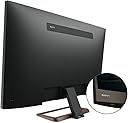
Questo monitor in formato 16:9 ha una risoluzione 4K UHD che esprime 3.840 x 2.160 pixel, con una finitura bella e diversa dal solito, con colori caldi sui toni del bronzo e del marrone, sia per le pastiche che per le parti in metallo, che rendono facile l’integrazione anche in contesti con arredi più classici. Solida la COSTRUZIONE, grazie all’ampia base in metallo e allo snodo che ne consente l’inclinazione mantenendo un’ottima stabilità nonostante l’altezza del monitor, che difetta invece della possibilità di essere regolato in altezza. Molto comodo il vano passacavi ricavato nel piedistallo, come anche il posizionamento degli INGRESSI posti sul retro in verticale ed in basso (USB C, HDMI, DisplayPort), non in bella vista come avviene sui monitor LG. Utilissima la presa USB-C con capacità di alimentare un laptop che consumi sino a 65W: personalmente, l’ho testata con il mio Microsoft Surface Laptop 3 ed ha funzionato a meraviglia. Ottima la qualità del PANNELLO IPS, con una copertura della gamma cromatica DCI-P3 – quindi non sRGB - pari al 95%, con risultati non comuni sia per quanto attiene alla fedeltà cromatica che per intensità e brillantezza della riproduzione, con un buon angolo di visione. Altrettanto buona, ma non eccezionale, l’integrazione HDRi a 10 bit proprietaria di BenQ, forse anche per una frequenza standard di 60 Hz, che assicura un onesto – ma non eccezionale - response time di 12 ms, 4ms in GtG. Non fermatevi al dato tecnico, che sembrerebbe sconsigliarne l’utilizzo videoludico, perché se per voi la frequenza di aggiornamento non è un problema eccessivo, la vividezza dei colori compenserà ottimamente un tempo di risposta non eccelso. La tecnologia EYE-CARE di BenQ, poi, offre un ottimo comfort visivo, combinando la tecnologia B.I.+ (Brightness Intelligence Plus) alla tecnologia Low Blue Light, alla funzionalità antisfarfallio e a modalità di illuminazione come quella ePaper o Eye Reminder, rendendo piacevolissimo l’utilizzo continuato, anche nelle ore serali. Ottimi gli SPEAKERS integrati TreVolo 2.1, il cui volume è comandabile da una comoda rotella posta nell’angolo in basso a sinistra della cornice, con due unità per i medio –alti posti nella cornice grigliata alla base del monitor ed un piccolo “subwoofer” dedicato alle frequenze medio-basse posto sul retro dello schermo, che dà un ottimo contributo in caso di montaggio a muro o comunque nelle vicinanze della parete posteriore; il tutto è completato da dei comodi programmi di equalizzazione preimpostati, facilmente richiamabili dal TELECOMANDO – forse il gadget più comodo fornito a corredo – che ha anche una piccola base in gomma rigida su sui riporlo, che si incastra perfettamente nel piedistallo del monitor. Nell’insieme un monitor che mi ha molto soddisfatto, che ho preferito al precedente LG 34WL85C e che ho confrontato a lungo con altri modelli BenQ, LG, Dell e HP prima della scelta definitiva: adatto ad ogni contesto, dalla produttività alla visione di contenuti, dalla multimedialità all’attività videoludica, rimarrete stupiti della qualità di riproduzione e dagli innumerevoli utilizzi che consente un pannello così ampio… vi assicuro che non riuscirete più a tornare indietro e che qualsiasi schermo Wide Screen in 21:9 vi sembrerà piccolo al confronto… assolutamente da consigliare! Grazie del tempo che mi avete dedicato leggendo sin qui. Se avete trovato utile la mia recensione, vi sarei grato se cliccaste sul pulsante “SI” riportato qui sotto. Grazie.
Y**I
4k resolution at 32" is a visual treat. IPS panel on this is superb with negligible back light bleed. Only problem is that the overall brightness isn't adjustable when HDR is on unlike TVs. But the colours pop on this screen even without HDR so I don't miss it. I bought it for gaming with PS5, I don't play competitive online multiplayer games so I'm happy with the 60 Hz. And the speakers on this are pretty good. Obv not a high end soundbar setup but I use only the inbuilt speakers most of the time when I'm not using my headphones. Get plenty loud and is quite clear. Overall an amazing product. BenQ aced it.
A**N
Really great monitor for both entertainment and productivity. The built in sound is great for a built in sound system. It won’t replace dedicated sound systems but will get the job done for casual video watching and other stuff. Color and picture quality it top notch at the price. I would definitely recommend if you’re in the market for a great 4K monitor. It’s one of the best 4K monitor in its category.
G**Y
Excellent monitor! Display: Great IPS monitor with great and accurate colors. Excellent black uniformity. Build quality: Build quality is solid. HDR: HDR is working as specified. 3 HDR modes: Cinema HDRi, HDRi and Display HDR. Supported refresh rates on 4k resolution: 23 to 60 Hz. 30 is working if needed. Stand: Only tilt. No up/down. Remote control: nice bonus Speakers: very good but cannot replace good stand alone speakers.
Trustpilot
1 month ago
1 month ago