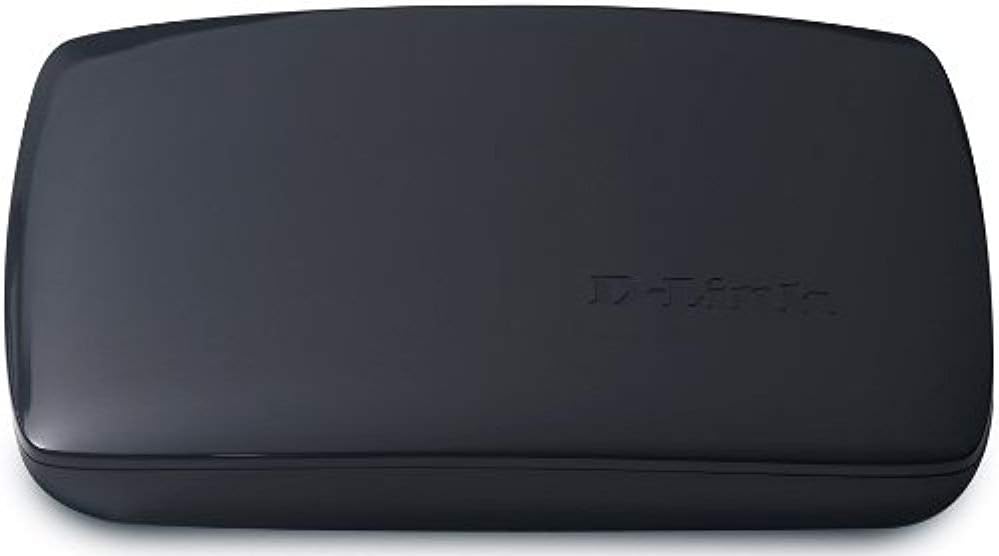


D-Link MainStage TV Adapter for Intel Wireless Display (DHD-131)
Product ID: 1675998
⚡Quick & secure wireless setup
📺1080p Full HD streaming
🔊Surround 5.1 audio support
Buy anything from 5,000+ international stores. One checkout price. No surprise fees. Join 2M+ shoppers on Desertcart.
Desertcart purchases this item on your behalf and handles shipping, customs, and support to Morocco.
📡 Elevate your living room vibes—wireless HD streaming made effortlessly chic!
The D-Link MainStage TV Adapter (DHD-131) wirelessly projects your Intel WiDi-enabled laptop screen onto your HDTV in crisp 1080p with full 5.1 surround sound. Designed for seamless, secure setup and free from DRM or codec limitations, it lets you surf, stream, and share content from the comfort of your couch. Backed by 24/7 basic installation support, it’s a stylish bridge between your laptop and home theater—perfect for the modern multitasking millennial.
| ASIN | B0053XG256 |
| Best Sellers Rank | #829,480 in Electronics ( See Top 100 in Electronics ) #20,143 in Laptop Chargers & Adapters |
| Customer Reviews | 2.3 2.3 out of 5 stars (45) |
| Date First Available | May 23, 2001 |
| Is Discontinued By Manufacturer | No |
| Item Weight | 8 ounces |
| Item model number | DHD-131 |
| Language | English, French |
| Manufacturer | D-Link Systems, Inc. |
| Product Dimensions | 6.4 x 4.75 x 1.2 inches |
E**4
Works great, but...(Update, 5/16/2012)
I love this thing! I had built an HTPC about 6 months ago and was using it to watch and surf the internet on my big screen television when my wife and I decided to buy new laptops. Both laptops came with WiDi support so we bought this and I moved the HTPC into my office as a desktop. It is so much better hitting one button on our laptops and instantly (almost) being online as opposed to having to boot up my HTPC. It was very simple to set up. The only reason I gave it 3 stars is that every time we push the button to start it up it asks to update and the two times we said yes (once on her laptop, once on mine) it stopped working. We finally got it back up and running and now we just always tell it no to the updates out of fear of losing it again. UPDATE: So, after only a couple of months of minor use (maybe once a week) this thing quit working. Our laptops say that they don't recognize an adaptor. They look for it but don't find it. Once in a while we can get it to work but then it breaks the connection halfway through a movie or video. Very frustrating. So we just bought a new TV and Blu-ray with Hulu, Netflix, Amazon, etc. built in and use that. I have always liked D-link so this is disappointing.
M**O
Not reliable
Video quality was very good (pretty similar to one over HDMI cable). Unfortunately when I was streaming audio it was skipping (silence) for fraction of second at least 3-5 times during one song - very annoying. Then the most annoying part was when device decided to completely disconnect and you had to reconnect again - this was happening at least every 30 min. I had to return it because for me it was unusable - I wasn't able to watch entire movie without the need to reconnect at least 3 times. I doubt it's problem with my laptop as it's brand new laptop with i7 processor. Another thing is that I wasn't able to get 5.1 dolby audio - Intel website was sending me to Sony for latest drivers (sony version of driver was less than needed as specified on Intel page). Maybe I was just unlucky and got broken unit - I will try with netgear push2tv. Good luck
J**B
Not yet ready for prime time.
This is a very good concept, but this thing is much to laggy to be useful. The other problem with this device is that it doesn't display everything you see on your laptop screen. Some of the icons are missing for example. Great idea, but not recommended until technology improves.
A**B
GARBAGE
Bought DHD 131 to stream from my sony vaio (core i5 with newer sandy bridge and updated WiDi drivers) laptop to avoid all the wires. This product however is absolute junk, it keeps dropping the connection constantly . I have a good 35 Mbps Internet speed and my new apple tv works like a charm streaming HD even 1080p videos without stutter or dropped connection . I even tried using multiple laptops with newer chipset, updated the firmware on DHD 131, but never got satisfactory performance . Don't even attempt streaming high quality videos as this fails miserably at that. I was not an apple fan but after using and seeing the change with apple tv, I have to admit I am a fan. I would not recommend D link DHD 131 to anyone. And oh yeah the customer service is also pretty poor as they will blame everything on your Internet speed and would not be of any help...
S**D
Enjoying benefits of Audio over HDMI
Highlights I find Audio is a pleasant surprise with Samsung HDTV + Samsung BlueRay/Surround-a-Sound. Pros 1) Great investment ... $350 Intel laptop with WiDi is great for watching Intl TV shows. 2) Audio is surprise benefit ... wireless HDMI sounds great. You can quickly adjust volume from TV remote control. Much simpler to quickly mute when visitors call. The sum is greater than the parts ... MainStage bypasses anemic laptop speakers. 3) 1080p on 42" Samsung ... Japanese anime video is crisp with Internet Premium HD streams. Cons 1) Size ... I'd prefer size of USB dongle, then it would be priceless for business trips. 2) HDMI cable ... I got the product for 50% off; the only issues I had was with shipped cable. Everything was working fine. Then, I consolidated MainStage cabling into multimedia furniture and nothing worked. I swapped backed in premium HDMI cable, and it works. 3) Occasional issues with video feed a. Sometimes, I only see 720p video in upper left corner on 1080p white background. This varies by video stream provider. Sometimes, restarting Chrome Browser helps. b. Rarely, the wireless video link will drop ... but the HDMI audio is still working. You can still watch the video on laptop display. Fairly graceful degradation ... I'll investigate to see if this is just WiFi environmental noise/bandwidth issue. Conclusion: I enjoy using the product. When I set up the system, both MainStage and Intel WiDi laptop had to upgrade their own firmware over Internet. Once they were both upgraded, the system is doing a good job of staying Auto Connected. Reliability is similar to 5 GHz WiFi Bridge (Dlink DAP 1522). Even though we live in the suburbs, the teenagers groan when their online gaming hangs on WiFi 11a. When you consider there are no cables, it is pretty impressive that 2.4 GHz WiDi video is almost as robust at 5 GHz WiFi video streaming. As friends and family see how well WiDi works ... it is a shame that Intel radios aren't available in Apple iPhones and Android smartphones.
J**T
Once connected this works fantastic. Not having to have to plug the computer in to the tv with a physical connection is so much easier. There have been a few occasions the connection has been lost and It is hard to tell when the connection breaks if it is the adapter or the computer that is responsible, but annoying though it is, it is easy to reconnect. I would have given a five if the range had been greater. I would definitely recommend this to anyone who watches TV on their laptop.
A**S
I use D-Link exclusively for all my networking. When I had a choice between a Belkin and this, it was clear which I would trust with WiDi. I now realize that Intel's WiDi as a whole is not yet ready to replace HDMI. I had a 3rd gen i7 processor that I used with it and regularly got annoying glitches that impeded connectivity and also messed with my Wi-Fi connection altogether. Maybe in one more generation/iteration, it will be where it needs to be. I'm hopeful. I'm keeping it, but I rarely use it anymore because of how much of a pain it is to use. An HDMI cable across my living room may be less visually pleasant, but it's a HELL of a lot more reliable and functional. Also, WiDi has mouse-cursor lag. As in if you move the cursor, it doesn't move right away. That's obviously when you use a resolution of 1920x1080. You can use a "fast-mode", but even that has lag, just a lot less; and you have to operate in a smaller screen resolution. If you just want to tinker, definitely get it. It's a nice toy to play around with. If you want to replace your HDMI cable, be prepared to be annoyed. If you don't mind having a long HDMI cable in your living room, I strongly recommend sticking to that for the time being. Check back in another generation.
S**A
pros It is very good product, setup was easy and it works well with my Sony LCD. Few things to consider i do not know these things before buying like i have full HD laptop having screen resolution 1920*1080, when i connect this to tv, it only connects in "exteneded mode" then it supports full HD mode otherwise not, if you want to duplicate the screen it will only duplicate in less resolution mode not in full HD. That is the only drawback otherwise it is perfect. cons Not easily available in canada, only available online..
R**N
Bought this for my mom after she asked me to get her a cable to hook up her laptop to the TV. My mom is far from a techie, and she uses this with no issues, so it's pretty simple. Works really well.
J**N
I bought this as a replacement product for one I had previously that I used to mirror the screen on my older laptop. I don't think it works with any Windows versions after Windows 7, as I tried it with my tablet, and it didn't work. That was unfortunate for me, as it really was easy to set up and works great with my older laptop, which has Windows 7, and my Samsung TV.
Trustpilot
2 weeks ago
2 months ago