


🎮 Level Up Your Game with Alarco!
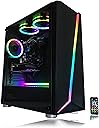
The Alarco Gaming PC Desktop Computer is powered by an Intel i5 3.10GHz processor, equipped with 8GB of RAM and a spacious 1TB hard drive. It features a dedicated NVIDIA GTX 650 graphics card, ensuring high-quality visuals for gaming. With Windows 10 Pro pre-installed and WiFi readiness, this PC is designed for both performance and convenience. The addition of RGB fans adds a stylish touch to your gaming setup.
| ASIN | B07YQCQBJK |
| Additional Features | Tower |
| Aspect Ratio | 1.77:1 |
| Best Sellers Rank | #202,191 in Computers & Accessories ( See Top 100 in Computers & Accessories ) #8,020 in Tower Computers |
| Brand | Alarco |
| Built-In Media | PC Tower |
| CPU Model | Core i5 |
| CPU Model Number | 2400 |
| CPU Speed | 3.1 GHz |
| Color | Black |
| Connectivity Technology | Ethernet, HDMI, USB, Wi-Fi |
| Cooling Method | fans |
| Customer Reviews | 3.7 out of 5 stars 2,872 Reviews |
| Display Resolution Maximum | 1920x1080 |
| Display Type | LCD |
| Graphics Card Description | Dedicated |
| Graphics Card Interface | PCI Express |
| Graphics Card Ram | 4 GB |
| Graphics Coprocessor | NVIDIA Gforce GTX 650 1GB |
| Graphics Description | Dedicated |
| Graphics Ram Type | GDDR5 |
| Hard Disk Description | HDD |
| Hard Disk Interface | Serial ATA-600 |
| Hardware Interface | Ethernet, HDMI, USB 2.0, USB 3.0, VGA |
| Human-Interface Input | Keyboard |
| Keyboard Description | Standard QWERTY keyboard, English layout |
| Keyboard Layout | QWERTY |
| Manufacturer | Alarco |
| Memory Slots Available | 1 |
| Memory Speed | 3.1 GHz |
| Memory Storage Capacity | 1 TB |
| Model Name | Vazgen_Plus |
| Model Number | Vazgen_Plus |
| Model Year | 2023 |
| Native Resolution | 1920 x 1080 |
| Number of Component Outputs | 5 |
| Operating System | Windows 10 |
| Personal Computer Design Type | Computer Tower |
| Power Plug Type | Type B - 3 pin (North American) |
| Processor Brand | Intel |
| Processor Count | 4 |
| Processor Series | Core i5 |
| Processor Socket | LGA 1155 |
| Processor Speed | 3.1 GHz |
| RAM Memory Installed | 8 GB |
| RAM Memory Technology | DDR3 |
| RAM Type | DDR3 SDRAM |
| Ram Memory Maximum Size | 16 GB |
| Resolution | 1920 x 1080 |
| Specific Uses For Product | Business, Gaming, Personal |
| Specification Met | Windows 10 Pro, NVIDIA Gforce GTX 650 1GB, 1TB hard drive, 8GB DDR3 RAM |
| Total Expansion Slots Quantity | 4 |
| Total Number of HDMI Ports | 1 |
| Total Usb Ports | 7 |
| UPC | 617222069052 |
| Video Output | DVI, HDMI, VGA |
| Video Output Interface | DVI, HDMI, VGA |
| Video Processor | NVIDIA |
| Warranty Description | 1 year warranty covers any defects in workmanship or defects in original parts for 1 years from date of receipt. Does not cover damage due to accident, modification, overclocking, abuse, or other damage done after receipt of item. Any added software and viruses are not covered. If the issue is covered under the warranty, buyer pays to ship the computer back to us for repair and the return shipping… |
| Wireless Compability | 802.11ac |
| Wireless Network Technology | Wi-Fi |
| Wireless Technology | Wi-Fi |
A**A
Loved it overall
This was great for a starter PC. A great price and it ran smoothly. However it lasted a few months in my house. I assumed it was an issue with the product being defective but it was actually my child spilled liquid on the power source. I had to replace the power source, but the PC would not come back to life. I had to trash the PC because I could not find anyone to assist with fixing. So be sure you keep your kids and liquid away and be mindful off your resources to get it fixed if needed.
B**N
Just build your own..
So, the same day I got the PC it basically died on me. I used it for ~4 hours. I did a test stream on Twitch which did rather well if I’m being honest. Never actually got to play any games on the PC itself as it died before any were even done downloading. This would have been my first ever ‘gaming’ PC and was beyond ecstatic when I first turned it on, it’s like opening your first game console on xmas day. And for a little context I’m 25yo and have wanted a PC capable of low to mid range gaming on as well as able to run programs needed for graphic art since I was 16. Needless to say I was devastated when it blue screened twice within 10 minutes and failed to post to either of my monitors (which are also brand new like the HDMI cables). I looked up numerous, possible solutions on how to fix my issue and could not find the issue, so I can only assume it was the hardware. In the end I decided to return it and build my own PC. After a lot of research into building PCs I realized it’s just a much better option. Don’t be me, don’t look for a shortcut. If you’re going to buy a prebuilt go with a reputable manufacturer such as NZXT, DigitalStorm, CyberPower, etc.. I was afraid to build my own PC, the fear of messing something up just lingers over me, but watching YouTubers such as JayzTwoCents, ToastyBros (who actually mentioned this PC in a “do not buy” type of video) and AlphaGaming to name a few, they showed me it’s not hard at all to build one. It just takes time, patience and a little understanding. Also to note, when I received the PC and took it out of the box there was no paperwork or manuals of any sort and no contact information in case of trouble shooting which was a little shady to me, even checked here on Amazon for seller contact info and couldn’t find any and if it is there then shame on me for not finding it. So buyers do beware. Edit: 10/9/2020 It’s been close to four months since I’ve built my own PC and I just wanted to let those who might be scared to do so know that it’s rather easy and VERY rewarding, especially when you hit that power button and everything works as it should. If you go into building with some knowledge on what to do you will have little to no problems at all. Not only do you feel proud but you’ll feel a sense of relief too. As if you ever want to upgrade a part or have to do some regular maintenance, you will always know what to do and where to put things. So please do not waste your time and hard earned money on this pretty looking pile of scrap metal. These parts are so far out of date it’s disgusting to pay that much. So please, I really do encourage you to build your own. You can do it, I believe in you. If you do decide to build your own and ever need help with anything, visit the /r/pcmasterrace subreddit. You’d actually be surprised how many nice, helpful people are there.
J**S
Needs some hardware updates ....2012 hardware
Customer support seems to be helpful after the sale their are some things that need mentioned number 1 my graphics card was from 2012 its 128 bit 1024 memory this is not going to work good gaming however of u know how to upgrade the i went with a frozeriii or aka frozer 3 with gddr 5 3gb ram it definitely made it better the next thing ide like to say is 8gb of ram is not that good so after many many hrs of looking on amazon and ebay i finally found the 8gb card to make the pc 16 gb of ram also note that the hard drive is not solid state ssd its mechanical hdd computer came well pkged with no damage apon checks of plugs and wires and conections i found no faults also note in bios xmp is not supporting as far as i see the options their tho thier is no cd rom i advise to buy external also please note their is no restore system so make sure u back this thing up or at min a spare windows to use just incase i do like the lights but seem like outdated led lights i hope this honest reveiw helps somone .
R**N
Check the processor fan as soon as you take it out the box.
So I’m writing this review after owning and using the pc for a month and I gotta say, for what it is, it’s pretty solid for a starter rig. It runs pretty much all the games I like to play (destiny 2, boarderlands 2, apex legends, and gta5) relatively smoothly with little hiccups here and there, however the graphics card it comes with is not powerful enough to run call of duty war zone so just keep that in mind if that’s what you are trying to play on this rig cause it won’t even boot it up. I do notice frame drop off at times in game but it’s very minor. My biggest complaint is something I literally just noticed maybe 10-15 minutes ago. The processor fan was not connected at all and looks like it was installed 90 degrees the wrong way. When I plugged in the processor fan, the wires were rubbing on the fan blades so I loosened them and let them hang semi-freely as to not fray them. All and all though it’s a pretty good starter for someone just getting into gaming on pc and is a great starter for someone who wants to get in to diy pc building. There are components in this rig that I will be upgrading as soon as possible, mainly the ram and the graphics card. Other then that, the rgbs inside the rig, from what I can see and I am no where close to being an expert, seem to be button style battery powered and went out the day after I received the pc, of which is not a big deal to me cause I wasn’t gonna turn them on in the first place, but if that would bother you then just know that when you try to use them. Other then those 2 minor things I have no real complaints and am looking forward to building up this rig as time goes by. Edit: I have discovered why the rgb fans and rgb strip at the bottom of the device was not working properly and have sense fixed it, however I am not an expert on pc building, what I found was a little Concerning to me. When taking off the back panel of the pc, I found the the power cable of the rgb controller had had the 4 pin connector (that is supposed to plug into either the motherboard or power supply to my knowledge) cut off and daisy chained into a staida cable dait chain the had a 6 pin connector that was supposed to be plugged into the hard drive of the pc. I can write of this as a shipping issue, however not the fact that there are 2 6 pin connectors on the motherboard that could have been used for the 4 pin rgb controller power instead of the solution that the builder found easier. Be it as it may, after connecting this ghetto rigged rgb controller I noticed an immediate fan speed increase and a fix the the problem with the rgb I was having before so as of right now, no harm no foul, but if I have anymore problems I will be sure to edit this review
S**N
My first gaming PC, and I love it!
I am that grandma that started playing video games at almost 60. My daughter got me started on WoW on my laptop. That didn't last long. She suggested that this would make a good beginner's PC for gaming, so I got it. So far, it works great. I hooked it up to my 65" TV so I can see everything very well, and I am having a blast. The only hiccup was when we first opened the box and hooked up the keyboard and tried to turn it on, it wouldn't come on. It took a bit to figure out that the company had sent it with the power switched to on, so when my daughter flipped it, thinking it was set to off, of course nothing happened. once we figured that out, everything has been fine ever since. Would definitely recommend. Oh, and my daughter and grandson like that they can switch the colors to their preference when they are using it, too. :)
D**R
Horrible product never buy
I ordered this gaming pc thinking it was going to the best of the best like the lister said and it’s a horrible gaming pc he said windows 10 is in stalled even know it can’t run it I want to return it and get my money back I can buy another for the same price with way better parts I can’t even get Bluetooth on it I can’t run any games or it kicks me out even a mobile game kicks me out within a second and I can’t get google to run at all this is the worst pc I would not even use it when the parts came out in 2012 the mother board is the worst thing I seen and I had a Ethernet cable hacked up to it the hole time I will never buy from this seller again.
M**I
The worst PC I have ever used. Please read my review before purchasing.
One of the worst PC's I have ever used. I bought this PC in April. Less than seven months later I get nothing blue screens, error screens and crashes. Since the HDD would wipe, I diagnosed the HDD's health using both the command prompt and from BIOS. Nothing. The PC constantly crashes. Making it, well, basically unusable. It sometimes even crashes to the BIOS setup screen and won't let me boot back into Windows because it doesn't recognize Windows on my HDD, but it will let me power the PC off and power it back on, and then it's fine - sometimes. The PC comes with Windows 10 installed and activated. Some programs and applications won't wipe from the HDD, like Steam and Microsoft Edge, which were installed on the HDD. So it isn't the HDD. Windows 10 is installed and activated, I never used a dual boot or ran Linux or another OS and I never modified or upgraded/tampered with the PC's hardware in anyway. The OS, case, hardware and everything I received with the PC is exactly the way it was then, now. I never use this PC for anything heavy or hardcore. It's an i5 and I respect that. I ran multiple virus scans using Windows Defender, Kaspersky, and Malwarebytes and Avast thinking maybe by some magical reason I ran a virus or a gnarly rootkit, nothing came of it. It's gotten to the point I had to purchase a separate 1TB external HDD to back my PC up because it will either crash mid-use and I lose everything or it will just wipe upon power up. Please, I know the price is decent. But for the times we're in, please reconsider.
M**.
Waste of money....
I've had it for a few days now and for the love of everything that's holy... I can't figure out how to get into the Bios. It posts and the locks on the Motherboard splash screen. I got it working after accidentally getting into the bios and booting widows from there. Seems like it really doesn't want to send anything from the video card. That being said.... if I do manage to get in to boot into Windows, it's great. Everything works. I'm still trying to figure out what this is happening. It would be nice to know what key to press to get into the bios though. If anyone knows, please tell me. (On the bright side, I figured out what was happening with the boot problem. It turns out the thing keeps trying to boot from my external USB hard drive. Unplugging it for restarts works like a charm.) Still want to know what the bios key is but I guess I'm going to have to inspect this cheap motherboard to find out what it is and then look it up. I raised my rating from one star to three.
ترست بايلوت
منذ 3 أسابيع
منذ أسبوعين