Buy anything from 5,000+ international stores. One checkout price. No surprise fees. Join 2M+ shoppers on Desertcart.
Desertcart purchases this item on your behalf and handles shipping, customs, and support to Morocco.
🔬 Zoom into the future of discovery—because seeing is believing!
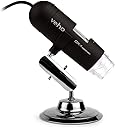
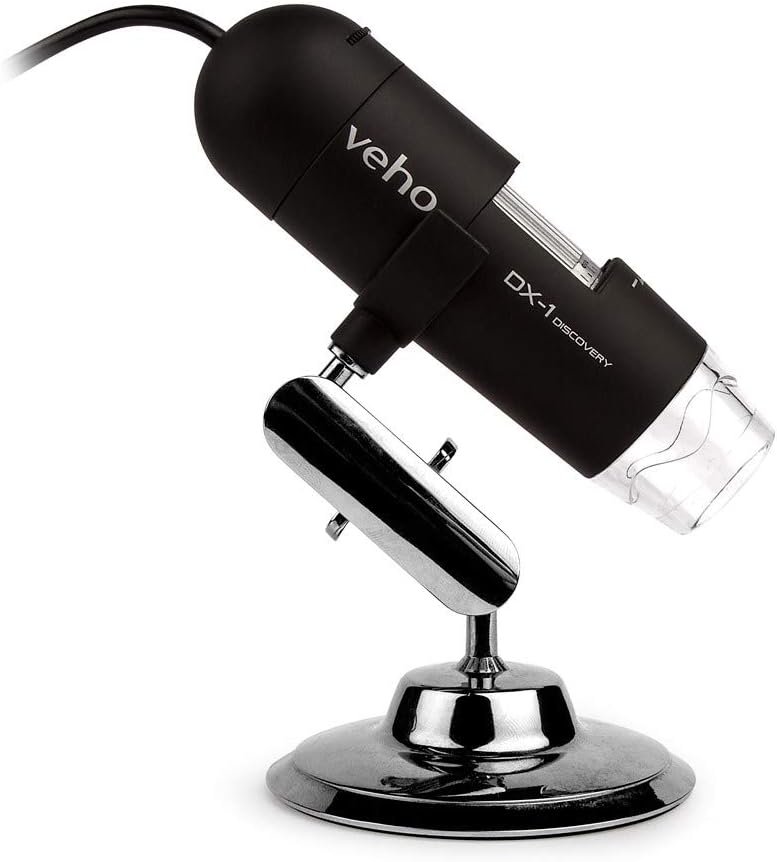
The DX-1 Digital Microscope by Veho offers 2MP HD imaging at 1920x1080 resolution with 100x to 200x digital magnification. Equipped with 8 LED lights and high-speed DSP, it supports the latest Windows and Mac OS for smooth plug-and-play operation. Compact and lightweight, it’s designed for professionals seeking detailed microscopic analysis with ease and style.


| ASIN | B07MJGV5F3 |
| Best Sellers Rank | #4,392 in Camera & Photo Products ( See Top 100 in Camera & Photo Products ) #580 in Lab Handheld Digital Microscopes |
| Brand | Veho |
| Built-In Media | Calibration ruler, Cradle stand & Cleaning cloth, Software CD, User Guide, Veho DX-1 Microscope |
| Color | Black |
| Compatible Devices | Personal Computer, Laptop |
| Customer Reviews | 3.7 out of 5 stars 644 Reviews |
| Enclosure Material | high speed dsp |
| Global Trade Identification Number | 05060594760266 |
| Item Weight | 0.32 Kilograms |
| Light Source Type | LED |
| Magnification Maximum | 200 x |
| Manufacturer | Veho |
| Manufacturer Part Number | VMS-006-DX1 |
| Material | high speed dsp |
| Model Name | VMS-006-DX1 |
| Model Number | VMS-006-DX1 |
| Objective Lens Description | Achromatic |
| Power Source | Handheld |
| Real Angle Of View | 45 Degrees |
| Real Angle of View | 45 Degrees |
| Voltage | 5 Volts |
| Warranty Description | 1 Year |
A**R
great for the field
I took this and a rugged (2goPC) netbook on a 5 day Geology Field trip. I stored the microscope in a soft cloth bag inside a Nalgene water bottle. This way, I can keep the microscope in my day pack, and not worry about damaging it. The base does not fit into the water bottle, so I detach it and store it separate. The body is pretty rugged, and the lens and LEDs are recessed. The place I'd expect a failure, would be where the USB cable enters the body of the microscope. Be careful you don't kink the cable here. It seems to have two focal lengths related to distance from the object. One at about 10x, the other about 400x. It's great for looking at grain structures of rock samples. The rocks I had were not going to come home on the airplane, but I have close up pics, and pics of friends rocks too. The internal LED lights make this easy to use. When you've collected a pic, look at the magnification on the body of the microscope. Double click on the picture on the side-bar of the microscope software. When the picture opens up in the picture editor, enter the magnification into the box provided in the upper right corner of the picture editor. Now, you can use the software measurement tool in the picture editor to measure structures (and save the measurements) on the picture. Be sure you save the picture to your "My Pictures" folder. My son found a small but very ugly bug, the microscope software has video capture capability, and we were able to capture a video of the bug (turned over) trying to right himself. My son also took some really cool pictures of candy wrappers and pea-cock feathers at 400x. The actual lens is shielded by the outer clear plastic ring, and it's easy to just press the microscope against your object to view, focus, snap a pic. I don't use the base stand much. After a few tries, you can operate the microscope with one hand. There is a button to capture a picture, or click on the PC. The only down-side I have, is the lens cap does not fit tightly. I plan to add a thin bead of silicon sealer to the edge of the lens cap. But I'm glad that the lens cap does have an eye for a string to tie it to something.
D**E
When manufacturers stop supporting operating systems they would be better served by pulling the unsupported hardware off the market ...
Product worked until Windows 10. No Windows 10 drivers now and software that allows you to capture photos or video no longer can find the microscope. Have been out to Veho website and the latest drivers off their support download did not rectify the situation. Given this, I'm surprised and dismayed to see this model still being sold when functionality is severely limited. When manufacturers stop supporting operating systems they would be better served by pulling the unsupported hardware off the market or making the limitations known. Personally don't think they should be allowed to be sold on Amazon given they are non functional on Windows 10 without such clarification. Product was good prior to this change.
M**S
Great product for what it does - Description is MISLEADING
This little USB microscope is actually a descent product, with a few exceptions and a very misleading product description. Pros: At the two actual zoom settings, the microscope works great. The focus ring brings the picture into great view, and the snapshot feature (when used via the software) works great. Cons: The unit description leads you to believe that this is a mutli-zoom unit with zoom step all the way from 20x-400x, when infact the unit can only focus at two zoom levels the 20x zoom, and the 400x zoom, NOTHING IN BETWEEN. I also found that when you use the mechanical snap-shop button on the housing of the unit, it sticks and takes hundreds of unwanted snapshots. This problem leads to an additional problem of their software. There is no way to SHIFT-CLICk multiple images at the same time. You must delete each picture one at a time. This is troublesome when the button sticks and fills up the still-shot photo library with literally hundreds upon hundreds of snapshots. The stand that comes with it is OK, it does present a problem if you want to focus on an item from directly above. This is a problem because the stand has a short arm, and it cannot pose itself directly above the item to be viewed. I use this to cataloge my coin collection, and will provide GREAT zoom picture for such online auction sites as EBAY, etc. BE CAREFULL TO UNDERSTAND THIS UNIT WILL ONLY FOCUS AT THE (20X) AND (400X) ZOOM LEVELS AND NOTHING IN BETWEEN. This is very misleading in the description and could leave alot of people disappointed with their purchase.
P**D
Unhelpful user's manual, microscope provides two fixed levels of magnification, appx 20x and appx 400x
I just bought this microscope and after some initial disappointment, because I didn't really know how to use it and the documentation that comes with it is almost useless, I am now quite pleased with it. There is some confusion in reviews here over what this microscope can do -- is it really a 400x power microscope? The advertising describes it as "Magnification: 20x - 400x (Plus digital zoom in 640x480 mode)" Does that mean it can continuously zoom from 20X to 400x? The manual that comes with it does not really tell you how to use it. So I did a little experimentation, and found that it really has two fixed magnifications, appx. 20x and appx. 400x. There is a cylindrical drum you can twist for focusing the microscope. As you turn it an internal lens moves up and down the barrel, changing the distance to the specimen. On the drum, there's a scale, with markings from 20 to 400 on it, that is quite misleading -- it suggests that you can optically zoom continuously from 20x to through 400x. But that is not the case. Instead, there are two fixed magnification levels, one nominally 20x and one about 400x, corresponding to two different focus locations, and they do not correspond to the locations on the scale you would expect! Using it at 20x power: If you place a specimen, like a piece of paper, directly under the microscope and place the clear plastic end of the microscope directly on the paper, the 20x focus occurs when you turn the drum beyond the top of the scale, past the 400, then a little past the 20 mark as the scale starts repeating. At this focal point the internal lens is moved up the tube, far from the specimen. The field of view is 13.5 mm. You can then move the microscope farther from the paper, readjusting the focus as necessary. You can even move the microscope quite far from the specimen, and still be able to focus it with 20x magnification. When it is focused at infinity, (at the extreme end of the scale, about 60 over the top), the field of view is 11.2 degrees, or about 3" wide when the subject is 12" from the end of the microscope. Using it at 400x power: To get the the 400x magnification, again place the clear plastic end of the microscope directly on the specimen, say a dollar bill. The 400x focus location occurs when the drum is rotated beyond the bottom of the scale, to the 400 below the 20 mark. At this point, the internal lens is moved down the tube, to nearly as close to the specimen as it can get (about 22mm). The field of view is only about 0.8 mm, or 2 degrees. Most users would never notice that the microscope can focus at the 400x magnification: to attain it you must move the focus lens to nearly the full bottom of its travel; it is easy to go through the focal region too quickly to see it; and the documentation makes no mention of it. People may think the higher magnification is obtained by zooming in digitally on your computer screen, without realizing that the microscope focuses with high magnification itself. You'll need to turn on the LED illumination for the 400x scale to get an image. (There are eight white LEDs that provide good even illumination, not four as advertised.) Zooming: As well as these two focus regimes, there is a software zoom option. If you choose a capture size of 640x480 you can go to the preferences menu and choose zoom to zoom in digitally. The field of view zooms from 13.5mm down to 4.2 mm. Measuring actual magnification: The 20x and 400x are only approximage values, but you can measure the actual magnification by viewing a millimeter ruler or finer reticule if you have one. If the image capture size is set to 1280x960, I find that the width of the field of view is 13.5 mm at the "20x" focus, and about 0.8 mm at the "400x" focus. (about a 17x difference) The resolution, that is, the size of a single pixel in the field of view, is 13.5mm/1280= 10.5 microns for the "20x" focus, and 0.8mm/1280=0.6 micron for the "400x" focus. (Of course, the optics aren't perfect, and it appears to me that at the "400x" focus the optical resolution is about 3 pixels, that is, the smallest features you can see are about 2 micron in size. The magnification you see on your computer screen depends on the screen pixel size, also called the pixel pitch. Mine is 0.282 mm (or 90 pixels per inch, most LCD screens are 90-100 pixels/in.). For my screen, the two actual magnifications are then, 1280*0.282mm/13.5mm = 26.7x and 1280*.282mm/0.8mm = 451x. This is for viewing on the computer screen at "actual size", not zooming in. Measuring object sizes: The software allows you to measure objects with rulers you can draw over a picture, but you need to enter the actual magnification to calibrate the software ruler. They suggest you take that reading from the scale on the microscope, but there's so much up and down play in the focus drum that you can't rely on its readings for the true magnification. It's best to calibrate the field of view by taking a picture of a millimeter ruler. Then you know what true size the full width of the captured image corresponds to. That works well for the appx. 20x focus point. Unfortunately, the magnification box allows entry of only integers up to 220, so you can't enter an actual magnification, like 451, to get accurate numbers. Even so, you can measure object sizes and do the math yourself. In particular, you can use the software ruler to measure sizes in pixels with a magnification factor of one, and get an accurate pixel measurement. Saving images: The software lets you save the images in uncompressed *.bmp or compressed *.jpg file formats. You can choose the level of compression for the *.jpg files; remarkably, the 3.7 MB files (1280x960x3bytes) can be compressed to about 100KB without much loss of resolution. Image resolution: Despite the ad hype, the sensor is not a 2 megapixel (Mp) sensor -- the spec sheet in the instruction manual says it is 1.3 (Mp). The maximum resolution is attained when you choose an image size of 1280x960 = 1.23 Mp. Although there is an option for capturing images at 1600x1200, those images are interpolated, and don't result in any greater actual resolution. With these considerations in mind, you'll find that this microscope is a great value for the money, and you can take some really good photomicrographs with it.
D**R
What most others have said
Veho VMS004DELUXE USB Powered Microscope. The scope came in an attractive package that was easy to open. Setup was simple if your computer can read mini cd's. Windows XP didn't recognize it when I plugged it in which surprised me because XP usually 'says' something whenever I plug anything new in a usb port. The stand leaves a lot to be desired. It is not very stable at 400x, and that leads to difficult focusing. The focus wheel is easy to move but would be better if it moved less per revolution making it more exact. There are no instructions except how to set it up from the disk. I suggest reading Paul Clifford's review. He explains this scope, and how to use it, in an easy to understand way... good job Paul! I am very impressed with the interface 'MicroCapture'. Viewing live what the scope is seeing is very nice. At 400x one must use a gentle hand. It's easy to take pictures and movies. The pictures are very clear if the scope was focused. Everything considered, this is a great scope.
N**L
Awesome concept but..
To start, I already own an $800 microscope that has a magnification of 400x, so I thought I would buy this after reading the magnification just to see how they compare, especially considering the price is so generous. I thought that after plugging it in, the magnification wouldn't be perfect, but it would at least be ball park. Not even close. In fact, its a down right lie. The maximum magnification that is claimed to be 400x is actually closer to 100x than any of the others I compared it to using the stronger microscope that I have. The clarity under that magnification is between fair and good, but not great. This is a neat piece of equipment, but it really is just a toy. It should not be considered by anyone that actually needs good resolution microscopy with a magnification greater than about 100x.
4**2
not disappointed at all
it's smaller than i imagined it would be but that doesn't really make any difference. confirmed working on windows 7 x64. the device drivers installed without any problems. the program it comes with works quite well and i've had no problems with it so far. the included driver disc is mini-size but it worked just fine (using BluRay-ROM if anyone cares). it may not be a 400x zoom but its still worth the money in my opinion. i'll try uploading some pictures that i've taken so you can get some idea of the maximum magnification. when you zoom to the max, the letter 'y' in 'liberty' on a penny fills the entire screen. for clarification it comes with a stand that feels sturdy and of clean manufacture. the packaging was in good shape, although i eventually took a knife to the plastic to get it open. there's also a greyish white button on the microscope itself that you can push to instantly pull up the capturing program on your computer. have fun.
A**.
disappointed
I bought this as a gift for my father. So far, I am disappointed. The software is provided on a mini-CD rom, which is useless if you don't have a pop-out CD rom tray. So, I have not been able to install this software. I have contacted Veho to find out if they have the microscope driver and micro capture software available as a download from their web site. Their website is useless. I clicked on the download section of their site and was greeted with a message stating that the quota of downloads had already been met for the day and I should try again later. This was my first visit to the site. I checked the FAQ section to see if there was info about obtaining the downloads some other way - there are no FAQs even posted on the site. I sent a technical request and am now waiting for a response. If you don't have a pop-out CD tray, don't buy this product - you won't be able to load the software. While the mini-CD looks great with the product packaging, it isn't useable.
E**Y
FUNCIONA MUY BIEN
BUENA CALIDAD,BUENA RECEPCIÓN DE VISIÓN Y Y DE FÁCIL INSTALACIÓN Y MANEJO. LO COMPRE ESPECIALMENTE PORQUE REALIZO PEQUEÑAS SOLDADURAS EN DISTINTAS PLACAS Y LA VERDAD QUE EN ALGUNAS DE DIFÍCIL ACCESO Y QUE VEO POCO ME A SOLUCIONADO Y FACILITADO LA TAREA. CALIDAD PRECIO ESTA MUY BIEN.
J**S
An excellent product for the price.
This is an excellent product. For a small price you get an easy-to-use device which produces good, clear images which will stand a certain amount of enlargement in printing. Remember, this is a tiny fraction of the cost of a digital camera macro set-up for similar magnification, and an even tinier fraction of the cost of professional lab-standard equipment: for what you pay, it is excellent. I had one of these years ago, but it was no longer compatible with modern operating systems, so I replaced it. I tried a rival, which looked like it had a good spec., but was so disappointed I returned it and went back to Veho, with no regrets. I like to photograph live insects and other mini-beasts without harming them, and apart from the very fastest moving ones, you can do this effectively, before releasing them back to their environment, at 20x. 200x is good for plant surfaces etc. but obviously the depth of field and proximity means that this is almost impossible for moving objects (as other reviewers have noted, this is a result of the laws of physics not a fault with the device!). As a hobby, for producing some very nice images, or recording biodiversity in your backyard, or just enjoying a creative, non-harmful interaction with nature, this is a great product. I might purchase a macro-SLR set-up one day, but for now, with a busy life and other expenses, this is a superb, easy-to-use hobby item which I very much enjoy.
G**T
Excellent!
Perfect product for my requirements.
J**L
Good portable USB microscope
Once you install the driver and software, the microscope is good to go; just connect via USB port. Good to take images and videos. It would have been better if the Veho software had more capabilities. The downside is the lack of magnification scale while saving an image. If you need to find the size, make sure to keep a reference standard like a graph sheet or so in the figure, on focus.
A**O
microscopio
Il prodotto corrisponde perfettamente alla descrizione. Ottima qualità e prezzo. esegue il proprio lavoro in modo eccellente. Ottimo per controllare particolari di disegni su monete
Trustpilot
1 week ago
2 weeks ago