🚗 Stay ahead of the curve with every drive—because your story deserves to be recorded!
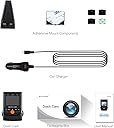
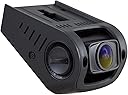
The AUTO-VOX A118C Dash Cam delivers reliable 1080p Full HD video with a wide 170° field of view, ensuring comprehensive road coverage. Featuring loop recording and a G-sensor, it automatically saves and protects critical footage during impacts. Its compact, adhesive mount design keeps it discreet, while the built-in LCD screen allows easy configuration without a computer. Night vision capabilities enhance recording quality in low-light conditions, making it a practical and essential companion for millennial professionals seeking peace of mind on the road.


| ASIN | B00UUQD9L6 |
| Are Batteries Included | No |
| Auto Part Orientation | Drivers Side |
| Auto Part Position | Rear |
| Brand | AUTO-VOX |
| Built-In Media | Cable, Memory Card, User Manual |
| Color | A118C |
| Compatible with Vehicle Type | Car |
| Connectivity Technology | USB |
| Control Method | App |
| Customer Reviews | 3.2 out of 5 stars 602 Reviews |
| Display Type | LCD |
| Field Of View | 170 Degrees |
| Flash Memory Type | MicroSD |
| Global Trade Identification Number | 00749501768520 |
| Included Components | Cable, Memory Card, User Manual |
| Item Dimensions D x W x H | 2.05"D x 2.83"W x 1.69"H |
| Item Weight | 0.3 Kilograms |
| Manufacturer | AUTO-VOX |
| Mounting Type | Adhesive Mount |
| Optical Sensor Technology | CMOS |
| Other Special Features of the Product | G-Sensor, Loop Recording, Night Vision |
| Real Angle of View | 170 Degrees |
| Screen Size | 1.5 Inches |
| Special Feature | G-Sensor , Loop Recording , Night Vision |
| UPC | 749501768520 |
| Vehicle Service Type | Car |
| Video Capture Resolution | 1080p |
D**R
I thought this information might be useful to others
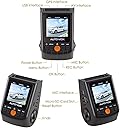
I rarely comment or review purchases, but in this case, I thought this information might be useful to others. I was not paid nor provided with any discount in order to write this review. I have had the Auto-Vox A118-C/B40-C dashboard camera for about a month and a half now, and it is working very well so far. The camera is very small and not very noticeable. Nice device design overall. I placed it in the black dots area of the windshield, to one side of the rear view mirror, with the lens protruding just below the black dots area. The camera is very light so it sticks well, even in the dotted area. With a settings of 5 minutes per video segment, it writes a segment to the SD card every five minutes, and overwrites the oldest segments when the SD card gets full. Each 5 minute segment of video is written as a .MOV file, which takes approximately 400,000 KBs, when recording at 1080P. That allows about 6 hours of recording on a 32GB SD card. The SD card has a folder named MOVIE, where all video segments are normally saved. Under the MOVIE folder, there is also a folder called RO (for ReadOnly), where the video segments are stored when the G-Sensor (a collision, or bump in the road) is activated, or when the OK button on the device is pushed. The content of the RO folder is never overwritten. The unit has a small screen thru which configuration can be done, which eliminates the need to connect the unit to a computer in order to configure it. The middle white LED indicates power is on, the left red LED blinks when recording, and the right hand red LED blinks when recording audio. The easy way to view the files on the SD card is to remove the device from the car and use the supplied USB cable to connect the device to a computer. When the device powers on after plugging it into the computer, the screen on the device shows a choice of Mass Storage or PC Camera. Select Mass Storage (which is the default) and press OK on the device. The device is then recognized by the computer and is accessible as just another drive where you can view the contents of the MOVIE and RO folders. I am not an expert in video quality, but the captured videos look very good, certainly good enough to capture any activity leading to a car accident. Even night videos appear good enough for that purpose. In summary, I am so far very satisfied with this product as it does exactly what it is designed to do. I am waiting to see if it will still function well in the above 100 oF, or 110 oF summer heat with high humidity. By the way, I have had to contact Auto-Vox's customer support ([email protected]) because the car charger cable end was a bit flaky and needed replacing. To my pleasant surprise, I got an immediate reply the very same day, telling me that a replacement car charger cable was being shipped from China. Got it about 15 days later. Wow! Great Service. Update May 2017: After a little over a year, this unit still works well, but with one exception. It has a thermal cut off switch which turns the unit off when the temperature inside the car is too high. In northern states of the US, you may seldom encounter this problem,but if you live in southern states, you may experience many situations where the unit simply does not come on until you have driven for a while and the temperature inside the car has come back down to a reasonable level. Unfortunately, the unit does not come back on automatically when the temperature has come down, so power to it must be turned off and on to have it become active again. (I just unplug at the unit and plug it back in).
A**Y
Misses action while writing files (Update: the device has stopped booting)
UPDATE: So after less than 5 months of owning the camera it has stopped booting. It just gets stuck in the boot screen which says "auto vox". I have tried multiple memory cards which work in other cameras and resetting the device but nothing has worked. I am currently in contact with their support which is fairly responsive, but they keep telling me to try basically the same thing (reformat sd card, try another sd card, reset device) in different ways. I have changed my review to one star for now. ------------------- I had been researching for the best dash cam for the money and ultimately I ended up with this one. It has a small form factor and is fairly cheap compared to the others. I think it is ok except for a few things which others haven't really mentioned, and one really big one which is kind of a deal breaker. Bottom line I would look elsewhere. 1. The camera will miss seconds of recording between writing files! I didn't realize this until I needed it but it completely missed some reckless driving. I assume because it was busy writing one of its many files. The gap between the two files was a few seconds but that was enough to miss what I needed. 2. The capacitor models seem to need a few minutes of being powered before they can reliably write the video file after getting turned off. At first while testing I was plugging the camera in, taking a few seconds of video and then unplugging it. I ended up with corrupted videos every time until I realized it had to be on for longer, guess for the capacitors to charge up enough to give the unit enough time to write files after being powered off. 3. The camera writes a lot of files. Each file is limited to 3 minutes by default if I recall correctly and you can increase that to 10 minutes. This means it is kind of a pain to back track in your day to find a specific event since you will have a lot of separate files and not one continuous video. I haven't played with much of the other options yet besides turning off the g-shock sensing. This feature basically saves video files when a shock is detected so that they won't be overwritten by new footage. In practice bumps in the road would randomly save files and take up space on the default sensitivity. I have a 32GB card and I get 150 minutes of videos.
D**T
works even with 64Gb
Bought 2 of them and like them because of shape and mount. It is easy to mount/connect and forget. Due to mount directly to window, video is less shacky and better quality. That is main reason I bought it. Somebody saying that display is small. I'm ok with that. This is camera to record but not to watch video. To get 64Gb sd card support, you have to format it to FAT32 (not extFAT). Video qality is acceptable as for evidence and as for money I paid. At night video is worse and you cannot see license plate number at motion. There is almost zero manual and some settings do nothing (China product:( ). Video is playing great on VLC player. Do not see any missings.
J**N
Recording randomly just stops
My initial thoughts on this were that this is a great dashcam. It mounts way up high on the windshield using tape, not suction, so it's not going anywhere. The power cord is long enough to tuck out of sight along the headliner, down the crease in the "A" pillar or behind the weatherstripping on the door frame, then under the dash and to the power socket. The video quality is 4 star at 1080p with interior audio and no discernible video stutter that I have experienced with a couple other dashcams in the same price range. Then the problem started. While the video doesn't stutter, the camera recording will freeze. And it will do this randomly. it could be find for several hours, or freeze after 20 minutes. This is actually indicated by the recording LED above the display, it will go steady-on instead of slowly blinking. The recording indicator ON screen will still blink though. When this happens, recording just stops as if it was told to stop recording, rather than continuously recording a still image. I contacted the vendor, and after much back and forth, they offered a replacement unit, no cross-shipping. Send in the original, they send a replacement after they receive the unit, not when you send them the tracking number to verify that it's been shipped. The replacement does exactly the same thing. After a bit more back and forth with customer support, and they are going to send me a refund when I send them back the unit.
E**Z
A Good Camera at a Good Price
I purchased the item for my new car and was able to mount it pretty easily. Living in Arizona I wanted to get the Capacitor model versus a battery model of the camera due to the vulnerability of the battery to fail in the heat. The camera comes with a long "wire cover" extension to hide the wires and give it more of a factory look and the cover and mounting plate for the camera (it's two parts) attach firmly with 3M mounting tape. Overall it looks pretty decent and mounted behind the rearview mirror so it's not really visible unless you look right at it. The package came with some nice mounting clips for the wires which I didn't need as I was able to run it under the headliner and down the inside of the A-pillar. The power cord to the lighter is very long (surprised) and the screen while tiny is functional. The direction book was decent although more "step by step" instructions would've been good too but it was easy to figure out. The package was professionally labeled with no misprints and it was shrink wrapped. Overall the packaging itself gets an "A+" from me. There was a nice card inside from Auto-Vox with customer service information and a small flash-drive type thing I think to use the micro-sd card in a larger sd card-reader? I bought a 32mg mini-sd card to thinking there would be no card included however there was also already an 8mg Samsung card in the camera I had to remove to use my 32mg. I figured the bigger card was better (up to 7 hrs before looping back with 32mg). I took the car out in bright daylight and used the camera for about an hour then went home and downloaded the "movie" files from the mini-sd card to the SD reader on my computer. Note there is also a USB cord to hook the camera directly to the computer however it is recommended to use an SD card reader to transfer the files. Picture quality is a B+ in the daytime with some slight blurring on the outside edges probably due to the wide 170 degree viewing field (most cameras had 120 degree or even less). Getting that extra field of vision range is worth a little blurry edges in my opinion. It made out license plates that were in front of me and while not a super clear picture was more than adequate for what I wanted it for (accident mitigation). I will update this review after some night driving with those observations. Overall I give the camera a good score and think it's a great value for the money. There are a few better cameras out there but they cost a lot more money but this one is great for the price point.
T**Y
**Possible Lemon Warning**
This dash cam was, at first, a good purchase. It was easy enough to install - the power cord was very long, so it was easy to rout it through the car without having wires all over the place (they were only visible in one spot). Also, it came with good equipment to install (little sticky clips to keep the wires taught). I took it for a drive and the video quality seemed pretty good when I viewed it afterwards. The video skipped in some places, but that might have been my computer. Here's the problem though: before I had even had the camera for 24 hours, it crashed. When I started up my car, the camera was unable to boot past the startup screen. It wasn't the card, the power, or anything else - it was just a hardware defect (this is a known issue, by the way). If this happens, the camera is pretty much a bust. I looked for help on several forums and tried several troubleshooting issues, but it came down to the fact that the camera itself was faulty. So, I had to return it. I was initially happy with the camera and would have given it a great review if it hadn't been a lemon. I may still try to buy another, because like I said, if it works, it works well. Just be warned that you might get a lemon...
T**P
Poor quality. Won't turn on.
I have had several dashcams over the years and this is by far the worst quality I have ever experienced. even the cheap $40 ones have performed well out of the box for up to 2 years. I have a battery version of the exact same one from another seller and it has been performing really well for the last 3 years. Decided to get the Capacitor version from this seller based on recommendations on DashCamTalk.com. Received this yesterday and plugged it into my 12V outlet in my car and it wouldn't turn on. Tried all other 12V outlets and in multiple cars as well. Nothing. Looks like the power cable is defective. This is a great dashcam but I will not be buying from this seller again.
K**S
Capacitor whaaaaat? Update 9/28/2016
What can I say, I think for around $75 USD or so, it's very good. There are other dash cam's out there that produce about the same image quality during daylight driving, Maybe even better than this cam. But! This camera has an advantage over the cheaper competition. REALLY GREAT NIGHTTIME RECORDING. As the sun goes down the camera compensates, the image gets a little more noisy but it copes with it well till the sun goes completely down. When dusk is totally totally done and all you have are street lights and your head lights admittingly there isn't much to see. There is enough that you can make out what's going on. However here in the USA, and more specifically here in California where I live, the intersections are pretty well lit. If you are involved in something that dash cam could catch, it's probably going to be at an intersection anyway. With just a little more light at these intersections the camera easily captures an image. No it's not like a daylight recording, but it more than gets the job done... So what the heck is a capacitor and how does it work? -- I'm not going to go into the technical details of exactly how a capacitor works because I honestly don't know. But what a capacitor does is hold a little bit of electricity. They can wear out like a rechargeable battery, but take a long long time. They are also a lot more resilient to heat. Using a capacitor like a battery is nothing new, but it offeres something unique to dash cams. The dash cam for most people runs 100 percent of the time off the cars power via USB or some such. With a small and usually super ultra cheap low quality, Lithium Ion rechargeable battery, being charged aaaaaaaal the time by a crappy circuit, and being exposed to a hot car all it's life after it comes out of the box, these poor batteries are usually reduced to a single digit percent of what they could hold when you first pulled out your shiny new dash cam and stuck it in your car. A capacitor, resistant to 150+ degrees Fahrenheit (65+ C) or more and being specifically designed to be charged all the time (mainly there to protect circuits from power drops by releasing some of it's small stored charge) suffers from none of these problems. What's the down side you ask? They only hold about as much charge (or even less) than the fried rechargeable lithium battery in your old dash cam. The capacitor has enough juice to run the cam for a few seconds after you turn your car off, it closes it's recording into the SD card, and powers itself off. Then it still has enough power to keep the clock (and settings) running/stored for at least a few days. This being by design the length of time the capacitor can keep the clock running in the cam shouldn't change much. So how that you're an "expert" in capacitor enabled dash cams. how does it actually work you may wonder? Well, it works just like a regular dash cam, only it can only run for about 5, complain that it's battery is dead and then power off. Oddly this happens when I plug it into my computer to download videos off it. You plug it in, it complains that it has a dead battery, then asks if you want to use it as a web cam or mass storage. I have never tried the web cam feature, but selecting mass storage will mount it as a drive on your computer. Speaking of mass storage, the transfer speeds are rather impressive. This will depend heavily on the micro SD car you have installed but I get 10 to 11MB/second. I'm used to getting like 2 to 5MB per second on these kinds of devices. With a USB3 enabled micro SD card reader you may be able to get much faster than this. And what about these files you get? I know I keep putting words in your mouth.. :) Well they are rather hefty. A little over 100MB/ min. I have my cam setup to start a new video every 5 min. So each section is something like 520mb per 5 min chunk. That's actually a bit on the high side compared to the very reasonable, but far from $800+ HD camcorder video quality. That being said a 32GB card gives me a solid 2 - 3 days of committing. My drive is 35 or so min each way on average, but can take an hour or more. Just remember to get a good quality and fast micro SD card and you should be fine. These cards will get fully written to as much as once a day deepening on how much driving you do. That's hard on flash memory. Usability and optics: The cam is fairly easy to use. The button layout is kind of weird when compared to what the menu's tell you to push, but it works. The buttons have a nice click to them. One of the things you will want to do is set the sensitivity of the G (shock) sensor. I have mine set to medium and a good solid bump in the road will still trip it. Thinking about setting it to it's 3rd and lowest setting. Basically I would need to hit (or be hit by) something. If the shock sensor is tripped the current video file gets moved to to a special folder and will not be over written as the camera continues to record video and record over the old ones. When it detects a "crash" you will see a little yellow exclamation mark on the screen. You also have the option to put your name or something in a text field and set if the date and time (along with that text field) will be imposed onto the video. I put my 1st initial and last name in the text field and have it set the time and date into the video. Seems like the right thing to do should I ever need to use this video as evidence. So far it has never locked up, booted wrong, corrupted a video or done anything to misbehave in any way. It powers on and records. Wheeeee. The optics seem nice and appear to be made of glass. The sense is exposed on the front and it's easy to accidentally put finger prints on. I imagine it might scratch easy so if it's not mounted, put it some place safe that will protect the lens. Mounting and adjusting: Mounting was super easy. I connected the base to the cam, positioned it, making sure there is room for the USB cable to go in and out or for the cam to slide back on the mount with the USB still inserted, eyeballed it, peeled off the sticky stuff, again carefully lined up the cam, again making sure I have room, and stuck it to the windshield. Wriggled it around a bit, pulled the cam off, leaving the mount and gently applied pressure to ensure a good bond. Adjusting the mount.... Well you can't. Adjusting the lens however, works nicely. It clicks up and down and it's got enough friction between clicks that you can more or less position it to what ever angle is best for you. Oh the power adapter it comes with is super long. It should be long enough for what ever vehicle you have. So that's about it. I hope this was helpful. // J UPDATE 9/28/2016 - Dashcam continues to perform perfectly (after a year sitting in my windshield). I am replacing it however with the new A119 Capacitor model Viofo has released. I'm going to hand down the 118-C to a friend. Here's to another year.
ترست بايلوت
منذ 5 أيام
منذ 4 أيام