We remain fully operational. Our teams are working around the clock to ensure your deliveries continue safely.
قم بتنزيل التطبيق


معلومات عنا
حقوق الطبع والنشر © 2024 Desertcart Holdings Limited
قم بتنزيل التطبيق


Buy anything from 5,000+ international stores. One checkout price. No surprise fees. Join 2M+ shoppers on Desertcart.
Desertcart purchases this item on your behalf and handles shipping, customs, and support to Morocco.
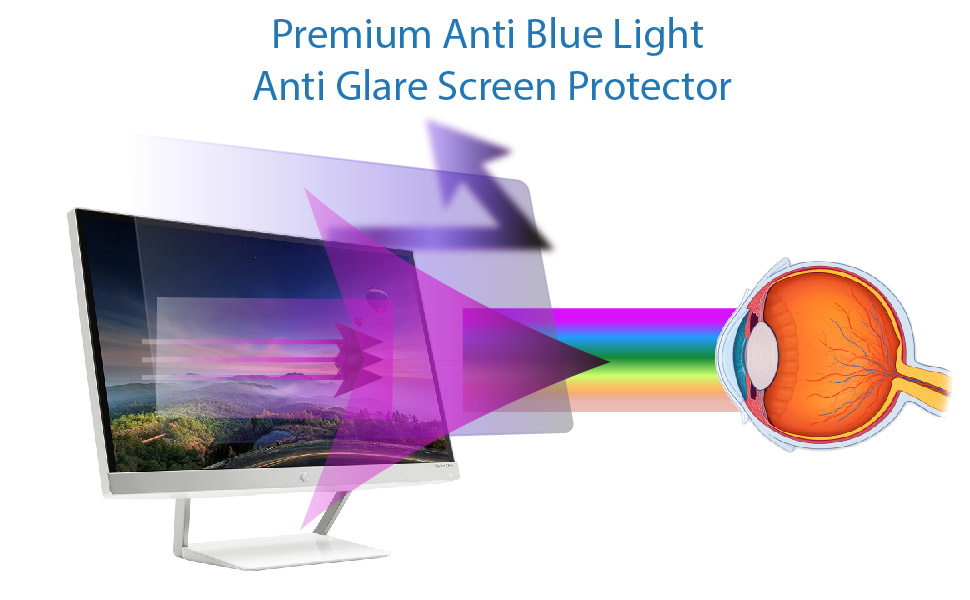
👁️🗨️ Shield your eyes, elevate your screen time.
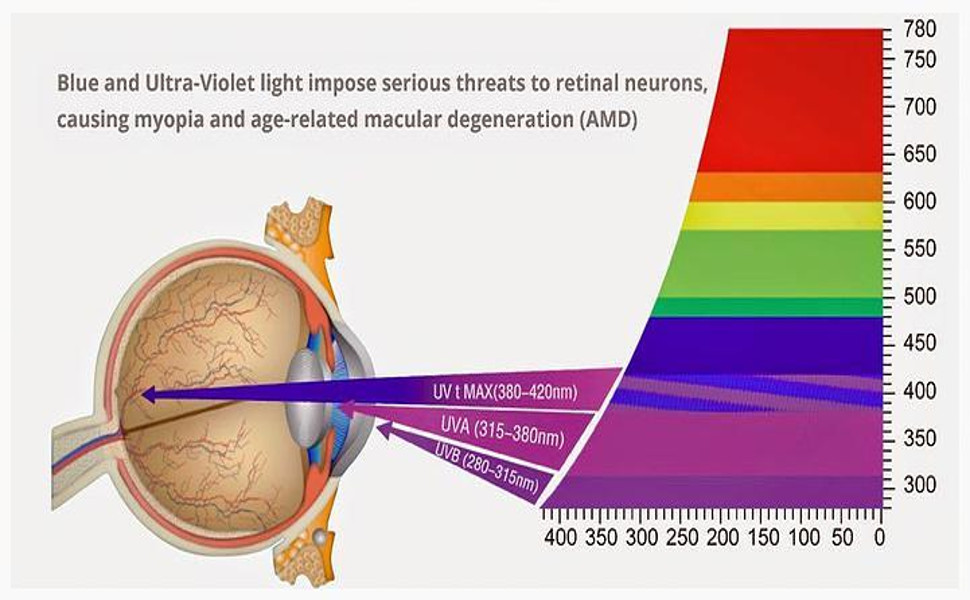
The EZ-Pro Anti Blue Light Screen Protector is a precision-engineered 32-inch (diagonal) TV accessory that filters out up to 80% of harmful blue light, reducing digital eye strain and promoting better sleep. Featuring a crystal-clear, 9H hardness scratch-resistant surface, it preserves your screen’s vibrant clarity while protecting against everyday damage. Designed for easy, bubble-free installation, this screen protector is ideal for professionals, gamers, and anyone seeking healthier screen habits without sacrificing visual quality.



| ASIN | B07R6P9RB9 |
| Best Sellers Rank | #83 in Computer Screen Protectors |
| Brand Name | EZ-Pro Screen Protector |
| Clarity | 100 |
| Compatible Devices | Television |
| Customer Reviews | 4.1 4.1 out of 5 stars (222) |
| Finish Type | Smooth |
| Item Dimensions L x W | 27.36"L x 15.35"W |
| Item Hardness | 9H |
| Manufacturer | EZ-Pro Screen Protector |
| Material | Plastic |
| Model Name | ANTI-BLUE-32-SCREENPRO |
| Model Number | ANTI-BLUE-32-SCREENPRO |
| Number of Items | 1 |
| Part Number | ANTI-BLUE-32-SCREENPRO |
| Screen Size | 32 Inches |
| Screen Surface Description | Smooth |
| Special Features | Scratch Resistant |
| UPC | 086547854436 |
| Unit Count | 1.0 Count |
| Water Resistance Level | Not Water Resistant |
K**4
Great Blue-Light protector: Easy Install steps!
I was told that one possibility why my left eye has AMD -and I go monthly for a shot IN that eye, so it doesn't progress further..... is because I've been using a TV with no Blue Light protection, for 9 months. So, I spent an evening researching the best blue-light screen for my 32" Samsung TV, which I use as my PC Monitor. I've learned through the years the best methods for installing screen-protectors for cellphones. Aha....! This one sets up a VERY similar method to the one for the easiest installation of cell-screen protectors. :-) "Anti-Blue Light" comes inserted in a TUBE box, so no travel-wrinkles. Pull out the baggie with a helpful squeegie for the next-to-last step (and some tiny CELLPHONE screen cleaners & dust removers: pretty useless, since you are cleaning a large TV screen....). Also provided is a circle of the TAPE ALREADY STUCK AROUND THE SCREEN -to use if you MESS UP and have to place fresh tape around the screen, to try "Install effort #2." Fear not: Simply follow these instructions (after watching the short manufacturer's video on Amazon, within the item's info: by a lady with a red top). Wash your hands. Before unboxing the blue-screen, get a microfiber "Ultimate Cloth" (or a cloth to clean eyeglasses) and WET, then squeeze, that cloth. Wipe it firmly over the entire screen, both vertically and horizontally. Let it dry. Shine a flashlight on it to see if any dust shows & just TAP the provided dust-remover over any dust-dots. Then pull the Blue-Screen itself out of the tube-box. You will see that the tabs to REMOVE the two plastic "entire screen covers" are already affixed & labeled (Red side is removed BEFORE -& Green, AFTER positioning the screen). 1st, place the Anti-Blue-Light Protector ON your clean screen, with all tabs & covers still attached. Be sure it FITS! If not, send it back & remeasure, then reorder. If it fits...simply but CAREFULLY (without touching the now uncovered side of the Blue Light Screen) pull OFF the "red label side" layer and the 4 pieces of thin brown tape, from around the 4 edges. Next, position the sticky top & 1 side so that your TV Screen is exactly parallel vertically & horizontally, to your Blue Screen....then press it on, firmly pulling the provided, white plastic presser OVER the still-attached Green tab's cover, as you smooth the Blue Light over your clean TV screen, to the other edge. Make a pass with the white presser OVER the 4 edges, now stuck to your TV Screen. Then simply use the Green tab to gently pull off the top cover (embossed all over with "Anti-Blue Light" in green....). Voilà....! You now have a screen that saves your eyes from Blue Light - and glare; the colors and contrast on your screen should seem as before - and mine do. I'm really glad I selected this "easy-install" Blue-Light protector. :-)
T**2
Anti Blue Light Screen Protector
I had one I bought a yr ago. I decided to try a new one. This one is a little more money, but it is far superior. Be aware, they are a real pain to put on easy to scratch. A hair to big, trim with a razor. I put a clear packing tape over the very edge. Experience tells me I don't want it to end up on the floor overnight.
L**A
It really works
Easy to install. It really reduces the glare.
E**E
Reduces the brightness at night
Works
R**C
Edge adhesive strips are very visible
This screen protector only had adhesive on the edges, which is fine. It makes the rest of the application process easier because you don't have to worry about bubbles. However, the adhesive strips are very visible on the screen, even after you painstakingly push out as much of the air bubbles out. I'd rather the screen protector go around the TV's borders than on the screen itself.
A**S
Actually works
Definitely recommend buying
A**R
This did not reduce glare AT ALL
This product did not reduce glare at all on my screen. Since it was not the right size I had cut the product to make it fit making it non refundable. I threw this product in the trash since it did not perform as promised.
F**S
Makes screen a bit fuzzy
I have a 27" monitor with a hard plastic blue screen protector on it, which looks crisp but reflects like a mirror. So I tried this one for my 32" monitor. Unlike the other screen protector I have, this one is soft and is applied directly over the screen as you would a tempered glass screen protector on your phone. The problem is that it sticks to the screen only on the edges with a tape, which leaves a small gap between the protector and the screen. This causes the screen to look a bit fuzzy. If you push the protector with your screen, the image behind becomes crisp, which means a better way of installation would make this product better. The tapes fall right on the edge inside the screen and you can see them, specially on the taskbar. I can live with that most of the time, but sometimes it can be distracting. The anti-glare feature does work better than my other screen protector.
A**K
Does the job well. I wished the size of the protector is wide enough to stick on the edges of the screen rather than the screen itself though. Maybe should have a proper edging that could hang on the screen instead.
H**Y
Really like this filter, super easy to install,no bubbles, no colour distortion. I find it much easier to fall asleep maybe a placebo effect but it works for me. Very happy with the purchase.
P**E
picture is fine.my tv is still a bit bright.the filter itself sucks and thats because i barely handled it and it left creases and slight dents everywhere????????? why? the adhesive around the corners peeled partially off wth the backing never retutned back to normal? not a good design invention.oh and the cleaning cloth and alcohol wipe are very tiny so that i can barely administer them i bought this as temperary buy, im going to the states for the official filter. mmmmman how i hate sony products,they have always been made of paper..........hang in their t.o.!!!!!!!
J**Y
Happy so far with the product. It would be nice if the seams from the glue were not visible on the edges of the screen (do understand how that would be a challenge). Unsure at this point if it has helped my eyes at all, but there is no glare and I can see my screen perfectly both for video and for my studies, in which I use dual screen regularly and have had no challenges.
L**O
It really cuts the glare, I am happy with it.
ترست بايلوت
منذ 3 أسابيع
منذ أسبوعين