We remain fully operational. Our teams are working around the clock to ensure your deliveries continue safely.

قم بتنزيل التطبيق


معلومات عنا
حقوق الطبع والنشر © 2024 Desertcart Holdings Limited
قم بتنزيل التطبيق


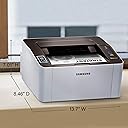


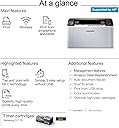


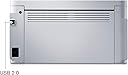

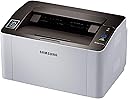



🖨️ Print smart, print fast, print fearless.
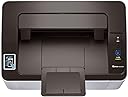
The HP Samsung SL-M2020W/XAA is a compact wireless monochrome laser printer designed for home office professionals seeking fast, high-quality printing. Featuring NFC and WiFi connectivity, it enables seamless mobile printing with sharp 1200 x 1200 dpi resolution at speeds up to 21 ppm. Its eco-friendly toner technology and ergonomic design make it a reliable, stylish, and efficient addition to any modern workspace.


| ASIN | B00JCA4GQS |
| Additional Printer Functions | Scan |
| B&W Pages per Minute | 21 ppm |
| Best Sellers Rank | #322,448 in Office Products ( See Top 100 in Office Products ) #445 in Laser Computer Printers |
| Brand | Samsung |
| Built-In Media | 1 x Samsung Xpress M2020W Mono Laser Printer |
| Color | Black/White |
| Color Pages per Minute | 21 ppm |
| Compatible Devices | PC |
| Control Method | App |
| Controller Type | Android |
| Customer Reviews | 4.0 4.0 out of 5 stars (2,183) |
| Dual-sided printing | Yes |
| Duplex | Manual |
| Global Trade Identification Number | 00191628387786, 00887276962481, 08806085986565, 08806086205290, 08872769624818 |
| Hardware Interface | USB |
| Ink Color | black |
| Is Electric | Yes |
| Item Dimensions D x W x H | 8.46"D x 13.7"W x 7.01"H |
| Item Type Name | Samsung Xpress M2020W Mono Laser Printer |
| Item Weight | 8.8 Pounds |
| Manufacturer | HP |
| Maximum Copy Resolution Black and White | 1200 x 1200 dpi |
| Maximum Copy Speed Black and White | 21 ppm |
| Maximum Media Size | 8.5 x 14 inch |
| Maximum Print Resolution Black and White | 1200 x 1200 dpi |
| Maximum Sheet Capacity | 150 |
| Model Name | M2020W |
| Model Number | SL-M2020W/XAA |
| Model Series | M2000 |
| Number of Trays | 1 |
| Other Special Features of the Product | Auto Document Feeder |
| Output sheet capacity | 100 |
| Paper Size | 3 inch x 5 Inches, 8.5 inch x 14 Inches |
| Power Consumption | 310 Watts |
| Print media | Card stock, Envelopes, Fabric, Labels, Paper (plain) |
| Printer Connectivity Type | USB, Wi-Fi |
| Printer Output Type | Monochrome |
| Printer Type | Laser |
| Processor Count | 1 |
| Resolution | 1200 x 1200 |
| Scanner Type | Sheetfed |
| Series Number | 2020 |
| Specific Uses For Product | Office, home office |
| Total USB 2.0 Ports | 1 |
| Total Usb Ports | 1 |
| UPC | 191628387755 012304139539 642125256971 191628387786 804993629800 801940120083 809394433704 724627169901 724627169857 804067194050 799198923498 724627169741 638084837443 192018954403 887276962481 191628507559 191628507528 |
| Warranty Description | Comes with Manufacturer Warranty. |
| Warranty Type | Limited Warranty |
| Wattage | 310 watts |
T**L
Small, fast, inexpensive...yep.
Light, small desk space footprint, fast monochome printing, and wireless. I literally can't ask for anything more. This printer replaced an HP 6600 all-in-one whose ink would dry up after 4 days of no use. We were blowing through money on toner due to that issue. We realized we needed nothing more than basic black an white printing and the M2020W came to our rescue like a knight in shining armor except for it's a printer sans armor. The finish on the plastic is matte also. Set up was snap, used the CD that was included but there is a website you can go to as well that downloads a file and works the same way. Total set up time was about 10 minutes. Wireless works great from across the house and there is also a cloud printing feature which is excellent and quite useful at those random times when you need to print something at home from somewhere else. The printer itself is super basic, no scanning, no faxing, just printing. The page feeder holds about 100 pages. Print speed is quick and quality is solid. Black and white for the win. There is one Toner module to swap when it's empty. Some other thoughts: -Amazon sells this for $83+tax. Replacement toner is $43+tax for brand name. Staples sells the printer alone for $129.99 and the same toner there is over $60. -This is a laser, toner won't "dry out" like inkjet style printers
A**R
Nice printer, wireless printing could be better
The printer works fine, very compact size. I first tried it with NFC printing (from a Samsung smart phone) and that works great! Nearly as fast as USB printing, although you have to install a Samsung printer app on the phone. I had to install the Samsung software on a Windows PC in order to get the printer's wireless configured with a password for my network. Setting up Google cloud printing wasn't hard, but sometimes it prints in 30 seconds, and sometimes it takes 10 minutes! Tried Wi-Fi direct printing, and it found the printer OK, but I gave up waiting for it to finally print. I got it for a receipt printer, and I can't keep a customer waiting for 5 or 10 minutes for the printer to finally receive a print job. Wound up connecting it via the included USB cable to a Linux netbook. The printer works fine under Linux, but the Samsung Universal Print Driver requires you to run a shell script to install it. The wireless printing does work, just be aware that it may be much slower than a USB cable.
C**K
Giving it 4 stars out of the box - PC user
10 minutes from unboxing to printing. If you have any modicum of security on your network you will have to connect the printer to your PC to complete installation. But, even so it is essentially plug and play. No useless coaster comes with it, just connect to website download software, you get a choice whether to install internet diagnostics or just the driver and also a printer manager. I skipped the diags and opted for the manager. It does take a good two minutes to fire up the first time, and there was an aroma of heated plastic. I was ready to run into the kitchen and get the fire extinguisher, but it's all fine. No fire, no smoke. The only other thing that threw me was the the button on the printer for WPS. Normally, on any other device, means Wireless Protected Setup and it only needs to be activated during setup to connect to your network, so after set up was complete and I saw it was still on I hit that button so the light would go out. And I was no longer connected, had to go into the printer manager and reconnect. So, for this printer It really is just a network connectivity light, and if it's not lit, it means you're not connected. After setup is complete you get a choice whether to receive annoying "supplies" messages, and a couple of other notifications which I've already opted out of and forgotten. Actually I may not have gotten those options until I ran the printer manager to reconnect to the network. Either way, you actually have a choice. The prints are clear and the type is dark. It's cute and compact. Little wheezy while printing, and I also got some speaker noise during setup, but nothing since, no constant whine. I've only had it up and running for a half hour now, but so far so good. You might be interested to know that it actually is an HP printer branded Samsung, as HP provides the warranty on the printer. For this money, and not having ink cartridges dry up between infrequent printing, I'm going to say it's worth it. I reserve the last star to leave a place for a future update. But feels like a good purchase. Edit 2.23.2019 I still like this little guy. I see folks after me have not had good experiences. Aside from the hot plastic smell the first time I fired it up, I have had no issues with this printer. I don't print often, and I was sick and tired of paying $75 for inkjet cartridges to have them dry out between printings. The print is still clear and dark, and every time I've attempted to print (maybe four times since my original review) it's fired right up. I can see where dragging it around to every device in the house to connect with USB would be a pain as another reviewer said, but that didn't apply to me. I still say it's a good deal. I bought two cartridges with the printer, so I will be upset if somehow those don't work, but I didn't have any installation issues where I needed to install a "fix". So hopefully that will not apply to me. I guess a year or two from now when I try to change the cartridge I'll find out. For this price and the perfectly acceptable quality of the prints, maybe it won't be that upsetting.
B**G
Very compact and easy to set up
D**O
He comprado 2 de ellas una para casa y otra para un familiar, aun funcionando sin fallas por mas de dos años. Ideal para la escuela y trabajo ligero. Mi principal motivo de compra es que el toner se puede comprar relativamente barato (rellenado o generico)por lo menos muy por debajo del precio de la impresora ya que la mayoria de los toners cuestan mas o igual que la misma impresora Recomiendo checar antes de comprar una impresora el costo del toner
M**E
So far, so good, this printer seems very good! The installation was a breeze, as soon as it as been on my WiFi connection, the airprint was working, no other program to install or to download, Highly recommend this printer, it print fast, quietly, the size is small and pretty. The toner recharge are a bit expensive, but you can find jobber ones at about 39$ at 123inkcartrides.ca but I rather purchase a good printer that takes expensive cartridges than poor quality printer that takes inexpensive toners
S**E
Qualità stampa bassa. Spesso si inceppa. Restituito immediatamente.
R**R
Great solution for my home use. Been testing for 2 weeks. I finally gave up on the all-in-one printer/scanner/fax inkjet as we mostly just print black and white and the inkjet refill industry is criminal. Pros: - simple, fast, high-quality printing - small printer - wireless printing from anywhere in house (2-storey) - relatively easy setup - PC and iphone Cons: - poor instructions for connecting to your iphone - says you need there app, but on iOs 9, i simply chose "print" and it found the printer but there was some confusion up to this point. - you need a cd drive to run install the PC software
ترست بايلوت
منذ يومين
منذ أسبوعين