

Buy anything from 5,000+ international stores. One checkout price. No surprise fees. Join 2M+ shoppers on Desertcart.
Desertcart purchases this item on your behalf and handles shipping, customs, and support to Morocco.
⚙️ Elevate your CNC workflow — precision and control in the palm of your hand!
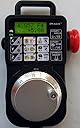
The VistaCNC P4-S USB Handwheel MPG CNC Controller offers professional-grade control for Mach3, Mach4, LinuxCNC, and UCCNC systems. Featuring a plug-and-play USB connection, a bright backlit LCD, and a 100-step anodized aluminum MPG dial, it delivers precise, ergonomic, and reliable machine operation. Designed for seamless integration and real-time adjustments, this controller transforms your CNC experience with intuitive controls and durable build quality.
| ASIN | B00MGOE0ZO |
| Best Sellers Rank | #699,803 in Industrial & Scientific ( See Top 100 in Industrial & Scientific ) #226 in Hand Wheels |
| Brand Name | VistaCNC |
| Color | Black |
| Customer Reviews | 4.4 4.4 out of 5 stars (18) |
| Display Type | LCD |
| Item Weight | 1 Pounds |
| Manufacturer | VistaCNC LLC |
| Material Type | Anodized Aluminum |
| UPC | 706090937003 |
M**A
Nice piece of hardware.
This is the only pendant I have used so I don’t have a comparison to others. Their unit is ergonomically nice sporting a sturdy well molded plastic body with rads all around, it has a feel of a die cast part, molded plastic does not imply cheesy, this design is sturdy. The size is perfect, the buttons are responsive; sometimes membrane switches or switches with overlays like this one take some fussing to actuate, but these are perfect. The screen is well lit and clear. The hand wheel is metal, has a study handle and very distinct detents, as expected. The markings are super clean on the dial. The whole unit fits well in the hand and just feels good to use. There’s a nice mode button on the thumb and a safety stop, which in my case (Mach 4) serves as a soft stop, like hitting the enable/disable button on the computer. The unit has a long cord and a nice cable relief coming out of the unit as well as a hang handle if you want to hang it. For the unit, it’s well documented and the drivers are kept up to date by Vista CNC for several flavors of controls like Mach, Linux cnc, whatever. Go to their site to check it out and you will have confidence. The modes of operation are well thought out and just what you need when tramming things in or jogging around. Install note: I’m using mach4 and was up and running in about 1/2 hour, mostly since I had a hard time knowing how to enable the plugins and don’t go right to the directions “as supplied”, the process is sort of left up to you knowing what you are doing to install (reminder, you got your machine controller and system up and running, so this is an easy path to set up). Tip1 - you need to have your controller off line / disabled to enable the plugins (after you dump the 2 plugin files to the Mach plugins folder). I got that part, tried it, still no control, pendant is on, no button response on the on board leds, oh no now what, the other folks said it was “dirt simple”, bad unit? My machine is windows 10? Aliens? windows driver interfering with things (ps when you plug in per instructions, the windows systems does its usual thing and messages “device set up”, sort of like a false signal that you are set up)? hmm maybe I should try to update the firmware, sounds like some sort of techno nerd thing to do on a dateless Friday night, ok let’s do firmware ... Tip2: Update the firmware before getting panicky. In my case it took about 2 minutes, one minute to read, one minute do it ALL SET AND WORKING! All the set up and operation is documented at the vista cnc site - one bundle for the manual, firmware update and install and the plugin files. This all worked out fine. Just follow the directions ... oh and my firmware may have been out of date since the actively maintain it presumably to keep synced with Mach 4 If your looking for something cheaper, it’s out there. But something better, maybe not so much. Check in - after using this I don’t know what I did before using it. If you are on the fence, just go for it and stop playing around with the keyboard. I like the feed trim mode to adjust the feed (or spindle if your machine allows this). When adjusting feed, it’s you and the machine and the pendant, which makes the process of tuning so easy and “real-time”, with eyes-on the work at hand. I’ve also used this to make a cnc act as a manual machine, almost as convenient as having hand wheels. With this, you don’t have to MDI for simpler tasks. I love this thing.
C**.
works flawlessly… worth the money
this was a great upgrade for my mach3 CNC
P**R
Truly Fantastic
Fantastic with LinuxCNC. It did take a while to get configured - there is a later version of the config files in a folder - that needs better documentation. I used an AI to help get it configured and resolve some conflicts with QTDragon. Since then I’ve used it a lot and it’s fantastic. I would never go back. This is so much more accurate and responsive than the Asian knock-offs. Now I can also effortlessly use my CNC as a manual mill if I want and it makes setups so much easier.
M**P
Works with Mach 4
It works with Mach 4 ad advertised. Learning curve, but I figured it out so 🤷🏼♂️
K**H
disappointed
Thought I was getting wireless, but a hard wired unit showed up. to top it off I had to buy a USB extension. You would think they would make it with 20 feet of cord you only get 6 feet.
A**Y
Nicely built tool with non existent support
The pendant design is not bad, and build quality is nice. Comes with one flavor of firmware which needs to be re-flashed if you use it with another controller. The flashing software is Windows only (Mac users, make sure you don't ridicule your Windows friends). Configuration instructions are obsolete and irrelevant - I had hard times configuring it for PathPilot - the suggested configuration plain did not work - PathPilot refused to boot after you make those changes. Support apparently does not exist - you send them email via website contact and never hear back (and that seem to be consistent experience, as other users on public forums report the same). And unfortunately the device is not popular enough that community support would pick it up. I finally made it work after days if experimenting, failing and retrying (at least partially, some functions like spindle control or e-stop still don't work), but heard of many others who gave up and either returned or shelved their pendants.
M**E
Great great pendant love it
This is the best for mach4. This pendant us the best thing ever. We love it. It makes zeroing and moving it to a position way easier than clicking on the computer and trying to see where the machine is going or having one person do the watching while the other jogs. With this you can do it all yourself. Only con i i have is i wish it was wireless
L**Y
Works with Mach4
This pendant worked with Mach4 on the first attempt. Firmware update to Mach4 was successful and installed plug ins to Mach4. Work's great. 100% satisfied
ترست بايلوت
منذ شهر
منذ شهر