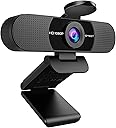
🚀 Elevate your video presence—because your meetings deserve more than just 'good enough'!
The EMEET C960 Webcam delivers professional 1080p Full HD video with a wide 90° field of view and dual noise-cancelling microphones, ensuring crystal-clear visuals and audio for all your online meetings and streams. Its plug-and-play USB connectivity supports major platforms like Zoom, Teams, and YouTube, while automatic low-light correction and a privacy cover make it a versatile, secure, and stylish upgrade for any home office or remote workspace.


| ASIN | B07M6Y7355 |
| Antenna Location | Online calling, conferencing, streaming |
| Are Batteries Included | No |
| Best Sellers Rank | #2 in Webcams |
| Brand | EMEET |
| Built-In Media | C960 Webcam, Cover, User Manual, USB Cable |
| Camcorder Type | Webcam |
| Color | Black |
| Compatible Devices | Devices using Windows 7/10/11, MacOS 10.10 and above, Linux, and Android TV 7.0 or later |
| Connectivity Technology | USB |
| Customer Reviews | 4.4 4.4 out of 5 stars (32,199) |
| Display Resolution Maximum | 1920x1080 (1080p Full HD) |
| Effective Still Resolution | 2 MP |
| Effective Video Resolution | 1080 Pixels |
| Exposure Control Type | Automatic |
| Features | Usb, Dual Noise-Cancelling Microphones, Auto Low-light Correction, Webcam with Cover, Tripod Holder |
| File Format | JPEG |
| Flash Memory Type | NOT Available, Rely on Your PC/Mac |
| Focus Type | Fixed Focus |
| Form Factor | Compact |
| Has Image Stabilization | No |
| Image Aspect Ratio | 16:9 |
| Item Dimensions D x W x H | 4.88"D x 2.65"W x 2.04"H |
| Item Weight | 0.16 Kilograms |
| Lens Type | Wide Angle |
| Manufacturer | Shenzhen eMeet technology Co.,Ltd. |
| Maximum Aperture | 2.8 f |
| Maximum Focal Length | 3600 Millimeters |
| Minimum Aperture | 2.8 Millimeters |
| Minimum Focal Length | 300 Centimeters |
| Model Name | C960 |
| Model Number | 960 |
| Number of Speakers | 1 |
| Operating System | Android TV (V7.0 and above), Linux, We recommend using the mainstream operating systems instead of Chrome OS which may not be compatible with all versions and models., Windows (Win 10, 11,Tips: Incompatible with Window Hello functions), macOS (10.14 and above) |
| Screen Size | 1.97 Inches |
| Sensor Type | CMOS |
| Shooting Modes | Webcam |
| Style Name | 1080P |
| Supported Audio Format | Unspecified, but likely includes common audio formats used in video conferencing software such as PCM, MP3, AAC, and Opus. |
| Supported Image Format | JPEG |
| UPC | 712317254662 709812555899 |
| Video Capture Format | AVI |
| Video Resolution | 1080p |
| Viewing Angle | 90 Degrees |
| Warranty Description | 36-Month Warranty includes parts & labor. |
| Water Resistance Level | Not Water Resistant |
| White Balance Settings | Auto |
| Zoom | Optical |
A**.
Solid Upgrade Over Built-In Camera, Great Quality
Fully compatible with Windows 11 and a clear upgrade over the built-in camera on my HP computer. The video quality is noticeably better, and the microphone performs well too. Picture and sound are both solid, making it a reliable option for calls and meetings. It also has the little thingy to block the camera for privacy, which is a nice touch. For meetings, programs such as Zoom, Google Meet, or Microsoft Teams include mute controls, adding another layer of privacy and control. Friendly suggestion: mine came with a USB-A connector. It works fine, but it would be even better if it used USB-C or came with both options. I bought it a while back, so by now it may already include USB-C. Overall, it delivers strong performance and dependable quality at a very competitive price point
K**C
Easy to Use and Great Quality
The EMEET 1080P Webcam was incredibly easy to install — truly plug and play. I had it up and running in seconds with no software needed. The picture quality is clear, the microphone works well for calls, and the wide 90° field of view makes it perfect for Zoom or Teams meetings. Great value for anyone needing a reliable webcam for work or streaming.
V**.
Solid WebCam for Mac Mini M1
Yes, the camera works with Apple's Mac Mini with the M1 chip running macOS Sonoma 14.0. I read mixed results in the reviews and questions. I'm guessing those who had issues missed some basic setup steps. Here's my experience, and I hope it helps others. I connected the camera to one of the two USB ports on the back of the Mini. I have a USB hub for other components, but I plugged the camera directly into the computer. I then tried FaceTime and Zoom, and the camera worked, although the image appeared very grainy, especially for a 1080P unit. I did a reboot, but that didn't help. I then went to the Emeet website to figure out how to adjust the image quality. I downloaded their EMEETLINK software for Mac. Once installed, the image quality improved. I could use the software to change things such as sharpness, contrast, and white balance. I still don't consider it crystal clear 1080P, but it's good enough for video chats. Low-light performance is lacking. The other reason I got a webcam was to use Siri because the Mac Mini doesn't have a microphone. I went into settings to enable Siri and Location Services so that Siri would be more productive and accurate. Hitting the Siri button caused the microphone icon to appear at the top of the screen, and Siri worked. The C960 is a solid little webcam for the money that works fine with the Mac Mini M1 as long as you download the EMEETLINK software. I would not recommend this to anyone looking to do podcasts or YouTube videos. For that, use the iPhone and Continuity Camera feature built into the Mac, or get a higher-end 4k cam. But if you want a simple camera and microphone for the Mac Mini, this is a solid choice for the money.
R**R
Gwyndolyn
Excellent webcam the quality of audio and video is superb, definitely worth the investment for all my zoom meetings. I’m very well pleased, installation was easy❣️
T**T
Nice Webcam.
Excellent value!!!! Great build quality. Sound can be a little low at times but it works well and camera is great.
J**H
Use it all the time at work
Never had anyone complain they can't hear me and video quality is good enough for meetings, pretty easy to setup and operate.
J**E
11 months of great performance
I purchased this Feb 2025. Performed well for about 11 months. Now the mic drops out randomly and the video glitches. But up until then, worked great and perfect for my 5 day a week home office use.
S**N
Great little camera
Clear, sound is good, easy to move and attach to anything. Viewing angle is the same as my HP Omnibook X laptop but a much better image. It has a blue LED showing it is on.
ヌ**ー
Windows11でカメラのテストをする場合は、スタートバーから「カメラ」で検索してカメラアプリを起動します。 USBに接続してアプリを起動したところ、サクッと起動。 高画質でマイクも良好。とても簡単で拍子抜けしました。 小さくて軽く、位置や角度も手軽に調整可能。安くて心配しましたが十分な性能です。
C**Y
I can definitely say, after hooking up this camera, that it does its job perfectly. The video quality for making video calls was perfectly clear. The audio aspect was equally impressive. The microphones seemed to pick up the voice from a couple of feet away from it (sitting at the computer desk) but wasn't overwhelmed by any background noise. Whether this is a design function utilizing noise cancellation or just a matter of it not being a very noisy environment remains to be seen. The snap down cover for privacy is about as basic as it gets. A well fitting plastic lens blocker on a hinge, but really what more do you need to achieve those results? The only complaint I would have (and it's being very very picky I suppose) is the way it "mounts" on the monitor. While it initially sat quite still and steady, as soon as I reached up to tweak the positioning it shifted all over the place. This was very easily rectified, however, with about 5 cents worth of electrical tape to hold the clip solidly to the top/back of the monitor. So in reality, it's not so much a "complaint" about it as a VERY minor inconvenience. In summary, high quality, great sound, great picture, very easy to install and use. I'd certainly recommend it to anyone looking for an affordable camera with built in mic.
M**N
Wow! Very impressive webcam. Plucked into an empty USB port and it started working. Did a self test using Zoom app and was surprised by the crystal clear image of myself and the good voice quality. Exceeded my all expectations.
M**I
Good quality product with great results. Plug and play, no installation needed.
X**A
Buena cámara, tiene una imagen que sirve para reuniones online, lo malo es que no es compatible con Windows hello
ترست بايلوت
منذ يومين
منذ أسبوعين